



What is Honcho? Honcho is an open-source memory infrastructure for AI agents, developed by Plastic Labs: you save messages and events, Honcho reasons in the background to gradually understand each user and each agent, then returns compressed context to insert into any model. According to the GitHub API (read on 04/11/2026), the plastic-labs/honcho repository has around 7,900 stars, nearly 970 forks, AGPL-3.0 license, written in Python, created on 10/09/2023 with the most recent push on 03/11/2026. A managed service version is available with usage-based pricing, for example 2 USD for every million tokens ingested, according to the honcho.dev homepage (read on 04/11/2026). This post answers what Honcho can do, where the real costs are, how to set it up, data risks, and when to use it.
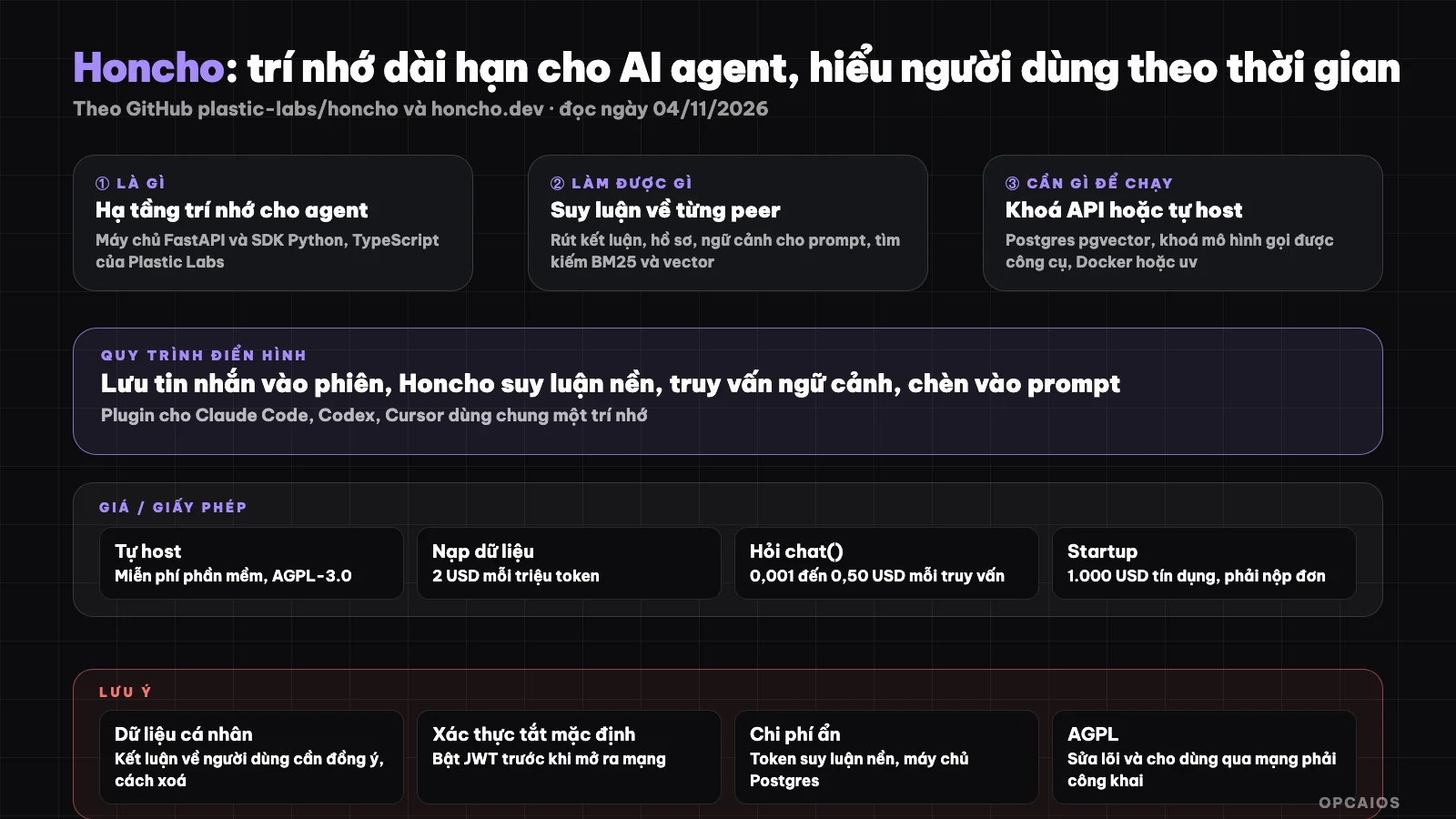
Honcho's Save, Reason, Query, Insert loop. Diagram: OPCAIOS.
What is Honcho and who created it?
Honcho is a FastAPI server with Python and TypeScript SDKs, specialized as long-term memory for agents. Plastic Labs, an AI research company, is behind the project. What sets Honcho apart is that it reasons toward conclusions about people rather than just storing passages and retrieving them.
According to the README on GitHub (read on 04/11/2026), Honcho organizes everything around the concept of "peer": users and agents are both equal entities. The structure comprises five layers. First is workspace, the highest container to separate data between applications. Next is peer, anyone participating in conversation. Then comes session, a conversation with many peers. Message is the smallest data unit. Finally, scope groups multiple sessions to limit memory scope. From that data, Honcho creates "conclusions," "representations," and "peer cards" that summarize identity. If you are not yet familiar with the agent concept, see What is an AI agent?.
What can Honcho do?
Honcho does four things in a loop: save conversations, reason in the background, enable queries, and return context ready to insert into prompts. The README also mentions hybrid search combining BM25 with vectors, document ingestion, and plugins for many AI programming tools.
| Feature | Brief description from README (read on 04/11/2026) |
|---|---|
| Reasoning memory | Draw conclusions from conversations and events, not just match passages |
| Peer model | Track users, agents, groups, projects as entities changing over time |
| Cross-perspective | Model what this peer knows about that peer when configured |
| Natural language questions | chat function answers questions like "how does this user learn best" |
| Context for prompt | session.context() exports ready-made format for OpenAI or Anthropic |
| Hybrid search | BM25 plus vectors on peers, sessions, or entire workspace |
| Agent plugins | Claude Code, Codex, Cursor, OpenCode, Kilo Code, OpenClaw, Hermes, MCP |
| Command-line tools | honcho-cli to inspect deployment or run local machine with Docker |
One practical usage example (hypothetical): a math tutor assistant saves all lessons from a student into Honcho. After a few weeks, when the student returns, the assistant asks Honcho "what types of problems does this student usually get wrong" and receives a brief answer to insert into the prompt, instead of stuffing the entire conversation history. This is exactly the kind of scenario the README uses as a startup example.
The project reports it measured on long-memory benchmarks like LongMemEval and LoCoMo, and claims to reach the "Pareto frontier" of agent memory; that is a result the project published, not yet verified. OPCAIOS has not measured it.
How much does Honcho cost, what license does it use, and where are the hidden costs?
Honcho has two ways to use it: self-host for free under the AGPL-3.0 license, or use Plastic Labs' paid service billed by volume. Self-hosting doesn't cost money for the software, but still costs money for the language model, since the reasoning step underneath calls the model API for every message.
| Item | Information (from honcho.dev homepage, read on 04/11/2026) |
|---|---|
| Data ingestion | 2 USD per million tokens, including storing messages and reasoning |
Reading context context() |
Unlimited, around 200 ms per the project's report |
Querying chat() |
By tier: 0.001 / 0.01 / 0.05 / 0.10 / 0.50 USD per query |
| Free credits | 5 USD on signup according to the page's structured data, not yet visible in displayed text |
| Startups under 5 million USD in funding | 1,000 USD credits, discounted pricing for 12 months, must apply |
| Enterprise | Custom package, contact sales |
| Self-host | Free software, AGPL-3.0 |
Prices do not include tax and may change. Hidden costs when self-hosting include three items. First is the model API key: according to the README, all features by default use a small OpenAI model and the text-embedding-3-small embedding model; you can point to OpenRouter or an OpenAI-compatible endpoint like vLLM or Ollama, but the model must support tool calling. Next is the server running PostgreSQL with pgvector, the API, and background processes. Finally there is operations: backups, upgrades, enabling authentication.
On AGPL-3.0: this is a strong copyleft license. If you modify Honcho code and let others use it over a network, you must disclose your modifications to those users. Using the original code as an internal service usually has fewer complications; if you plan to embed it in a closed-source commercial product, ask a lawyer. This is not legal advice.
How do I install Honcho and get started?
The quickest way is to get an API key from app.honcho.dev and install the SDK; if you want to run it on your own machine, install honcho-cli and let it set up the local infrastructure using Docker. The README also has instructions for self-building from source using Docker Compose or installing manually with uv and PostgreSQL.
- First, install the Python SDK (or
npm install @honcho-ai/sdkfor TypeScript):
pip install honcho-ai
- Next, if you want to run locally, install the CLI and set up the infrastructure including API, reasoning process, Postgres, and Redis:
uv tool install honcho-cli
honcho init
honcho start --setup basic
honcho doctor
- If self-building from source using Docker, set
LLM_OPENAI_API_KEYin the.envfile and run:
git clone https://github.com/plastic-labs/honcho.git
cd honcho
cp docker-compose.yml.example docker-compose.yml
cp .env.template .env
docker compose up
- Finally, with Claude Code, the README shows how to install the plugin using
/plugin marketplace add plastic-labs/claude-honchothen/plugin install honcho@honcho. Plugins for Codex, Cursor, and OpenCode share the same config file in~/.honcho, so pointing two agents at the same workspace gives them shared memory.
See What is Docker? if you've never run Docker Compose before. OPCAIOS hasn't run the commands above; they are copied directly from the README.
Limits, risks, security, and legal
The biggest risk with Honcho is the very thing that makes it useful: it stores and reasons about people. Every conclusion about a user's preferences, habits, and weaknesses is personal data that must be handled as sensitive, with consent and a way to delete.
There are five points to understand. First, according to the README, authentication is off by default when self-hosting (AUTH_USE_AUTH=false); you must turn it on and create JWT keys before exposing the server to the network. Second, when using a cloud model for the reasoning step, conversation content is sent to that model provider, even if Honcho runs on your machine. Third, reasoning runs asynchronously, so new messages may not immediately affect the answer; the README suggests using the representation endpoint when you need to read quickly. Fourth, conclusions drawn by the model may be wrong; don't use them to make important decisions about people without human review. Finally, if you serve users in Europe or Vietnam, you must check GDPR and Vietnam's personal data protection rules; we have not checked the original text for the Honcho case, this is just a reference note, not legal advice.
Honcho versus Other Options
Honcho sits between a homemade vector store and other agent memory libraries. The table below is a general description, not a measurement.
| Option | Strengths | Weaknesses |
|---|---|---|
| Honcho | Peer reasoning, many agent plugins, has a service version | AGPL, consumes tokens for background reasoning |
| DIY RAG on pgvector | Full control, cheap with little data | Only retrieves passages, doesn't understand users on its own |
| Manual memory file (MEMORY.md) | Simple, transparent | Doesn't update itself, hard to scale across many people |
| TencentDB Agent Memory | Shared memory for agent groups | Different approach, see separate post for comparison |
When Should You Use Honcho?
Honcho works well when your product has users coming back repeatedly and the experience is much better if the agent remembers them. For one-off tasks, static document Q&A, or very tight token budgets, a simple RAG system usually suffices.
| Scenario | Recommendation |
|---|---|
| Learning assistant, training, long-term customer support | Try Honcho, start with the service version |
| Want Claude Code and Codex to share a project memory | Try the plugin, point to the same workspace |
| Q&A over a fixed document repository | Use RAG, don't need Honcho yet |
| Extremely sensitive data, can't leave the machine | Self-host with a local model, enable authentication |
| Closed-source commercial product that modifies Honcho | Ask a lawyer about AGPL first |
| Non-technical person | Should only use through existing plugins; self-hosting requires server skills |
OPCAIOS's Experience
We added Honcho to the Repo section in the Tools category on opcaios.org after reading the README and checking that the repository is still maintained; we haven't run it ourselves, so this section states the criteria we use to consider it, not an evaluation after using it.
Our criteria has four points. First, the repository is alive: GitHub API shows the most recent push on November 3, 2026, one day before we read it. Next, the AGPL-3.0 license is acceptable for internal use, but we will not modify the core and resell it. Third, hidden costs lie in tokens: each message triggers a reasoning step, so you must estimate conversation volume beforehand instead of enabling it for every stream. Finally, the alternative question: we use Obsidian as a knowledge repository and agents like Claude Code, Antigravity, Codex; Honcho is only worth adding if it reduces manual context-copying between agents without creating another repository of personal data that needs protection.
Read more: What is MCP?, What is Claude Code?, What is Second Brain?, Tools section, 5 best memory tools for AI agents in 2026.
Frequently Asked Questions
Is Honcho free?
Honcho is free if you self-host it under the AGPL-3.0 license in the plastic-labs/honcho repository on GitHub (checked 04/11/2026). However, you still pay for a server running PostgreSQL with pgvector and API costs for the underlying reasoning model. Plastic Labs' hosted service charges per token: 2 USD per million tokens ingested, and 0.001 to 0.50 USD per chat query, according to honcho.dev checked the same day. The page's structured data mentions a 5 USD trial credit, but we haven't seen this in the displayed text, so check when you sign up.
How is Honcho different from RAG?
RAG retrieves passages semantically similar to a question from a document repository, then puts them into the prompt. Honcho adds another step: it reads conversations over time and draws conclusions about each person or agent—for example, habits, preferences, goals. When you query, you get a synthesized profile or answer, not just an excerpt. Honcho still has BM25 search combined with vectors like a RAG system. If the problem is answering fixed documents, RAG is usually cheaper and enough; if the problem is understanding users who come back many times, Honcho is more suitable.
What do you need to self-host Honcho?
According to the README on GitHub (checked 04/11/2026), the easiest way is to install honcho-cli then run honcho start --setup, which needs Docker and an API key from a model provider. If you install manually, you need uv (which installs Python 3.13 or higher), PostgreSQL with the pgvector extension, and an OpenAI-compatible model key with tool-calling support. Redis is optional. You have to run two processes: the API server and the "deriver" background process for reasoning. Before opening to the internet, turn on authentication and create JWT keys as the README instructs.
Can Honcho be used with Claude Code?
Yes. The README lists the official plugin for Claude Code, installed with /plugin marketplace add plastic-labs/claude-honcho then /plugin install honcho@honcho. You can also add Honcho as an MCP server via HTTP to any MCP-supporting application. Plugins for Codex, Cursor, OpenCode, Kilo Code, OpenClaw, and Hermes are also available. One thing to note is that plugins read from the same config file, so if you point multiple agents to the same workspace, they share the same memory. OPCAIOS hasn't tried this plugin yet, so we can't say how stable it is in daily work.
Can someone with no coding knowledge use Honcho?
Someone with no coding knowledge will find it hard to use Honcho directly, because it's infrastructure for developers: SDK, API, database. The closest way is to install the plugin in Cursor or Claude Code, where most of the connection setup runs through a ready-made service and login. To self-host or integrate into your own product, you need to know Docker, environment variables, and API key management. If you're running a one-person business and want to understand when you need memory for an agent and when a good notes file is enough, check OPCAIOS's AI application training course.
Source: GitHub plastic-labs/honcho (README, API, checked 04/11/2026: around 7,900 stars, AGPL-3.0), honcho.dev homepage (pricing section, checked 04/11/2026); not read/not verified: honcho.dev/pricing page (returned 404 when checked), the evals page and the project's benchmarks, the 5 USD trial credit only seen in structured data; star count and pricing may change. Experience is OPCAIOS's. This post is not legal advice.
Translated from Vietnamese with AI. Read the original.
Want to apply this in your business?
Book a free 30-minute call (Vietnam time, in English or Vietnamese).