


What is an AI Agent?
An AI Agent is a system in which a large language model (LLM) autonomously decides what steps to take and what tools to call in order to accomplish a goal, rather than simply answering a question. According to Anthropic's "Building effective agents" (posted 19/12/2024, read 25/10/2026), the core difference is who controls the flow: with workflows, code predetermines the path; with agents, the model itself provides direction. This post explains what an AI Agent is, how it differs from chatbots and workflows, common design patterns, risks, when to use it, and OPCAIOS's experience.
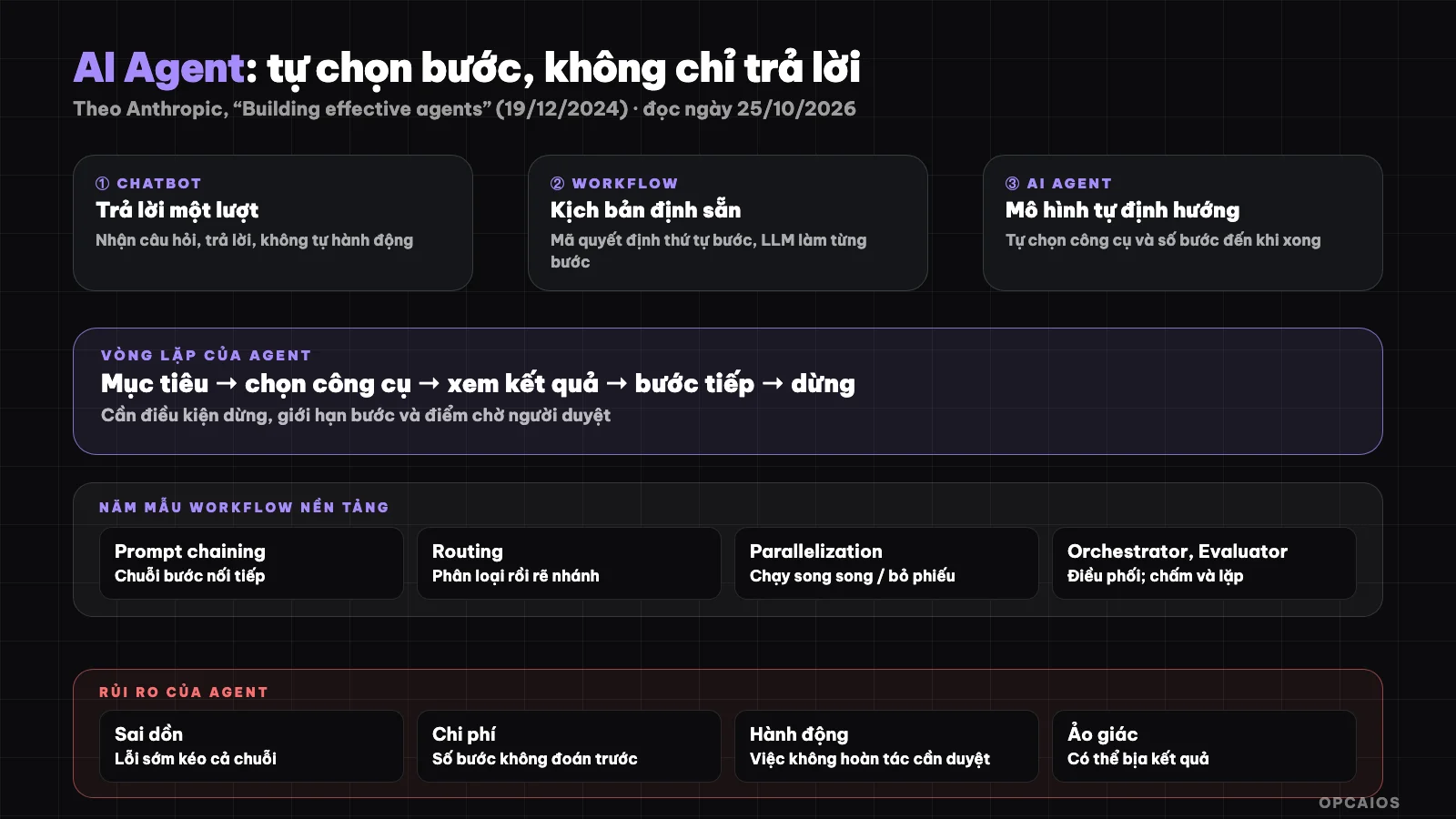
Chatbot answers, workflow runs by script, agent chooses its own steps. Diagram: OPCAIOS.
What is an AI Agent and how does it differ from a chatbot?
A chatbot receives a question and answers once; an AI Agent receives a goal, makes its own steps, calls tools (search, read files, call APIs, run commands), sees the result then decides the next step until complete or blocked. The same LLM can power both, but an agent has a loop and the right to act.
A quick way to remember: chatbot "talks", agent "does". A chatbot answering questions about refund policy is a chatbot. A system that receives complaint emails, looks up orders, drafts replies, asks you to approve then sends and logs to CRM is an agent (has tools, has a loop, has a stop point waiting for a person).
On foundations, you should first understand what is an LLM: an agent is just a way to organize an LLM with tools and a loop, not a new type of model.
How does an AI Agent differ from automated workflow?
Workflow is a sequence of steps drawn by humans beforehand, each step can call an LLM but the order does not change; an agent decides the order and number of steps at runtime. Anthropic calls both "agentic systems" and recommends finding the simplest solution first, only adding complexity when truly needed.
| Criterion | Chatbot | Workflow | AI Agent |
|---|---|---|---|
| Who decides the next step | User asks again | Code/script predefined | Model decides itself |
| Uses tools | Usually not | Yes, in fixed order | Yes, chooses tools |
| Number of steps | 1 turn | Known beforehand | Unknown beforehand |
| Predictability | High | High | Lower |
| Cost, latency | Low | Medium | Higher |
| Example | FAQ Q&A | Form → AI summarize → send email (n8n) | Receive an error, read code, fix, run tests by itself |
The table above is general description, not measurement. When tasks have clear and repeating steps, workflow is almost always cheaper and more stable.
Common agentic design patterns
Anthropic describes five foundational workflow patterns from which many agent systems are built: prompt chaining, routing, parallelization, orchestrator-workers, and evaluator-optimizer. Understanding these five patterns helps you know if you need a workflow or a true agent.
- Prompt chaining: divide work into successive steps, output of one step is input of the next, you can insert checks with code between steps.
- Routing: classify input then send to a specialized processing branch (for example price questions go one way, complaints go another).
- Parallelization: run multiple LLM calls at the same time, or divide independent work, or run the same work multiple times to vote.
- Orchestrator-workers: one LLM coordinates by dividing work to worker LLMs then combines results.
- Evaluator-optimizer: one LLM generates a result, another LLM scores and gives feedback in a loop.
To dive deep into designing parallel flows, see what is graph engineering.
What components make up an AI Agent?
A minimal agent has four parts: a model (the brain), tools (the hands), memory or context (what it knows in the session), and a loop with stop conditions. Without clear stop conditions or permissions, an agent easily loops forever or acts outside its scope.
- Model: choose by difficulty and cost, see which AI model to choose.
- Tools: functions or APIs the agent can call. The MCP standard helps connect tools by a common protocol.
- Context/memory: documents, history, results from previous steps; retrieving private documents usually uses RAG.
- Loop and limits: max steps, budget, list of things that must ask a person before doing.
Risks and Limits of AI Agent
Agents trade off latency and cost for the ability to handle open-ended work. Anthropic makes clear that agents are more expensive, can make compounding errors (a wrong assumption in step 2 ruins the whole chain) and need careful testing in isolated environments with safety guardrails.
- Compounding errors: a wrong assumption at step 2 breaks the entire chain. Reduce by adding checkpoints midway and human review at steps that can't be undone.
- Irreversible actions: sending email, deleting data, transferring money. The default should be asking permission, not asking for forgiveness.
- Hallucination: an agent can make up tool results or numbers, see what is AI hallucination.
- Data leaks and prompt injection: the webpage or email content an agent reads may contain malicious instructions. Grant only the minimum permission needed.
- Unpredictable cost: the number of steps is unknown ahead of time, so you need to set step limits and budgets.
When to use AI Agent, when not to?
Use an agent when the problem is open-ended, the steps can't be predicted, and you accept higher cost in exchange for flexibility. If the steps are clear, repetitive, and need consistency, use a workflow; if a single LLM call with lookup and examples is enough, don't add more.
| Situation | Suggestion |
|---|---|
| Answer common questions from documentation | One LLM call + RAG |
| Form → summary → send email → write spreadsheet | Workflow (where to start automating) |
| Fix bugs in an unfamiliar codebase | Agent (with testing as a stopping point) |
| Research a topic, read many sources, synthesize | Agent, with a step for human to review sources |
| Work with financial or legal consequences | Workflow + human review, don't let the agent decide alone |
OPCAIOS experience
We use agents for open work like writing and testing code, researching sources, drafting blog posts, while repetitive predictable work still runs on workflows. Every article drafted by an agent goes into draft status awaiting human review, never auto-published.
What we learned: the hard part isn't "make the agent smarter" but setting stopping points and permissions. An agent with permission to write to a live database needs clear boundaries (insert drafts only, don't edit published posts). Limitation: we haven't measured the success rate for each agent, so I'm not giving any efficiency numbers here. See also the AI system I use to run my work alone and what is Paperclip about coordinating multiple agents.
Frequently asked questions
Is AI Agent the same as ChatGPT?
Not quite. ChatGPT is a chatbot app; when it uses tools on its own across multiple steps to do work, it behaves like an agent. "Agent" is how you organize a system, not the name of a product.
How is AI Agent different from Automation (Zapier, Make, n8n)?
Automation runs on a script you draw; an agent decides its own steps. Many good systems blend both: workflows for repetitive parts, agents for open parts.
Can AI Agent replace employees?
It can take on some tasks, but compounding errors and irreversible actions mean you need someone to oversee. Claims of "full replacement" usually lack evidence; see why I don't believe promises of 300% productivity gains.
Can someone without coding use AI Agent?
Yes with ready-made tools, but start with low-risk work and always have a review step. Safe process: coding agents for people who don't know code.
How do I start using AI Agent in a small business?
Pick one small task, with clear right/wrong criteria, run the agent in suggestion-only mode, measure results over a few weeks before granting more power. If you need a guide, see AI application training service.
Source: Anthropic, "Building effective agents" (19/12/2024), read 25/10/2026; post notes that many described tools changed since late 2024 and hasn't read Anthropic's new Managed Agents docs. The comparison table is OPCAIOS general description, not measurement. Experience is OPCAIOS's.
Translated from Vietnamese with AI. Read the original.
Want to apply this in your business?
Book a free 30-minute call (Vietnam time, in English or Vietnamese).