


What is a personal AI assistant?
A personal AI assistant is an AI tool that has been given a predefined role, voice, and your own documents, so that each time you ask it for help you don't have to explain from the beginning; the results are still reviewed by you before use. This article does not promise an assistant that "knows everything about you" and does not promise how many hours you will save: OPCAIOS has not measured that number and has no data from users outside. This article distinguishes chatbots, assistants, and agents, divides how to create them into three levels A, B, C, and provides complete instruction templates along with hypothetical examples.
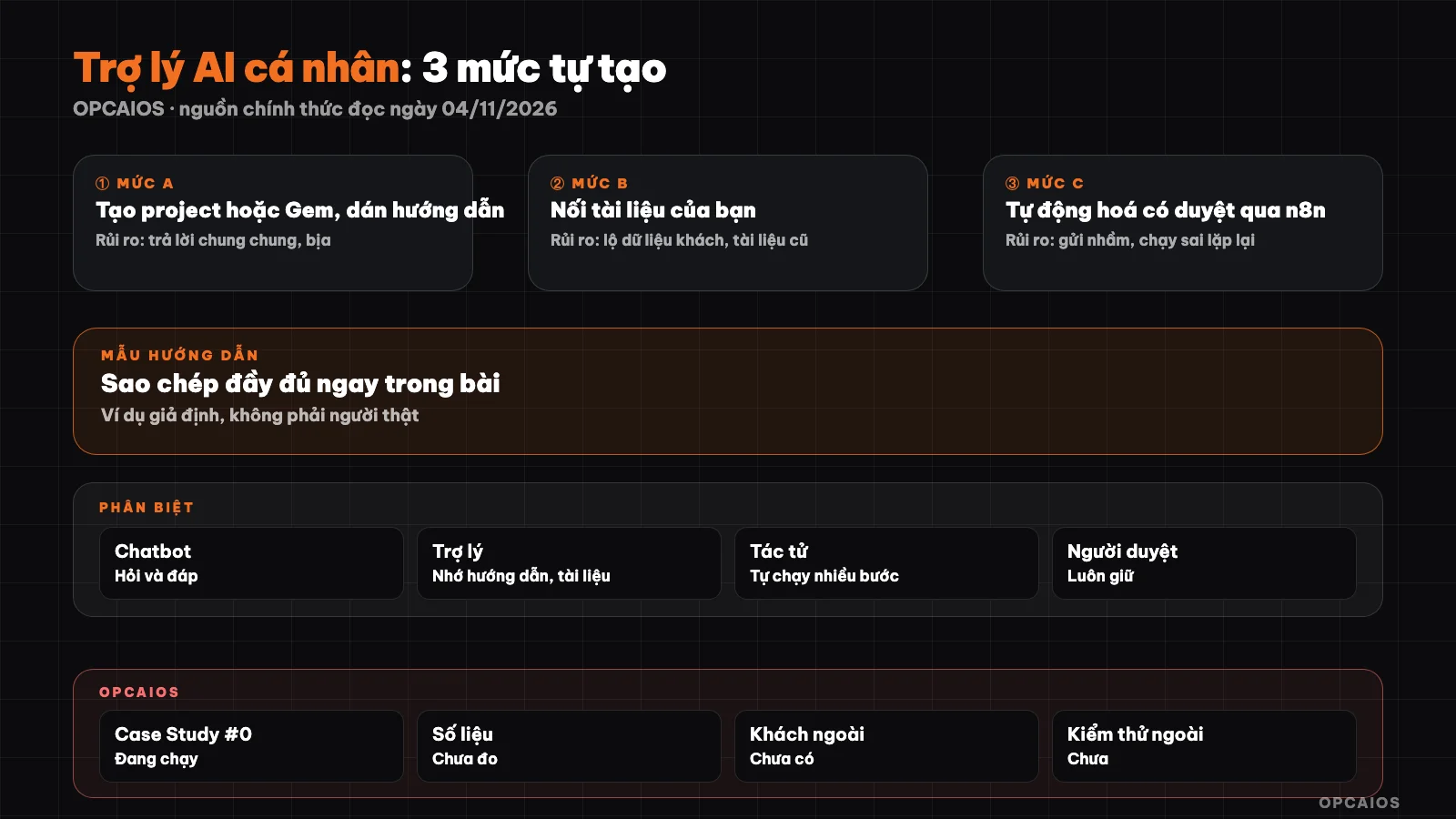
Three levels of creating a personal AI assistant: the higher you go the more you need review. Diagram: OPCAIOS.
How is a personal AI assistant different from a chatbot and an agent?
A chatbot is a general conversation framework for everyone: it doesn't know what you sell, what voice you write in, who your customers are, unless you say so right in the conversation. A personal assistant is a chatbot with two things added: a fixed instruction manual and a set of your own documents. An agent goes one step further: it decides on its own which tool to use, which step to take. Anthropic, in their technical post on 19/12/2024, separates the two concepts by who controls them: a workflow is a sequence of steps predetermined by code, an agent is a model that decides the next step on its own. The boundary to remember: an assistant answers, an agent acts; sending messages, editing files, deleting data is where you need a fence.
| Type | What I read on the official page (04/11/2026) |
|---|---|
| Chatbot | Claude turns on default memory in Free, Pro, Max, Ultra plans; can be turned off in settings |
| Assistant with instructions and documents | Claude Projects: custom instructions and files, free account can create up to 5 projects. Gemini Gems: name, instructions, can add files; Google notes from November 2026 Gems on personal accounts will move to "skills" |
| Agent | See What is an AI agent |
ChatGPT has Projects and custom GPTs, but OpenAI's official help page returns a 403 error when we read it, so the article does not state their limits or plans.
What are the three levels of creating an assistant: A, B, and C?
The three levels differ in one thing: how much of your stuff the assistant gets to touch. Level A only needs one instruction manual. Level B adds documents. Level C connects to other tools and runs by events. Go through each level in order, using each for at least a week, because the risks rise faster than the benefits. The table does not list money because prices vary by plan.
| Level | What you do | Main risk | Cost |
|---|---|---|---|
| A | Create project/Gem, paste instructions | Vague answers, making up details | You may try with a free plan depending on the tool |
| B | Upload price list, processes, sample posts | Customer data leaks; old documents lead to old answers | Some features only in paid plans (RAG in Claude Projects) |
| C | Connect message channels, spreadsheets using n8n | Wrong sends, wrong runs repeat | Tool fees, model call fees, maintenance effort |
Level A: how do you create an assistant in one session?
Level A is creating a project (Claude), Gem (Gemini), or GPT/Project (ChatGPT) then pasting a well-written instruction manual; this is the cheapest way to know if you will actually use an assistant. The steps:
- Choose one thing that repeats every week, like answering messages asking for price.
- Choose one tool you already have an account for; if you can't choose yet, read Gemini, ChatGPT or Claude.
- Create a new project or Gem and paste the instruction manual from the template below.
- Try it with 5 real situations you have faced, then fix the instructions after each mistake.
If you are not used to writing requests for AI, read what is a prompt first.
Level B: how do you safely connect your documents?
Level B is letting the assistant read a selective set of your documents: current price list, processes, a few sample posts in the right voice, frequently asked customer questions. Principle: less but correct, three to five short files, note the update date. Do not put in customer names, phone numbers, addresses, payment information; full contracts; passwords, API keys. How to gather background information into one file is shown in context pack for solo workers. Test: ask 5 questions you know the answer to, see if the assistant follows the documents or makes things up.
Level C: What is Automation with Human Review?
Level C is connecting an assistant to an intake channel and a result delivery channel, usually with a tool like n8n, so the assistant drafts based on events. Hard rule: the assistant only drafts into a queue, a human presses send. Minimal design includes: intake point (webhook or form), a step calling the model with fixed instructions, a place to store drafts for review, and a reviewer log. If you don't have a regular reviewer yet, don't move to Level C.
Template Instructions for Your Assistant: How to Copy and Fill In?
Good instructions have six parts: role, customer, voice, process, limits, format. Replace text in brackets with your information.
ROLE
You are the draft assistant for [your name], who [your profession, who you serve].

USER AND CUSTOMER
My customers are [industry, size, common problems].

VOICE
[3 to 5 traits: how to address people, sentence length, words not to use].
Example of a paragraph I wrote: "[paste one real paragraph, with customer name hidden]".

PROCESS
1. Read the message I paste in.
2. If information is missing, ask back at most 3 questions before drafting.
3. Use only documents I provided; if none, say "no information available".
4. Draft 2 options: short and full.

LIMITS
- Don't state price, deadline, or commitment on your own if the document doesn't have it.
- Don't give legal, tax, or medical advice.
- Don't ask for passwords, card numbers, or ID papers.
- This is only a draft; remind me to check before sending.

FORMAT
Vietnamese. Each option gets its own heading. At the end, list details I need to verify (price, date, name).
Example scenario: Interior designer selling services
This example is hypothetical, not a real person and not an OPCAIOS customer. "Ha" takes on apartment interior design jobs, 50 to 80 square meters, and often gets price inquiries while on site. Ha fills in the template: customers are apartment owners; uses "mình", short sentences, doesn't promise timeline; adds a step to ask area, number of rooms, budget if the customer didn't say; adds a limit "I don't give final quotes, only explain how the pricing table works and suggest scheduling a survey". Ha uploads three files: fee calculation, process, two sample replies with names hidden. Ha keeps the reply writing part, holds onto the pricing decision.
What Risks Should I Know Before Building an Assistant?
Three risk groups, and no level eliminates them all. First, private data: what you paste or upload goes to the provider, so read privacy settings and don't share other people's sensitive data; see 5 Data Security Rules When Using AI. Second, making things up: models can write confidently about things that are wrong, especially numbers, names, terms; telling the assistant to use only your documents reduces but doesn't stop this. Third, dependency: features change names or get replaced (like the shift from Gems to skills), rate limits change, accounts get locked. Keep your instructions and source documents as plain text so you can switch tools in one session.
OPCAIOS Experience
OPCAIOS is a website built by one person, Le Quoc Nghia, together with AI agents. We use Claude Code, Codex, and Antigravity in parallel with different roles, an Obsidian note vault, and a common rule file that every agent reads at the start of each session and logs at the end. This system is running on Nghia himself as a test (Case Study #0). Real limits: no productivity data yet, no time saved measured, no outside customers testing yet, and everything sent out has human review. A broader picture is in An AI system that runs on its own.
Frequently Asked Questions
How is a personal AI assistant different from regular ChatGPT, Claude, or Gemini?
The core is the same type of model. The difference lies in what you put on top: a fixed instruction set about role, voice, and limits, plus your own documents. This way you don't have to describe the context every time. Quality depends mostly on the instruction set and how clean your documents are.
Do I need to know programming to create a personal AI assistant?
Not for levels A and B: you create a project or Gem and paste text into it. Level C usually requires learning an automation tool or getting support. At all three levels, the most important skill is writing clear requirements, choosing the right documents, and checking the results.
Is a personal AI assistant free?
It depends on the tool and timing. Claude's help page states that free accounts can create up to 5 projects, and expanded document search (RAG) is for paid plans (read on 04/11/2026). For Gemini and ChatGPT, we haven't confirmed current limits so we don't mention them. Check the pricing page before deciding.
What data should I give the assistant, and what shouldn't I?
Should give: public price lists, processes, common customer questions, a few writing samples in your voice. Shouldn't give: customer identification info, full contracts, payment data, passwords, API keys, documents you're not allowed to share. If you need real examples, hide names, phone numbers, and addresses first.
How long before I know if the assistant is useful?
We suggest trying for one week on a repeating task, then evaluating yourself with a three-column table: what works immediately, what needs lots of fixing, what doesn't fit. This is a rough way to measure, not scientific. If you're still fixing most drafts, review the instruction set before moving to level B or C.
Next Steps
Copy the instruction template above into a project or Gem, fill in your information, and use it for one repeating task for exactly one week. Each day, write three columns: task, works immediately or needs fixing, what to fix. At week's end, update the instruction set based on repeated errors, then think about moving to level B.
Source: Claude help pages on Projects and memory, Google help page on Gems, Anthropic's "Building effective agents" post (19/12/2024), all read on 04/11/2026; OpenAI help page couldn't be accessed (403 error) so ChatGPT section is unverified; Gemini limits and pricing unverified; the service seller example is hypothetical; experience is from OPCAIOS.
Translated from Vietnamese with AI. Read the original.
Want to apply this in your business?
Book a free 30-minute call (Vietnam time, in English or Vietnamese).