


What is Wispr Flow?
Wispr Flow is an AI speech-to-text application: you speak, the app types right at your cursor in any application, automatically removes filler words ("uh", "um"), handles self-corrections mid-sentence, adds punctuation and formatting. According to the homepage (read October 25, 2026), Wispr Flow runs on Mac, Windows, iPhone and Android, supports over 100 languages, and the company claims speeds 4 times faster than typing (220 words per minute versus 45 words per minute, these are the provider's figures). Free plan offers 2,000 words per week; Pro plan $15 per month ($12 if paid annually). Example calculation: typing 2,000 words at 45 words per minute takes about 44 minutes, while at 220 words per minute takes about 9 minutes (the provider's speed figures). Key point to check before buying: the homepage does not mention Vietnamese, so Vietnamese recognition capability has not been confirmed. This article explains what Wispr Flow is, features, pricing tiers, privacy, how to use it and limitations, and OPCAIOS's experience.
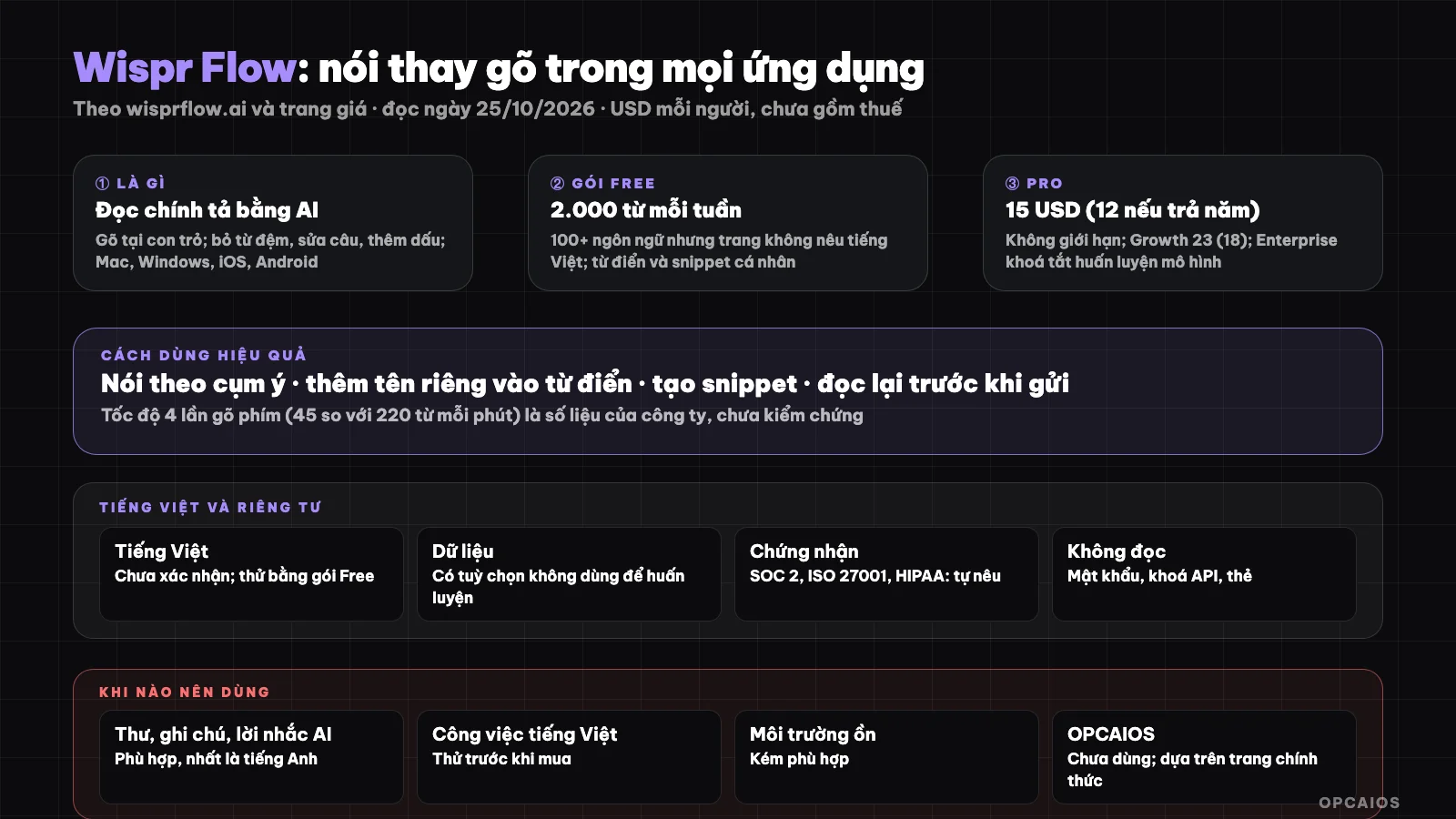
Speak instead of typing in every application; need to try Vietnamese and read the data policy first. Diagram: OPCAIOS.
What is Wispr Flow and how does it work?
Wispr Flow is "AI that converts speech to text clearly and polished in every application", according to the homepage (read October 25, 2026). How it works has four parts:
- Types at your cursor without needing plugins or integration; removes filler words, handles self-corrections mid-speech, adds punctuation and formatting as you speak.
- Personal dictionary for proper names and terminology, snippets that expand from a voice shortcut, and writing style for each application; syncs across devices.
- Notetaker (records meeting notes with speaker names, summarizes topic and next steps), only on Mac and Windows.
- Homepage advice: use built-in microphone, avoid Bluetooth headsets like AirPods as they may reduce accuracy, and select the right language you speak instead of auto-detection.
Hypothetical example: someone speaks 5 minutes at a time, 8 times a day, meaning 40 minutes a day using Wispr Flow on one of the 4 supported platforms. To understand the recognition model and text cleaning, see What is LLM?.
What pricing tiers does Wispr Flow have?
Wispr Flow has four tiers: Free, Pro, Growth and Enterprise. According to the official pricing page (USD per user, excluding tax, read October 25, 2026), Free $0 with 2,000 words per week, Pro $15 per month ($12 if paid annually), Growth $23 per month ($18 if paid annually). Example calculation: a Pro user paying annually spends $144 per year, lower than $180 if paying monthly, meaning 20% cheaper.
| Tier | Price per month (paid annually) | Spelling limit | Key points |
|---|---|---|---|
| Free | 0 | 2,000 words per week on computer; weekly limit on mobile | Mac, Windows, iOS, Android; 100+ languages; personal dictionary and snippets; limited Notetaker |
| Pro | 15 (12) | Unlimited | Shared dictionary and snippets; longer Notetaker history |
| Growth | 23 (18) | Unlimited | Unlimited Notetaker; admin controls model training for the whole team |
| Enterprise | By agreement (annual payment only) | Unlimited | Locks model training |
The page also shows $33 and $26 levels for Growth without clarifying which is current; we took the lower amount and recommend you check when signing up. All tiers have the option not to use your data for model training; Enterprise locks it down. The page does not mention "Command Mode" or "privacy mode" by name.
Can you use Vietnamese with Wispr Flow?
Vietnamese capability is an unconfirmed point: the homepage mentions supporting 100+ languages but does not mention Vietnamese, and OPCAIOS has not tested it. Testing with the Free plan has three steps:
- First, select the right language in settings instead of leaving it on auto-detect.
- Next, read the same Vietnamese passage that has proper names, numbers and terminology.
- Finally, compare with the original text and count errors.
Hypothetical example: read 200 words, if there are 10 errors (5%) then you need to fix 10 places, which may not be faster than typing by hand. The Free plan gives 2,000 words per week, enough to try about 10 times like this in 7 days. For work needing accuracy (contracts, data), always proofread after speech-to-text.
How does Wispr Flow handle privacy and data?
Privacy is something I need to read carefully since the app cleans text using AI. According to their website (checked on 25/10/2026), the company mentions SOC 2 Type II, ISO 27001, and HIPAA certifications; this is a marketing claim, OPCAIOS hasn't verified it. A hypothetical example: using 2 hours daily for 30 days means 60 hours of audio, so 100% of the Data and Privacy section is worth reading before turning it on. Five things to note:
- Where audio and text go: the app cleans text using AI so data is usually processed on servers; I haven't read the detailed policy yet, so read the Data and Privacy section (Settings > Data and Privacy according to their website).
- Company's claims: data isn't sold; users choose whether to share data to improve the product; the company has SOC 2 Type II, ISO 27001, and HIPAA certifications. These are marketing claims, I haven't verified them.
- Sensitive app: don't dictate password spelling, API keys, or card information; use it in private since the mic also records people around you.
- System permissions: the app needs microphone permission and input control permission; only grant when you trust it.
- Notetaker and meetings: if recording meetings, ask permission from participants (see What is Fathom?).
How do I use Wispr Flow effectively?
Using it effectively means speaking in phrases and reading the results back. A hypothetical example: writing 10 emails daily, each 80 words, that's 800 words daily. Suppose it saves 40% time for slow typists; this is an assumption, not a measurement. Six steps:
- Speak in phrases, not word by word; the app cleans up repetition.
- Add proper nouns and terminology to the dictionary (company names, products).
- Create snippets for repeated answers (addresses, greetings, sample quotes).
- Use it for emails, notes, prompts for AI (long commands for AI assistants are faster than typing).
- Read back before sending, especially numbers, names, and terminology.
- Check your weekly limit on the Free plan before relying on it.
When should I use Wispr Flow?
| Situation | Suggestion |
|---|---|
| Writing many emails, notes, AI prompts in English | Suitable |
| Work in Vietnamese | Try the Free plan first; not confirmed |
| Slow typing or hand pain | Could be helpful |
| Loud environment, not private | Less suitable |
| Very sensitive data | Read the policy; consider local tools |
OPCAIOS's experience
I haven't used Wispr Flow; the tool name only appears in a few reference notes in my knowledge base, so this post is based on their official website and pricing page, not my own experience. I also haven't tested Vietnamese accuracy and don't have measurements for typing speed. When prompting AI agents, I still mostly use the keyboard.
Read more: 6 best speech-to-text tools in 2026.
Frequently asked questions
What is Wispr Flow?
It's an AI dictation app that types text at your cursor in any app, automatically cleans up filler words and adds punctuation.
Is Wispr Flow free?
There's a Free plan with 2,000 words per week on desktop; Pro is $15 per month (or $12 if paid yearly), unlimited.
Does Wispr Flow support Vietnamese?
The site lists 100+ languages but doesn't mention Vietnamese; try the Free plan to check.
Is it safe?
The company says they don't sell data and have security certifications, but I haven't verified; read the policy and turn off data sharing if needed.
Does it replace typing?
It's faster for lots of work, but you need to read back. If you want to learn how to use AI to boost writing productivity, check out OPCAIOS's AI application training course.
Source: wisprflow.ai and wisprflow.ai/pricing, checked 25/10/2026; speed and certifications are company claims, unverified; couldn't find Vietnamese support and detailed data policy. Pricing doesn't include tax and may change. Experience is OPCAIOS's.
Translated from Vietnamese with AI. Read the original.
Want to apply this in your business?
Book a free 30-minute call (Vietnam time, in English or Vietnamese).