



What is Fathom?
Fathom is an AI tool that automatically records, transcribes, and summarizes online meetings, extracts action items, and allows you to search meeting content later. According to the official pricing page (read on 25/10/2026), the personal Free plan is "free forever" with unlimited recording and transcription; the Premium plan is $20 per month ($16 if paid annually); the Team plan is $19 ($15) and Business plan is $34 ($25) with a minimum of 2 users. For example, an independent consultant can use Fathom for Zoom, Google Meet, or Microsoft Teams calls with clients. One notable feature: Fathom is presented as having a recording mode that doesn't require a bot to participate (currently in beta) alongside the bot mode. This post explains what Fathom is, its features, pricing, how to use it for a one-person company, important considerations about recording permission, privacy and data security, things we couldn't verify, and OPCAIOS's experience.
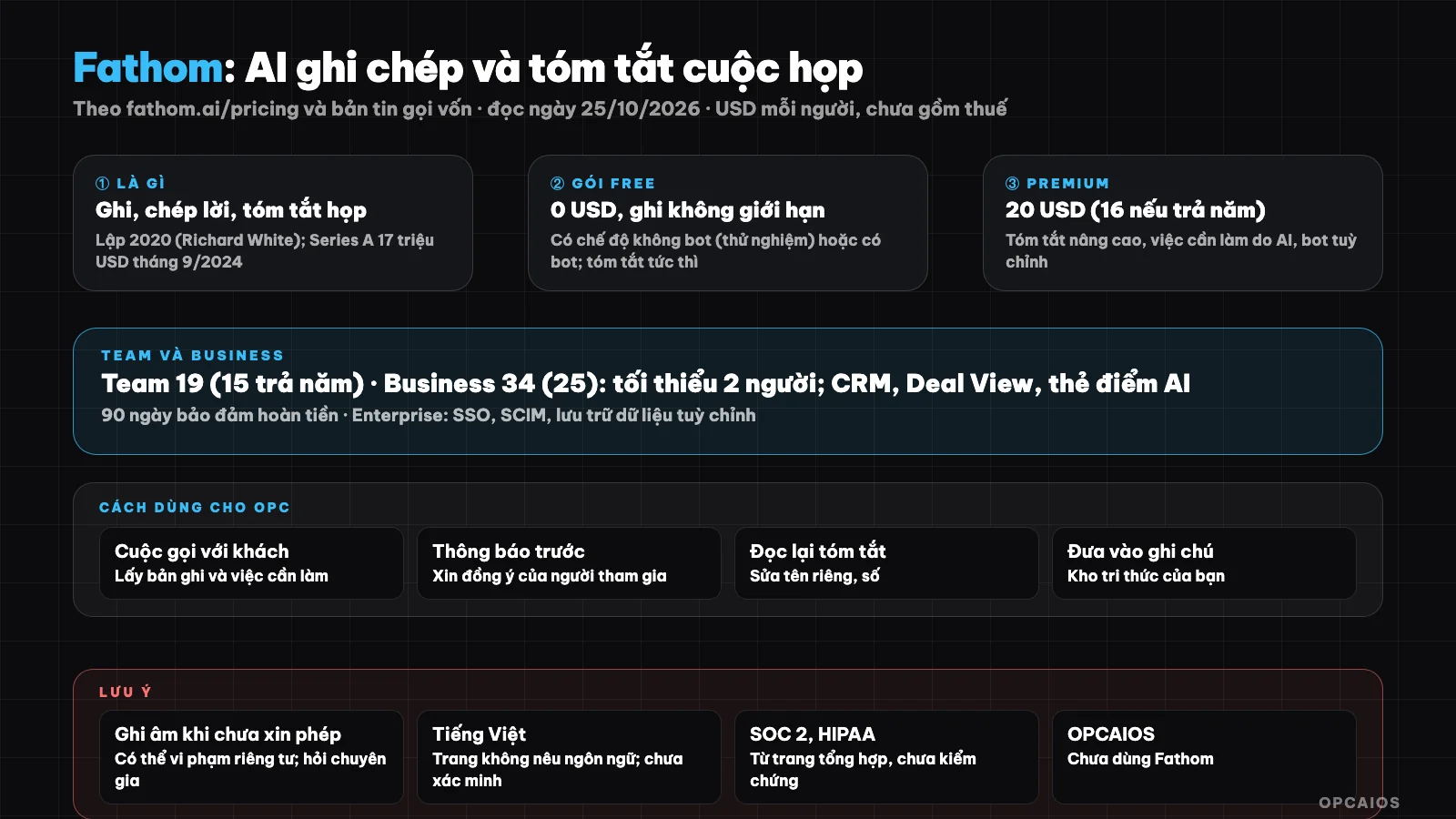
Automatic note-taking is very convenient, but you need to ask permission from participants and check the summary. Diagram: OPCAIOS.
What is Fathom and who created it?
Fathom is an AI meeting note-taking tool founded by Richard White, who previously built UserVoice, in 2020. According to reports, the company's funding history includes three milestones:
- Early 2022: seed round of $4.7 million.
- September 2024: Series A round of $17 million led by Telescope Partners.
- Within Series A, $2 million came from users, community fundraising via Wefunder.
Third-party aggregator sites list Fathom as having SOC 2 Type 2 and HIPAA certification, data encryption, and not using data to train AI. We haven't verified these points with Fathom's security page, so please read it yourself before using it for sensitive data. Related topic: AI note-taking is an application of language models (see What is LLM?).
Is Fathom free and how much does it cost?
Fathom has a free plan for individuals, while paid plans are charged per user. According to the official pricing page fathom.ai/pricing (read on 25/10/2026), the price per user per month, excluding tax, is as follows:
- Free: $0, unlimited recording and transcription.
- Premium: $20, or $16 when paid annually.
- Team: $19 ($15 when paid annually) and Business: $34 ($25 when paid annually), both require a minimum of 2 users.
Fathom's Enterprise plan is priced by agreement, including SSO, SCIM, and custom data storage. Example scenario: an independent consultant who only needs to transcribe client calls can start with Free. When needing action items extracted by AI, the Premium plan at $16 per month (paid annually) is the next step. The pricing page also mentions a 90-day money-back guarantee for paid plans. Prices may change, so check Fathom's pricing page again before deciding.
Feature table by plan
According to the official pricing page (USD per user, excluding tax):
| Plan | Price per month (paid annually) | Key features per page |
|---|---|---|
| Free (individual) | 0 | Unlimited recording and transcription, recording without bot (beta) or with bot, instant AI meeting summary, clips, playlists, search within meetings |
| Premium (individual) | 20 (16) | Plus advanced summaries, AI-extracted action items, meeting conversation assistant, custom bot |
| Team | 19 (15), minimum 2 users | Plus global search across meetings, team highlight clips list, comments, folders, keyword alerts |
| Business | 34 (25), minimum 2 users | Plus CRM field sync, Deal View, training metrics and AI scorecard, custom summaries |
| Enterprise | By agreement | SSO, SCIM, enterprise security controls, custom data storage, customer success management |
Some AI features are noted as "limited use" (action items, account-wide Q&A currently in beta). The page doesn't list supported languages, so we cannot verify Vietnamese quality; try it on a real meeting. How the monthly and annual prices are labeled on the page is unclear, we inferred from the "pay annually" toggle.
How to use for a one-person company
- Use for calls with customers and partners to get accurate records and action items.
- Notify and ask permission from participants before recording (see section below).
- Review the summary and make corrections; push action items into your management tool (see How AI helps one person run an entire business).
- Put important findings into your note repository (see What is Second Brain?).
- Use clips and highlights to share with customers instead of sending the full recording.
- Set rules for archiving and deleting old recordings.
Notes on recording and privacy
- Ask permission before recording, even in no-bot mode: details in the FAQ section below.
- Accuracy: transcription may get names, numbers, and terminology wrong; AI summaries may miss things or make inferences; verify before using as evidence.
- Sharing and sensitive data: check sharing settings, give minimum permissions for calendar access, don't record meetings about contracts, health, personal finances until you understand how data is stored.
Quick comparison of meeting note-taking approaches
| Approach | Good for |
|---|---|
| Fathom (Free plan) | Individuals who want unlimited recording and summarization, okay with limited features |
| Premium or Team paid plans | Need advanced summaries, teamwork |
| Manual notes, meeting platform's native recording | Sensitive meetings or don't want to add another tool |
| Build your own transcription workflow | Need data control; have technical skills |
OPCAIOS experience
We haven't used Fathom; our knowledge base only mentions this tool in documentation for a customer data module, so this post is based on the official pricing page and newsletters, not our experience. We also don't have data on Fathom's accuracy for Vietnamese transcription. Our internal principle when using recording tools: notify participants, don't record sensitive customer data into services we haven't checked the policy for, and always review the summary before using it.
Frequently Asked Questions
What is Fathom?
It's an AI tool that records, transcribes, and summarizes online meetings, extracts action items, and lets you search back through content.
Is Fathom free?
There's a free personal plan with unlimited recording and transcription; paid plans start at $15 per person per month (billed annually).
Does Fathom support Vietnamese?
I couldn't verify this: the official pricing page doesn't list languages. Try recording a short meeting with the free plan and check the transcript, especially proper nouns and numbers.
Do I need permission to record a meeting?
You should ask permission. Recording or video-taping others without their knowledge may violate privacy and personal data regulations, and erodes customer trust. I haven't checked Vietnam's current laws or the laws of participants' countries, so you need to ask an expert for the correct legal answer. The safe approach has three steps:
- First, announce at the start of the meeting that Fathom (or Fathom's bot) will record and transcribe.
- Next, get clear agreement from each participant, especially customers.
- Finally, save the agreement in an email or meeting notes.
According to Fathom's pricing page (read 25/10/2026), the no-bot mode is still in beta. Example scenario: a Zoom or Google Meet call with a new customer should start with "I'm recording this call to capture action items—do you agree?" The no-bot recording mode is more convenient but doesn't replace the need to notify.
Is meeting data safe?
Meeting data on Fathom is sensitive information, and I haven't verified the safety level because I haven't confirmed security claims against their source. Some third-party summary pages mention Fathom has SOC 2 Type 2 and HIPAA, encrypts data, and doesn't use data to train AI, but these points haven't been confirmed with Fathom's security page. For example, a Zoom or Google Meet call about contracts should be carefully considered before letting Fathom record. Before using it for sensitive data, do four things:
- Read Fathom's privacy policy (I've only read the pricing page, 25/10/2026).
- Check sharing settings, since recordings are private by default according to one summary page.
- Grant minimal permissions to your calendar and meeting account.
- Don't record meetings about personal health or finances until you understand how data is stored.
According to the pricing page, only the Enterprise plan mentions SSO, SCIM, and custom data storage. To learn how to use AI safely for meetings and knowledge management, see OPCAIOS's AI application training course.
Source: fathom.ai/pricing (read 25/10/2026) and fundraising news; information about SOC 2 and HIPAA from summary pages, not verified; haven't read supported languages, privacy page, or recording regulations. Price excludes tax and may change. Experience is OPCAIOS's.
Translated from Vietnamese with AI. Read the original.
Want to apply this in your business?
Book a free 30-minute call (Vietnam time, in English or Vietnamese).