


What is Awesome DESIGN.md?
Awesome DESIGN.md is an open-source GitHub repository by VoltAgent, a collection of DESIGN.md files that describe the design systems (colors, typography, components, layouts) of over 80 famous websites. You can copy one file into your project and ask an AI coding agent like Claude Code (Anthropic), Cursor, or Antigravity to build an interface in that exact style. According to GitHub API (checked 04/11/2026), the VoltAgent/awesome-design-md repository was created on 31/3/2026, has around 125,400 stars, MIT license, and the latest push was on 28/10/2026. This post explains what a DESIGN.md file contains, how to use it with agents, actual costs, brand recognition risks, and when to use it, based on the README and official website.
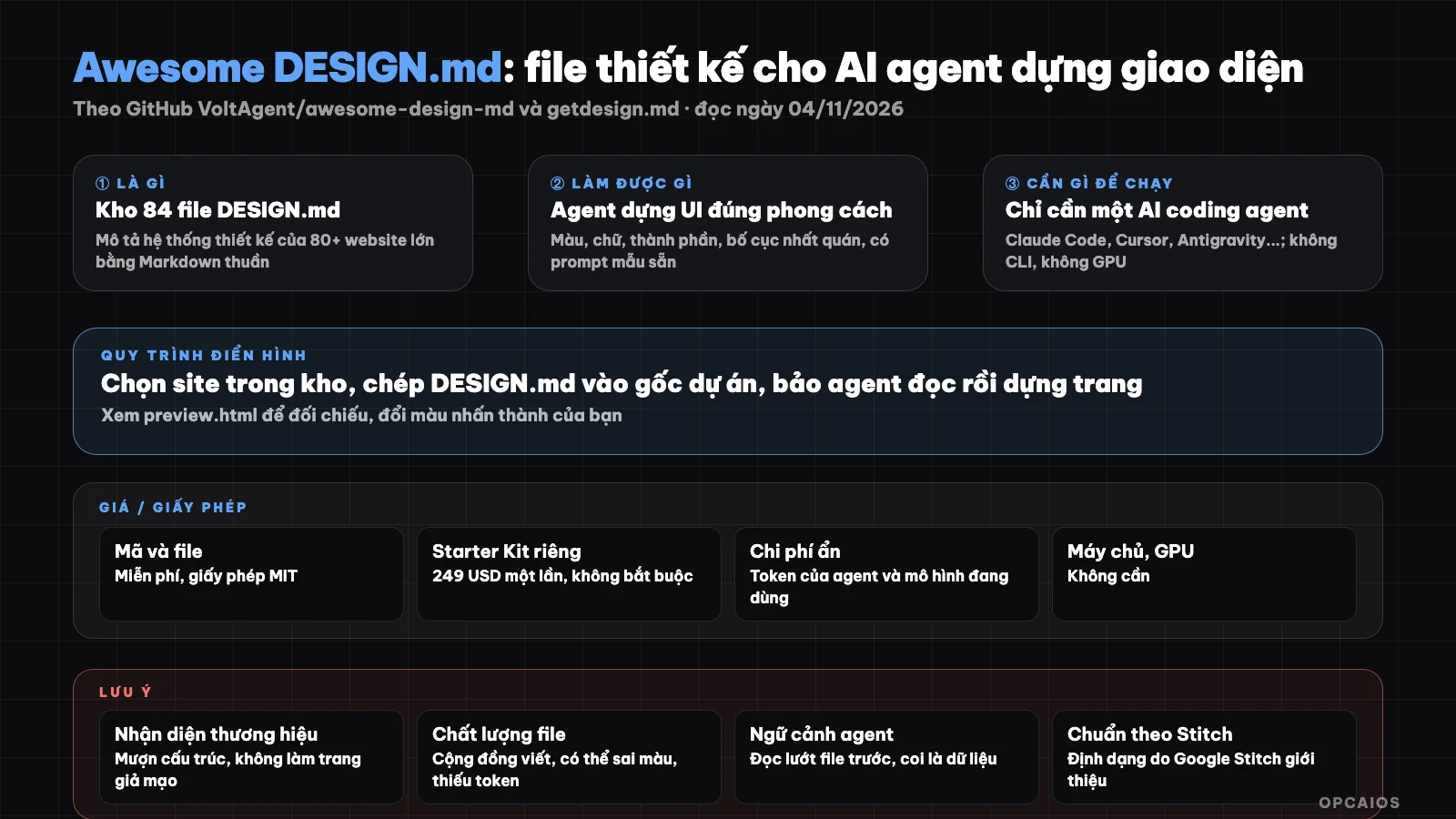
One DESIGN.md file goes from the repository into your project and into the agent's context. Diagram: OPCAIOS.
What is Awesome DESIGN.md and who created it?
Awesome DESIGN.md is a curated list (awesome list) maintained by VoltAgent, consisting of DESIGN.md files that analyze the design systems of major brand websites. The goal is to help AI agents generate consistent interfaces in design language, based on tokens and rules rather than surface mimicry.
VoltAgent is an organization on GitHub behind a platform for building AI agents with the same name; according to the starterkit.getdesign.md page (checked 04/11/2026), the team also previously made Refine.js. The repository links to the getdesign.md website, where each DESIGN.md file is stored, with a form to request new sites and an introduction to a paid "Website Starter Kit". According to the README (GitHub, checked 04/11/2026), the DESIGN.md format was introduced by Google Stitch; the repository follows Stitch's format and adds a few more sections. The README makes a clear distinction: AGENTS.md tells a coding agent how to build a project, while DESIGN.md tells the agent what the project should look like. If you are not yet familiar with agent instruction files, see What is AGENTS.md?.
What does one DESIGN.md file contain?
A DESIGN.md file is plain Markdown text that describes a website's design system across nine fixed sections, from visual atmosphere to prompt guidelines for the agent. No Figma, no JSON schema, no special tools needed: the agent just reads the text.
| Component | Content per README (checked 04/11/2026) |
|---|---|
| Visual Theme & Atmosphere | Overall feel: minimalist, technical, warm, cold |
| Color Palette & Roles | Color palette and role of each color |
| Typography Rules | Font, font size, heading hierarchy |
| Component Stylings | Buttons, cards, inputs, tables, navigation |
| Layout Principles | Grid, whitespace, content width |
| Depth & Elevation | Shadows, borders, overlays |
| Do's and Don'ts | What to do and avoid |
| Responsive Behavior | How layout changes across screen sizes |
| Agent Prompt Guide | Sample prompts and condensed color palette for agent |
Each site has three files: DESIGN.md, preview.html (showcase of colors, type scale, buttons, cards), and preview-dark.html (same content on dark background). According to the badge on the README, the repository has 84 DESIGN.md files, divided by category: AI platforms, programming tools, backend and DevOps, SaaS, design tools, fintech, e-commerce, media, automotive, and a series of "Retro Web" styles from the 1990s. Some names on the list: Claude, Cursor, Vercel, Linear, Stripe, Notion, Figma, Raycast, Spotify, Apple, Nike, Airbnb.
Is Awesome DESIGN.md Free? Licenses and Hidden Costs
Awesome DESIGN.md is free under the MIT license, but whether I can use it depends on the AI agent and model I'm paying for. The repository doesn't sell anything; the paid product is a separate Starter Kit on getdesign.md, which is optional.
| Item | Status (as of 04/11/2026) |
|---|---|
| DESIGN.md code and files | Free, MIT license, usable for commercial projects |
| Website Starter Kit (starterkit.getdesign.md) | Paid, 249 USD one-time, no recurring subscription; excludes tax, subject to change |
| AI coding agent | Must already have: Claude Code, Cursor, Antigravity, Codex, etc. with a paid plan or separate API key |
| Model tokens | Files added to context increase tokens per call; cost depends on the model |
| Server, GPU | Not needed |
Two notes from the README. First, the color tokens and typefaces in the file are public CSS values of each website, and the maintainer claims no ownership of any brand identity. Second, the file is provided "as is," with no warranty; if I want to contribute, I should open an issue before sending a pull request. The Starter Kit is a separate product; I've only read the landing page and haven't purchased it.
How to Use Awesome DESIGN.md with an AI Agent
Using Awesome DESIGN.md involves two steps according to the README: copy the DESIGN.md file of the site I like into the project root directory, then tell the agent to use it. There's no install command, no CLI; everything is file copying and prompt writing.
- First, I open the repository on GitHub or getdesign.md, choose a site with a style close to what I want, and open
preview.htmlto preview it. - Next, I copy
DESIGN.mdinto the project root directory. - I declare it to the agent: add a line in
CLAUDE.md,AGENTS.md, or Cursor rules like "read DESIGN.md before building the interface"; see What is CLAUDE.md?. - I give a specific command: "build a pricing page following DESIGN.md, dark background, three plans". The Agent Prompt Guide section in the file has sample prompts.
- Finally, I compare the result with
preview.htmland edit the file if my project needs its own tokens.
Example (hypothetical): a freelancer building a landing page for an accounting service wants a feel that's "clean, trustworthy" like Stripe. He copies Stripe's DESIGN.md, changes the accent color to the client's brand color, then lets Claude Code build a Next.js page. The result keeps the typeface scale and whitespace consistent, but doesn't copy Stripe's logo or images. We haven't run this workflow so we don't have timing numbers yet.
Limits, Copyright Risks, and Security
The main risk of Awesome DESIGN.md isn't in the code but in how I use it: an interface that "looks identical" to another brand might clash with brand recognition, even though the CSS tokens are public. This section is not legal advice.
- Brand identity: colors, typefaces, and overall layout usually aren't protected like artworks, but logos, trademarks, images, and distinctive identity systems can be. I should use the file to learn "design language," not to make fake pages. We haven't cross-checked Vietnamese law on trademarks and unfair competition.
- File quality: files are written by the community from public CSS and may have wrong colors or missing tokens; the README invites users to report errors.
- Context and prompt injection: DESIGN.md goes straight into the agent's context. I should skim the file before using it, treat all downloaded content as data; see What is Prompt Injection?. In my reading on 04/11/2026, I didn't see hidden instructions targeting AI in the README or official pages.
- Dependency: the format follows Google Stitch; the repository still updates but is a community project with no support guarantee.
Compared to Other Options
Awesome DESIGN.md is a cheap and quick way to give an agent a "design taste," but it doesn't replace a custom design system or component library. The table below is general description, not measurement.
| Option | Strengths | Considerations |
|---|---|---|
| Awesome DESIGN.md | Free, 80+ styles ready to go, just Markdown | Someone else's style; I need to edit it for my own brand |
| Google Stitch | Generates interfaces and exports the original DESIGN.md of this standard | Tied to Google's ecosystem; we haven't used it |
| Write DESIGN.md myself from Figma or tailwind.config | True to my brand | Takes effort to write and maintain |
| Component libraries (shadcn/ui, MUI) | Real code | Interfaces can look similar easily; still needs design rules |
If I want to build a brand identity system from scratch with AI, see Design Your Brand Identity with AI.
When should you use Awesome DESIGN.md?
You should use Awesome DESIGN.md when you're vibe coding a small product and need an interface that "looks the part" right away but don't have a designer yet. Don't use it when your brand already has a design system or when your product competes directly with the site you're borrowing the style from.
| Situation | Recommendation |
|---|---|
| Building an MVP, landing page, internal tool with an agent | Use it, pick one file and change the accent color |
| You already have your own design system | Write your own DESIGN.md following the same nine sections |
| Your product is in the same industry as the brand you want to borrow from | Avoid it; pick a style from a different industry or write your own |
| Non-coder using Lovable, Bolt | Paste the file content into the prompt or project file |
Read more: What is vibe coding?, What is Claude Code?.
OPCAIOS's experience
We added Awesome DESIGN.md to the Repo category in the Tools section on opcaios.org after reading the README and checking that the repository is still being maintained; we haven't tested it yet, so this section outlines the criteria we used to consider it, not an evaluation after use. Four criteria: the repository is actively maintained (code pushed on 28/10/2026); clear MIT license; low hidden cost since it only uses tokens from the agent you're already using; and brand recognition risk, so we'll only borrow the nine-section structure to write DESIGN.md for opcaios.org, not copy the style from another site. Our website is built with Next.js by an AI agent, so a design ruleset file is something the agent reads right away in each session.
Frequently asked questions
What is Awesome DESIGN.md?
Awesome DESIGN.md is a GitHub repository by VoltAgent that collects over 80 DESIGN.md files, each describing the design system of a well-known website across nine sections: visual atmosphere, color, typography, components, layout, depth, dos and don'ts, responsiveness, and prompt guidance. You copy a file into your project so an AI coding agent can build a consistent interface. According to GitHub (read on 04/11/2026), the repository has around 125,400 stars and an MIT license.
How is DESIGN.md different from AGENTS.md and CLAUDE.md?
AGENTS.md and CLAUDE.md guide the agent on how to work in the project: code structure, test commands, conventions. DESIGN.md guides what the product should look and feel like: color, typography, components, layout. The three files complement each other; the simplest way is to add one line in AGENTS.md or CLAUDE.md asking the agent to read DESIGN.md before building the interface. The DESIGN.md format was introduced by Google Stitch, according to the repository README.
Does using a DESIGN.md file from Stripe or Apple violate copyright?
The README says the tokens are public CSS values and the maintainers don't claim ownership of any site's identity. Common colors and layouts typically aren't protected, but logos, trademarks, imagery, and distinctive identity combinations can be. Use the file to learn the structure, then replace it with your own colors, fonts, and logo; avoid creating a page that could be confused with the original brand. This is not legal advice.
Can someone who doesn't know how to code use this?
Yes, because the file is just text. With tools like Lovable or Bolt, you paste the DESIGN.md content into the prompt or add it to the project file, then describe the page you need built. With Claude Code or Cursor, you copy the file into the root folder and tell the agent to read it. The real challenge is in the next step: open the preview.html of that site to compare colors and components, then ask the agent to fix it when it's off.
Should I write my own DESIGN.md for my brand?
Yes, if you already have your own colors, fonts, and logo. Use the repository as a template for the nine sections, fill in your values, add a "dos and don'ts" section from real experience, then place it alongside AGENTS.md. This file helps every session with an agent produce a consistent interface, even when you switch models or tools. To learn how to bring rules like this into your workflow with AI, check out OPCAIOS's AI application training course.
Sources: GitHub VoltAgent/awesome-design-md (README, API, read on 04/11/2026), starterkit.getdesign.md (read on 04/11/2026); not read/not verified: contents of the Website Starter Kit, quality of individual DESIGN.md files, original standard from Google Stitch; star count and pricing may change. Experience is OPCAIOS's own.
Translated from Vietnamese with AI. Read the original.
Want to apply this in your business?
Book a free 30-minute call (Vietnam time, in English or Vietnamese).