



What is a brand identity and can you make one with AI in an hour?
A brand identity is a set of elements that help customers recognize you: name, logo, color palette, typeface, image style, and tone of voice. With AI tools, a small business owner can have a first version (name, logo, colors, design templates) in about one hour of focused work; but "replacing a designer" is only partly true: AI creates options quickly, while choosing the right positioning, checking name and trademark availability, and maintaining consistency are still your job. This post provides a 60-minute process, five tools (Namelix, Looka, Canva, Ideogram, Gamma) with prices from official pages on 10/24/2026, what AI doesn't do for you, notes on logo ownership and trademarks, and OPCAIOS experience.
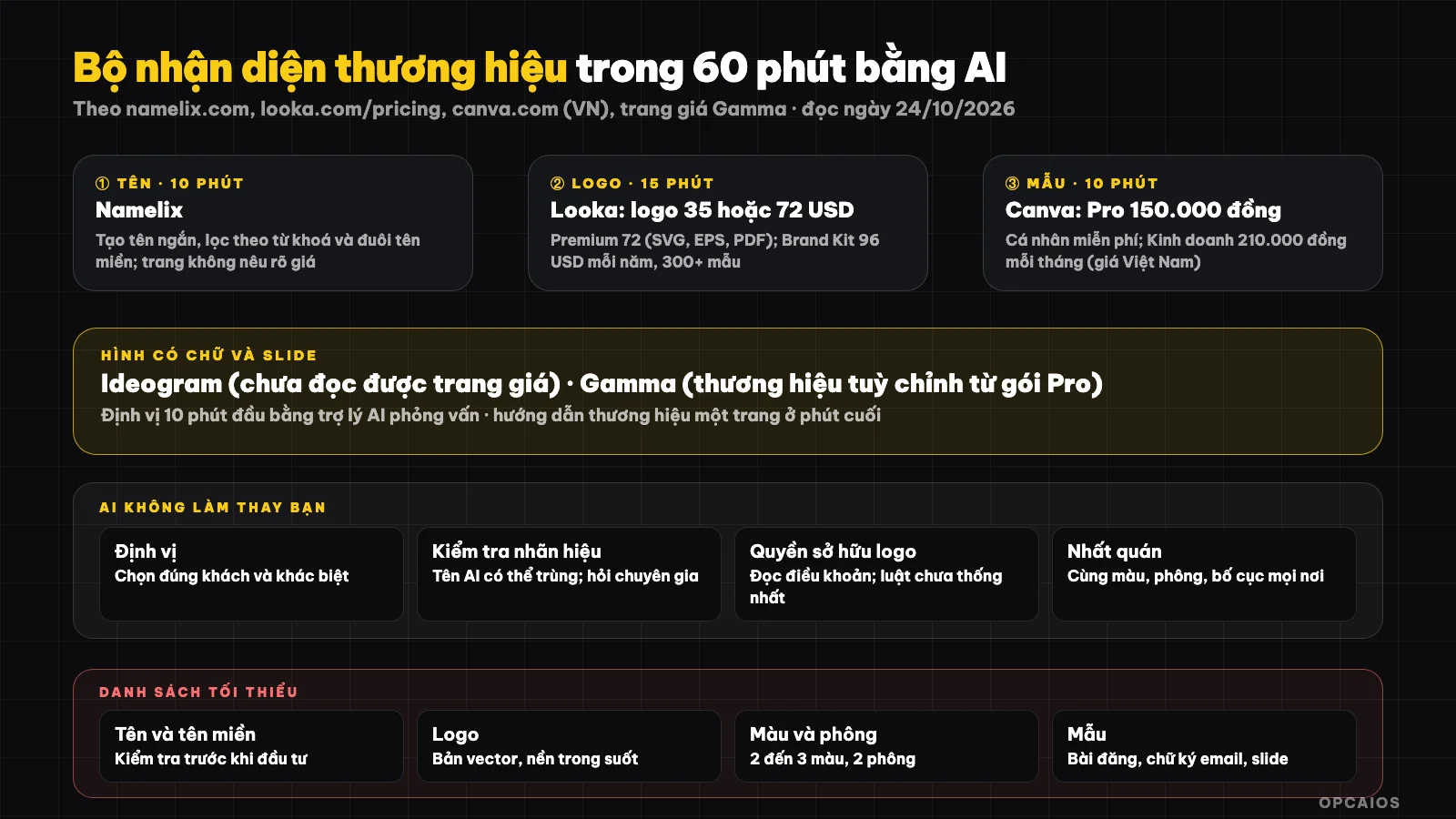
Six steps in 60 minutes; checking trademark and consistency are the parts not handed to AI. Diagram: OPCAIOS.
What are the steps in the 60-minute process?
The 60-minute process is a sequence of six steps in order, from positioning to presentation, each step using one tool. First, spend 10 minutes writing positioning with an AI assistant; next, 10 minutes choosing a name with Namelix; then, 15 minutes making a logo with Looka; then 10 minutes building a color palette and template set in Canva; finally, 10 minutes for images with Ideogram and 5 minutes for a document with Gamma. Detailed table:
| Minutes | Task | Suggested tool |
|---|---|---|
| 0 to 10 | Write positioning: what you sell, to whom, what's different, three words describing brand personality | AI assistant to interview you and summarize |
| 10 to 20 | Brand name and check domain name | Namelix |
| 20 to 35 | Logo | Looka |
| 35 to 45 | Color palette, typeface, template set | Canva (brand identity) |
| 45 to 55 | Illustration images needing text (banner, cover) | Ideogram |
| 55 to 60 | Presentation or document on brand | Gamma |
Five Tools
1. Namelix: creating names
According to Namelix's official page (read on 24/10/2026), Namelix is an AI business name generator that creates short, memorable names with filtering by keyword, domain extension, and learns from names users have saved. The page introduces the Brandmark logo tool and domain name search. The page does not state whether it is free or not, does not mention logo pricing, and does not state commercial use rules, so OPCAIOS does not assert these points. Hypothetical example: a small shop owner inputs keywords about their business field, filters by desired domain extension, then saves a few names they like for the tool to learn their taste. First, the names found still need to be checked against trademarks; second, you need to verify the domain is available; finally, you should ask a few acquaintances if the name is easy to read.
2. Looka: logo and brand identity
According to the official pricing page: create a logo for free, pay only when satisfied. Basic logo package $35 one-time (one low-resolution PNG file); Premium package $72 one-time (multiple formats PNG, EPS, SVG, PDF, many color variations, unlimited changes, full ownership); Brand Kit package $96 per year (vector logo, over 300 templates for social media, business cards, email signatures, brand guidelines; according to the page you still own the logo after subscription ends); Brand Kit with AI-generated website $129 per year. Prices do not include tax.
3. Canva: templates and brand consistency
According to the official pricing page displayed for Vietnam: free Personal plan 0 đồng, Pro 150,000 đồng per month, Business 210,000 đồng per month for one member; there are options to pay by day or week for Pro, saving 16% if paying per year; the page also sells an additional "AI Pass" for AI allowances. We have not been able to read which plan includes Brand Kit, so please check before purchasing.
4. Ideogram: images with text
Ideogram is an AI image generation tool often mentioned for its ability to draw text within images, so it is suitable for banners or cover images that need headlines. OPCAIOS could not read Ideogram's official pricing page because automatic access is blocked. Secondary sources conflict about free allowances, package pricing, and commercial use on the free plan, so we do not state any numbers. For example, if you need a cover image with your brand name, try several options with Ideogram. Before commercial use, read the current pricing page and terms.
5. Gamma: documents and slides by brand
Gamma is an AI tool that creates presentations, documents, and websites from a topic. According to Gamma's pricing page (read on 24/10/2026), the Pro plan has custom branding, meaning you can apply your brand's colors and fonts to documents. Hypothetical example: after confirming colors and fonts, create a slide deck introducing your services then edit by hand. You need to check whether the free plan has Gamma branding and which plan allows your own branding. See also What is Gamma?.
What AI does not do for you
- Positioning: AI provides options; choosing what fits your customers is your job.
- Checking names and trademarks: the names AI suggests may overlap with registered brands; search trademarks and ask an intellectual property expert.
- Ownership rights for AI-generated logos: copyright rules for AI-generated products are not yet unified between countries; read the tool's terms about ownership rights and avoid using images too similar to others' logos. This is a general note, not legal advice.
- Consistency: use the same colors, fonts, layout everywhere.
- Differentiation from competitors: AI logos tend to look alike; compare against competitors in your niche.
Minimum brand checklist
- Name and domain (see What is Cloudflare? about domain management)
- Vector logo and transparent background version
- Two to three main colors, two fonts
- Templates for posts, business cards, email signatures, slides
- One-page brand guidelines (colors, fonts, how to use the logo, tone of voice)
- Profile pictures and cover images for social media channels (see TikTok/Reels Channel Without Showing Your Face)
OPCAIOS's experience
With OPCAIOS, the logo and website identity were built according to our own direction (dark color palette with accent colors, cover images for posts created by source code following a common template); we did not use the five tools in this post to create this identity and have not tried Looka or Namelix, so the post is based on official pricing pages. We have no reliable records about Canva usage level so we do not assert it. What we learned from making cover images in batches: one fixed template, only changing accent colors, icons, a few words, maintains consistency better than creating new ones each time with AI.
Frequently Asked Questions
Can I create a brand identity system with AI in one hour?
Yes, you can get a first version with name, logo, colors and design templates, but not a complete system. The 60-minute process breaks down into six tasks: positioning, naming, logo, colors and fonts, imagery, and documentation, using tools like Namelix, Looka, Canva, Ideogram and Gamma. For example, Looka's basic logo package costs just $35 one-time, while the Premium package is $72 for multiple formats. However, trademark checking, positioning selection and maintaining consistency require additional time beyond that one hour. First, search the trademark database for your name; next, read the terms of use for logo rights; finally, write a one-page brand guidelines document. This is OPCAIOS's reference framework, not a guarantee of results.
Which AI logo tool is the cheapest?
Among the five tools in the article, Looka has the clearest logo pricing: you create logos for free and only pay when satisfied. According to the official pricing page as read on 24/10/2026, the basic package at $35 one-time (low-resolution PNG) is the lowest I found; if you need vector files, the Premium package is $72. Prices do not include taxes. Namelix has not stated its logo price, and I could not access Ideogram's pricing page, so I cannot compare those.
Do AI-generated logos belong to me?
It depends on each tool's terms and your country's laws; please read the terms of service (Looka states full ownership in the Premium package) and consult an intellectual property expert.
Do I need to register a trademark?
Consider it if your brand is important; ask an intellectual property expert about the process in Vietnam.
Can AI replace a designer?
AI can replace the part of generating options quickly, but cannot replace positioning, aesthetic judgment and consistency. For example, Looka can create many logo options in minutes, but choosing the option that fits your customers and expertise is still the job of the business owner. First, AI-generated logos tend to look alike, so you need to compare with competitors in your niche. Second, your name and logo need trademark checking. Third, a brand identity system only has value when you use colors, fonts and layouts consistently everywhere. To learn how to use AI for design and content, see OPCAIOS's AI application training course.
Source: namelix.com, looka.com/pricing (read via browser), canva.com/vi_vn/bang-gia (read via browser), Gamma pricing page, read on 24/10/2026; could not access Ideogram and Coolors pricing pages (blocked); prices do not include taxes and may change. Legal note is for reference only. Experience is OPCAIOS's own.
Translated from Vietnamese with AI. Read the original.
Want to apply this in your business?
Book a free 30-minute call (Vietnam time, in English or Vietnamese).