


Automated weekly reports are a short summary that a system automatically queries data for and sends to you at a fixed time each week, so you can see your business situation in a few minutes instead of opening five different dashboards. For OPC owners—one-person companies using AI—the hard part isn't building a message pipeline, but choosing the right few metrics to watch and keeping AI from making up numbers. This post doesn't promise a report template "standard for all industries": which metrics matter depends on your model, and we don't publish OPCAIOS's actual operating figures. You'll get a list of metrics to keep and to drop, a one-page report structure, how to build a workflow using n8n, how to make AI interpret rather than calculate numbers, threshold alerts, send channels, and data security.
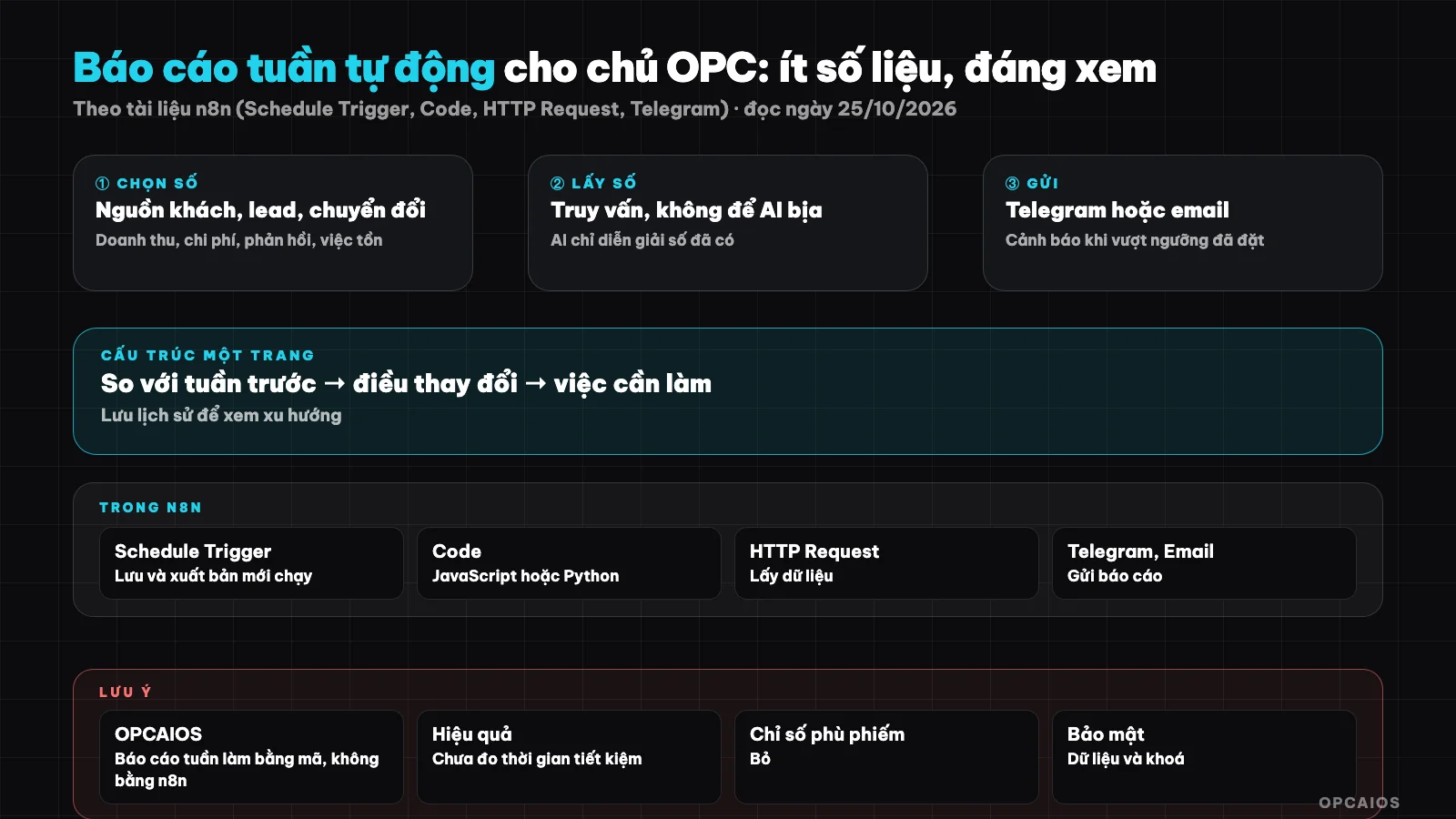
From scheduled run to one-page report: numbers come from queries, AI only interprets. Diagram: OPCAIOS.
What metrics should a weekly report have?
Metrics worth putting in a weekly report are ones where, if they change, you'll do something different—and about 6 to 8 metrics are enough for one person. Organized into 7 suggested groups, each answers one question. Customer source (new customers from search, social, referral, email) answers which channel is driving people. Leads (new leads, unanswered leads) tells you if anyone is being forgotten. Conversion, from lead to order or appointment, shows where the funnel leaks. Revenue received this week, compared to last week, shows if money is coming in. Ad spend and tool costs tell you if you're burning money. Customer feedback (feedback count, complaints, new ratings) tells you what customers are saying. Pending work (overdue tasks, posts awaiting approval) shows what's stuck with you. Example: if unanswered leads jump from 2 to 9 in one week, your first job is to reply to leads, not post more content. With search as a customer source, figures can come from Google Search Console, depending on your system.
Vanity metrics to avoid
- Total views or follower count unlinked to leads or revenue.
- Posts published (measures effort, not results).
- Averages of everything mixed together, easy to hide problems.
- Metrics you can't influence next week.
If your model doesn't have revenue yet, swap in an earlier metric, like conversations with prospects. Don't fill empty slots with pretty numbers.
Vanity metrics to avoid
- Total views or follower count unlinked to leads or revenue.
- Posts published (measures effort, not results).
- Averages of everything mixed together, easy to hide problems.
- Metrics you can't influence next week.
If your model doesn't have revenue yet, swap in an earlier metric, like conversations with prospects. Don't fill empty slots with pretty numbers.
One-page report structure
- Opening line: one conclusion sentence for the week (example "leads up, replies slow"). This sentence is interpreted by AI from the numbers below.
- Metrics table: this week, last week, difference.
- Alerts: list only metrics that exceed threshold.
- Action items: at most three things, with reasons.
- Data notes: which sources errored or fell short this week.
The fifth line matters: the report must clearly state when a source didn't deliver data, instead of showing 0 and causing confusion.
Building a Weekly Report with n8n: Which Blocks Do You Need?
Building a weekly report with n8n requires 5 main blocks, according to n8n's official documentation (read on 25/10/2026). Step 1 is the Schedule Trigger block: runs on a schedule (hourly, daily, weekly, monthly, or cron). This block uses the workflow's timezone if set, otherwise it uses the n8n server's timezone. You must save and publish the workflow for the schedule to run. Step 2 is the HTTP Request block: calls the API of your data source, lets you set the method, headers, authentication, and supports pagination. Step 3 is the Code block: calculates metrics, compares to the previous week, supports JavaScript and Python. The Code block has a mode to run once for all items or once for each item. Step 4 is the Telegram (Send Message) block: sends a message to a chat, requires bot authentication info. To send to a channel, you must add the bot to the channel. Step 5 is the Send Email block: sends via SMTP server, requires SMTP authentication info. For your own n8n setup, see setting up n8n on a VPS.
Suggested Workflow Order
- Set Schedule Trigger for Monday morning, choose a clear timezone to avoid time drift.
- One HTTP Request branch or database query for each source (orders, leads, expenses, feedback).
- Code node totals numbers, calculates the difference from the previous week, and flags alerts.
- AI block receives the calculated number table, writes the interpretation section.
- Check: if one source fails, add a data error note line.
- Send via Telegram or email, then record the report in your history storage.
Why Should AI Only Interpret, Not Calculate Numbers?
AI should only interpret because language models predict text with high probability, they don't retrieve verified facts. This is also why Google Search Central recommends manually checking AI-generated content (read on 25/10/2026). Applied to reports, every number must come from queries and Code nodes, not from AI. The process has 4 steps:
- Give AI the pre-calculated number table, ask it to only use those exact numbers.
- Forbid AI from inferring new numbers, new percentages, or definitive causes.
- If data is missing, tell AI to write "no data available".
- After AI responds, check every number in the text must be in the input table; if it doesn't match, send the report without the interpretation section.
Example scenario: the input table shows 12 new leads, but AI writes "increased 40%" even though that number isn't in the table; the check step blocks this sentence and sends the report with only the numbers.
How Should You Set Alert Thresholds and Comparison to the Previous Week?
Comparison to the previous week is the minimum of a weekly report, and alert thresholds should be simple, set by you. If you have enough history, also compare to the average of several weeks to avoid overreacting to random fluctuations. Three commonly used thresholds: unanswered leads over a certain number of hours, expenses exceeding weekly budget, and overdue tasks exceeding a certain count. Example scenario: you set 24 hours for unanswered leads and 3 overdue tasks; the report only lists items exceeding these two thresholds. Alerts should be very few, because getting alerts every day means you'll stop reading them.
- First, set 2 or 3 thresholds for your most important metrics.
- Next, review the thresholds after 4 weeks.
- Finally, drop any alert you've never acted on.
Competitor tracking metrics can be an optional item, see tracking competitors with Firecrawl and n8n.
Send channels, history storage, security
- Telegram works for short summaries to read on mobile; email works for full reports with tables.
- History storage: record each report (numbers and text) in a table or dated file, to compare long-term and re-check when in doubt.
- Security: don't put customer personal data in messages; only send totals. Store access keys in n8n's credential vault, don't paste them into the workflow. Think about what business data you send to outside AI services, see securing business data when using AI.
OPCAIOS Experience
OPCAIOS has a weekly marketing report running early in the week, consolidating data from website admin areas (customers and leads, orders, ad spend entered manually or synced) then notifying through a messaging channel and email that the owner sets. It alerts when ad spend exceeds the set limit. We do this using code in the website, not with n8n, so the n8n blocks above are how you build the equivalent, not a description of our system. We don't publish the actual numbers from the report, and haven't measured how much time the report has saved.
Frequently Asked Questions
How many metrics is right?
Usually 6 to 8. More than that and you'll skim over them; fewer and you might miss signals. Each metric must be tied to an action.
Can I let AI calculate the numbers?
You shouldn't. Let queries and Code nodes do the calculation; AI should only write interpretation from numbers you already have, plus a step to verify that the numbers in the text match the table.
Should I send via Telegram or email?
Telegram works for short summaries you can read quickly on your phone, while email works for full reports with tables. You can use both, as long as you don't put customer personal data in messages—only send aggregate numbers. According to n8n documentation (read 25/10/2026), the Telegram block needs bot authentication info and to send to a channel you need to add the bot to it, while the Send Email block needs SMTP authentication info. For example, a 3-line summary sent via Telegram on Monday morning, and the full table sent via email.
What do I check if the report doesn't run at the right time?
Check that the workflow has been saved and published, and that the workflow's timezone or n8n server timezone is set correctly, per the Schedule Trigger documentation.
I'm just starting out and don't have data yet. What do I do?
Start with 3 metrics: new leads, unanswered leads, and outstanding tasks. Add gradually as data sources become available, and don't fill gaps with made-up numbers. If you don't have revenue yet, use earlier indicators like the number of conversations with prospects. For example, in week one you just need one handwritten table of 3 numbers at the end of the week, then next week you can connect n8n to pull the numbers automatically. If you want to learn how to build an automated system with guidance, check out OPCAIOS's AI application training course.
Sources: n8n documentation on Schedule Trigger, Code, HTTP Request, Telegram and Send Email, and Google Search Central guidance on AI-generated content (read 25/10/2026); not yet verified: the specific effectiveness of reports for each business, using n8n for this report (OPCAIOS does not use n8n for this report); experience is from OPCAIOS.
Translated from Vietnamese with AI. Read the original.
Want to apply this in your business?
Book a free 30-minute call (Vietnam time, in English or Vietnamese).