


Tracking competitors automatically with Firecrawl and n8n – what is it?
It's a scheduled process that fetches content from a competitor's pricing page or blog in clean text form (Markdown or structured JSON) using Firecrawl, compares it with the previous fetch in n8n, and alerts you only when there are significant changes. According to Firecrawl documentation (read 25/10/2026), the service has modes for scraping a single page, crawling an entire website, and mapping URLs; output can be Markdown, HTML, or JSON according to a schema you define. First thing to say: only monitor public information, respect the site's terms and robots.txt, don't bypass login, don't collect personal data. This post guides you step by step: choosing targets, fetching data, comparing, reporting, costs, legal notes, and OPCAIOS experience.
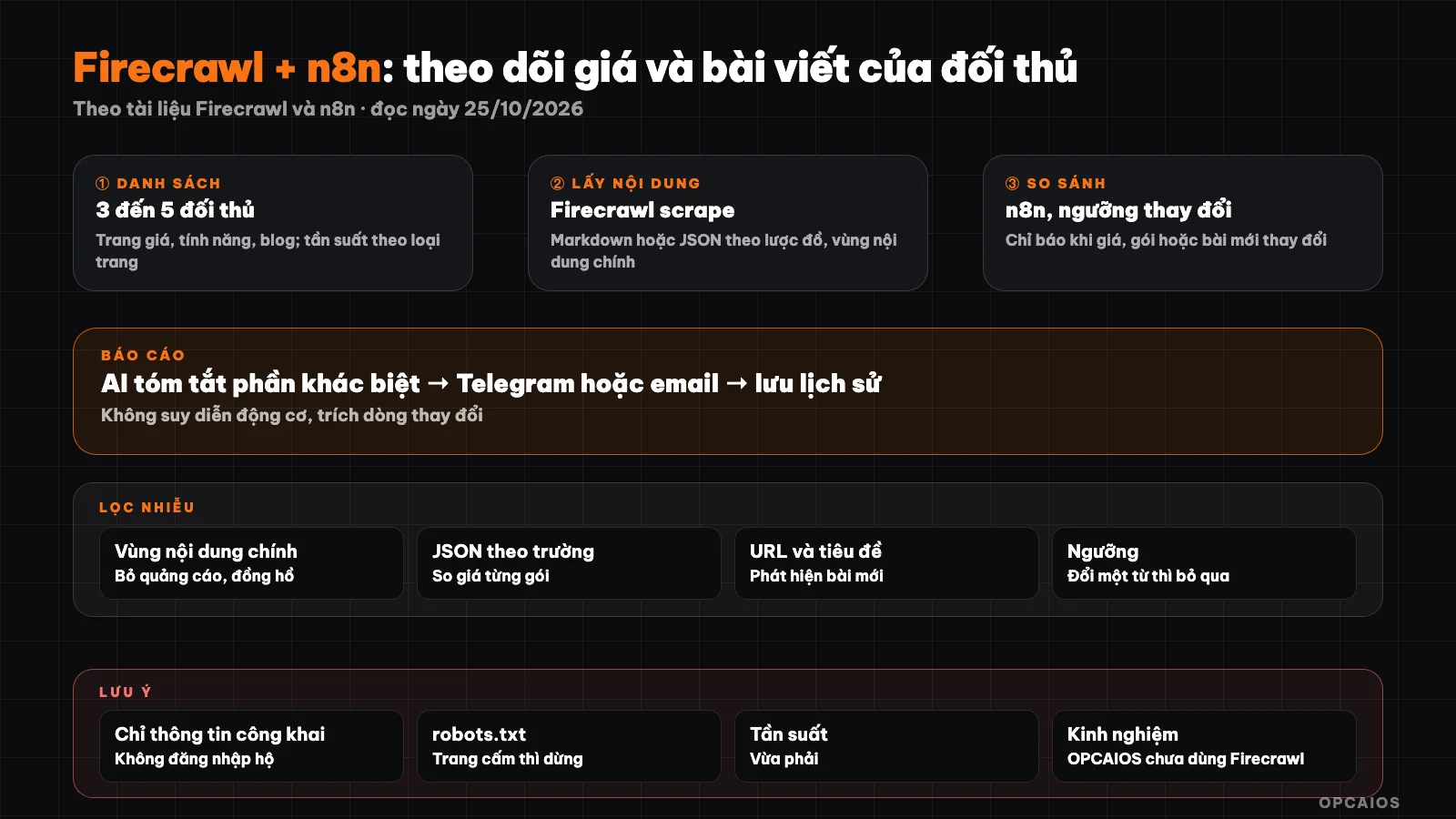
Fetch public content, compare old and new versions, alert only on significant changes. Diagram: OPCAIOS.
Step 0: What should you monitor and how often?
| Target | Purpose | Suggested frequency |
|---|---|---|
| Pricing page | Know when competitors change price, packages, promotions | Daily |
| Features page, changelog | Know what they add to the product | Weekly |
| Blog, news page | Know what topics they write about | Daily or weekly |
| Careers page | Guess their investment direction | Weekly |
Step 0 is deciding what to monitor, per the October 2026 version of this post. Start with 3 to 5 competitors and 1 to 2 pages each; more will create noise and waste cost. Example setup: 5 competitors, 2 pages each, so 10 pages per run. Pricing pages should be checked daily, blog and changelog weekly is enough. First pick pricing pages, then add blogs, finally add careers pages.
Step 1: What is Firecrawl and how do you use it?
Firecrawl is a service that fetches web content as clean text. According to Firecrawl (documentation read 25/10/2026), it has three modes: scrape, crawl, and map. For example, the scrape endpoint takes one URL and returns Markdown (optionally with HTML, screenshots, or JSON extracted by AI according to a schema); crawl follows links within a website; map lists the URLs of a domain. There is an open-source version to run yourself but it lacks the features of the cloud version; read the license carefully. Pricing and limits change so we won't quote numbers here; check the official pricing page.
Try a call with HTTP (keep the API key in n8n credentials, don't paste it in prompts or code):
curl -X POST https://api.firecrawl.dev/v1/scrape \
  -H "Authorization: Bearer $FIRECRAWL_API_KEY" \
  -H "Content-Type: application/json" \
  -d '{"url": "https://example.com/pricing", "formats": ["markdown"]}'
The API version may change; check the endpoint and parameters against current documentation before use.
Step 2: How do you build the workflow in n8n?
The n8n workflow is a chain of seven nodes running on a schedule. Don't have n8n yet? See Guide to installing n8n on a VPS. The nodes in order, from first to last:
- Schedule Trigger: runs on a schedule, for example 7 AM every day.
- URL list: a Code node or spreadsheet holding URLs, competitor names, page types.
- Loop each URL and HTTP Request calls Firecrawl, with breaks between calls.
- Fetch previous version from storage (spreadsheet, database).
- Compare new and old versions.
- Has changes: call AI to summarize, send alert, save new version. No changes: do nothing.
- Error handling: if Firecrawl fails or the page blocks, log it and alert once, don't alert every day.
Steps 3 and 4: How do I compare changes and get AI to summarize them?
True comparison means removing noise before reporting, using the approach in this post (October 2026 version). Websites constantly change unimportant things like countdown timers, ads, and session codes, so Firecrawl retrieves the content but n8n has to filter out the noise. To avoid false alerts, I first extract the main content area instead of the entire page. Next, for pricing pages, I use JSON with a schema (package name, price, billing cycle, features) then compare each field; for blogs, I compare URL lists and titles, since a new post means a new URL. Then I normalize whitespace, remove timestamps, and set thresholds: if price changes, a package is new or gone, I report it; if one word changes, I skip it.
In step 4, n8n sends the language model the differing sections (old, new) and asks it to summarize in 2 to 3 sentences what changed. The model doesn't infer intent, it pulls the changed lines as evidence, and returns "not sure" when data isn't enough. See What is an LLM?. The principle is that AI summarizes, it doesn't judge. Input data comes from the crawl service (Firecrawl).
Step 5: How do I report and keep history?
Following the approach in this post (October 2026 version), a good report has four parts from the crawl service data (Firecrawl), and the final call is yours, not the workflow's:
- Brief message via Telegram (see What is a Telegram bot?): which competitor, what changed, the link.
- Weekly digest sent by email: price change table, new posts.
- Store history to plot price over time.
- Each report comes with the question "Need to respond?"
For example, when a competitor changes the price of a main package, a Telegram message alerts me the same day.
Costs
| Item | Notes |
|---|---|
| Firecrawl | Billed by plan and number of scrapes; see official pricing page |
| n8n | Self-hosted on VPS: only server costs |
| AI summarization | Very small if I only send the differences |
| Your time | Filtering noise and tuning thresholds in the first few weeks |
See also Free AI Tech Stack.
Legal and ethics
- Only take public information; don't log in for them, don't bypass bot protection.
- Read the terms and robots.txt; if the site bans automated scraping, don't do it.
- Moderate frequency so I don't overload someone else's servers.
- Don't take personal data (user profiles, competitor's customer emails).
- Don't copy competitor content and claim it as mine; use the information to understand the market.
- This is not legal advice; ask an expert if you're monitoring at large scale.
OPCAIOS experience
We haven't used Firecrawl in our official workflow; our competitor tracking tool sits in the website admin area, using a link preview service and public web archive (Wayback), runs on schedule with a step to compare old and new versions. The hardest part isn't fetching data, it's filtering noise: if I don't set thresholds, alerts come so often I ignore them all. The Firecrawl and n8n sections above are based on official Firecrawl and n8n docs (read 25/10/2026); we haven't run the full workflow ourselves and have no data on time saved.
Frequently Asked Questions
Is it legal to monitor competitor prices?
Gathering publicly available price information is generally acceptable if you comply with terms of service and robots.txt; laws vary by location, so consult an expert when operating at scale.
How is Firecrawl different from writing your own scraping code?
Firecrawl processes pages that use JavaScript and returns clean Markdown or JSON, so you don't have to set up a browser automation tool. According to Firecrawl (documentation read on 25/10/2026), the service offers three modes: scrape a single page, crawl an entire website, and map list URLs. In return, you pay based on usage level, while the open-source version you run yourself lacks the features of the cloud version. This post does not mention Firecrawl pricing; check the official pricing page before deciding.
How do I avoid false alarms?
Extract the main content area, compare by field (JSON), normalize text, and set a threshold.
Do I need AI?
Not required to detect changes; AI only helps summarize the differences.
What frequency makes sense?
A reasonable frequency is checking prices daily, while blog posts and features are checked weekly. Example scenario: n8n runs at 7 a.m. for 10 price pages and blogs from 5 competitors, so Telegram alerts you the same day if prices change. Start with a lower frequency, say once a week, then increase gradually as you fine-tune your noise filter threshold. To learn how to build a market monitoring system with AI, see OPCAIOS's AI Application Training.
Source: Firecrawl and n8n documentation, read on 25/10/2026; Firecrawl pricing not mentioned; the complete Firecrawl with n8n workflow has not been run in full; legal information is for reference only. Experience is from OPCAIOS.
Translated from Vietnamese with AI. Read the original.
Want to apply this in your business?
Book a free 30-minute call (Vietnam time, in English or Vietnamese).