


Setting up Ollama and Open WebUI on your personal computer is a way to run language models right on your computer: Ollama downloads and runs open-source models, while Open WebUI provides a chat interface in your browser like the chat apps you're familiar with. According to Ollama's GitHub (read on 25/10/2026), Ollama uses the MIT license and has versions for macOS, Windows, and Linux. The software doesn't charge a fee and your data doesn't have to be sent to external services, but "100% free" only applies to licensing: you still pay through hardware, electricity, and time, and small models running on your machine are usually worse than large cloud models. This post goes through six steps: checking configuration, installing Ollama, loading a model, installing Open WebUI with Docker, daily use and security, then limitations and OPCAIOS's experience.
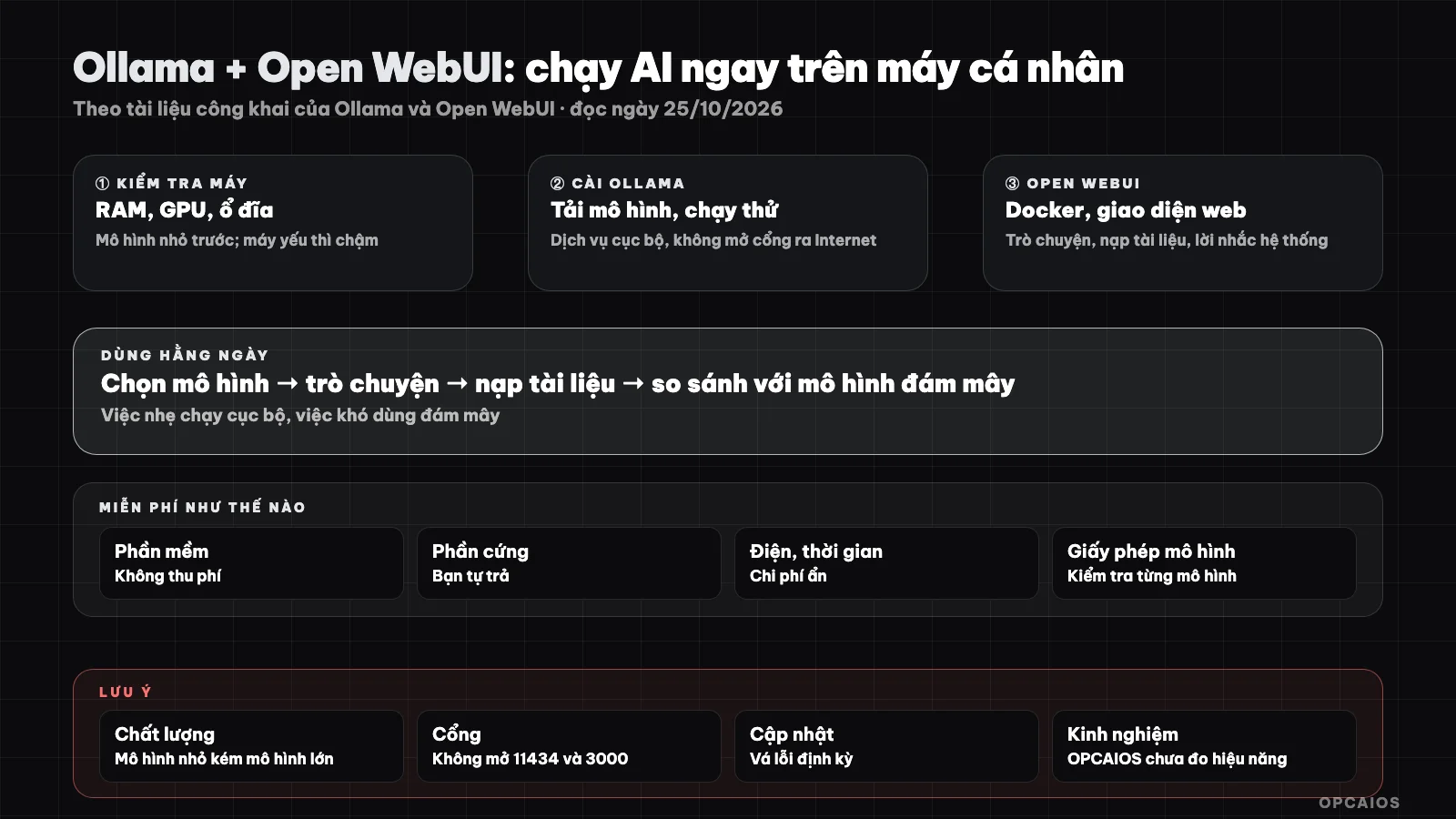
Ollama runs the model, Open WebUI is the interface; data stays on your machine. Diagram: OPCAIOS.
Step 0: What configuration does your machine need to run Ollama?
Your machine can run Ollama when it has enough memory for the model you choose. According to Ollama (read on 25/10/2026), it has versions for macOS, Windows, and Linux. Four factors to check:
| Factor | Note |
|---|---|
| RAM / unified memory | The larger the model the more memory it needs; small models with a few billion parameters run on machines with 8 to 16 GB, large models need much more |
| GPU | Having a dedicated GPU or Apple Silicon chip will be much faster than using CPU only |
| Storage | Each model takes up a few GB to tens of GB |
| Operating system | Ollama supports macOS, Windows, and Linux according to the official website |
Start with a small model; if your machine is slow, that's a hardware limitation not a setup error. This post doesn't state specific minimum configuration levels because it depends on the model and how it's quantized.
Steps 1 and 2: How do you install Ollama and load a model?
Ollama is a tool for running language models locally, according to Ollama (read on 25/10/2026). First, go to Ollama's official website, download the version for your operating system, and install it like a regular application (macOS, Windows), or use the install command on Linux according to the instructions on their site. Only download from the official website. Next, open a command line window and check:
ollama --version
Ollama runs a local service that by default listens on port 11434 on your machine's internal address (according to the documentation). Don't expose this port to the Internet. Then load and run a model, for example with Llama:
ollama pull llama3.2
ollama run llama3.2
Model names in the library change over time; see the list at Ollama's model library and pick a version that fits your machine. Type a question to test it, exit with /bye. With Vietnamese, the quality varies a lot between models, so try 2 or 3 models with the same question and pick the best one. See also What is an LLM?.
Step 3: How do you install Open WebUI with Docker?
Open WebUI is an open-source web interface that connects to Ollama. The common way, according to Open WebUI (documentation read on 25/10/2026), is to run it with Docker (install Docker Desktop or Docker Engine first):
docker run -d -p 3000:8080 --add-host=host.docker.internal:host-gateway \
  -v open-webui:/app/backend/data --name open-webui --restart always \
  ghcr.io/open-webui/open-webui:main
Go to http://localhost:3000, create the first admin account (this account lives on your machine). Open WebUI usually auto-detects Ollama running on the same machine; if not, go to connection settings and enter the Ollama address. The documentation also recommends setting the WEBUI_SECRET_KEY variable as fixed (generate it with openssl rand -hex 32) so users don't get logged out when you recreate the container. The main tag is a continuous build of the main branch, not a new stable release; when using it for real you should pin a version tag like vX.Y.Z and back up your storage before updating.
Step 4: How to use Open WebUI daily?
Daily use is how you leverage Open WebUI after installation, consisting of four main tasks:
- Chat and select a model in the top corner.
- Upload documents to ask questions about your content (Open WebUI has document and search features; quality depends on the model and how you split passages). The principle is similar to the self-learning AI chatbot for internal documents (RAG) post.
- System prompt for each role: editing, translating, summarizing.
- Use offline after downloading a model, if you turn off features that need the internet.
For example, you upload a 20-page contract and ask about payment terms via Open WebUI; first read the answer, then cross-check it with the original.
Step 5: How to secure Ollama and Open WebUI?
Security involves five tasks, because local services do not have protection layers like public services, according to Open WebUI (October 2026):
| Task | Reason |
|---|---|
| Do not expose port 11434 and 3000 to the Internet | Local services do not have protection layers like public services |
| Set a strong password for your Open WebUI account | The interface contains chat history |
| Access remotely through a private VPN, do not expose ports | Reduces attack surface |
| Update Ollama and Open WebUI periodically | Patch security flaws |
| Only download models from sources you trust | Models and files are data loaded from outside |
First, check the ports. Next, set a password. Finally, update once a month.
Limitations to know and when to use?
The biggest limitations are quality and speed. According to Ollama (October 2026), models running locally depend on your hardware. Five things to know, for example when using a laptop:
- Quality: small models running locally usually perform worse than large cloud models on complex reasoning and Vietnamese.
- Speed: depends on hardware; without a GPU it will be slow.
- Resources: consumes RAM and battery (laptop).
- Hidden cost: electricity, hardware, setup time and updates.
- Model license: each model has its own license; check if using for commercial purposes.
Suitable for: drafts, translating, summarizing sensitive documents you do not want to send out, experimenting. Not suitable for: work requiring high accuracy or latest knowledge; then consider cloud services with clear data policies. See also free AI Tech Stack.
OPCAIOS experience
We have not used Open WebUI for official work; we tried running local models internally for small tasks but most of our writing and programming work still use cloud models for quality. We have not measured speed or compared quality systematically, so we have no numbers to provide. The commands above follow the public documentation of both projects and have not been run by us across all operating systems.
Frequently asked questions
Is Ollama really free?
The software does not charge a fee; you pay with hardware, electricity and time. Models have their own licenses.
Can weak machines run it?
Yes with small models, but slow and limited quality.
Is data sent outside?
When running locally, chat stays on your machine, because Ollama runs the model right on your machine and Open WebUI stores data on your local Docker disk. However, check which features in Open WebUI need the network if you want to be completely offline. For example, downloading a model for the first time from Ollama's library needs the Internet, but subsequent chat does not. According to Open WebUI documentation (read October 25, 2026), the data disk holds chat, users and settings across updates. Disconnect the network to test after downloading a model.
Can it replace ChatGPT or Claude?
For light tasks yes; for complex tasks usually not yet.
Can it be used for business?
Yes if you check the model license and security. According to Ollama's GitHub (read October 25, 2026), Ollama uses an MIT license, while each model has its own license. First check the license, then lock network ports, finally pin the Open WebUI version. To build a secure AI system for small business, see OPCAIOS's AI application training course.
Source: public documentation from Ollama and Open WebUI; commands and model names may have changed, please check the official pages; performance not measured. Experience is from OPCAIOS.
Translated from Vietnamese with AI. Read the original.
Want to apply this in your business?
Book a free 30-minute call (Vietnam time, in English or Vietnamese).