



What is Sandbox Codex?
Sandbox Codex is the boundary enforced by the operating system around every command that Codex runs on your machine: where commands write their output, whether they can reach the network. Approval policy is the second layer, deciding when Codex must stop and ask you before crossing that boundary. According to the "Sandbox" and "Agent approvals & security" pages in the Codex documentation (developers.openai.com/codex redirects to learn.chatgpt.com/docs, read on 03/11/2026), these two layers are separate but run together. This post does not promise any absolutely safe configuration: the documentation itself notes that the network filtering layer only reduces rather than eliminates risk, and full-access mode has no protective layer. The post goes through three sandbox modes, approval levels in CLI version 0.162.1, network, full-access flag, sandbox by operating system, a suggestion table and comparison with Claude Code. General introduction is in the post What is Codex.
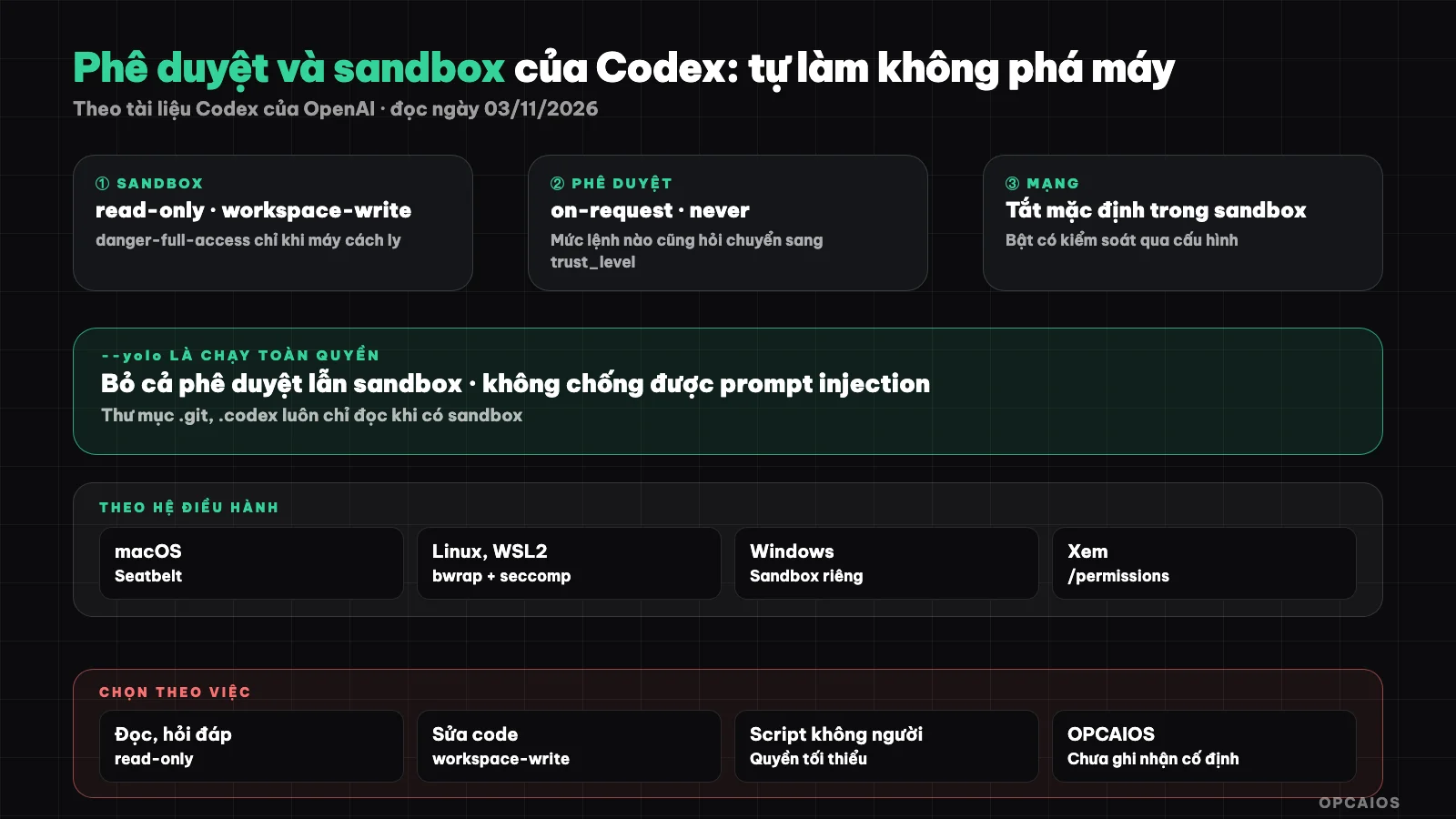
Sandbox sets technical limits, approval mode decides when to ask the person. Diagram: OPCAIOS.
How are Codex's three sandbox modes different?
Codex's three sandbox modes differ in the scope of file writing and network access for commands the model generates. The codex --help command in Codex CLI version 0.162.1 (run on 03/11/2026) lists exactly three values for the -s, --sandbox flag: read-only, workspace-write and danger-full-access. The "Sandbox" page of the Codex documentation describes: read-only allows only reading; workspace-write allows editing in the working directory and running everyday commands, the default mode with fewer hassles; danger-full-access removes all file and network limits. Important point: sandbox applies to child processes too, so git, package managers or test commands all inherit the same restrictions.
| Mode | File writing | Network | When to use |
|---|---|---|---|
read-only |
No | No | Reading unfamiliar code, asking questions, planning |
workspace-write |
In working directory and temporary directory | Off, unless enabled in configuration | Everyday code editing |
danger-full-access |
Everywhere | Yes | Only in isolated container or virtual machine |
The documentation also notes that in workspace-write, the .git, .codex, .agents and .aws directories remain locked read-only even within the writable zone, including everything below them.
What approval levels does Codex still have?
Codex currently has two selectable approval levels: on-request and never. CLI version 0.162.1 reports an error when you type -a untrusted and only accepts these two values. The "Agent approvals & security" page (read on 03/11/2026) confirms that Codex no longer supports approval_policy = "untrusted", and this old value can prevent Codex from starting, so it needs to be removed from config.toml, profile files and scripts. The documentation recommends replacement as follows:
- Want read-only but still be asked: use
read-onlywithon-request. - Want to keep strict rules like before (every command must be approved): drop the approval_policy line, mark the project
trust_level = "untrusted"in the user-level config.toml. - Want to keep some kinds of questions, auto-reject others: use the
granularpolicy.
codex --sandbox read-only --ask-for-approval on-request
codex --sandbox workspace-write --ask-for-approval on-request
The second line is the Auto preset that the documentation recommends for directories with version control. The --full-auto flag in old guides is reported as "unexpected argument" by version 0.162.1.
What are auto-review and the /permissions command used for?
Auto-review is a way to hand qualifying approval requests to a review agent instead of showing you a prompt box, while keeping the sandbox boundary intact. The "Sandbox" page (read on 03/11/2026) describes the "Approve for me" option consisting of workspace-write sandbox, approval_policy on-request and approvals_reviewer = "auto_review"; on CLI the corresponding flag --approve-for-me is in codex --help. The review agent only considers actions already needing approval (crossing sandbox, calling blocked network, MCP tools with side effects), looks for signs of data leaks, probes for keys and destruction; if review fails then the action does not run. Auto-review costs extra model calls. In the CLI session, type /permissions to change the permission set in use; the desktop app has a permission selection button right below the input field.
How does network access work in the Codex sandbox?
Network access in the Codex sandbox is off by default: in workspace-write mode, commands don't reach the internet until you enable the network_access = true lock in the [sandbox_workspace_write] table of config.toml. According to the "Agent approvals & security" page (read on 03/11/2026), to enable network while still limiting domains, turn on the network_proxy feature and declare an allowlist of domains. Three rules to remember:
- Enabling proxy when network is off has no effect; enabling network without enabling proxy means commands go out freely.
- The domain list works as allowlist first, block rules always win; internal addresses and localhost are blocked by default.
- Proxy doesn't filter web search, MCP tools, browser, Computer Use, or cloud tasks; these have their own switches.
Web search by default uses an index pre-stored by OpenAI instead of fetching pages directly, to reduce prompt injection; the --search flag enables direct search.
Why is the Codex full-access flag dangerous?
The Codex full-access flag is --dangerously-bypass-approvals-and-sandbox, with alias --yolo (version 0.162.1 accepts both), which turns off all approval prompts and sandbox at once. The description in codex --help calls this flag "EXTREMELY DANGEROUS", meant only for environments already isolated from the outside. It's dangerous because every command the model generates runs straight with your account's permissions: reading SSH keys, sending source code outside, deleting files outside the project—nothing blocks it. Malicious instructions hidden in READMEs, websites, or issues (prompt injection) no longer need to trick you into clicking approve. The responsible way to use it, per the documentation: run in Docker or Dev Container so the container acts as an isolation layer, then enable danger-full-access inside.
How does the Codex sandbox run on macOS, Linux, and Windows?
The Codex sandbox uses the native mechanism of each operating system, so installation and limits differ by machine. Summary from the "Sandbox" and "Agent approvals & security" pages (read on 03/11/2026):
| Operating System | Mechanism | What to do |
|---|---|---|
| macOS | Seatbelt, run commands via sandbox-exec with mode-specific profiles |
Use it right away, no extra setup |
| Linux, WSL2 | bubblewrap (bwrap) plus seccomp |
Install the bubblewrap package; Ubuntu 24.04 may need extra AppArmor profile loading |
| Windows (PowerShell) | Windows native sandbox, prefers MXC, elevated and unelevated versions are old fallbacks | Enable prefer_mxc if your machine and policy support it |
In Docker, Linux sandbox may not run if the container blocks namespaces or seccomp; in that case the documentation suggests letting the container handle isolation. To test a command in the sandbox, use the codex sandbox subcommand; the syntax in the documentation and version 0.162.1 differ slightly, so check codex sandbox --help for your installed version.
Which sandbox and approval settings should I choose for each task?
| Task type | Suggested config | Reason |
|---|---|---|
| Read an unfamiliar project, ask about architecture | read-only + on-request |
Nothing gets modified |
| Daily code edits in a git repo | workspace-write + on-request (Auto preset) |
Fewer prompts, still asks for network or writes outside the project |
| Long task, don't want to click approve | Auto with approvals_reviewer = "auto_review" |
Keeps boundaries, reduces dialog boxes |
| Run automatically in CI | codex exec --sandbox workspace-write or read-only + never |
No one sits to approve |
| Throwaway testing | --yolo in an isolated container |
Only when your machine has nothing to lose |
The table is a suggestion from OPCAIOS, not a recommendation from OpenAI. Running unattended has its own post: codex exec runs automatically.
How do Codex permission modes differ from Claude Code?
Codex permission modes differ from Claude Code mainly in how they layer: Codex separates into two clear axes (sandbox mode and approval policy), while Claude Code packages most of it into a permission mode list like plan, acceptEdits, auto, bypassPermissions, and sandbox is an extra feature to turn on. In Codex, sandbox is on by default; in Claude Code, the documentation says sandbox is off by default. Both have a model-based approval layer (Codex's auto-review, Claude Code's classifier in auto mode) and a mode that bypasses everything and should only run in a container. Details about Claude Code are in the post plan mode and permission modes in Claude Code; using both at once is covered in use Codex and Claude Code together.
OPCAIOS Experience
The things below are true, at a conceptual level:
- I have Codex CLI 0.162.x and the Codex desktop application on my main work machine, running in parallel with Claude Code and Google Antigravity.
- Many project directories are marked as trusted in config.toml. I have not recorded any sandbox mode or fixed approval level set as the default for all sessions, so I cannot say which mode OPCAIOS uses.
- Codex hooks are only used to report session status, with no hooks to block dangerous commands yet. The protection layer remains sandbox, approval, and the owner.
- I have a user-level AGENTS.md for Codex, with content equivalent to Claude Code's user-level guidelines (reply in Vietnamese, read documentation order at the start of the session, log at the end of the session). This is guidance for the model, not a technical blocking layer.
General principles are in the post security when using AI to write code.
Frequently asked questions
Is the Codex sandbox turned on by default?
Yes, according to the Codex documentation I read on 03/11/2026, the default permission mode applies sandbox automatically, and the network is off by default. Directories using git are usually suggested the Auto preset (workspace-write plus on-request), directories without git are suggested read-only. On Linux and WSL2 you need to install bubblewrap first; if it is missing, Codex will warn you at startup.
Why does Codex give an error when I use -a untrusted?
Because Codex removed the untrusted value from approval_policy. According to the "Agent approvals & security" page I read on 03/11/2026, version 0.162.1 only accepts on-request and never, and the documentation says the old value can cause Codex not to start. Delete that line from config.toml and scripts. If you want to keep the style "ask about every command", set trust_level untrusted for the project in the user-level config.toml instead of setting approval_policy. The --full-auto flag in the old guide is also gone in this version.
Is it safe to turn on the network for Codex?
Turning on the network increases risk, because a misdirected command could send code or keys outside. A safer way is to turn on network_access with network_proxy and only allow the domains you need, for example the package manager registry. Don't put real keys in the prompt, and review the command log after the session.
When can I use --yolo?
Only when the machine running Codex is already isolated from the outside, for example a Docker container or Dev Container that contains no real keys and does not mount important directories. On your everyday work machine, this flag removes all protection layers. If you just don't want to click approve many times, try auto-review first: keep the sandbox but reduce the prompts.
What mode should someone who doesn't know code choose?
Start with read-only to ask Codex to explain the project, then switch to the Auto preset once you understand what needs to be done, always working on a repo with git. The full process is in the post programming agent for people who don't know code. If you want someone to guide you through real work, see OPCAIOS's AI application training course.
Source: Codex documentation from OpenAI, pages "Sandbox" and "Agent approvals & security" (developers.openai.com/codex redirects to learn.chatgpt.com/docs/sandboxing and learn.chatgpt.com/docs/agent-approvals-security), plus codex --help version 0.162.1, read on 03/11/2026; I have not yet tested sandbox myself on Linux and Windows; flag names may change by version; the mode selection table is a suggestion. The experience is OPCAIOS's.
Translated from Vietnamese with AI. Read the original.
Want to apply this in your business?
Book a free 30-minute call (Vietnam time, in English or Vietnamese).