



Running Multiple AI Models Through One Gateway
What is running multiple AI models through one gateway? It means your application calls a single address in a familiar format (usually an OpenAI-compatible API), while the gateway decides which model from which provider (for example OpenAI, Anthropic or Google) to call, retry or switch to a fallback model when there's an error. This post does not promise that a gateway will "reduce costs" as a certainty: a gateway gives you tools to control and compare, while whether you actually save money depends on how you use it and measure it. This post also does not list the price of any model or service because prices change. The content consists of 6 parts: how self-hosted gateways differ from intermediary services, benefits, risks, how to pin model versions, how to log costs and link to the plug-pull plan when AI tools raise prices or go down. The technical points are based on documentation from OpenRouter and OpenAI, read on 25/10/2026.
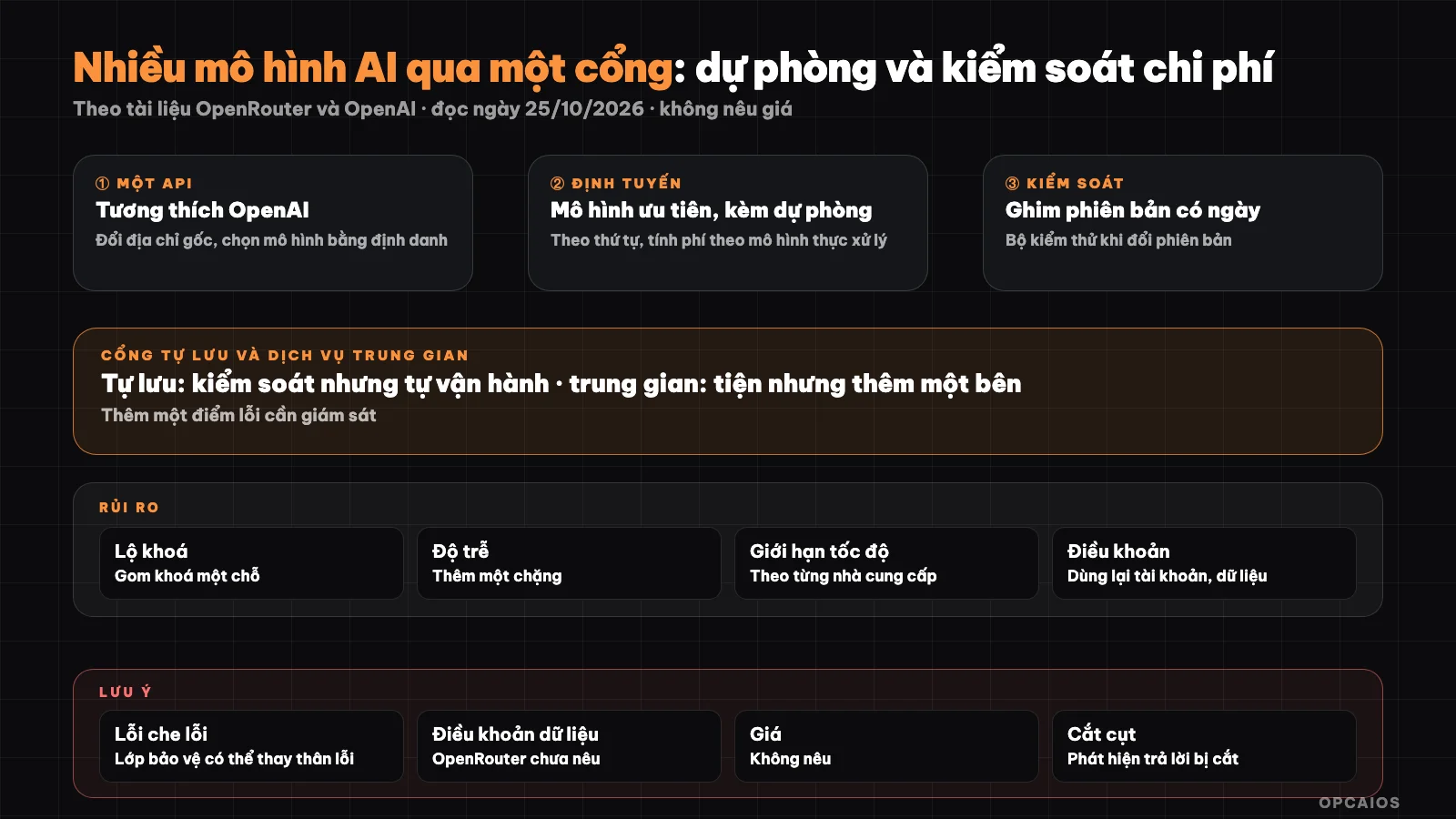
One address to call, many models behind it, with fallback and logging. Diagram: OPCAIOS.
What is API compatibility and why is it convenient?
API compatibility is an interface that many providers and intermediary services alike accept, with the same Chat Completions endpoint, message structure and familiar parameters. For example, the quick start documentation of OpenRouter (read on 25/10/2026) states that you can use OpenAI's SDK as a direct replacement by changing the base address to OpenRouter's address and selecting a model using an identifier. This way application code changes little when you switch models. Note that "compatible" does not mean every feature is identical: tool calling, structured output, images and prompt caching may differ by model, so you need to test. The suggested process consists of 3 steps. First, change the base address in the SDK configuration. Next, select a model via identifier and run a sample question set. Finally, check each advanced feature you are using, such as structured output, on the new model before enabling it for customers.
How does a self-hosted gateway differ from an intermediary service?
A self-hosted gateway is a gateway you operate yourself on your own machine, while an intermediary service is another company operating the gateway for you, like OpenRouter or similar services on the Internet. With a self-hosted gateway, you keep the provider key, data goes from your machine straight to the provider, but you must install, update and patch, and the point of failure is on your machine. With an intermediary service, operational effort is almost zero, but the key is usually passed through the service's account, data goes through the service and then to the provider, and there is an added point of failure. For example in a hypothetical scenario: if your application processes customer messages, an intermediary service means the message content goes through another company. Intermediary services are convenient, but you should read the service's data policy carefully. The OpenRouter fallback documentation page that OPCAIOS read says nothing about provider terms or data handling, so that part is unverified and you need to read it yourself.
What are the benefits of using an AI gateway?
Using an AI gateway has 4 main benefits: fallback, easy model testing, cost control and less dependence.
- Fallback. According to OpenRouter documentation, you provide a list of models in order of priority; if the first model fails (due to rate limit, service interruption, context length exceeded...) then try the next model, and billing is based on the model that actually processes. A self-hosted gateway does the same with your logic.
- Easy model testing. Change a model name in configuration instead of rewriting code, convenient for comparing quality on the same sample question set.
- Cost control and limits. Every call goes through one point so it can be logged, set a daily cap, by feature or by user. Choose a light or powerful model for each task to test and know if you save money.
- Less dependence. When your application only knows "one address", leaving a provider hurts less. See the plug-pull plan when AI tools raise prices or go down.
Example in a hypothetical scenario: an application uses OpenAI as the main model and another model as fallback and still answers customers when the main model hits rate limits.
What risks come with using an AI gateway?
Using an AI gateway has 7 risks to consider beforehand, and the biggest risk is adding another single point of failure to every API call. First, have a direct fallback call path and monitor gateway health, so the gateway isn't the only thing standing between you and disaster. Next, protect your keys: store them separately from your code, one key per application, set rate limits and be able to revoke them. Next, measure real latency because the gateway adds another hop. Also, read the terms of service from OpenAI, OpenRouter and each provider, because some plans have clauses about sharing or reselling data. The gateway doesn't remove the provider's rate limits, just helps redirect traffic, so you need queuing and retry logic with exponential backoff. Finally, run test suites before switching to a fallback model, and filter sensitive data before sending it; see 5 data security rules when using AI. Hypothetical example: the fallback model's quality might be lower than the main model, and your application needs to accept that quality level before enabling it, whether the main model is from Anthropic or Google.
What is model version pinning and why should you do it?
Model version pinning is specifying a particular model snapshot with a date instead of the "latest" alias, which applies to OpenAI models as well as Anthropic or Google models. OpenAI's documentation (read on 10/25/2026) recommends that production applications pin versions this way, and states that even snapshots within the same model line can produce different results; the documentation includes a recommendation to build test suites to evaluate when you change versions. Implementation involves 3 steps. First, avoid using the "latest" alias for critical features. Next, record the version you're using in your configuration so everyone on the team can see it. Finally, only upgrade versions after re-running your test query suite. The "latest" alias is convenient for experimentation but can change behavior without you knowing. Hypothetical example: a chatbot that returns the correct format today might change how it responds after a provider updates the alias, while a dated snapshot keeps the same behavior so you decide when to upgrade.
What should a cost log record?
A cost log is a record of each model call so you know where your money goes. Each call should record 7 items:
- Time of call.
- Feature making the call.
- Which model actually processed it, including when using fallback.
- Input and output tokens.
- Response time.
- Error status.
- Whether fallback was used.
Don't record sensitive content verbatim. From the log, each week check 3 things: which feature costs the most, the fallback usage rate, and whether a cheaper model can deliver equivalent quality, whether from OpenAI, Anthropic or Google. Add a daily spending cap so infinite retry loops don't burn through your monthly quota. Hypothetical example: a product description writing feature that fails and retries continuously will hit the daily cap and stop, instead of using up your entire month's allowance. This step directly relates to auditing AI tool spending.
OPCAIOS's experience
OPCAIOS uses a self-hosted gateway with OpenAI-compatible mode so the content writing and analysis features in our admin tool call models through a single address, with keys we create and store separately from the code. For some features, the configuration lets us pick a preferred model plus a fallback plan and detect when responses get cut off mid-sentence. We also ran into the reality that when the upstream provider reports an error, the frontend protection layer might swap in its own error page instead, so the API needs to report the upstream error some other way. We haven't released cost savings numbers yet, haven't fully measured the latency the gateway adds, and haven't used a third-party intermediary service for these features in production.
Frequently Asked Questions
Is using a gateway cheaper?
Not necessarily. A gateway helps you compare and set caps, but you only save money if you measure and switch models reasonably for each task.
Self-host or use a middleman service?
Self-hosting gives you data control and key management but costs operational effort. A middleman service saves effort but adds another party with access to your data and another point of failure; read their terms.
Should I pin model versions?
For critical features, yes, per OpenAI documentation read on 25/10/2026. Pinning means specifying a dated model snapshot instead of the "latest" alias, because even snapshots within the same model line can give different results. The process has 3 steps. First, record the version you're using in your config. Next, keep a set of sample questions, say 20 real customer questions. Finally, run that set again before upgrading and compare results with the old version. For quick experiments, the "latest" alias still works, but don't put it behind features your customers depend on. Example: a product description writer should pin the version until the sample question set gives results matching the old version.
Does a gateway remove rate limits?
No. Each provider still has their own limits. A gateway just helps you switch to another model if you hit a limit, if you set it up that way.
Can I share one paid account with multiple people through a gateway?
It depends on the plan terms and provider, and OPCAIOS does not confirm sharing is allowed. Some plans or accounts have terms about sharing, reselling, or multi-user use, so don't reuse a license or personal account for purposes the terms don't allow. The suggested process has 3 steps. First, read the terms of each provider like OpenAI, Anthropic, or Google, and any middleman service. Next, note which terms allow sharing and which forbid it. Finally, if the terms aren't clear, ask the provider, or use separate keys for each person, each with its own quota and revocable. Example: a group of 3 people sharing one key won't know who spent how much and it's hard to revoke when someone leaves the group. If you want to learn how to apply AI safely, see OPCAIOS's AI application training course.
Source: OpenRouter startup and fallback docs, OpenAI text creation guide on model snapshot pinning (read 25/10/2026); unverified: OpenRouter data terms, provider pricing and limits, account sharing terms; experience is OPCAIOS's.
Translated from Vietnamese with AI. Read the original.
Want to apply this in your business?
Book a free 30-minute call (Vietnam time, in English or Vietnamese).