


Exit Plan (Unplugging Plan) When an AI Tool Raises Its Price or Stops Working
An exit plan is a document that answers the question in advance: if an AI tool your business relies on raises its price, changes its terms, throttles its speed, retires a model, crashes its service, or locks your account, what do you do in the first hour, first day, and first week to keep the business running? This post doesn't promise you immunity from supplier risk, because a solo business cannot control every layer of technology. The goal is to reduce downtime and lower switching costs.
I'll cover the types of risk, model retirement policies from Anthropic and OpenAI (read October 25, 2026), and an 11-step framework from dependency inventory to drills.
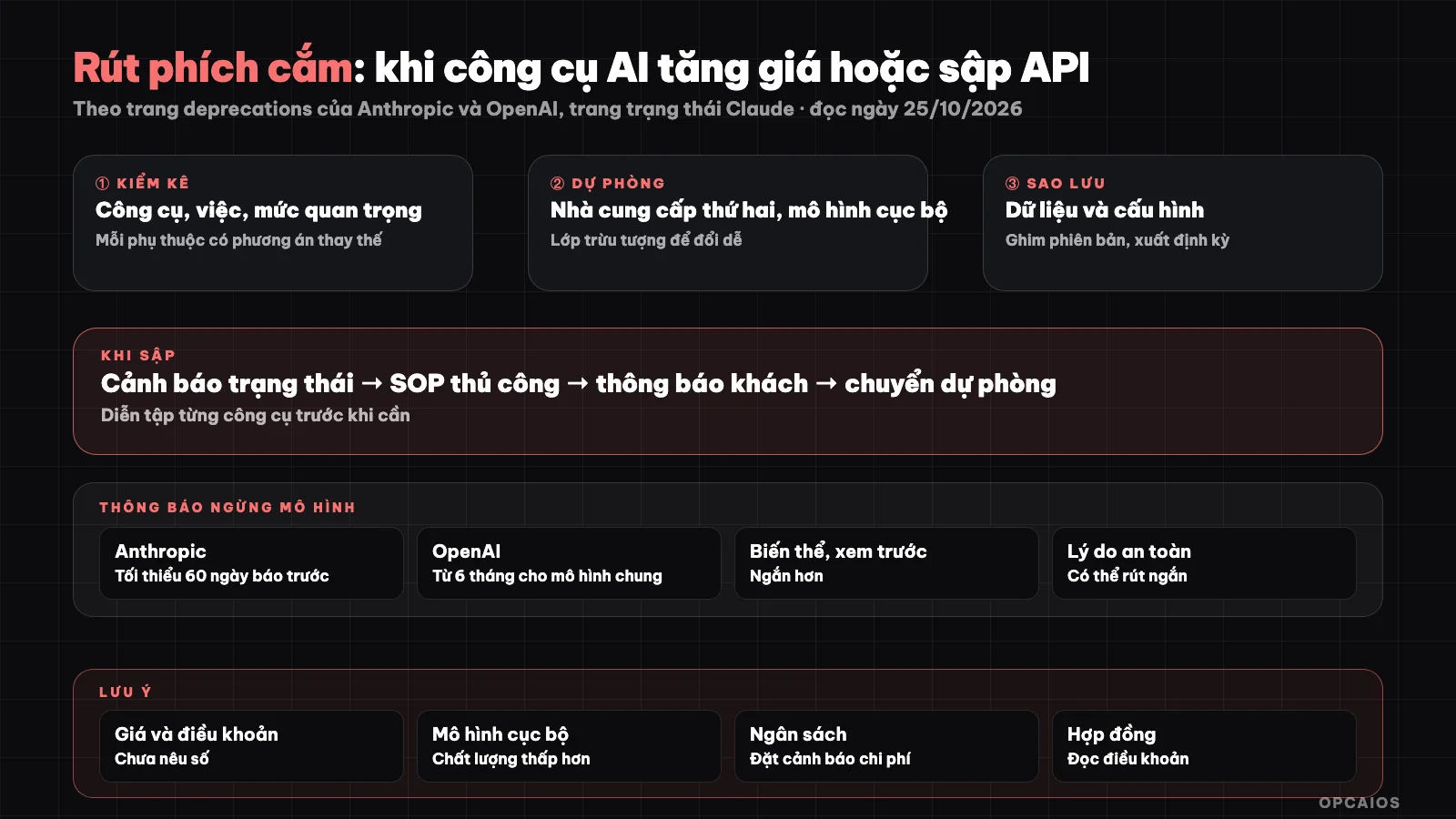
From dependency inventory to supplier switchover drills. Diagram: OPCAIOS.
Types of Supplier Dependency Risk
| Risk | How it shows up | Impact on a solo business |
|---|---|---|
| Price increase / plan change | Monthly cost or token-based cost goes up, features move to a pricier plan | Profit margins shrink |
| Terms change | Data policies, permitted uses change | May breach client contracts |
| Rate limiting / quota | Overload errors, long waits | Automation bottlenecks |
| Model retirement or version drop | Model gets removed, outputs change | Prompts fail or break outright |
| Service crash | API and interface don't respond | Downtime until supplier fixes it |
| Account lock | Suspension due to payment or violation | Lose access, possibly data too |
How far ahead does Anthropic warn before retiring a model?
Anthropic posts on its model deprecations page (read October 25, 2026) that it regularly retires old models and splits their lifecycle into 4 states: active, legacy, deprecated, and retired. It sends notice via email and documentation, with a commitment to at least 60 days notice before retiring a publicly released model. The page also lists many retired models; requests to a removed model will fail, along with suggested replacement models.
Real-world lesson: the "model gets removed" risk is not theoretical. Notice periods are in months, so what matters is having a real person read that email and a plan to test the replacement model early. For example, if you get notice on December 1, 2026 with a 60-day deadline, spend the first 2 weeks running test examples on the replacement model. Timelines can change, so re-read Anthropic's official page when you apply this.
How far ahead does OpenAI warn and how does its status page help?
OpenAI on its deprecations page (read October 25, 2026) says it notifies via email to customers using the model and posts to that page. Generally released models get at least 6 months notice, specialized variants at least 3 months, and preview versions can be retired much sooner, around 2 weeks. Safety or compliance reasons can shorten the deadline.
Both Anthropic and OpenAI have service status pages that let you subscribe to incident updates; Anthropic's status page supports email, SMS, Slack, Teams, webhook, and RSS/Atom. The practical way to use this is to sign up for at least one channel you check daily—email or Slack, for example—for each critical supplier. OpenAI's timelines can change, so re-read its official page when you apply this.
Step-by-Step Planning Framework
1. How do I inventory my dependencies?
A dependency inventory is a table listing every tool you use, what it does, its importance level, alternatives, and data export capability. Three columns are decisive: importance level, alternatives, and data export capability. A tool that is highly important with no alternatives and no data export is your number one weakness. For example, according to the October 2026 inventory, the main language model from Anthropic or OpenAI has high importance, so you need a backup provider or a local model and prompts you control. Automation tools like n8n need to export workflows as files. Email and payments have very high importance because they affect revenue, so you need a backup provider and a customer list. Small utility tools with low importance you can drop.
An inventory is also when you check if you are over-buying tools. Make a table in Google Sheets and update it every quarter.
2. How does an abstraction layer help me switch providers?
An abstraction layer is a single point that every workflow calls to use a model, so switching providers only means changing one place. There are 3 things to do. First, put prompts in a separate file or table, not scattered across workflows. Second, call the model through one function, one n8n node, or one routing gateway. Third, keep output format clear, for example JSON with a schema, so another model plugging in breaks less. For example, if 12 workflows all call an Anthropic model, switching to OpenAI through one gateway only requires changing 1 configuration instead of 12 workflows, saving about 2 hours each time you switch (assumed estimate). If using n8n, set up a separate sub-workflow for calling the model so every other workflow calls that sub-workflow.
3. When do I use a backup provider and a local model?
A backup provider is a second service you have already tested using your own test case set, while a local model is a model running on your machine. For important work, try at least one second provider, for example switching between Anthropic and OpenAI. For sensitive work or when you need to run offline, consider a local model; see setting up Ollama and Open WebUI on your personal machine. Local model quality is usually lower than large cloud models and depends on hardware, so use it as a backup plan, not expecting it to be equivalent. For example, try 20 test cases between Claude and GPT in one afternoon then record your success rate. OPCAIOS does not state a specific success rate because we don't have verified data yet.
4. Export data and back up regularly
Set a schedule to export your customer list, workflows, documents, and prompts to somewhere you control; encrypt backups and try restoring them regularly, because a backup you have never restored is not a backup. See more principles in 5 rules for data security in business when using AI.
5. What is version pinning and how do I do it?
Version pinning is calling a model by a specific version name instead of the alias "latest," when the provider allows it. Write down the version in one place and schedule testing a new version before the old one stops. For example, if Anthropic says a model stops working in 60 days, schedule testing the replacement on day 30. Same for libraries and programming tools: AI-written code sometimes uses syntax from a different version, so pin versions in your dependency lock file. Pinning keeps results stable while that version is alive, but does not replace testing a replacement before the deadline, because every version has an end date. You can save a version table and end dates in Google Sheets and check it again every 30 days. With a one-person company, the person in charge is you, so a reminder line in Google Calendar on day 30 is more useful than a long document.
6. Budget and cost alerts
Set spending limits and alerts at the provider if available, add your own monthly cost tracking table, and set a rule: above what percentage do you review it. Prices change, so read the official pricing page each time you decide; this post does not give numbers.
7. Status monitoring
Subscribe to incidents from the status page of important providers, bring them into a channel you read (email or Slack). Add active checks in your workflow: call a small request on schedule and alert when errors pile up.
8. Manual process when it breaks (SOP)
For each important work, write how to do it without AI ahead of time: email templates for replying to customers, manual checklist, acceptable delay time. When it breaks, you follow the document instead of thinking in panic.
9. Customer notification
Prepare honest notification templates ahead: there is a disruption, you are working on it, estimated time, contact channel. Do not hide an incident if it affects customer data or deadline.
10. How do I run a "pull the plug" drill?
A pull-the-plug drill is pretending a tool vanishes to check if your plan works. Every quarter, pick one tool and do 4 things. First, turn off the API key in your test environment. Next, switch to the backup provider. Then, write down what breaks and how long it took. Finally, update your inventory table. Pick tools gradually so everything important gets tested at least once a year. For example, this quarter drill the main Anthropic model using Claude, next quarter drill n8n by restoring a workflow from a backup file. Write results into Google Sheets the same day you drill so you track progress through the quarters of 2026. The goal of a drill is to measure real switching time, for example 45 minutes or 3 hours, not to prove the plan is perfect. If switching takes too long, write more manual SOPs or build an abstraction layer before drilling the next tool.
11. Contracts and terms
Read terms about data, notice time for changes, data export when ending, and product deprecation policy. With business customers, check whether your contract commits to a service level that your provider does not commit back to you. This is a reference suggestion, not legal advice.
OPCAIOS Experience
The things we actually do: route multiple models through a single gateway so switching models or providers doesn't touch each application; self-host n8n on a VPS instead of relying completely on n8n cloud service (see setting up n8n on a VPS); and encrypted backups. We've also seen cases where AI-written code used the wrong library version, so pinning versions is a habit. We don't publish figures on downtime or cost savings, and we don't claim this approach prevents all incidents. Self-hosting also means taking responsibility for server security yourself. See also AI toolkit for OPC model.
Frequently Asked Questions
Why does a one-person company need a plug-pulling plan?
Because there's no backup technical team: one tool going down can stop all revenue. A plan helps you know what to do ahead of time instead of scrambling in a crisis.
Do AI providers warn before discontinuing a model?
Yes. According to their official pages (read on 25/10/2026), Anthropic commits to at least 60 days notice for publicly released models; OpenAI warns at least 6 months ahead for generally available models, while preview versions may only get around 2 weeks. Have a real person read the notification emails, and re-read the official pages each time you apply because the timelines can change.
Do I need to run models locally?
Not required. Worth considering for sensitive or critical work that needs to keep running when the cloud goes down, as long as you accept lower quality than usual.
Is pinning versions enough to be safe?
No. Versions still have expiration dates. Pinning keeps results stable during that time, but you still have to test the replacement before the deadline.
Where do I start if I have nothing yet?
Start with a dependency checklist, then pick the most critical tool to find a replacement for and practice switching. First, list every tool and mark which ones have no replacement. Next, put your prompts in a separate file and call the model through a single point. Finally, test a second provider using 20 of your own test examples and subscribe to the main provider's status page. If you want to learn this properly, check out OPCAIOS's AI application training.
Source: Anthropic's model deprecations page (platform.claude.com), OpenAI's deprecations page (developers.openai.com), Claude status page (status.claude.com) (read on 25/10/2026); unverified: specific prices, contract terms from each provider, local model effectiveness versus cloud; Experience is OPCAIOS's.
Translated from Vietnamese with AI. Read the original.
Want to apply this in your business?
Book a free 30-minute call (Vietnam time, in English or Vietnamese).