



What is Codex?
Codex today is OpenAI's coding agent: you describe what you want in words, Codex reads the source code in your project directory, edits files, runs commands, and presents changes for your review. According to the README of the github.com/openai/codex repository (read on 03/11/2026), Codex CLI runs on your computer, is open source under the Apache-2.0 license, and comes with IDE extensions, desktop applications, and Codex in the cloud. This post does not claim Codex always writes correctly, does not compare benchmarks, and does not state which ChatGPT plan OPCAIOS uses. The post covers: how today's Codex differs from the old Codex model in 2021, four places to run it, login, pricing from the official page today, risks, a brief comparison with Claude Code, when to use it, and real experience from OPCAIOS.
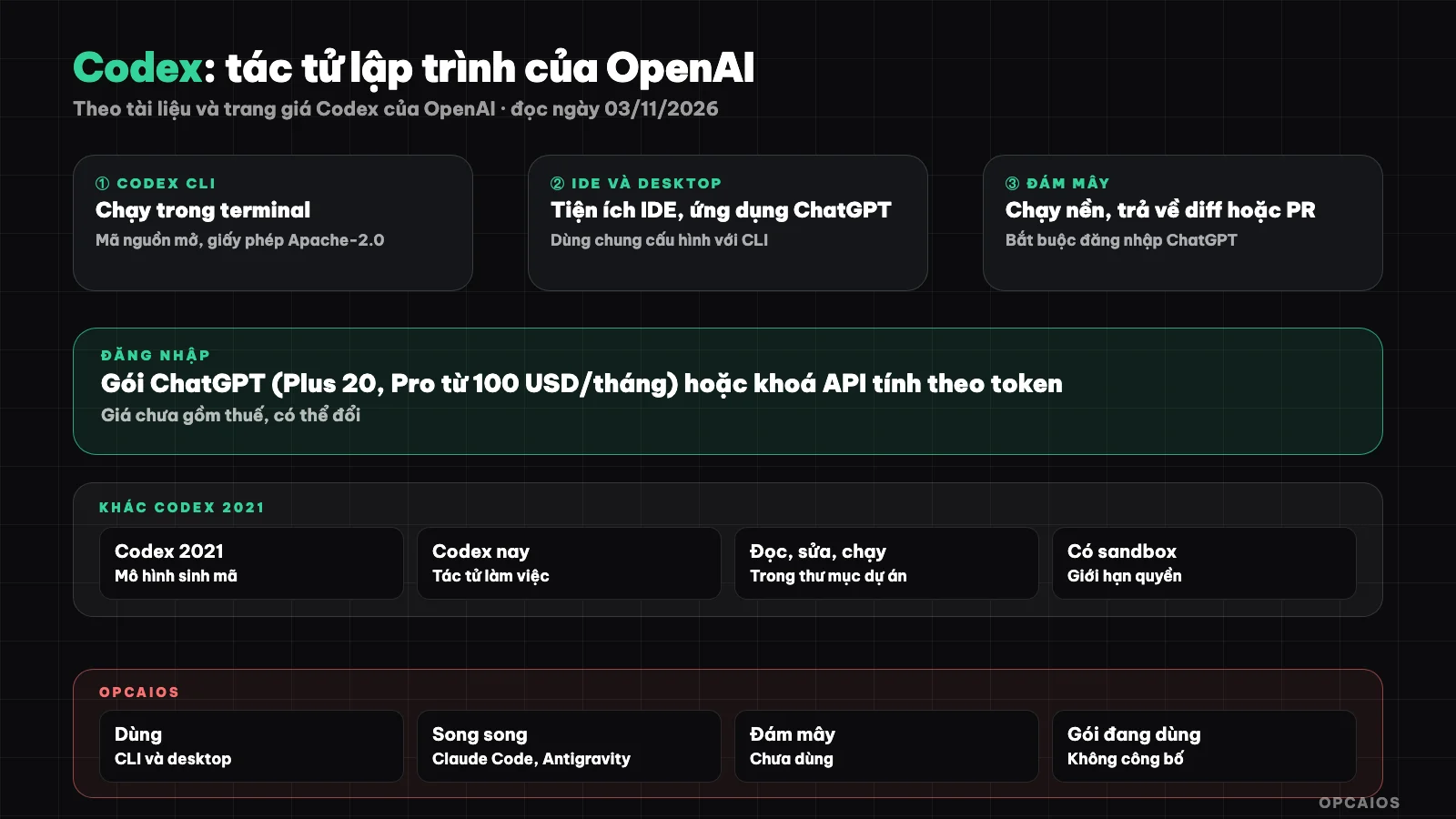
One agent, four places to run, same loop: assign work, Codex works in sandbox, you review the diff. Diagram: OPCAIOS.
How does today's Codex differ from the old Codex model in 2021?
Today's Codex is a complete programming agent, while Codex in 2021 was only a code generation model. The paper "Evaluating Large Language Models Trained on Code" by Mark Chen and colleagues (arXiv 2107.03374, submitted 07/07/2021, read on 03/11/2026) describes Codex at that time as a GPT model fine-tuned on public source code from GitHub, and a production version of that model powered GitHub Copilot. The old model took a description and returned a code snippet; the model did not open files by itself, did not run commands, did not work with git. Today's Codex is software that runs on your machine or OpenAI's cloud, uses newer models behind the scenes, reads the project on its own, edits multiple files, runs tests, and reports results. When reading guides online, check the date to avoid mixing up the two. If you are not sure what an agent is, see What is an AI agent.
Where does Codex run?
Codex runs in four places, using the same account. The table below is compiled from the README and Codex documentation at learn.chatgpt.com/docs (developers.openai.com/codex redirects here, read on 03/11/2026):
| Place to run | How to open | Suits |
|---|---|---|
| Codex CLI | Type codex in terminal in your project directory |
People comfortable with terminal, need automation with codex exec |
| IDE extension | Extension for VS Code, Cursor, Windsurf; Xcode and JetBrains have their own integration | People who want to see diff next to code |
| Desktop application | ChatGPT app for macOS, Windows, select Codex; from CLI type codex app |
People who like graphical interface |
| Codex in the cloud | ChatGPT on web, mobile, or desktop, select cloud environment and GitHub repository | Long tasks, runs while machine is off |
Current documentation calls the desktop application "ChatGPT desktop app", with Codex as one mode in it. Codex in the cloud gives each task its own workspace; you see the changes, ask for more edits, then commit or open a pull request (see Codex in the cloud). With CLI, version 0.162.1 on our machine lists subcommands like exec, review, resume, mcp, cloud, app, and doctor; how to install is in Install Codex CLI.
Do you log into Codex with a ChatGPT plan or an API key?
There are two ways to log into Codex: a ChatGPT account to use your subscription plan's limit, or an API key to pay by usage. According to the Authentication page in Codex documentation (read on 03/11/2026), the desktop app, Codex CLI, and IDE extensions accept both when working on your machine, but Codex in the cloud only accepts ChatGPT login. In CLI, codex login opens your browser to log into ChatGPT; API key is passed through standard input with codex login --with-api-key; codex login status tells you which way you are using. With an API key, cost is charged at standard API prices on your OpenAI Platform account and some cloud features are not available. The documentation recommends using an API key for automated processes like CI. Login information is stored on your machine, by default in ~/.codex/auth.json as plain text or in your operating system's credential store, so do not share or push this file to git. An account logging in by email and password must enable multi-factor authentication to use Codex in the cloud.
How much does Codex cost today?
Codex is not sold separately: Codex comes as part of ChatGPT packages, or is priced by API key. The Codex Pricing page (developers.openai.com/codex/pricing redirects to learn.chatgpt.com/docs/pricing, accessed 03/11/2026), USD per month, before tax, subject to change:
| Plan | Price | Pricing page notes on Codex |
|---|---|---|
| Free | 0 | One standard-speed model in the desktop app, varies by rollout |
| Go | 8 | Same as Free |
| Plus | 20 | Web, CLI, IDE plugins, iOS; automatic code review, Slack; buy additional credits |
| Pro | 100, 200 or 500 | Everything in Plus; currently no 5-hour window limit |
| Business | 20/person per year or 25 per month | ChatGPT and Codex, larger virtual machines for cloud work |
| API Key | Per API pricing | CLI, SDK, IDE plugins; no cloud features |
The Plus limit is only stated as an estimate of messages per machine per 5-hour window, varies widely by model, may include weekly limits; cloud work uses more of the limit. The features table by plan does not list CLI for Free and Go, so to be sure CLI works, count on Plus or an API key. This is not financial advice; the pricing table sits next to Claude Code and Cursor in the post Claude Code, Cursor or Codex CLI.
What are Codex's limits and risks?
Codex's risks come from the fact that Codex edits files and runs real commands on your machine. According to the "Agent approvals & security" page (accessed 03/11/2026), Codex on your machine runs in a sandbox enforced by the operating system, usually can only write in the working directory, network is off by default, plus an approval policy that decides when to ask you. A directory with git gets Auto mode suggested; a directory without git gets read-only suggested; in the default write mode, .git and .codex stay read-only protected. Five things to remember:
- Sandbox bypass flag:
--dangerously-bypass-approvals-and-sandbox(alias--yolo) turns off both sandbox and approvals; use only in an isolated virtual machine. - Prompt injection: web or unknown file content can hide instructions that make the agent do the wrong thing.
- Wrong code that looks right: always read the diff and test it.
- Limits: long work burns through limits fast; check with
/status. - Secrets: don't paste keys, passwords into prompts; see security when using AI to write code.
How to pick a mode for each job is in the post Codex approval and sandbox modes.
How is Codex different from Claude Code?
Codex and Claude Code work the same way: task by voice, runs in terminal, IDE, desktop and cloud. The main differences are the model provider (OpenAI vs Anthropic), payment method (ChatGPT plan vs Claude plan), instruction file (Codex reads AGENTS.md, Claude Code reads CLAUDE.md) and source code (Codex CLI is open under Apache-2.0). The full table is in the post Claude Code, Cursor or Codex CLI; how to have both agents work on one project is in the post using Codex and Claude Code at the same time.
When should I use Codex?
Use Codex when Codex fits the plan you are already paying for and the way you work. Reasonable cases:
- Already pay for ChatGPT Plus or higher: Codex comes in the plan, try it before buying more.
- Want to read the source code of the tool: Codex CLI is open source.
- Need long-running work and to open pull requests: use Codex on the cloud after linking GitHub.
- Need to automate with scripts: see codex exec runs on its own.
- Want a second reviewer:
codex reviewand/reviewread changes without editing the work tree.
Not yet ready if you don't have git or backups. The workflow for people new to code is in the post programming agent for people who don't know code.
OPCAIOS's Experience
Our main machine at OPCAIOS runs Codex CLI version 0.162.x and the Codex desktop application, used alongside Claude Code and Google Antigravity; we don't use Cursor daily. Here's what's real:
- AGENTS.md at the user level for Codex, with content equivalent to Claude Code's file: respond in Vietnamese, read documentation at session start, log at session end.
- config.toml sets the default model, thinking level to "medium", adds another model provider, subagents use smaller models, and marks project directories as trusted.
- Each task from the desktop application has its own working directory by date.
- Multiple agents coordinate through a shared status file and daily log, each session only commits its own files. We've seen over 1,500 "different" files just because of line ending style when one agent deployed from a Windows machine.
We haven't used Codex on the cloud to open pull requests, haven't run codex exec in CI, don't have command-blocking hooks (current hooks only report session status), and haven't measured Codex's quality or cost against other agents.
Frequently Asked Questions
Is Codex free?
Partially. According to the pricing page read on 03/11/2026, the Free plan at 0 USD includes one standard-speed model in the desktop application, subject to rollout, and the feature table doesn't list CLI for this plan. To use CLI, IDE utilities, and Codex on the cloud, the pricing page starts at Plus 20 USD/month; or use an API key and pay per usage. Prices don't include tax and may change.
Is Codex the same as GitHub Copilot?
No. In 2021, a production version of the old Codex model ran GitHub Copilot, according to arXiv paper 2107.03374. Today's Codex is OpenAI's own separate agent product, logged in via ChatGPT or API key, running in terminal, IDE, desktop application, and cloud. Copilot is GitHub's product with its own packages and usage.
Can I use Codex if I don't know how to code?
You can for small tasks if you keep safety discipline. Start on a test project with git, assign read-only tasks first (for example "explain this project"), then only assign one small change and read the diff before accepting. When you don't understand the diff, ask Codex to explain each change in plain language.
Does Codex read CLAUDE.md files?
No, by default. According to the AGENTS.md page in the Codex documentation (read on 03/11/2026), Codex looks for AGENTS.override.md, then AGENTS.md, then alternative names you define in project_doc_fallback_filenames. The documentation also has an /import command to import settings from Claude Code, but we haven't tried it. The simple way is to keep common rules in AGENTS.md; see What is AGENTS.md.
Where should I learn Codex?
Follow this order: read the Codex CLI page and Authentication page in the official documentation, install CLI per the README, run a read-only task on a test project, practice reading /diff, then learn approval mode, AGENTS.md, and automation. If you want someone to guide you through your actual work, see OPCAIOS's AI application training course.
Source: github.com/openai/codex (README), learn.chatgpt.com/docs (Codex CLI, Codex IDE extension, ChatGPT desktop app, Codex Cloud, Authentication, Agent approvals & security, AGENTS.md, Pricing; developers.openai.com/codex redirects here), arXiv 2107.03374 (Chen et al., 2021), codex --help version 0.162.1, read on 03/11/2026; prices don't include tax and may change; rate limits are only estimates from the pricing page; CLI capability with Free and Go plans not verified; /import command not tried. Experience is OPCAIOS's.
Translated from Vietnamese with AI. Read the original.
Want to apply this in your business?
Book a free 30-minute call (Vietnam time, in English or Vietnamese).