



What is Claude AI?
Claude AI is an assistant developed by Anthropic. You type in a request, attach files if needed, and Claude responds, writes, summarizes, analyzes, or creates documents, spreadsheets, and presentations. You can use it on the web at claude.ai, on desktop applications, and on mobile apps, so you don't need to know how to code. This Claude AI guide is written for office workers and small business owners. We don't promise Claude is always correct, we don't promise it saves time (we haven't measured it yet), and we don't guarantee the quality of Vietnamese. The article includes how to use it, a pricing table read from the official website on 04/11/2026, five first tasks with copyable prompts, and real limitations.
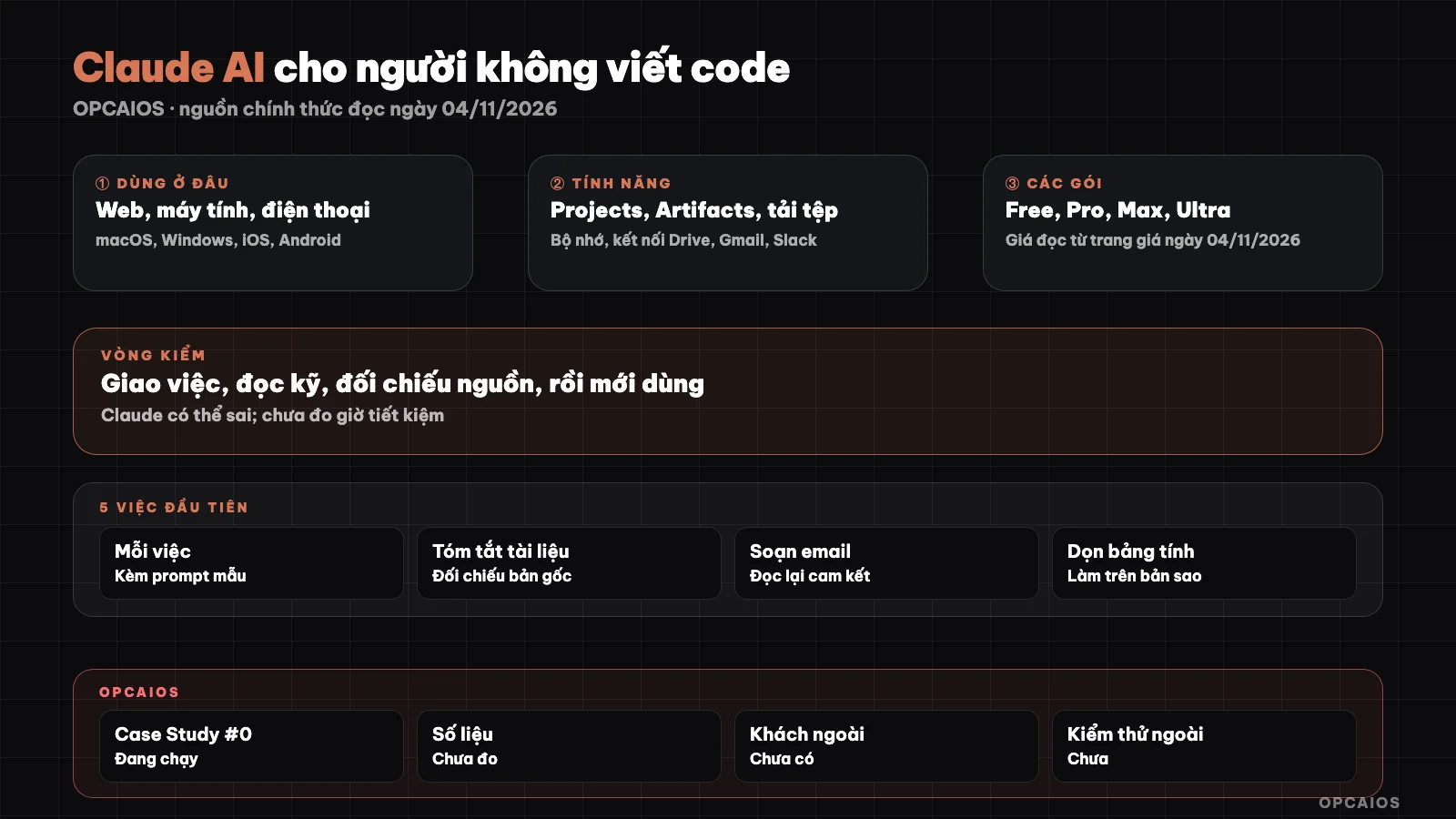
Claude for non-coders: where to use it, features, and the final review step. Diagram: OPCAIOS.
What is Claude AI, and what do you use it for?
Claude is a family of large language models from Anthropic, packaged as a chat product that users usually call Claude AI. The official product page describes Claude as a collaborator for real work, not just answering questions: you point it to files and tools, state your desired outcome, and Claude creates files you can edit like documents, spreadsheets, and presentations. People who don't code use it for writing work: drafting and editing emails, summarizing long documents, building tables from notes, making plans, and asking questions back to think things through more clearly. Claude Code is a different product from the same company, aimed at programming; see What is Claude Code. How to write requests to Claude is covered in the article What is a prompt. A key point to remember: Claude writes smoothly but is not a database of facts. It can state numbers or sources that don't exist, so anything with consequences must be checked by you.
Where can you use Claude, and what features does it have?
According to claude.com read on 04/11/2026, Claude has a web application, desktop applications (macOS and Windows), and mobile applications (iOS and Android). It also has a Chrome browser extension, integrations with Microsoft 365 and Google Workspace, and Claude Code for programming. Cowork has now been merged into Claude; see the article claude-cowork-la-gi (same batch, not yet published).
| Feature | What you use it for | What the docs say |
|---|---|---|
| Projects | Group files and instructions specific to one topic | Available on all accounts; Free allows up to 5 projects; sharing requires Team or Enterprise |
| Artifacts | Documents, presentations, pages, dashboards that open beside the chat window | Requires "Create and edit files" to be on; Free, Pro, and Max can publish public links |
| File upload | Bring PDFs, Word, Excel, images into Q&A | Chat max 500 MB per file, 20 files per chat; project 30 MB per file |
| Memory | Remember context from previous conversations | Each project has its own memory; can be turned off |
| Connections | Connect Google Drive, Gmail, Slack, Microsoft 365 | Pricing page lists connections in all plans; Artifacts and app connections are not in Free |
Files that aren't PDFs are read as text; embedded images may be skipped. PDFs 100 pages or under are analyzed including images; 101 to 1000 pages are read as text only.
What are Claude's plans, and what do they cost?
Claude has a free plan and paid plans. According to claude.com/pricing read on 04/11/2026, prices are shown in USD, the page doesn't list region, taxes not included, and may change.
| Plan | Price on pricing page | Main points |
|---|---|---|
| Free | 0 USD | Limited use per 5 hours and per week; no Claude Code |
| Pro | 20 USD/month, or 17 USD/month if paid annually (200 USD one-time charge) | Higher limits than Free, includes Claude Code, Projects, Research |
| Max | 100 USD/month | 5x the usage of Pro |
| Ultra | 200 USD/month | 10x the usage of Pro per week |
| Team | Standard seat 20 USD/seat/month if paid annually, 25 USD if paid monthly | 2 to 150 users, centralized admin |
Limits are calculated per 5-hour session and per week. Conversation length, which features are on, and which model you pick all affect your usage; chat, Claude Code, and desktop app share one limit. See your remaining usage in Settings, Usage section. We haven't checked the price converted to dong or taxes in Vietnam yet. Price comparison with ChatGPT and Gemini is in the article Gemini, ChatGPT or Claude.
How to Use Claude AI: Five Things to Try First
The examples below are hypothetical; replace the parts in square brackets with your own content and don't paste real customer data until you've read the limitations section below.
1. Summarize a long document. Upload the file and paste:
You are a document reading assistant for small business owners. Summarize the attached file into: 5 main points, 3 risks, 3 questions I should ask the author. Only use information in the file; where there is none, write "file does not mention". Note the page number for each point.
2. Rewrite an email in the right tone.
Rewrite the email below to send to [first-time partner contact]. Polite tone, brief, no more than 120 words, with one clear offer at the end. Keep the numbers and dates I mentioned. Original email: [paste content].
3. Turn messy notes into a table.
Below is meeting notes. Create a table with columns: task to do, responsible person, deadline, notes. If a person or deadline is missing, leave it blank and mark "need to ask", don't guess. Notes: [paste content].
4. Plan your week.
I have the following tasks: [list]. Each day I have around [number] hours of focused work. Please suggest a 5-day schedule, explain the reasoning for the order, and point out which tasks should be dropped or delegated if I'm overloaded. Ask me for clarification if information is missing.
5. Ask Claude to critique your draft.
This is a draft [proposal to send to client]. Play the role of a critical reader: list 5 places that could cause confusion, 3 claims without evidence, and 3 questions a client might ask. Don't rewrite the draft, just critique. Draft: [paste content].
General tips: provide context, name your reader, set a length limit, and ask Claude to clarify when information is missing. See other office tasks in AI for office workers.
What Are Claude's Limitations?
The most important limitation is reliability: Claude can be wrong while sounding very confident. Here's what you should know before using it for real work:
- Numbers, dates, quotes, and links must be checked against the original source. Never use financial, tax, legal, or medical results without a specialist reviewing them.
- Usage has a rate limit per session (5 hours) and per week; long tasks, large files, or extended conversations use up the limit faster. Anthropic may adjust the rate limit.
- Files have maximum size and page limits.
- The data privacy page (Free, Pro, Max, Ultra plans) states that conversations are only used to improve Claude if you enable that setting; anonymous chats are not used for this. The page advises caution with financial information, health records, passwords, and confidential documents. Data retention time is unverified. See also 5 data security rules when using AI.
- Don't let Claude send emails or process payments on your behalf without reviewing first.
Can Claude Handle Vietnamese?
You can chat in Vietnamese: the support page notes that Claude replies in the language you write in, and Vietnam is on Anthropic's list of countries where products are available (checked 04/11/2026). However, Vietnamese is not in the interface language list or the multilingual benchmark table in the developer documentation. That documentation says Claude handles most Unicode-script languages with varying quality depending on the language, and recommends testing it yourself. We use Vietnamese daily but make no promises about quality: test it yourself with the exact type of text you need.
OPCAIOS Experience
Le Quoc Nghia uses Claude daily, both in chat and Claude Code, and uses Claude Code in Vietnamese on macOS. We have not measured effectiveness, don't have productivity numbers, have no external clients, and have not measured time saved. All plan information is read from the pricing page, not from experience. This article describes careful use, not proven results.
Frequently Asked Questions
Is Claude AI free?
There is a Free plan. According to claude.com/pricing as read on 04/11/2026, Free costs 0 USD, has usage limits every 5 hours and each week, includes web chat, desktop, mobile, Artifacts and memory, but no Claude Code. To use more or to use Claude Code, you need a paid plan. Prices and limits can change, so check the official pricing page before paying.
Can someone who doesn't know how to code use Claude?
Yes. You only need to describe the task in words, upload files and read the results. The first reasonable tasks are summarizing, rewriting emails, making tables and planning. The limitation is that results can still be wrong, so you need to check data and sources. If you want to move on to programming tools, see Claude Code for beginners.
How is Claude AI different from Claude Code?
Claude AI is a chat interface used on web, desktop and mobile, suited for writing and documents. Claude Code is a tool that works directly with code and commands in a folder on your machine, with a permission mechanism. Both share the usage limits of your plan. People who don't program usually start with the chat interface and only add Claude Code when they have work that needs it.
Will my data entered into Claude be used for training?
With Free, Pro, Max, Ultra plans, according to the support page, conversations are only used to improve Claude when you turn on that setting, and anonymous chats are not used. You can change the setting any time. Still avoid pasting passwords, card numbers, health records or confidential documents. Data retention period is unverified.
Should I trust Claude's results?
Only trust them after checking. Claude can state wrong data, dates or sources while still writing very convincingly. Safe approach: ask for clear notes on uncertain parts, check totals and a few sample lines, open original sources before sending to clients, and have someone with expertise review legal, tax and financial content.
Next Steps
Copy one of the five sample prompts above, replace the parts in square brackets with your non-sensitive content and test it on the Free plan before deciding to pay.
Source: claude.com (product page and claude.com/pricing), anthropic.com/supported-countries, support pages on Projects, Artifacts, file upload, usage limits, conversation data and languages, plus Claude Platform multilingual documentation, read on 04/11/2026. Unverified: prices converted to đồng and taxes in Vietnam, actual Free plan limits, data retention period, Vietnamese quality by topic, features only in Max, Ultra or Team plans. Experience is from OPCAIOS.
Translated from Vietnamese with AI. Read the original.
Want to apply this in your business?
Book a free 30-minute call (Vietnam time, in English or Vietnamese).