


What is "AI CMO"?
"AI CMO" is a term for a system using a language model to read marketing data, compare it against monthly targets, and propose weekly plans: what topics to write about, which days to post, which emails to send, which ads to increase or pause. The short answer to "should I hand over marketing planning to an AI CMO" is: yes, hand over the planning work; no, don't hand over decision-making. An AI CMO is not a real marketing director; it doesn't understand your brand the way a business owner does, it bears no legal responsibility, and it can misread data. This post doesn't promise that an AI CMO will boost revenue; we haven't measured that. The post covers what AI can and cannot do in weekly planning, how to design a review gate (which tasks should be automatic, which require human review), a risk matrix by task type, logging and undo, advertising law notes, and how OPCAIOS does it in our internal management tool.
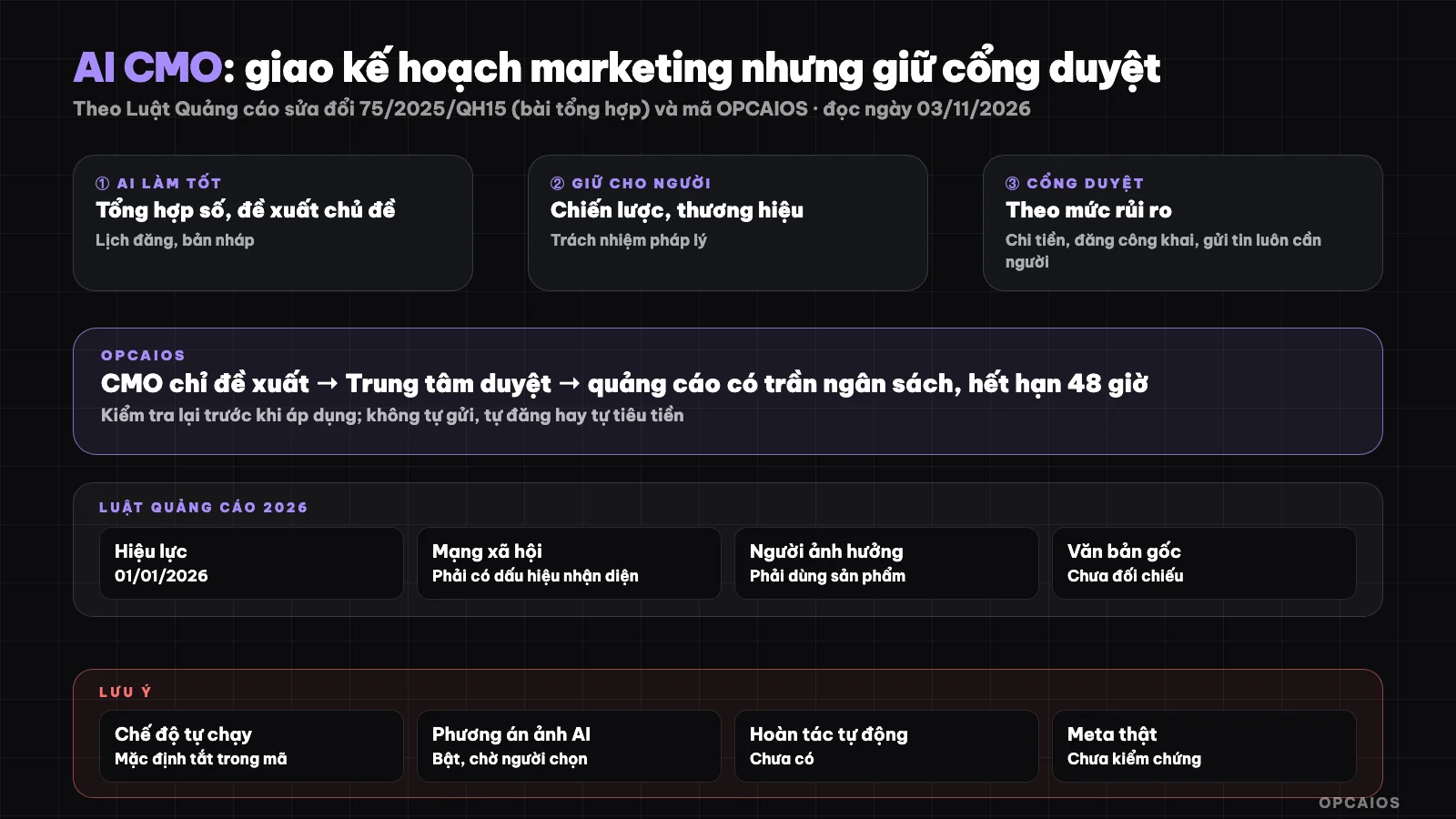
AI writes, humans decide: the more money or visibility a task uses, the tighter the review gate. Diagram: OPCAIOS.
What can AI weekly marketing planning do?
AI weekly marketing planning does well at three tasks: consolidate data, suggest topics, and schedule posts. These three are time-consuming for a solo worker but low-risk, because the output is only a draft. Specifically:
- Consolidate data: gather revenue, new customers, posts published, and ad spend from the start of the month, compare against targets, flag which channels are falling short. Important note: the weekly target number should be calculated by software (how much is still needed divided by weeks left), not made up by the model.
- Suggest topics: based on which posts have had good engagement before, questions customers often ask, where the funnel is leaking.
- Schedule posts: spread posts across days and channels, avoid bunching many posts on one day.
A solo marketing worker can use this plan as a draft for a Monday meeting with themselves. See more on building automated data reports in the post weekly reports auto-generated for OPC owners using n8n.
What can't AI CMO do?
AI CMO can't do three core things a real marketing director does: pick strategy, judge brand voice, and take responsibility. Strategy is the choice to drop one thing to focus on another—for example, sell only to one customer group this quarter; the model only sees data it has, not unseen opportunities, doesn't know the owner is about to change prices or launch a new product. Brand judgment is the feel of "this doesn't sound like us," "this image looks cheap," "this topic is sensitive this week"; the model can mimic tone but doesn't know the social context happening now. Legal responsibility falls on the advertiser and poster, not the software: when an ad overstates the truth, the business pays the price. One more real limit: AI can pull numbers wrong, mix up channels, or give a plan that sounds good but rests on too small a sample. So every number in a plan should be traceable back to its data source.
How do you design a review gate for AI CMO?
A review gate is the point where a task AI has prepared must stop and wait for a person to click approval before it creates any outside effect. Simple rule: if a task only makes a draft inside the system, let it run automatically; if it costs money, is public, or touches customers, make human review mandatory. Three groups that must be reviewed:
- Spend money on ads: raise budget, turn on a campaign, create a new ad. Add hard caps: max daily budget total, max change per move.
- Post publicly: social media posts, blog posts, landing pages. One wrong sentence is wrong in front of everyone.
- Send to customers: email, text, partner outreach. Once sent, can't take it back.
Three design rules come with it: proposals have an expiry date (expire and self-delete if data has changed), check status again right before running, and don't let batch approvals of things that need reading one by one. See more on the mindset of splitting human and machine work in the post 24/7 AI agent system for business owners.
Which tasks have high risk, which have low risk?
The risk level of a marketing task is determined by two questions: does it cost money, and can it be reversed? The table below is a suggested classification system (assumptions; each business should adjust for itself):
| Task | Costs money | Reversible | Suggestion |
|---|---|---|---|
| Synthesizing data, writing weekly diagnostics | AI cost only | Yes | Automate |
| Generating ideas, drafting posts | AI cost only | Yes (delete draft) | Automate, with daily limit |
| Creating image concepts for posts | AI cost only | Yes | Automate, person selects |
| Posting on social media, publishing blog | No | Partial (can remove, but already seen) | Requires approval |
| Sending email, messages to customers | Possible | No | Requires approval |
| Turning on, increasing ad budget | Yes | Partial (spent money is gone) | Requires approval, account owner only |
| Turning off underperforming ads | No | Yes | Still should approve (turning off wrong loses learning data) |
One point often forgotten: the cost of calling AI is also money. So set a monthly AI budget and enable auto-stop mode when approaching the limit.
What should the log and undo have?
A log records who proposed what, who approved, when, and what the result was; undo is the ability to revert to a previous state. Four minimum things should be saved for each task going through the approval gate:
- Proposed content and the reason AI gave it.
- Decision maker and the time of approval or rejection.
- Execution result: applied, failed with error, or expired.
- State before change, for example old budget, to revert manually if needed.
True undo only works with tasks inside the system: deleting drafts, discarding image concepts, canceling scheduled tasks. With external tasks, "undo" is usually a new action (reducing budget again, removing a post), so it should also go through the approval gate. Since not every task can be undone, putting the approval gate before the action matters more than an undo button after. To turn these steps into a process everyone follows, see SOP-izing the company to run itself while traveling.
How does advertising law affect AI CMO?
Advertising law affects AI CMO because every sentence AI writes, once posted or run as an ad, is advertising for the business and is subject to the law as if the person wrote it. In Vietnam, the amended Advertising Law No. 75/2025/QH15 was passed on 16/06/2025, effective from 01/01/2026, according to LuatVietnam's summary (read on 03/11/2026). Notable new points for solo workers: ads on social media must have a marker identifying them as ads or sponsored content; influencers cannot promote products they have not used or do not fully understand and must disclose advertising. Common wording mistakes AI easily makes: using "best," "number one" without proof, promising certain results, disparaging competitors. A practical approach is to add a step screening sentences against a prohibited-word list before the post enters the approval queue, and the approver re-reads the commitments section. We have not reviewed the full law; this section is for reference only, not legal advice.
OPCAIOS's Experience
OPCAIOS has a "CMO Brain" in its internal management area, written for one person doing marketing. It reads the monthly target, results from the start of the month, the past four weeks, which posts have worked, where the funnel leaks, then asks AI to draft a weekly plan with diagnosis, priorities, task list, and risks. The weekly target is calculated by the software, not set by the model itself. Each task in the plan is only a suggestion; when the owner clicks "Apply", the content becomes an idea in the writing stage, while emails, webinars, landing pages and ads only become one task in the marketing calendar, for the owner to do. The code makes clear: no sending, no posting, no spending automatically.
Everything waiting for a decision goes into a "Review Center": social media posts, auto SEO posts, comment replies, ad changes, tasks in the weekly plan, partner contact emails, image options. Ad changes only the account owner can approve, with a daily budget cap and a cap per change, proposals expire after 48 hours and are checked again before applying. Partner contact emails are not allowed batch approval. There is a step checking ad law using rules, documented as a support tool, not legal advice.
"Auto Run" mode only prepares work up to the review step (keeps idea queue, AI drafts, runs the writing stage) and stops when AI budget is no longer safe; it never approves, posts or touches ads. In the code, every part of Auto Run defaults to off. We did not check the settings on the running version when writing this post so we cannot say whether it is currently on or off. Only the feature where AI makes image options for posts waiting for design defaults to on, but it only creates options for people to choose. The system records who approved, when, and the result; there is no undo button yet for ad changes. The ads section has not been tested with real ad accounts; AI does not run any ads on its own. We have not yet measured whether the AI plan helps increase results.
Frequently Asked Questions
Can AI CMO replace a marketing director?
No. AI CMO can replace the writing work: collecting data, proposing topics, scheduling, drafting. The part of choosing strategy, keeping brand quality and taking responsibility for content is still the person's. For someone working alone, the right way to use it is to treat the AI plan like a draft to revise in 20 to 30 minutes at the start of the week, instead of staring at a blank page. If you find yourself clicking approve without reading, that is a sign the review gate has lost its purpose.
Should I turn on fully automatic mode?
Only turn on automatic for creating drafts inside the system, with a daily limit and AI budget. Do not leave on automatic for things that cost money, are public or go to customers. The reason is these things cannot be completely undone: ad money is spent, posts have been read, emails are in inboxes. Start with everything off, turn on each part after checking draft quality for a few weeks.
Does reviewing each task take a lot of time?
Yes it takes time, but less than doing it all from scratch. Tips to cut time: put everything waiting for review in one shared queue, sort by priority level (money tasks first), show blocking errors like missing images, and allow batch approval for low-risk task types. Tasks that need reading one by one, like partner emails, should not have a batch approval button.
How do I keep AI from making up numbers in the plan?
Have the software calculate the numbers, only let AI explain them. Specifically: weekly target, month progress, ad spend are calculated from data then put in the prompt as a table; ask AI to only use numbers in that table. The reviewer checks a few key numbers against the original report. If data is too sparse, like a few orders each month, read the plan as a suggestion, not a statistical conclusion.
Where do I start building an AI CMO for a small business?
Start with a monthly target table and an auto weekly report, then add the AI plan writing step. Next, build a shared review queue and clearly define which tasks must be reviewed. Only when these steps run smoothly should you think about auto mode for the drafting part. Read more one-person marketing agency with AI. Want to learn how to build a marketing process with AI and a review gate, see OPCAIOS's AI application training course.
Source: LuatVietnam, post "7 new points of the amended Advertising Law 2025" (read 03/11/2026); risk level table is assumed; have not checked the full text of Law 75/2025/QH15 and Advertising Law 2012; Auto Run on/off status on the running version not checked; effectiveness of AI plan not yet measured by OPCAIOS. Experience is OPCAIOS's.
Translated from Vietnamese with AI. Read the original.
Want to apply this in your business?
Book a free 30-minute call (Vietnam time, in English or Vietnamese).