



SOP (Standard Operating Procedure, standard operating procedure) is a document that describes how a repetitive task should be done, step by step, who does it, when it's done, how to check it, and how to handle unusual situations. The document needs to be clear enough that a person, or automation, who has never done that task before can still do it correctly. The article title says "run on its own for 2 weeks," but that's not guaranteed: no single-person company system runs completely on its own without at least a backup person and minimum supervision.
A more realistic goal is: after SOPing, most repetitive work runs without you, while unusual situations are reported to you or a backup person at the right time. The article (read from source on 25/10/2026) walks through 7 steps, from recording an SOP from current work to testing by "taking a vacation trial" for 2 to 3 days, along with ways to handle customers, money, and public network alerts.
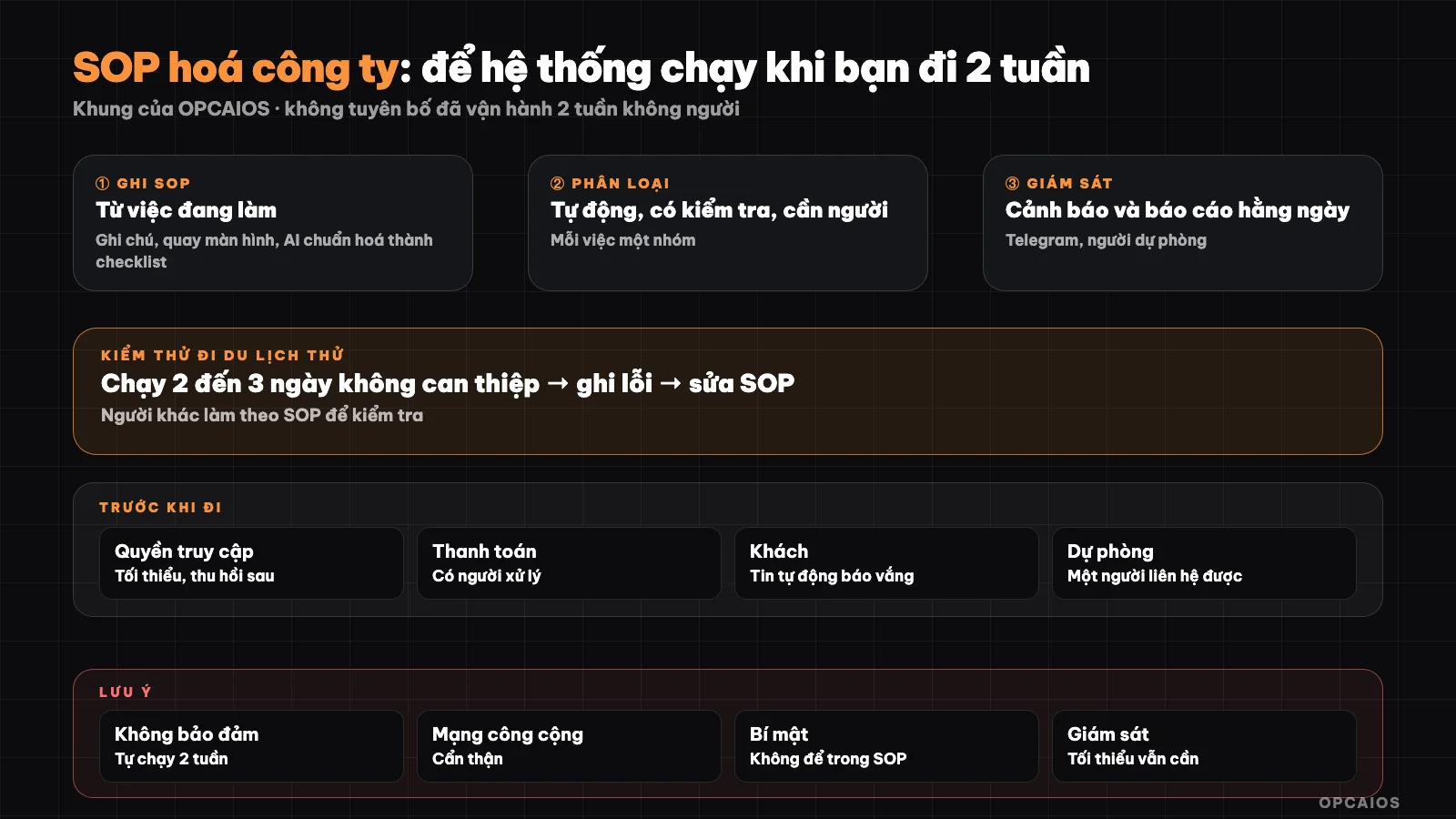
From current work to a system with monitoring and a backup person. Diagram: OPCAIOS.
Step 1: Record SOP from how you're currently doing it, don't write from imagination
Recording SOP from current work means writing it down while you're actually doing it, because SOPs written while thinking usually go wrong because you forget steps you do by habit. The process has 4 steps. First, screen record or take notes side-by-side while you do that task once normally, speaking out loud the reason for each step as you go. Next, ask AI like Claude to standardize your recording into a numbered checklist, one action per step, with inputs, outputs, and completion conditions. AI might make up steps or misunderstand, so you have to read through and fix it.
Then, ask someone who has never done that task to run the SOP, you just watch and don't explain; where that person gets stuck is where the SOP is missing something. Finally, fix the SOP and set a date to review it each quarter, since tools and interfaces change. Example scenario: the SOP "send monthly invoice" takes 20 minutes to record and 30 minutes for someone else to test. So SOP weekly or daily tasks first, and tasks where forgetting costs money or loses customers.
Step 2: Choose a format that's easy to follow
| Format | Use when | Notes |
|---|---|---|
| Checklist | Sequential work, few branches | One action per line, with checkboxes |
| If/then decision | Work needing judgment (customer refund, email send error) | "If A then do X; if B then do Y; if unclear then report to person in charge" |
| Annotated screenshot | Actions on an interface | Screenshot the exact button to click; note the date since interfaces change |
| Pre-made template | Repeated email, message | Keep next to SOP, don't make people rethink it |
Each SOP should have a header with: purpose, person in charge, frequency, tools needed (don't write passwords), estimated time, and "when to stop and call you."
Step 3: Split work into three groups—how?
Splitting work into three groups is how you decide which work machines do completely, which machines do with checks, and which need people. Group 1 is completely automated, like welcome emails, backups, send template invoices; the condition is the wrong result is small and reversible. Group 2 is automated with checks, like draft article waiting approval or alert when error; the condition is someone reviews the result within a day or a week. Group 3 needs people, like refunds, complaints, large quotes, and sensitive content; the condition is there's a backup person authorized clearly.
Principle: the more it touches money, law, and reputation, the more it goes to group 3. For example, an n8n workflow sending a welcome email is group 1, but the decision to refund a customer is group 3. Don't push work to group 1 just so you can go play. List 20 repetitive tasks in Google Sheets and assign a group to each in 2 days, before building any automation for 2026.
Step 4: What does an SOP Repository and Monitoring consist of?
An SOP repository is a single, searchable place containing every process; monitoring is the mechanism that alerts you when the system breaks. The repository can be Obsidian, Notion, Google Docs, or a Markdown folder. More important than the tool itself is one place, consistent naming, a backup person with read access, and an offline copy in case the storage service fails.
A system running on its own without alerting you when it breaks is more dangerous than a system that fails loudly, so I need 4 minimum items. Item 1 is error alerts sent to a channel I actually read, for example a Telegram bot from an n8n workflow when a run fails. Item 2 is a short daily report: number of jobs run, number of errors, number of items awaiting approval, prepaid service balance. Item 3 is a "heartbeat" signal: if I don't receive the morning report, then the silence itself is the alert. Item 4 is a clear threshold for pausing or calling the backup person. If I self-host n8n, see setting up n8n on a VPS and remember to monitor the server too. For example, store the SOP repository in Google Docs or Notion, check the offline copy every 30 days, and update the review date.
Step 5: How do I delegate, grant access, and keep secrets safe?
Safe delegation means giving the backup person enough permissions to do their job without handing over all the keys. Going on vacation means someone else will touch your system, so I apply the principles in 5 rules for business data security when using AI. There are 5 specific things. Thing 1 is least privilege: use a separate account or restricted role, don't share the main password. Thing 2 is using a password manager with vault sharing, not sending passwords via chat or writing them in SOPs. Thing 3 is limiting money: the backup person gets a card or account with a spending limit, plus two-factor authentication.
Thing 4 is revoking access after the trip and rotating any keys that had to be shared. Thing 5 is notifying important providers like Google or Telegram if needed, so they don't lock the account because of logins from unfamiliar locations. When going away, don't log into admin dashboards, banks, or password vaults over untrusted public Wi-Fi at airports, cafes, or hotels. I use mobile data or a reputable VPN, and enable two-factor authentication at least 7 days before the trip, especially for Google accounts.
Step 6: What is a people backup plan?
A people backup plan is preparation so at least one person knows "what must not die" while I'm away. I prepare 4 things. First, a "read before" page listing daily tasks, tasks needing people, who to contact when something breaks and when to reach me, or when not to. Second, a second backup person or support vendor for technical emergencies if the first person is busy. Third, a minimum check-in window for me, for example 15 minutes each day to see the Telegram report, rather than going completely dark. Fourth, written decision rights: the backup person can refund up to how much, how to apologize and compensate.
In a hypothetical example, the "read before" page is 1 page in Google Docs, containing a list of 10 daily tasks and an emergency number. I send this page to the backup person at least 7 days before the trip and ask them if they understand.
Step 7: How do I run a "trial vacation" for 2 to 3 days?
A trial vacation means picking 2 to 3 normal business days, announcing I'm "away" and only intervening when the backup person or an alert requests it. Don't try this for the first time already at the airport. Step 1 is recording every time I want to step in, because that's a missing SOP. Step 2 is checking the daily report arrives on time. Step 3 is deliberately causing a small controlled incident, like turning off an n8n workflow, to see if the Telegram alert arrives. Step 4 is fixing the SOP and repeating if needed.
Only when three days pass smoothly is it worth trying a longer vacation, and the first one should be shorter than two weeks. For example in a hypothetical case, the first trial run recorded 6 times I wanted to step in, so 6 missing SOPs need to be written before the second trial run. OPCAIOS has not verified the number of trial runs needed for each business model, so I repeat until three consecutive days pass without my intervention beyond the morning report. I record the trial date and result in Google Calendar or Google Sheets, for example a trial in November 2026.
What customers and money need to be prepared when I'm away?
Preparation when away involves 4 groups of tasks about customers, payments, refunds, and taxes. The customer notification group: set up auto-replies for email and messages, clearly state the expected response time and emergency channels; if you have auto-delivery products, check the workflow from start to finish before you go. The payment group: check your payment gateway, manual reconciliation tasks, and invoice due dates of services you use, because domain expiration, card expiration, or API limit expiration will stop your system right when you're away.
The refund and complaint group: write down your policy and if/then procedures in advance, then hand the difficult parts to a backup person with authority limits. The tax, legal, and contract group: don't let filing deadlines fall during your trip. For example, write 5 important due dates into Google Calendar before a 2-week trip, and double-check card expiration dates. This is just a reference suggestion, not advice.
OPCAIOS's experience
OPCAIOS has AI agents and automation (n8n self-hosted on VPS, email sequences, auto-generated SEO posts but always waiting for manual review, knowledge base in Obsidian) and has the habit of writing down procedures for agents to follow. We don't claim to have run two straight weeks with no one around: parts like post review, payments, and error handling still need people. This post is a framework for you to test yourself, not the measured result of a specific trip. See also AI system running on its own and AI agent system running 24/7.
Frequently asked questions
Does SOPifying the whole company really let me go on a 2-week vacation without doing anything?
Not guaranteed. SOP and automation greatly reduce what you need to do, but you still need a backup person and minimal oversight. Try it for 2 to 3 days first.
Which tasks should I SOP first?
Recurring daily or weekly tasks and tasks where forgetting costs money or customers: receiving payments, delivering goods, replying to customers, backups, reporting.
Can AI write the SOP for me?
You can use AI to turn rough notes into a checklist, but you have to read it again and have someone else test it, because AI can make things up or skip steps.
How do I know if the system breaks when I'm away?
Use error alerts through Telegram or email, daily morning reports, and a heartbeat signal; if the report doesn't arrive, treat that as an alert.
What do I need to learn to build a system like this?
You need to know basic automation, access control management, and how to write clear procedures; you can start with OPCAIOS's AI application training course.
Source: common operational knowledge and standard security guidelines (read on 25/10/2026); unverified: the effectiveness of "running on its own for 2 weeks" in each business model, because it depends on industry and tools; Experience is OPCAIOS's.
Translated from Vietnamese with AI. Read the original.
Want to apply this in your business?
Book a free 30-minute call (Vietnam time, in English or Vietnamese).