


What Is a 24/7 AI Agent?
It is a program that uses a language model to receive tasks, plan steps, call tools, and report results, running continuously on a server instead of only answering when you open a chat window. For a solo business owner, "24/7" only has value when the system has three things: a stable place to run, limited permissions, and an alert mechanism when something goes wrong. Without these three, an agent running at night is just a nighttime risk.
Hypothetical example: Anthropic's Claude agent synthesizes news and delivers a report each morning, running 24 hours a day on a VPS, but only writes to a draft folder and sends alerts via Telegram. This post describes the minimal architecture, what should be delegated, how to limit permissions, monitor, handle when an agent fails, and the real constraints of OPCAIOS.
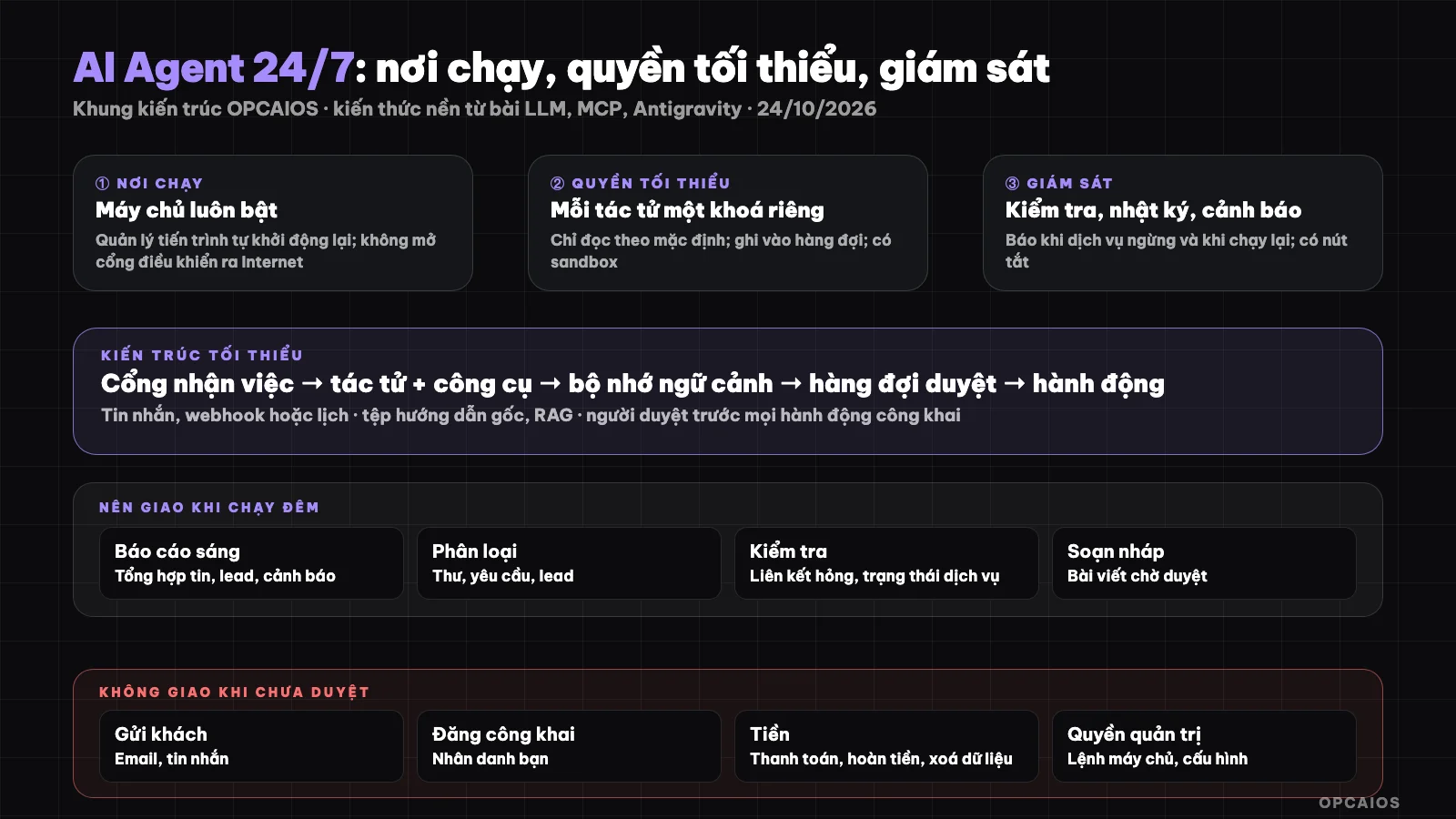
A continuously running agent needs a stable runtime, minimal permissions, monitoring, and a human reviewer. Diagram: OPCAIOS.
How Is an Agent Different from a Chatbot?
An agent is a program with a goal that breaks work into steps on its own, while a chatbot only answers when asked. An agent calls tools like reading files, calling APIs, or running commands, sees the results, then decides the next step (see What Is an LLM? on tool use and agents). Anthropic's MCP protocol standardizes how to connect agents with tools. For example, ChatGPT or Claude in chat form only drafts an email when asked, but an agent can read an inbox at 6 AM, sort 50 emails, then send a summary via Telegram. An agent is more powerful but also more risky: an agent can make mistakes many times very fast, so it needs minimal permissions and a human reviewer.
What Does a Minimal Architecture for a Continuously Running Agent Include?
The minimal architecture has six components: runtime, job intake port, agent plus tools, context memory, monitoring, and human reviewer. The table below is OPCAIOS's consulting framework, not an industry standard.
| Component | Role | Suggestion |
|---|---|---|
| Runtime | Machine always on | A dedicated server (see What Is a VPS?) or hosting service; manage process to auto-restart |
| Job intake port | Receive commands from you | Messages (e.g. Telegram bot), webhook, schedule |
| Agent + tools | Do the work | Only grant needed tools; each tool has its own permission |
| Memory, context | Know you and your business | Base instruction file, note store, RAG (see What Is a Second Brain? and What Is RAG?) |
| Monitoring | Know when it breaks | Periodic health check, alert through channel you read immediately |
| Human reviewer | Block risks | Queue waits for approval before any public action or non-reversible action |
What Tasks Should and Should Not Be Delegated to a Nighttime Agent
Should delegate: synthesize news and morning reports, sort emails and leads, draft articles, check broken links, monitor prices or competitors, back up and check service status.
Should not delegate without review: send emails or messages to customers, post publicly, process payments or refunds, delete data, change server configuration, run commands with admin rights.
How to Limit AI Agent Permissions for Safety?
Permission limits are the most important principle, because an agent running at night has no one watching. The six rules below are ranked by priority; first is minimal permission, last is not opening control ports to the Internet. Hypothetical example: an agent has only read-only API keys from one service and writes to a draft folder, so even if it fails 100 times in one night it cannot send a single email to a customer.
- Minimal permission: each agent has its own account and API keys, enough only for its job; do not use admin keys.
- Read-only by default: write to draft folder or queue, human reviews then applies.
- Sandbox and network limits: run commands in isolated environment when possible; see risks already documented in no-review execution mode in What Is Antigravity 2.0?.
- Do not store secrets in prompts or knowledge stores that the agent reads.
- Limit costs: set monthly token or spending cap and alert when near limit.
- Do not open control port to the Internet: access via SSH tunnel or VPN with authentication.
Monitoring and alerts
- Check key services regularly (agents, databases, job queues) and alert when they stop and when they restart.
- Structured logs: who did what, when, and what the result was; for tracing when things go wrong.
- Alert where you read right away, like Telegram, with a link to the logs.
- Test regularly with a sample job to know the agent still works right.
When the agent fails
- Stop the agent (with a clear off button).
- Look at the logs to see what it did.
- Undo from backup if needed.
- Narrow permissions or add a review step at the exact point it failed.
- Write down the lesson in a rules file so later runs don't repeat it.
OPCAIOS experience
By OPCAIOS internal operations papers, our system has one agent running on a Mac and one executor running on a private server, talking through a shared state file and Telegram. We have a service check every few minutes with alerts on Telegram when a service stops or restarts, a queue waiting for review of public content, monthly token limits, and rules not to hide secrets in the knowledge base. We also hit real limits: some parts (like shared long-term memory) have stopped working and the multi-agent link through webhooks has not run yet, so the papers say "check before trusting" rather than treat it as always running. We don't have a measure of the rate of tasks finishing right on their own, so we didn't put efficiency numbers in this post.
Frequently asked questions
What is a 24/7 AI agent?
A 24/7 AI agent is a program using a language model like Claude from Anthropic or GPT from OpenAI to take jobs, call tools, and report results, running all the time on a server, with monitoring and limits on what it can do. First, the agent takes a job through a Telegram message or a schedule. Next, the agent breaks the job into steps and calls tools. Last, the agent reports the result and waits for someone to review public actions. Example: a morning report is written at 6 a.m., and the business owner reviews it in 5 minutes.
What do you need at least to run a 24/7 agent?
You need at least six things to run a 24/7 agent: a place to run that's steady, a job port, context memory, least permissions, monitoring, and a reviewer. Example: a VPS for a few dollars a month, a separate API account with a monthly limit, and a Telegram alert are enough to try, but monitoring and a reviewer are not optional.
Is it safe to let the agent run at night?
Only if you limit what it can do, have a sandbox, alerts, and a review queue. Don't let the agent send to customers, post in public, or pay before there's a review.
How is an agent different from normal automation?
Normal automation runs a fixed script, like n8n sending email when a new form comes in. An agent plans each step, so it's more flexible but harder to predict. For example, when a customer sends an odd question, an n8n script fails at a step not in the flow, but an agent can find info and draft a reply for someone to review. So many systems mix both: n8n handles the fixed part, the agent handles the edge cases. To learn how to build a safe agent, see OPCAIOS's AI app training course.
Source: knowledge of agents and tools from OPCAIOS posts on LLM, MCP, Antigravity (read 24/10/2026); the architecture and permission rules part is OPCAIOS consulting framework, not an industry standard. The experience is OPCAIOS's from internal operations papers.
Translated from Vietnamese with AI. Read the original.
Want to apply this in your business?
Book a free 30-minute call (Vietnam time, in English or Vietnamese).