


What is Codex Cloud?
Codex Cloud is a way to delegate programming tasks to Codex running on a virtual machine managed by OpenAI instead of on your computer: you select a GitHub repository, describe the task, Codex edits the code, runs tests, then returns a diff for you to review, commit, or open a pull request. According to the "Codex Cloud" and "Cloud environments" pages in the Codex documentation (developers.openai.com/codex redirects to learn.chatgpt.com/docs, read on 03/11/2026), cloud tasks keep running after your machine goes to sleep and can be resumed from the web, mobile, or desktop application. This post does not promise that pull requests created by AI are correct or safe to merge immediately. OPCAIOS also has not yet used Codex Cloud to open pull requests, so the guidance section is based only on the documentation. General introduction is in the post What is Codex.
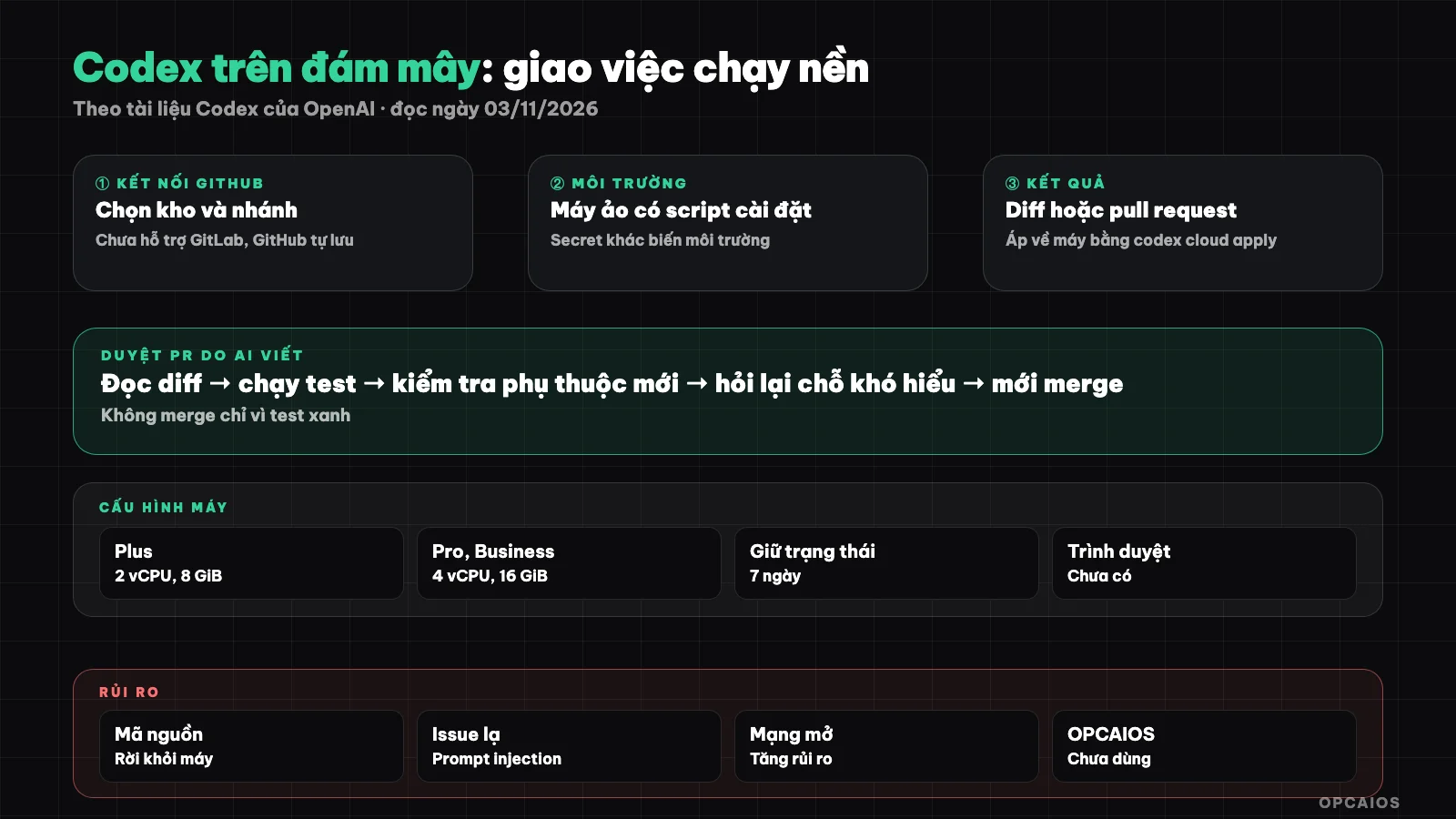
Environment is prepared once, each task runs separately, owner reviews before merging. Diagram: OPCAIOS.
How is Codex Cloud different from Codex CLI?
Codex Cloud differs from Codex CLI in where commands run: Codex CLI runs on your machine inside the operating system sandbox, while Codex Cloud runs each task in its own virtual machine managed by OpenAI, built from a pre-prepared "environment". According to the "Cloud environments" page (read on 03/11/2026), the default virtual machine for the Plus plan has 2 vCPU, 8 GiB memory, 8 GiB storage; Pro, Business, and Enterprise plans have 4 vCPU, 16 GiB memory, 32 GiB storage. The state of a task is kept for a maximum of seven days from the last time you resumed it. Codex Cloud (Legacy) still serves Code Review and GitHub integration, and has a plan to shut down. Current limitations according to the documentation: no browser and Computer Use on cloud yet, no support for self-hosted GitLab and GitHub Enterprise Server, personal skills on machine are not synced up, only skills in the repository can be used.
How do you connect GitHub to Codex Cloud?
Connecting GitHub to Codex Cloud happens when you create an environment. Steps according to the "Codex Cloud" page (read on 03/11/2026):
- Open ChatGPT on web or desktop application, log in to your ChatGPT account.
- Select Work in > Cloud, open Select environment, choose Create environment.
- Select a GitHub repository, connect GitHub if prompted, click Get started.
- Codex reads the repository, installs dependencies, runs a test; you fill in any missing information.
- View the setup report, save, click Publish, then start a new task.
Only grant GitHub permission for the repositories you need to use.
What does a Codex Cloud runtime environment consist of?
A Codex Cloud runtime environment is a reusable configuration used for all tasks: the code repository, dependencies, tools, and access settings. According to the "Cloud environments" page (read on 03/11/2026), Codex automatically recognizes the runtime, package version, and services from the repository, then records the tested settings in two fields: Install script (command to install dependencies) and Start skill (instructions to start services, check readiness). When published, the system captures the prepared file system; each new task starts from that snapshot, old tasks keep their own files, including uncommitted changes. To update, Edit then Republish; running tasks are not affected. Pre-recording lint and test commands in AGENTS.md helps Codex know how to self-check; see What is AGENTS.md.
How are network and secrets handled on Codex Cloud?
Network on Codex Cloud is configured per environment with three levels: enable all public internet, allow only package manager domain names (preset Package managers, including npm, PyPI, and many other registries), or add each domain individually. Secret values split into two types according to the "Cloud environments" page (read on 03/11/2026):
| Type | Used for | How to pass |
|---|---|---|
| Environment variable | Values programs must read directly | Pass directly into program |
| Network secret | Keys sent to a specific HTTPS service | Program only sees placeholder; proxy replaces with real key when calling allowed domain, port 443 |
The value of network secret: the real key is not in the process or files that agents can read. Additionally there is VPN via Tailscale and OIDC for cloud resources.
How to run multiple jobs in parallel on Codex Cloud?
Running multiple jobs in parallel on Codex Cloud means opening multiple jobs from the same published environment, with each job having its own workspace so they don't overwrite each other's files. From the terminal, the codex cloud subcommand (marked EXPERIMENTAL in codex --help version 0.162.1, run on 03/11/2026) has the commands exec, status, list, diff, apply. The codex cloud exec command requires the --env flag to specify the environment, has --branch to select a branch, and --attempts to run multiple attempts for the same job (best-of-N), default 1. Syntax per --help:
codex cloud exec --env <ENV_ID> --attempts 2 "Fix test errors in api folder"
codex cloud diff <TASK_ID>
codex cloud apply <TASK_ID>
Multiple attempts are convenient for comparing two approaches but consume extra quota; we haven't verified the consumption rate. Parallel jobs that modify the same file will conflict when merging, so divide work by different code regions; see the post multiple AI sessions editing one project.
How to safely review pull requests created by Codex?
Reviewing pull requests created by Codex safely means treating them like PRs from a new team member: read every line, re-run checks, don't merge just because the summary sounds reasonable. The documentation notes that Codex returns the response, diff, and command log, and you request further fixes before opening a PR. This is OPCAIOS's suggested process, not OpenAI policy:
- Re-read the original job description, then check if the diff does exactly that and only that.
- Scan for unfamiliar files: new scripts, CI changes, configuration, lockfiles; files outside scope are a sign to ask again.
- Read the command log, noting network calls and failed commands that the summary glosses over.
- Re-run tests on your CI, don't just trust the line "tests run".
- Scan for keys and sensitive data written into the code.
- Enable branch protection on GitHub: require review and checks before merging.
- Add another review round, for example comment
@codex reviewon the PR via the GitHub integration page; the documentation says review rules don't replace tests, branch protection, or human reviewers.
Details in the post using Codex to review code.
When should you submit jobs to the cloud instead of running locally?
| Situation | Choose | Reason |
|---|---|---|
| Long job, want to turn off machine | Cloud | Continue when machine sleeps |
| Many independent jobs, same setup | Cloud | Each job has its own space |
| Need files, services only on your machine | Local | Cloud only sees the repo |
| Sensitive code, contract forbids moving code outside | Local | Source code will leave the machine |
| Need browser, Computer Use, or GitLab repos | Local | Cloud doesn't support yet |
The table is a guideline. Automated runs on machine or CI are in the post codex exec running automatically.
What are the risks of using Codex on the cloud?
Risks of using Codex on the cloud fall into two groups: source code leaving your machine, and the agent being led astray by unfamiliar content like issues, README, or web pages. The page "Codex Cloud (Legacy): internet access" (read 03/11/2026) lists risks when enabling internet for the agent: prompt injection, code or key leaks, malware or dependency downloads with vulnerabilities, pulling content under license restrictions. The documentation gives an example of a GitHub issue hiding a command to send the latest commit content to an external server; if the agent follows it, data leaks. Ways to reduce risk:
- Open network at the needed level: prioritize Package managers preset, add domain names one by one.
- Read issues from strangers yourself before handing them to the agent.
- Use network secret instead of environment variables for service call keys.
- Check data policy of the package and your company before uploading customer code; this section is reference only, not legal advice.
General principles are in the post security when using AI to write code.
OPCAIOS's experience
OPCAIOS hasn't used Codex on the cloud to open pull requests, and hasn't run codex exec in CI or GitHub Actions. We use Codex via CLI version 0.162.x and the desktop app on the main work machine, each job submitted from the desktop app creates its own workspace by day, alongside Claude Code and Google Antigravity. So we have no metrics on cloud PRs. The closest real lesson comes from multiple agents working on one system: each session only commits its own files, some projects can only be edited on one machine, and we once had over 1,500 files reported as changed just because line endings changed when one agent deployed from a Windows machine.
Frequently Asked Questions
Does Codex on the cloud need my computer to be on?
No. According to the Codex documentation I read on 03/11/2026: cloud work runs in OpenAI's virtual machines and continues when your machine is asleep. You can open the same work from the web, phone, or desktop to see progress or request further edits. Only creating a new environment can be done on the web or desktop app, not on the phone.
Does Codex Cloud automatically merge pull requests into the main branch?
According to the documentation, Codex returns a diff and test results, and you decide whether to commit or open a pull request. When called in a PR via @codex through GitHub integration, Codex can push fixes to the PR branch if it has permission. That's why you should enable branch protection on GitHub, requiring review and checks before merge, so no changes go to the main branch without a person.
Is it safe to put API keys into Codex Cloud?
It's safer to use network secrets instead of environment variables. According to the Cloud environments page, the program only sees a placeholder value, and the proxy substitutes the real key when calling the allowed domain over HTTPS port 443. Environment variables are read directly by the program and agents. Whichever way you choose, use a key with narrow permissions, dedicated to the test environment, and revocable.
Does Codex Cloud work with GitLab?
According to the Cloud environments page I read on 03/11/2026, cloud environments do not yet support GitLab and GitHub Enterprise Server with self-hosting, and this is on the roadmap. The documentation table of contents has a GitLab integration page tagged Beta, but I haven't read that page so I haven't verified the scope. If your repo is on GitLab, for now use Codex CLI or the desktop app on your machine.
Should I use Codex on the cloud as a solo worker?
You should try it when you have long, independent work, your repo already has tests, and you're ready to read diffs carefully. Don't use it when the code contains sensitive customer data or you're not yet comfortable reviewing pull requests. Start with a small task on a test repo. If you want someone to guide you through workflows with AI agents on real work, see OPCAIOS's AI application training course.
Source: OpenAI's Codex documentation, the pages "Codex Cloud", "Cloud environments", "Codex Cloud (Legacy)", "Codex Cloud (Legacy): internet access" and "Review GitHub pull requests with Codex" (developers.openai.com/codex redirects to learn.chatgpt.com/docs), plus codex cloud --help version 0.162.1, read on 03/11/2026; have not verified consumption limits and which plans support Codex Cloud; OPCAIOS has not used Codex on the cloud so the PR review process is a suggestion. Experience is OPCAIOS's.
Translated from Vietnamese with AI. Read the original.
Want to apply this in your business?
Book a free 30-minute call (Vietnam time, in English or Vietnamese).