


Using Codex for code review
What is using Codex for code review? Using Codex for code review means having OpenAI's Codex programming agent read the changes (diff) of a branch, a commit, or a pull request and report potential errors before you merge, using the /review command on your machine or the @codex review comment on GitHub. This post does not claim that Codex code review catches every error, nor does it treat AI feedback as a quality guarantee: we do not have data measuring Codex's error detection rate, and the documentation we read does not provide that figure either. To be clear from the start: OPCAIOS does not use Codex code review regularly; the how-to section is based on official documentation and the --help output of Codex CLI version 0.162.1, read on 03/11/2026. The post covers: review on your machine, review on GitHub, review criteria, what AI often misses, reviewer checklist, and how to combine with tests. Not familiar with the tool? Read What is Codex.
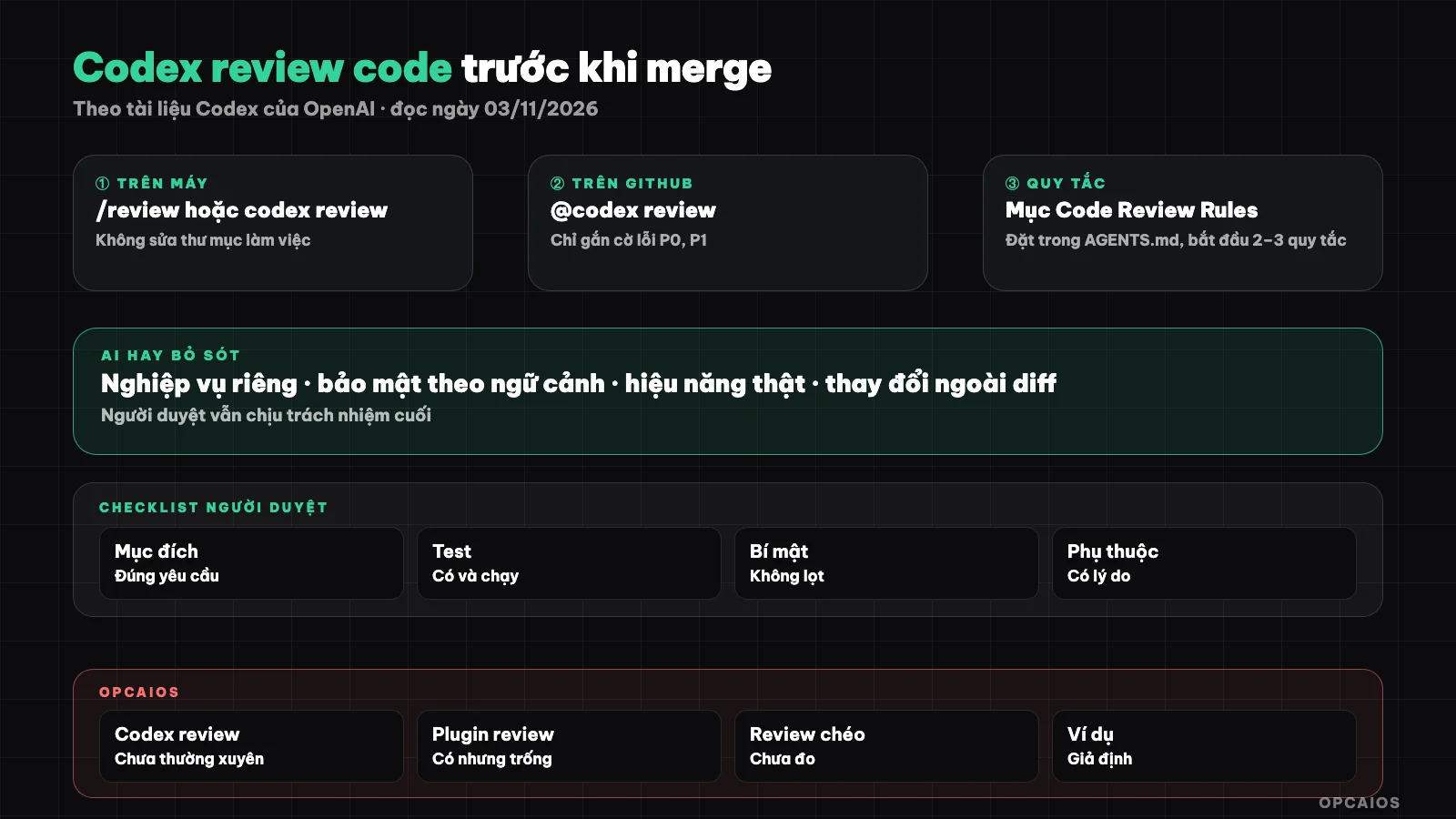
Automated tests catch mechanical errors, Codex scans the diff, the reviewer decides whether to merge. Diagram: OPCAIOS.
What can the /review command do in Codex on your machine?
The /review command is a way to start a code review session right in the Codex CLI, Codex desktop app, or IDE extension, without pushing code to GitHub. According to the "Code review" page on learn.chatgpt.com/docs (read on 03/11/2026, developers.openai.com/codex redirects there), Codex CLI offers 4 options when you type /review:
- Review against a base branch: Codex finds the merge base and reviews the entire diff of the branch against the base branch.
- Review uncommitted changes: review staged changes, unstaged changes, and files Git is not yet tracking.
- Review a commit: review only the changes made in a specific commit.
- Custom review instructions: review according to criteria you write yourself.
The desktop app and IDE extension have only the first 2 options, and the command only appears when the project is in a Git repository. According to the documentation, review does not modify the working directory, only reports findings in priority order. The review_model key in the configuration file allows you to use a different model just for review.
Is there a non-interactive review command?
Yes. codex review --help on Codex CLI version 0.162.1 shows that codex review runs review without opening a chat window, with flags --uncommitted (uncommitted changes), --base <BRANCH> (against a base branch), --commit <SHA> (a specific commit), and --title (title in the summary). The command accepts additional review criteria as text. The documentation we read does not describe this command, so details come only from the help text.
codex review --base main
codex review --uncommitted "Focus on checking access control and error handling"
How do you attach Codex to a pull request on GitHub?
Attaching Codex to a pull request means enabling Codex's Code Review feature for a connected GitHub repository, so Codex automatically posts a review on the pull request. According to the "GitHub" page in the integrations section of Codex documentation (read on 03/11/2026), the steps are:
- Connect your GitHub repository to Codex.
- Open Codex's code review settings page at chatgpt.com/settings/code-review, select your repository, and turn on Automatic review in the Review code section if you want every pull request reviewed.
- To automatically review your own pull requests, turn on Automatic review in Personal preferences and choose the trigger type.
- If you don't turn on automatic review, comment
@codex reviewon the pull request; you can add a focus, for example@codex review for issues in the database migration.
You need push or admin permissions on the repository. The documentation states that Codex only flags P0 and P1 level errors on GitHub to keep comments focused on high-risk issues. There is also an @codex security review command for security review, with full results in the Security Report tab of the task. This page does not mention ChatGPT plan requirements.
How to Write Review Criteria for Codex to Be Useful?
Review criteria are a short list of things you want Codex to examine carefully, placed in an AGENTS.md file so every review uses the same criteria. Codex's GitHub documentation recommends adding a ## Code Review Rules section to the nearest AGENTS.md file to the code that the rules govern, using ### to group checks; for each changed file, Codex applies the rules from the root file plus the most specific rules. The documentation suggests starting with 2 to 3 short rules and leaving mechanical checks like formatting and lint to CI. See more at What is AGENTS.md. Example for a course-selling website:
## Code Review Rules

### Payment
- Every change in payment webhook handling code must check signatures and prevent duplicate processing.

### Access Control
- Paid content must never be sent to the browser before checking permissions on the server.
Good criteria clearly state business risk and can be verified by reading code and are narrow enough.
What Does Codex Often Miss When Reviewing Code?
Codex often misses errors that require information outside the diff, and this is a reasoned judgment rather than a measurement result from us. An agent only sees the changes, the code it chooses to read further, and the criteria you provide; it doesn't know how real customers use the product or how large the real data is. Three areas need human examination:
- Business context: code is technically correct but violates business rules, for example discounts stacking when they shouldn't, or changing order status without sending an email. AI only knows the rules if they're written down.
- Security: vulnerabilities often lie at integration points, like a new route forgetting to check permissions or an environment variable being logged. See security when using AI to write code.
- Real performance: a query runs fast on 50 test rows but can be slow on real data; AI doesn't see table size or real throughput unless you provide the numbers.
Also, AI's findings can be wrong; compare each finding against the exact code line it points to.
Checklist Human Reviewers Should Check After Codex
The human reviewer checklist is the final step AI can't replace, because the reviewer is responsible for deciding to merge. Suggestions for use after Codex has run:
- Read the pull request description: does the diff do exactly what's stated, no more, no less.
- Read the actual diff, not just AI's summary.
- For each Codex finding, open the corresponding code line and verify the error yourself.
- Check relevant business rules: pricing, permissions, status, customer notifications.
- Check sensitive data: secrets, personal information, paid content aren't exposed.
- Check database changes: can they be rolled back, will they lock tables long.
- Ask about performance: how many rows does the new query run on, are there network calls in loops.
- Confirm automated tests have run and are green, including new tests for the changes.
- Record the reason for merging or not merging.
People who don't know code can still do steps 1, 4, 5, and 9; see more at safe process for people who don't know code.
How to Combine Codex Review with Automated Tests?
Combining Codex review with automated tests means dividing work: tests and lint catch mechanical errors, repeatable; Codex examines logic and risk in the diff; human reviewer decides. Suggested order:
| Layer | Catches | Who runs |
|---|---|---|
| Lint, type check, formatting | Syntax errors, type mismatches, style | CI, every push |
| Automated tests | Known behavior breaks | CI, every pull request |
| Codex review | Wrong logic, edge cases, P0/P1 risk | /review locally or @codex review |
| Human reviewer | Business rules, context-aware security, real performance | Project owner |
When Codex points out a real error, ask to write a test that reproduces it before fixing. To run Codex in CI, see codex exec runs automatically; sandbox mode determines what Codex can do, see Codex's approval and sandbox mode.
OPCAIOS Experience
OPCAIOS has not used Codex review code regularly, and I'll be straightforward so this post avoids confusion. The main machine has Codex CLI version 0.162.x and the Codex desktop application, used in parallel with Claude Code and Google Antigravity. The directory for Codex's code review plugin exists on the machine but is currently empty. We once asked another agent to review changes, but haven't measured its effectiveness, so we have no numbers on bugs caught. One lesson from multiple agents fixing the same system (see multiple AI sessions fixing one project): some bugs lie entirely outside logic—for example, one deploy from a Windows machine changed over 1,500 files just because of line break style. Looking at the number of changed files before reading details helps catch this kind of error early.
Common Questions
Does Codex code review replace human review?
No. Codex code review scans diffs quickly and flags P0, P1 risks, but only knows what's in the code and the criteria you've written. Business rules not recorded, real data or agreements with customers lie outside its view, and findings can be wrong. Use Codex as a second reader; the decision to merge still belongs to the person responsible for the product.
Does the /review command fix code on its own?
According to Codex's "Code review" documentation page (read 03/11/2026), review doesn't change the working directory: Codex only reports findings in priority order. To fix them, you request changes in the same session, and your sandbox mode and approval mode still apply. The safe way is to read each finding, pick the ones that are real, then have Codex fix them on a separate branch.
Why doesn't Codex comment on small bugs on GitHub?
The GitHub integration documentation says Codex only flags P0 and P1 level bugs to keep comments focused on high risks. So no comment doesn't mean the pull request has no small bugs. Format, naming, and style issues should go to lint and formatter in CI. To make Codex pay attention to a specific area, add focus after @codex review, or write rules in the Code Review Rules section of AGENTS.md.
How many review rules should I write in AGENTS.md?
Codex documentation recommends starting with 2 to 3 short rules then adding gradually. Rules should tie to real business risks in your project, like payments, access, personal data, and live in AGENTS.md near the most relevant code. After each bug escapes review, consider adding a rule or a matching test.
Can someone who doesn't know code use Codex review?
Yes, at a support level, if you treat the results as a checklist to verify rather than a judgment call. Ask Codex to explain each finding in plain language, point out the line and consequence for customers. What you do best is check business rules, sensitive data, and why you're merging. To learn a safe review process for your real project, see OPCAIOS's AI application training course.
Source: Codex documentation from OpenAI, the "Code review" and "GitHub" pages on learn.chatgpt.com/docs (developers.openai.com/codex redirects there), and codex review --help from Codex CLI version 0.162.1, read 03/11/2026; example review rules and course website are hypothetical; ChatGPT Code Review terms not verified, Codex catch rate not measured, review commands not tested on OPCAIOS repositories. The experience is OPCAIOS's.
Translated from Vietnamese with AI. Read the original.
Want to apply this in your business?
Book a free 30-minute call (Vietnam time, in English or Vietnamese).