


What is CRM?
What is CRM? CRM (customer relationship management) is software that collects information about current and prospective customers in one place: who they are, what we've discussed, where they are in the buying process. According to Salesforce's introduction page (read on 25/10/2026), CRM stores contact information, interaction history, purchase history, support requests and call notes. This post explains what CRM is, whether a solo business really needs one, how to choose between spreadsheets, free CRM and building your own, along with OPCAIOS's experience. Honest note: no software creates customers out of thin air, and all prices below are only what we read on the announcement page on the stated date.
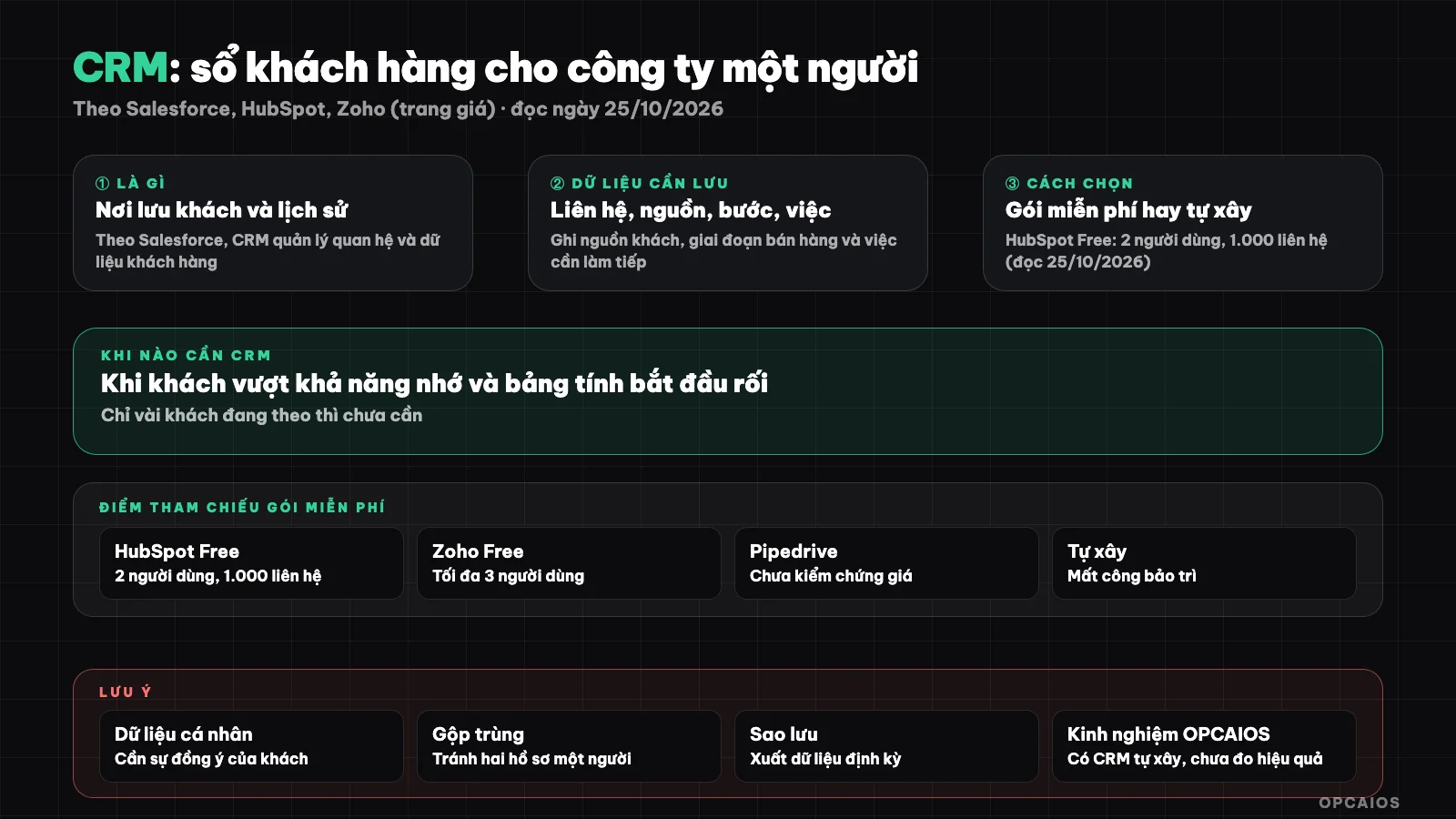
Basic flow of a small CRM: customers enter records, move through the process, have next steps. Diagram: OPCAIOS.
What is CRM and what are its parts?
CRM is the single place where you record your relationship with each customer: contact information, customer source, exchange history, open sales opportunities and next steps. The goal isn't to store for completeness, but so you don't forget to follow up with someone and don't ask the customer to repeat what they've already said.
A small CRM usually has four blocks. The first block is contact records, including name, email, phone number, where they came from. The second block is the sales pipeline, usually shown as a drag-and-drop board: new, contacted, consulting, quote, won, lost. The third block is tasks and reminders. The fourth block is a timeline recording every interaction so next time you can read it back in seconds.
CRM differs from email marketing software in that it tracks each individual and each deal, while email tools send in bulk. The two types usually connect; see more at what is email marketing.
Does a solo business need CRM?
Yes, but only when tracking customers starts exceeding your memory. If you get just a few customers a month and remember each one clearly, a spreadsheet is enough. When you have dozens of leads at once, multiple incoming channels and overlapping appointments, CRM helps you avoid missing things.
Signs you're ready:
- You once forgot to reply to a customer and lost the deal because of it.
- Customer information is scattered across email, messages, forms and notebooks.
- You don't know which leads are waiting for your action.
- You want to know which channel brings in customers instead of guessing.
Signs you're not ready yet: roughly under a dozen customers being tracked (our convention, not a scientific measure). If you want to build your sales process before choosing a tool, read automated sales funnel for solo workers.
Must-have features and skippable features
For a solo business, only three features are mandatory: contact records with history, simple pipeline and task reminders. Everything else gets added when there's real need, and adding too early just wastes your data entry time.
| Feature group | Need now? | Notes |
|---|---|---|
| Contact records and notes | Yes | Foundation of every CRM |
| Drag-and-drop pipeline | Yes | 4 to 6 steps is enough |
| Task reminders, appointments | Yes | Prevents forgetting |
| Import customers from forms | Should have | Avoids manual typing |
| Automation | Later | Only turn on when you understand the rules |
CRM pricing: free or paid?
Most small CRMs have limited free plans and paid plans billed per user per month. Below is what we read on official pricing pages on 25/10/2026; prices may change, not including tax, please check the original page before deciding.
| CRM | Free plan | Lowest paid plan | Source |
|---|---|---|---|
| HubSpot CRM | Free, up to 2 users, 1,000 contacts, no time limit | Starter plan says "from 7 USD/user/month", next to it shows 20 USD/user/month; the page doesn't clarify which is which, so we consider it unclear | HubSpot pricing page |
| Zoho CRM | Free Edition, up to 3 users | CRM Plus "from 20 USD/user/month"; pricing for Standard, Professional, Enterprise tiers unclear in page text | Zoho pricing page |
| Pipedrive | Unverified: pricing page returned 403 error when we accessed it | Unverified | could not access |
For solo work, HubSpot's free plan limit of 1,000 contacts usually suffices in the early stage, but carefully review the terms before putting your customer data into any foreign service.
Spreadsheets, Off-the-shelf CRM, or Build Your Own?
Three paths for three stages: spreadsheets for the early phase, off-the-shelf CRM when you need processes and reminders, build your own only when you have very specific needs and can handle maintenance yourself. Choose based on your customer volume and the time you're willing to spend, not on how fancy the tool looks.
| Criteria | Spreadsheet | Off-the-shelf CRM | Build Your Own |
|---|---|---|---|
| Initial cost | Nearly zero | Free tier or per user | Time and maintenance labor |
| Reminders, pipeline | Manual | Built-in | On your terms |
| Import customers from forms | Manual or integration | Usually included | Must write it yourself |
| Risks | Easy to miss, easy to make mistakes | Dependent on vendor, price changes | Bugs and security fall on you |
| Best for | Fewer than dozens of customers | Most solo businesses | Specific needs |
This is a general description, not a measurement. If you use automation tools like n8n to connect forms to your CRM, read What is n8n to understand the limits before you build.
How to Choose a CRM in 5 Steps
Choose based on your actual sales process, then test it with real data for a week. Don't choose based on the longest feature list, because you'll only use a small part of it.
- Write down the steps from when a customer first knows about you until they pay. That's your pipeline.
- List your customer sources: forms, messages, scheduling, purchases on your website.
- Pick 1 to 2 candidates with free tiers or trial periods.
- Enter 20 real customers and track them for a week. If data entry exhausts you, the tool isn't right for you.
- Check how to export data to a CSV file, so you don't get locked into one vendor.
CRM Risks and Limits
The biggest risk is dirty data: incomplete entry, duplicate customers, missing status updates, causing wrong reports and making you lose trust in the system. The second risk is vendor dependency, the third is customer data leaks.
- Duplicate customers: the same person entered from different channels under different emails. You need a way to merge records.
- Automation sending email to the wrong person: turn it off by default, only turn on individual rules after you test them.
- Security: limit who can view and export data; see 5 Rules for Business Data Security When Using AI.
OPCAIOS Experience
We built an in-house CRM for opcaios.org, copying ideas from another CRM project by the same owner, and we can verify in the source code that it has these parts: contact records auto-created from forms, scheduling and orders; drag-and-drop pipeline; tasks and reminders; alerts when a lead waits too long for a response; merge duplicate records; send email from CRM with unsubscribe links; and automation rules. All email rules to customers are off by default; users must turn them on.
Real limits: this self-built version cuts back a lot compared to the original project (quotes, after-sales care, loyalty points). We don't publish its customer count, revenue, or effectiveness, and haven't measured whether it raises our closing rate. Some messaging channels only work when users provide their own keys and approve access from third-party platforms; we've only tested that part with dummy data. Building our own made sense for us because we already had a coding team (AI agents coordinated by one person); for most solo businesses, using a free tier of an off-the-shelf CRM takes less work. The bigger context on how to run solo: AI systems that run solo.
Read more: Best CRM for small business 2026.
Frequently Asked Questions
How is CRM different from Excel or Google Sheets?
Spreadsheets store data but don't remind you of tasks, don't have a timeline for each customer, and don't automatically capture customers from forms. CRM does all of that. With fewer than several dozen customers, spreadsheets still work fine.
Is a free CRM enough for a one-person company?
Usually it's enough in the early stage. HubSpot advertises their free plan at maximum 2 users and 1,000 contacts, Zoho advertises their free plan at maximum 3 users (checked on 25/10/2026). Check their main pages since terms can change.
Should I build my own CRM?
Only if you have very specific needs or already have the ability to code and maintain it. Building your own costs effort to fix bugs and handle security. Most people should start with an existing CRM and export data to CSV to keep your switching options open.
Does CRM find new customers for you?
No. CRM manages customers already in the system. To get new customers you need content, ads, referrals, or other methods; see AI tools for finding B2B customers.
Where can I learn how to use CRM and AI for small business?
You can check out OPCAIOS's AI application training course, where we guide you through building sales processes and customer care with AI tools.
Sources: Salesforce CRM overview page, HubSpot CRM pricing page, and Zoho CRM pricing page (all checked on 25/10/2026); Pipedrive pricing not verified due to page returning 403 error, and Zoho package pricing not verified because the page text didn't display numbers. The "several dozen customers" threshold is our convention, not measured data. Experience is from OPCAIOS.
Translated from Vietnamese with AI. Read the original.
Want to apply this in your business?
Book a free 30-minute call (Vietnam time, in English or Vietnamese).