


n8n is a workflow automation platform that lets you connect applications and services together using drag-and-drop diagrams, with the ability to write code when needed. n8n runs on your own server or the company's cloud service, and now supports AI agents. For small business owners, n8n replaces repetitive work like copying data from forms into spreadsheets, notifying you when new orders arrive, or summarizing emails, with an automated process.
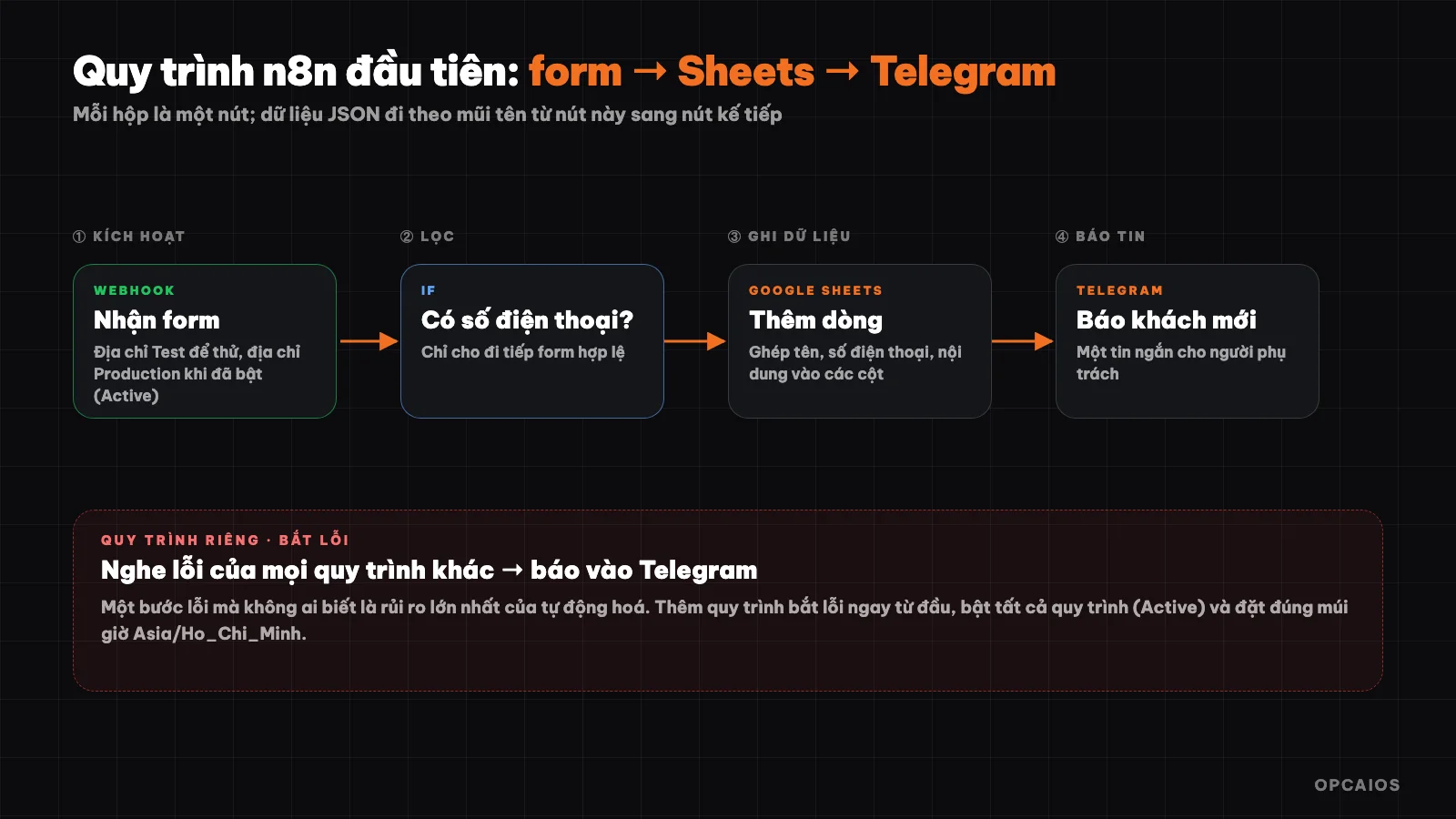
A typical n8n workflow: an event triggers, then processing steps connect in sequence. Diagram: OPCAIOS.
What is n8n?
n8n is a workflow automation and AI agent building platform under the "fair-code" model: open source code, self-installable, but released under the Sustainable Use License rather than a pure open source license. According to the official README, n8n combines a drag-and-drop interface with JavaScript or Python code when needed, connects over 1,500 services, and has over 9,000 pre-built workflow templates.
The name "n8n" is pronounced "n-eight-n", short for "nodemation": "node" because the interface uses nodes that connect together and runs on Node.js, "mation" from "automation". As of October 2026 on GitHub, the project has over 208,000 stars and continues to be updated regularly.
Three features make n8n different from many similar tools:
- Self-hosted: you run n8n on your own server, your data never leaves your managed infrastructure.
- Code fallback: when you hit something difficult, you insert a code node instead of being blocked by the interface.
- AI support: built-in AI agent nodes, can connect to models from OpenAI, Anthropic, Google, or open source models, and switch providers without rebuilding your workflow.
How does n8n work?
A workflow in n8n is a chain of nodes connected by arrows: the first node is a trigger node, and later nodes process data in sequence. Data flows through each node as a list of JSON items, and the next node can read every field that the previous node created.
| Node type | Role | Example |
|---|---|---|
| Trigger | Start the workflow | Webhook receives data, schedule runs at a time, new message |
| Action | Work with an application | Add row to Google Sheets, send Telegram message |
| Logic | Branch, merge, filter | IF, Switch, Merge |
| External call | Call any API | HTTP Request |
| Code | Custom processing in JavaScript or Python | Code |
| AI | Use AI models, agents | AI Agent |
If you're not yet familiar with two foundational concepts, read first What is API? and What is Webhook?: almost every n8n workflow starts with a webhook and uses API call nodes to do the work.
How is n8n different from Make and Zapier?
n8n, Make, and Zapier all do the same thing: connect applications and run workflows automatically. They differ mainly in where they run, how they charge, and how much technical freedom they offer.
| Criterion | n8n | Make and Zapier |
|---|---|---|
| Where it runs | Self-host on your own server or use n8n's cloud | Cloud service |
| How it charges | Self-host: cost is your server; cloud: by plan | By plan and number of actions |
| Write code | Has code node, can use npm libraries | More limited |
| Your data | Can keep entirely on your own infrastructure | Goes through the provider's infrastructure |
| Ease for beginners | Needs a bit more familiarity with concepts | Easier to start |
Choose Make or Zapier if you want to be running in minutes and don't want to manage a server. Choose n8n if you need data control, have large volume, or need to embed code and AI into your workflow. Details on each tool are in the directory: n8n, Make, Zapier.
How do I install n8n?
Installing n8n means running a Docker container on your machine or on a server. According to the official README, there are two ways. The quickest way is using the installation command (you need to install Docker first):
curl -fsSL https://get.n8n.io | sh
Or run it manually with Docker, with a storage volume so your data doesn't get lost when you restart:
docker volume create n8n_data
docker run -it --rm --name n8n -p 5678:5678 -v n8n_data:/home/node/.n8n docker.n8n.io/n8nio/n8n
Then open the editor at http://localhost:5678. Running on your personal machine is enough for learning. If you want the workflow to run 24/7 and receive webhooks from the Internet, you need a separate server (VPS) with a public address and HTTPS. OPCAIOS itself runs n8n on a separate server for internal workflows.
Two things you shouldn't skip when installing yourself: back up the data volume and set the encryption key for credentials (environment variable N8N_ENCRYPTION_KEY), because losing the key means connected accounts can't be read again; and don't leave the editor open publicly without authentication.
How do I create my first n8n workflow?
Your first workflow should be simple and immediately useful: when someone fills out a contact form on your website, write it to Google Sheets and send a message to Telegram. Follow these steps:
- Create a new workflow and add a Webhook node as the trigger. n8n provides two addresses: a Test address and a Production address.
- Paste the Test address into your website or form's webhook section, send a test form so n8n receives a sample of the data.
- Add an IF node to filter, for example only process forms that have a phone number.
- Add a Google Sheets node (add row) and map the form fields to the columns.
- Add a Telegram node to send a message that there's a new customer.
- Activate the workflow (Active) then switch your website to the Production address.
The website opcaios.org can send a webhook when there's a new form submission, with a signature so the receiver can verify it; the post What is a webhook? explains how to check the signature, and n8n can do this with a Crypto node combined with an IF node.
Common mistakes when using n8n
Most mistakes from new users come from a few repeating places.
- Confusing Test and Production addresses. The Test address only works while you're listening in the editor; the Production address only receives data when the workflow is active. Sending to the Production address when the workflow isn't active will get a 404 error. We once ran into this exact situation: a webhook used to connect internal agents returned 404 because the corresponding workflow hadn't been imported and activated on the server.
- Forgetting to activate the workflow. A workflow that's saved but not Active won't run automatically on schedule.
- Wrong timezone. The schedule node runs according to n8n's timezone; set the correct timezone (for example Asia/Ho_Chi_Minh) so your 8 AM workflow doesn't run at 1 AM.
- Misunderstanding multi-item data. A node that receives a list will run subsequent nodes once for each item; if you only want to run once, you need to combine them first.
- Not handling errors. When a step fails, the workflow stops silently. Add a separate workflow listening for errors and report to Telegram or email so you know right away.
What should I watch out for with security when installing n8n myself?
n8n holds keys and passwords for many services, so an n8n server is a worthwhile target and needs protection like a small safe. The minimum checklist:
- Run behind HTTPS and restrict access to the editor with strong authentication.
- Update regularly n8n and your server's operating system.
- One key per service, minimum permissions: use read-only permissions if the workflow only queries.
- Verify incoming webhooks with a key or signature, so no one can fake events.
- Back up regularly your data and encryption key, and test the restore.
When should I use n8n, when shouldn't I?
Use n8n when the workflow repeats many times, involves two or more applications, and the rules are clear enough to write out as steps. For example: push customers from a form into a CRM, compile a weekly report, send appointment reminders, categorize emails with AI.
Don't use it when the work only happens a few times, when the rules aren't clear and need judgment on a case-by-case basis, or when you have no one to maintain the server. In those cases, a cloud service like Make or Zapier, or doing it manually, is less troublesome.
With AI agents, the README says n8n supports multi-step workflows, using tools and with a human review step. Keep a human review step before actions that can't be undone like sending bulk emails or changing customer data; see the post What is graph engineering? on how to design AI workflows with independent verification steps. If you need AI to call into your system, the post What is MCP? explains the connection standard.
Frequently Asked Questions
Is n8n free?
Self-hosting n8n on your own server doesn't cost a license fee under the Sustainable Use license for internal use, but you pay for the server and maintenance. n8n's cloud version charges by plan. Read the license carefully on the official site if you plan to resell n8n as a service to customers.
Is n8n open source?
Not entirely. n8n is "fair-code": the source is public and self-hostable, but the Sustainable Use license restricts how you can commercialize it, unlike pure open source licenses like MIT.
Do I need to know programming to use n8n?
Not required for basic workflows: drag and drop nodes and map fields. Knowing how to read JSON and understanding APIs help a lot when workflows get more complex, and the Code node lets you use JavaScript or Python when needed.
Should I use n8n or Make?
Choose Make if you want to get running immediately without managing servers. Choose n8n if you need data control, high volume, or need to embed code and AI. Many people start with the cloud version and switch to self-hosting as they scale.
Where can I learn n8n quickly?
Start with small workflows like the form to Google Sheets example above, use ready-made templates on the official site, and read the documentation at docs.n8n.io. If you want to build automation workflows for your business, check out OPCAIOS's AI application training course.
Source: Official README of n8n on GitHub and n8n.io (checked 22/10/2026); OPCAIOS's experience running n8n.
Translated from Vietnamese with AI. Read the original.
Want to apply this in your business?
Book a free 30-minute call (Vietnam time, in English or Vietnamese).