


What is automatic appointment scheduling?
Automatic appointment scheduling is a system where customers choose an available time slot on your calendar, receive instant confirmation, get reminders before the appointment, and can cancel or reschedule on their own, instead of going back and forth with messages like "when are you free?"
For single-person services (consulting, training, care, repair), appointments are the most perishable inventory: an hour a customer no-shows is an hour you can't sell again. This post doesn't promise specific no-show reduction numbers; reminders and deposits usually help, but the degree of help depends on the industry and customers, and OPCAIOS doesn't have its own measurement data yet. The post covers the appointment flow, how to set available time slots, confirmation, reminders via email and Zalo, cancellations and rescheduling, deposits, time zones, how to measure no-show rates, a general comparison with Calendly and Cal.com, and the actual status of the scheduling page on opcaios.org.
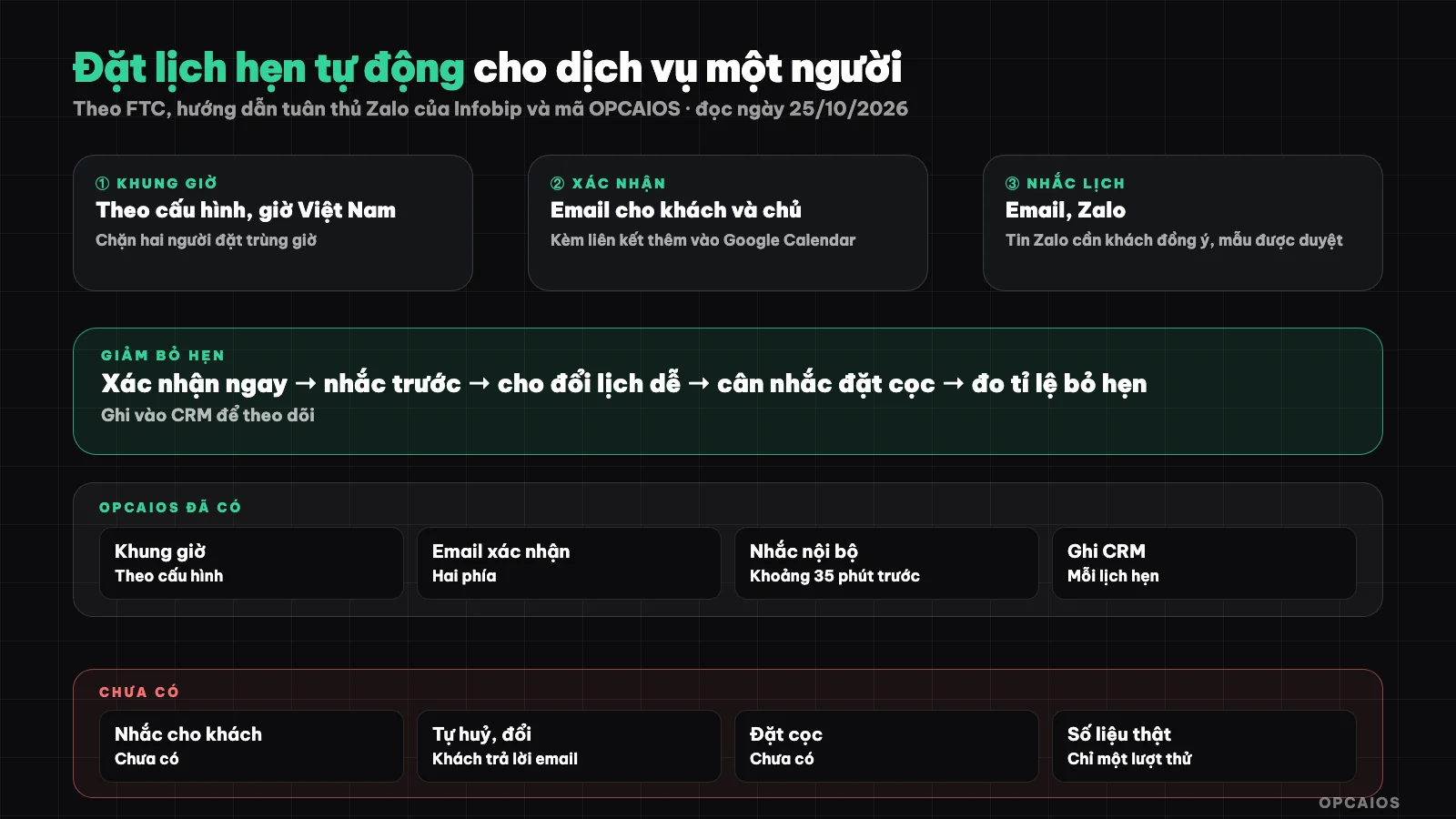
The appointment flow from when the customer picks a time to when you record the outcome of the appointment. Diagram: OPCAIOS.
What steps are in the automatic appointment scheduling flow?
The automatic appointment scheduling flow is a sequence of steps from when the customer opens the page to when the appointment happens, with the system doing one thing at each step instead of you:
- Scheduling page: clearly state how long the appointment is, whether it's free or paid, and what channel it's on (in-person, phone call, video call).
- Available time slots: the system calculates from your working hours, minus the hours already booked.
- Customer information: name, email, phone number, topic; add a notes field so you can prepare.
- Reserve and confirm: record the appointment, prevent two people from booking the same slot, send confirmation to the customer and to you.
- Reminder: one or two reminders before the appointment.
- Cancel or reschedule: customer does this themselves via link, or replies to email.
- Record the outcome: showed up, no-showed, late cancellation; this is data to measure.
Step 7 is the one most often skipped, and without it you can't tell whether reminders work. Appointments are also one step in the automated sales funnel, so link appointment bookings to the customer record.
How should you set available time slots?
Available time slots are the time periods customers can choose from, created from five parameters: working days in the week, time range each day (for example morning and afternoon separate), length of each slot, minimum advance notice time, and how many days ahead can be booked. Advance notice time (for example no booking within the next 12 hours) protects you from surprise schedules; limiting how far ahead limits customers from booking far away and forgetting. Someone offering a service should leave gaps between slots for notes and preparation, and only open as many slots as you can actually keep. If you use multiple calendars (personal calendar, work calendar), the tool needs to read your busy times to avoid double-booking; this is something tools like Calendly and Cal.com already do, but self-built systems have to handle it themselves.
What should an appointment confirmation include?
An appointment confirmation is a message sent right after the customer books, to help them trust the spot is held and know what to do next. A good confirmation email includes:
- Date and time with time zone clearly stated, and duration (for example 30 minutes).
- How to join: address, phone number, or video call link.
- Link to add to calendar (Google Calendar or calendar file).
- How to cancel or reschedule.
- What the customer should prepare before the appointment.
Send a copy to yourself so you don't have to open the admin panel to know you have an appointment. Transactional email should go through a reliable mail service so it doesn't end up in spam; see What is Brevo and What is email marketing.
How to Remind Customers of Appointments via Email and Zalo?
A reminder is an automated message sent to customers before their appointment so they remember, confirm again, or proactively cancel instead of missing it. The common approach is two reminders: one a day before, and one a few hours or tens of minutes before. Reminder channels:
- Email: cheap, easy to set up, but many customers in Vietnam don't check email often.
- Zalo: customers in Vietnam read more. Zalo has a ZNS notification service that sends templated messages to phone numbers; according to Infobip's compliance guidelines (a provider that integrates Zalo, read 25/10/2026), businesses can only send when customers have agreed or been informed beforehand of the message's purpose, and the template must be approved by Zalo and contain no advertising content. We haven't read Zalo's official documentation on template approval conditions and fees, so we don't mention numbers.
- SMS text messages: high coverage, but costs per message.
Reminder messages should have a button or link to "cancel / reschedule". The goal is to turn a missed appointment into an early cancellation so you can free up that time slot. With Zalo OA and Messenger sharing the same inbox, see customer care for Zalo OA, Messenger with AI.
What Rules Should Cancellation, Rescheduling, and Deposits Follow?
A cancellation and rescheduling policy is a rule stating how late customers can cancel or reschedule before their appointment, and what happens if they cancel late or don't show up. Letting customers reschedule via a link reduces back-and-forth messaging; limiting the number of reschedules prevents calendars from being pushed around indefinitely. A deposit is money customers pay upfront to hold a spot, deducted from the service fee or forfeited if they miss the appointment; deposits suit paid appointments or those requiring significant preparation, and fit less well with free initial consultations since they reduce the number of bookings. If you collect deposits via bank transfer, you can use a QR code with embedded content for automatic reconciliation, see collect payment with bank transfer QR codes via SePay. Write your refund policy before collecting deposits, and display it right on the booking page.
How Does Time Zone Affect Appointment Booking?
Time zone is a common source of booking errors when you have customers in other countries or your server runs on international UTC time. Vietnam uses UTC+7 and doesn't observe daylight saving time, so domestic customers rarely face this issue; customers in places with daylight saving time experience changing time differences by month. Three safety rules:
- Store appointment times as absolute timestamps (UTC), only convert to local time when displaying.
- Clearly state the time zone in all emails and reminders, for example "(Vietnam time)".
- If you serve international customers, display time slots according to the customer's browser time zone, or use a tool with this feature built in.
How Do You Measure the No-Show Rate?
The no-show rate is the number of appointments customers missed without notifying you, divided by the total number of confirmed appointments due in the same period. To measure it, each appointment must have a status after the appointment time: attended, no-show, cancelled early, cancelled late. Example (hypothetical, not real data): 40 appointments due in a month, 6 customers didn't show and didn't notify, no-show rate is 6/40 = 15%; early cancellations don't count as no-shows. Track by month and by customer source (ads, referral, blog post), since customers from different sources behave differently. When you change something (add Zalo reminders, add deposits), compare the rate before and after, but with only a few dozen appointments per month, small differences might be random; don't conclude from one month. This report can be sent automatically weekly, see automatic weekly reports using n8n.
Build Your Own or Use Calendly, Cal.com?
Calendly and Cal.com are ready-made booking services: connect Google or Outlook calendars, create a booking page, send confirmations and reminders via email, many plans are paid and have integrations. Cal.com markets itself as open source and describes an "open core" model on its GitHub repository (read 25/10/2026); we haven't verified the specific license of each component, so read the license file before self-hosting for commercial purposes. We don't mention pricing because we haven't read the official pricing page.
| Criterion | Calendly / Cal.com | Build Your Own |
|---|---|---|
| Time to start | Fast | Slower, needs testing |
| Check busy times | Built-in | You build it |
| Zalo reminders | Usually need extra integration | Can add if you have ZNS |
| Customer data | Sits with outside service | Sits in your CRM |
| Cost | By service plan | Development and maintenance time |
OPCAIOS's Experience
OPCAIOS's booking page is a free 1:1 conversation scheduling page on opcaios.org, programmed by an AI agent; according to the project notes, the setup includes 30-minute sessions, Monday through Friday, with a minimum 12-hour advance notice, and bookings up to 21 days in advance. What's actually in the source code: the owner configures working days, time slots, session length, notice time, and number of days for advance booking in the admin panel; time slots are calculated in Vietnam time (UTC+7) and exclude already-booked slots; a database constraint prevents two overlapping active schedules; after booking, the customer receives a confirmation email clearly stating "Vietnam time" with a link to add to Google Calendar, and the owner receives a separate email; the booking is recorded in the customer's profile in the CRM; about half an hour before the appointment, the owner receives an internal reminder with customer information.
What hasn't been done: no automatic reminder sent to customers yet, no reminders via Zalo, no self-cancel or reschedule link (customers reply to email to reschedule), no deposit collection, no reading external busy calendars, and no "no-show" status so we can't measure the no-show rate. The project notes only record one test booking created and then canceled by the system itself; we don't have real-usage data to publish yet.
Frequently Asked Questions
Does a solo service business need a booking system?
If you're getting several appointments a week or more, a booking system saves time back-and-forth messaging and reduces time mix-ups. With a few appointments a month, a form with a pre-filled free-time schedule might be enough. The consideration is less about the tool and more about the process: who confirms, who reminds, how customers reschedule. Start with a tool that has a free version or a simple booking page, measure for a few months, then decide whether to build your own to integrate with your CRM and Zalo channel.
How many times should you remind a customer before an appointment?
Common practice is twice: one day before so the customer can plan or cancel early, and a few hours or a few dozen minutes before so the customer remembers to join. More reminders can be annoying and waste message costs if you use SMS or ZNS. Each reminder should include the date and time with the time zone, how to join, and a link to cancel or reschedule. Measure the no-show rate before and after adding another reminder, tracking for at least a few months, because with few appointments the difference in a month might just be random.
Should you collect a deposit when a customer books?
Collecting a deposit works for paid appointments, appointments that take preparation, or industries with high no-show rates. For a free first consultation appointment, asking for a deposit might reduce the number of people booking, since customers aren't confident enough to pay upfront. If you collect a deposit, clearly state your refund policy (how far in advance to cancel for a full refund, what happens if you cancel late) and display it right on the booking page, before the customer pays. Bank transfer with a QR code with content helps you match deposits automatically instead of checking bank statements by hand.
Do you need customer consent to remind about appointments via Zalo?
According to Infobip's Zalo compliance guidelines (read on 25/10/2026), businesses may only contact customers through the ZNS notification service when the customer has agreed, provided their phone number, and been told the purpose of the message in advance; violating this can result in your channel being blocked. We haven't been able to read Zalo's official documentation on template approval conditions and fees. The safe way is to add a checkbox for customers to consent to appointment reminders via Zalo in the booking form, and only send messages directly related to the appointment, no ads.
Build it yourself or use Calendly, Cal.com?
Use an off-the-shelf tool if you need to launch now and your appointments aren't tightly tied to your CRM: calendar sync, booking page, confirmation, and email reminders all come built-in. Build your own when you want customer data in your system, reminders via Zalo, or appointment scheduling tied to your sales funnel; in return you handle busy calendar reading, time zones, testing, and maintenance yourself. With a coding agent, the code part moves pretty fast, but testing the cancel, reschedule, and reminder flows still needs a person. To learn how to build these kinds of workflows with AI, check out OPCAIOS's AI application training.
Source: Infobip, Zalo compliance and guidelines (read on 25/10/2026); Cal.com code repository on GitHub (read on 25/10/2026). Not verified: Zalo's official ZNS documentation (conditions, fees), Cal.com's specific license, Calendly and Cal.com pricing. The experience is OPCAIOS's.
Translated from Vietnamese with AI. Read the original.
Want to apply this in your business?
Book a free 30-minute call (Vietnam time, in English or Vietnamese).