



What is Gamma?
Gamma is a visual communication platform that uses AI to create presentations, documents, websites, images for social media and many other formats from a topic, a paragraph of text or an input file. According to its homepage (read on 24/10/2026), Gamma has an AI agent that helps outline first and then edits through conversation, imports Microsoft PowerPoint and PDF, exports to PowerPoint, PDF and many other formats, and connects with over 25 tools.
For example, a small team can try the Free plan first. The Free plan has 400 credits when you sign up; paid plans are Plus, Pro and Ultra. This explanation has 5 parts: (1) What is Gamma; (2) how to create content; (3) plans and prices according to the pricing page shown to Vietnamese users; (4) when to use Gamma instead of PowerPoint; (5) notes on quality and data, along with OPCAIOS's experience.
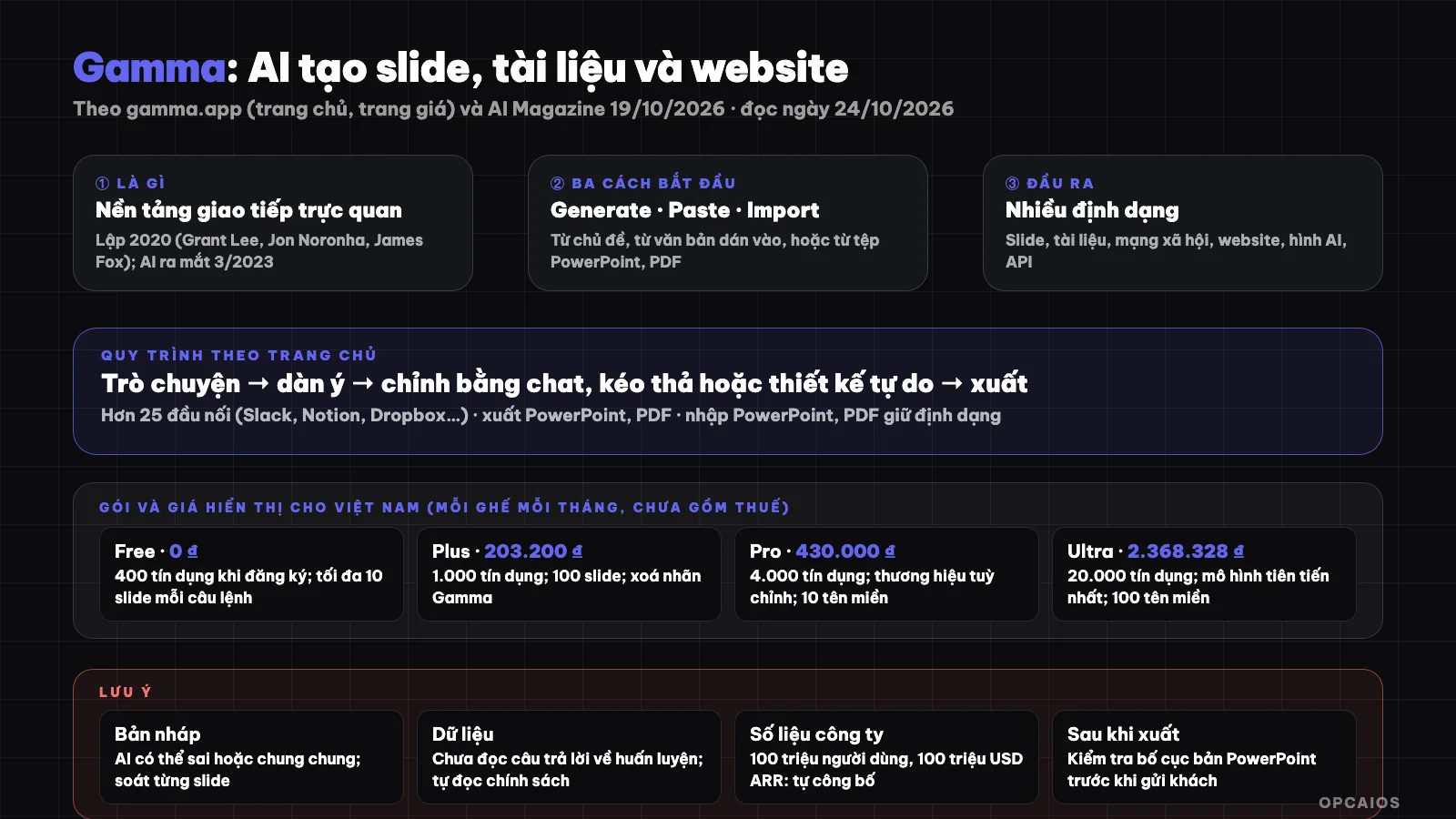
Gamma turns a topic or text into slides, documents, websites; always need to review content before use. Diagram: OPCAIOS.
What is Gamma and who created it?
Gamma is a software company that created a slide and document platform using AI. According to a summary article by AI Magazine (19/10/2026), Gamma was founded by Grant Lee, Jon Noronha and James Fox in 2020 in San Francisco, and launched an AI product in March 2023. Gamma creates an initial draft from a prompt and then lets users edit, change style and share as a presentation, document or website.
Also according to this article, Gamma surpassed $100 million in annual recurring revenue (ARR) with around 50 staff, is profitable, and has raised a total of around $90 million. Series B round of $68 million led by Andreessen Horowitz in November 2025 with a valuation of $2.1 billion. The numbers of users, over 100 million, and revenue are disclosed by the company; OPCAIOS does not independently verify, and other sources cite different total funding amounts. For example, if you need to compare the stability of a supplier, cross-reference multiple sources rather than relying on just one article.
Which AI models does Gamma use?
Gamma uses multiple AI models at once and routes each task to the appropriate model, according to an article by AI Magazine (19/10/2026). According to the company, Anthropic's Claude model powers over half of AI features, along with models from OpenAI and Google. This is information disclosed by the company, OPCAIOS has not independently verified. For example, a task to write an outline and a task to generate an image might use two different models. Therefore, when you input content into Gamma, you should read the data policy to know which providers your content may go through. If you want to understand these models, see What is LLM?.
What can Gamma create?
Gamma can create 6 groups of products according to Gamma's homepage (read on 24/10/2026). Group 1 is presentations, exported to PowerPoint, PDF and other formats. Group 2 is documents, from single page documents to long structured reports with images. Group 3 is images for social media like carousels and graphics in platform-specific sizes. Group 4 is websites, with a "input prompt, publish, share link" process. Group 5 is AI images like infographics, illustrations and brand-aligned images. Group 6 is API to automate creation and editing in your product. For example, an online course seller could create lecture slides using Gamma and then export to PowerPoint or PDF.
The process according to the homepage starts with a conversation, the agent outlines first so you can shape the story, then edit through chat next to the slides, drag and drop intelligent layout or switch to free design mode. OPCAIOS's introduction page describes three ways to start: Generate (AI writes from a topic), Paste (AI layouts the content you paste) and Import (convert files or webpages to Gamma format); see Gamma utilities page.
What packages does Gamma have and what are the prices?
Gamma has 4 packages: Free, Plus, Pro and Ultra, priced per seat per month. According to the official pricing page displayed to Vietnamese users (read on 24/10/2026), prices are displayed by location and may differ elsewhere, excluding taxes, and save up to 28% when paying annually. The Free package costs 0 ₫ with 400 credits upon signup and a maximum of 10 slides per command. The Plus package costs around 203,000 ₫ per seat per month, with 1,000 credits per month and a maximum of 100 slides per command. The Pro package costs 430,000 ₫ per seat per month, with 4,000 credits per month. The Ultra package costs around 2.37 million ₫ per seat per month, with 20,000 credits per month. The exact figures are in the table below.
Gamma charges AI costs using credits; the pricing page has a FAQ section about credits but OPCAIOS has not been able to read the content of the answers, so I'm not stating the credit consumption level for each presentation. The company also mentions SOC 2 Type II compliance. For example, a team of 3 users on the Plus plan will need 3 seats, as the price is calculated per seat. Please check the current pricing page before purchasing.
Detailed pricing table for each package
| Package | Price (per seat per month) | Key points |
|---|---|---|
| Free | 0 ₫ | 400 credits on signup; maximum 10 slides per command; import PDF and PPTX; export PDF, PPTX, PNG and Google Slides |
| Plus | 203,200 ₫ (2,438,400 ₫ per seat per year) | 1,000 credits per month; maximum 100 slides per command; remove Gamma branding; advanced AI image models |
| Pro | 430,000 ₫ (5,160,000 ₫ per seat per year) | 4,000 credits per month; premium image models; custom branding; detailed analytics, advanced sharing; up to 10 custom domains |
| Ultra | 2,368,328 ₫ (28,419,931 ₫ per seat per year) | 20,000 credits per month; most advanced models (text, image, video); up to 100 custom domains; early access to new features |
When should I use Gamma instead of PowerPoint?
Use Gamma when you need to create slide drafts, proposals or company presentations very quickly from an idea, and use PowerPoint when you need detailed control. For example, a presentation that requires controlling every pixel or complex animations is better suited to PowerPoint, Keynote or design tools. A simple website for quick sharing works well with Gamma, while a commercial website needing SEO, forms and deep integration suits a content management system or custom code. When working with a team in an ecosystem already using Slack and Notion, Gamma has over 25 integrations according to the homepage (read on 24/10/2026).
Gamma also integrates with Zapier, Make, n8n, Atlassian, ChatGPT and Claude according to an AI Magazine summary; for related automation see what is n8n? and what is Make?. For example, a business owner who needs a 10-slide proposal draft in one afternoon could create a draft with Gamma and then export to PowerPoint for refinement.
How do I use Gamma effectively?
Using Gamma effectively means providing an outline and real sources, then reviewing each slide before using it. There are 6 steps. Step 1: write a proper outline, not just a topic, with objectives, audience and 3 to 5 main points; use an outlining tool first so you can refine it. Step 2: provide sources, paste content or upload documents so AI formats the pages instead of making up numbers. Step 3: review each slide, as numbers, names and quotes must be verified.
Step 4: set your branding once including font, color, logo; the Pro package has custom branding. Step 5: export and check the PowerPoint version, review the layout after export, especially when sending to clients. Step 6: keep the original content elsewhere such as Google Docs or Notion, don't treat Gamma as your only storage location. For example, a 12-slide proposal should be reviewed for at least 30 minutes before sending.
Notes and limitations
- AI-generated content can be wrong or generic: always review; see about hallucination in what is LLM?.
- Sensitive data: don't enter contracts, customer data or secrets until you've read the data policy.
- Slide and credit limits: Free package maximum 10 slides per command and limited credits.
- Gamma branding: Free package displays the branding; Plus and above can remove it.
- Prices change over time and by location: check the current pricing page.
OPCAIOS Experience
OPCAIOS has a Gamma introduction page in the utilities section, with the note that the tool creates slide drafts very quickly from ideas but the content needs editing before presenting. We don't have official figures on time saved compared to making slides manually, and we haven't used Gamma's API in production; we also don't use the Ultra plan. For us, the most stable rule is to treat Gamma's output as a draft: data and conclusions must come from verified sources, not from AI.
Frequently Asked Questions
What is Gamma?
An AI platform for creating presentations, documents, websites and images from topics, text or files, with export to PowerPoint and PDF.
Is Gamma free?
Gamma has a Free plan. According to the official pricing page (read 24/10/2026), the Free plan comes with 400 credits on signup, maximum 10 slides per command, PDF and PPTX import, PDF, PPTX, PNG and Google Slides export. The Free plan displays the Gamma branding, while Plus and above plans can remove it. The Plus, Pro and Ultra plans are paid, per seat per month, and save up to 28% if paid annually according to the pricing page. Plus and Pro have additional or premium AI image models, while Pro has custom branding and up to 10 custom domains. Because credits are limited, Free plan users should try a short presentation around 10 slides first, review the content, then decide whether to upgrade. Prices are displayed by location and don't include tax, so check the current pricing page.
Can Gamma export to PowerPoint?
Yes; the homepage and pricing page mention export to PowerPoint, PDF and other formats, and import from PowerPoint, PDF. You should check the layout after exporting.
What AI model does Gamma use?
According to an AI Magazine summary, Gamma uses multiple models, with Claude running over half of AI features according to the company, along with models from OpenAI and Google.
Should I put sensitive documents into Gamma?
Don't put sensitive documents into Gamma without reading the data policy and terms. Gamma's homepage has a question "Does Gamma train on my data?" but OPCAIOS wasn't able to read the answer, so I can't confirm. The company mentions complying with SOC 2 Type II, but certification doesn't replace reading the policy yourself. With contracts, customer data or trade secrets, anonymize or use a summary instead of the original. For example, replace customer names and actual amounts with symbols before pasting into Gamma. To learn how to use AI safely for slides and documents, see OPCAIOS's AI application training course.
Source: gamma.app (homepage and pricing page, read via browser 24/10/2026; some pages returned 403 errors when loading automatically so couldn't be read: FAQ and help center), AI Magazine 19/10/2026 and search results on fundraising. Prices displayed by location, don't include tax. User numbers, revenue and model usage rates are from company announcements, not verified. Experience is OPCAIOS's.
Translated from Vietnamese with AI. Read the original.
Want to apply this in your business?
Book a free 30-minute call (Vietnam time, in English or Vietnamese).