


Make.com is a visual cloud automation platform: you drag and drop modules and connect them into a diagram called a scenario, and Make runs that diagram automatically to transfer data between applications. What stands out about Make compared to many similar tools is the ability to branch data using routers and filters right on a canvas, which works well for multi-step, multi-condition workflows. This post explains Make in everyday language, how credits work, how to create your first scenario, and common mistakes.
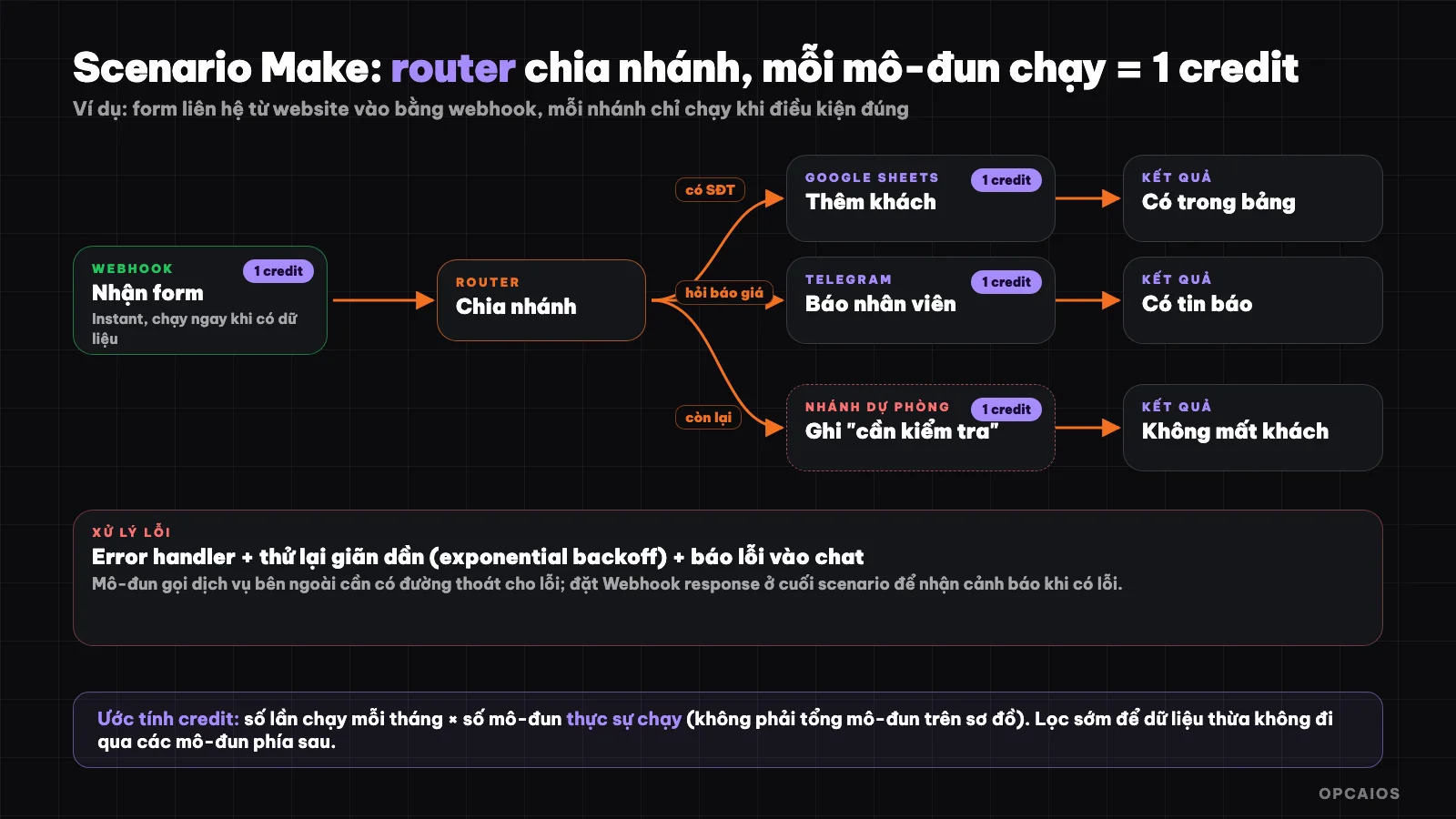
A scenario with branching: data comes in, router divides by condition, each module running uses credit. Diagram: OPCAIOS.
What is Make.com?
Make is a no-code automation platform where you build workflows by connecting modules on a canvas. According to Make's official documentation, a scenario is a sequence of modules that describes how data is transferred and transformed between applications and services. A typical example from Make's own guides: a marketing team adds leads to a spreadsheet, and the scenario automatically notifies the sales team via Slack.
Make was formerly called Integromat. According to information in OPCAIOS's Utilities Library, Make's homepage lists over 3,000 pre-built applications. Beyond scenarios, Make's documentation also mentions newer components: Make AI Agents, Maia (a conversational assistant for building automation), MCP servers to connect AI assistants with Make actions, and Make Grid.
What are scenarios, modules, routers, and filters?
Four basic concepts in Make:
| Concept | Meaning | Example |
|---|---|---|
| Scenario | The entire workflow, one diagram | "Contact form → Sheets → notification" |
| Module | One step, one action of one application | Add a row to Google Sheets |
| Router | Split the stream into multiple branches | Customer asks for quote goes to branch A, warranty goes to branch B |
| Filter | A condition for data to move forward | Only pass through if phone number exists |
Data from one module gets "mapped" to the next: you select the "customer name" field from the first step and drop it into the "name" field of the next step. Make also lets you add a fallback route for data that doesn't match any condition, so you don't lose customers by missing a case.
What is credit in Make and how is it calculated?
Credit is Make's billing unit: you buy credits in plans and each time a module performs an action, it uses credit. According to official documentation, "credit" has replaced the earlier term "operation," while plans and prices remain the same.
Basic calculation: for applications that don't use AI, one action (operation) equals one credit, regardless of data size. For example, a module uploading a file to Google Drive always uses one credit per file, whether the file is small or large. Some AI and advanced features are billed by actual usage (number of tokens, file size, number of pages, or processing time).
On AI, Make's documentation distinguishes two ways: if you use OpenAI or Anthropic Claude modules with your own account, you pay Make credit by number of actions and pay the AI provider for tokens; if you use Make's built-in "AI Provider" then credits are calculated by both tokens and actions. When choosing which way, estimate both costs.
Example calculation (hypothetical numbers): a scenario has 4 modules, runs for 500 customers each month, uses roughly 4 × 500 = 2,000 credits. With routers, each branch only runs when that branch's condition is true, so the number of modules that run in one execution varies by data. Count the modules that actually run, not the total modules on the diagram.
Is Make free?
Make has a free plan to get started. According to OPCAIOS's Utilities Library (compiled from the official pricing page), the Free plan has 1,000 credits per month, up to 2 active scenarios, and a minimum 15-minute interval between runs; paid plans start at Core around 9 USD per month for 10,000 credits. Make's pricing page currently requires a bot check so OPCAIOS hasn't verified prices as of October 22, 2026; check the official pricing page before deciding.
Official documentation also lists some technical limits: each team can create a maximum of 100 scenarios per day, and each scenario has a size limit of 2 MB.
How do I create my first scenario?
Your first scenario should follow the official Make guide example: monitor a spreadsheet, and when a new row appears, notify the person in charge. Six steps:
- Create a Make account (the Free plan is enough to try).
- Plan it out: identify the source application (Google Sheets), the trigger event (new row), and the desired result (notification).
- Create a new scenario and add the first module to monitor the source data, then connect your Google account.
- Add a processing module: send a message to Slack or Telegram, and merge fields from the spreadsheet into the message content.
- Add a router and filter if needed, for example only notify when a row has a phone number.
- Run a test once, check the result, then turn on the scenario and set the run frequency.
For your website, replace step one with a webhook: your website sends data as soon as there's a new form, and Make runs immediately instead of waiting to check the spreadsheet on schedule. Details on the concept are in What is a webhook? and What is an API?.
How does a webhook in Make work?
A webhook in Make is a URL address that an outside service sends data to in order to trigger a scenario instantly. According to the official documentation, there are two types: webhooks from individual applications (called instant triggers, labeled INSTANT) and custom webhooks that receive any data you send. If an application doesn't have a webhook, use a polling trigger to check on schedule.
A few details that often get overlooked, according to Make's documentation:
- Runs in parallel by default: a scenario using instant webhooks processes each request as it arrives, without waiting for the previous one to finish. To process in the correct order, turn on "Process data in order" in the scenario settings.
- Default response: when there's no Webhook response module, Make returns
200 Acceptedwhen it accepts into the queue,400 Queue is fullwhen the queue is full, and429 Too many requestswhen you exceed the rate limit. - Limited queue: with each 10,000 credits granted per month, each webhook can hold a maximum of 667 items waiting, and 10,000 items total. When the queue is full, Make rejects new data.
- Place the Webhook response module at the end. If you place it in the middle of the scenario and a step after it fails, the scenario won't stop and you won't get an error alert, and you might spend more credits without knowing.
The website opcaios.org can send webhooks (with a signature) to your Make custom webhook address; verifying the signature requires an additional processing step.
How do I handle errors in Make?
Make has its own error handling toolkit to keep scenarios running smoothly when a module breaks. According to the official documentation, it includes error handlers, exponential backoff retry logic, and active error throwing commands (Throw). The practical approach: attach error handlers to modules that call outside services, set retries for temporary errors like lost connections, and alert a chat channel when errors persist. Every process needs an "exit route" for errors, otherwise a single broken step will cause the whole scenario to stop silently.
How is Make different from Zapier and n8n?
Make, Zapier, and n8n all connect applications, but they differ in how intuitive they are, where they run, and how they charge.
| Criteria | Make | Zapier | n8n |
|---|---|---|---|
| Where it runs | Cloud | Cloud | Self-hosted or cloud |
| Interface | Visual canvas, branching with router | Sequential step list, Paths for branching | Node-based canvas, flexible, steeper learning curve |
| Pricing unit | Credit (each action with typical apps costs one credit) | Task (each successful action) | Self-hosted: server cost |
| Strength | Multi-branch workflows, complex data handling | Easiest to start, largest app library | Data control, code insertion, AI |
Choose Make if your workflow has many branches and conditions but you still want to use the cloud. Choose Zapier if you want the easiest option; see What is Zapier?. Choose n8n if you need data control or large volume; see What is n8n?. Summary info on each tool is in the library: Make, Zapier, n8n.
Tips for using Make effectively and saving credits
A few habits help scenarios run smoothly and avoid wasting credits:
- Filter early: place a filter right after the first module so unnecessary data stops there, without passing through credit-consuming modules downstream.
- Name modules and write clear notes, so others can take over easily; Make has notes for modules and routes.
- Always have a fallback branch for data that doesn't match any condition.
- Test run with sample data step by step before turning on the schedule for all data.
- Use instant webhooks instead of polling when the service supports it, since polling checks periodically and uses up runs even when there's no new data.
- Estimate credits before turning on: number of runs per month times the number of modules that actually run.
- Set up error alerts, so you know right away when a scenario breaks instead of finding out days later.
Frequently asked questions
What is Make.com and what is it used for?
Make is a no-code automation platform used to connect applications and services using diagrams called scenarios. Common examples: pulling customers from a form into a spreadsheet and notifying staff, syncing orders, creating scheduled reports.
Is Make free?
There's a free plan with 1,000 credits per month, maximum 2 active scenarios, minimum run interval of 15 minutes (according to OPCAIOS library compiled from the official pricing page). Paid plans start from Core at around 9 USD per month. Check the official pricing page for current numbers.
What is a credit in Make?
A credit is a unit of billing, replacing the term "operation". For non-AI applications, one action by a module costs one credit. Some AI features and advanced features are billed by tokens, file size, number of pages, or processing time.
Should I use Make or Zapier?
Choose Make if your process has many branches and conditions and you want to see the entire flow on one canvas. Choose Zapier if you want the easiest option with minimal setup. Try both with a real task and then compare the cost of credits and tasks.
How can I learn Make quickly?
Follow the "Create your first scenario" guide in Make's official help center, then try it with a small process of your own. To build automation workflows for small businesses, check out OPCAIOS's AI application training course.
Source: Make official help center (credits, webhooks, error handling, first scenario; checked 22/10/2026) and OPCAIOS Utilities library (plan pricing, number of apps). Make's pricing page blocks automated access so prices need to be confirmed again before signing up.
Translated from Vietnamese with AI. Read the original.
Want to apply this in your business?
Book a free 30-minute call (Vietnam time, in English or Vietnamese).