


What is Git?
Git is an open source, free version control system for source code, originally built to handle very large code repositories like the Linux kernel. According to the official introduction page git-scm.com (read on 25/10/2026), the entire Linux history of about 1.4 million commits takes up only about 5.5 GB, and Git is released under the GNU GPL v2.0 license. This post explains what Git is, the core concepts, basic usage, how it differs from GitHub, how to use it safely with AI, and OPCAIOS's experience.
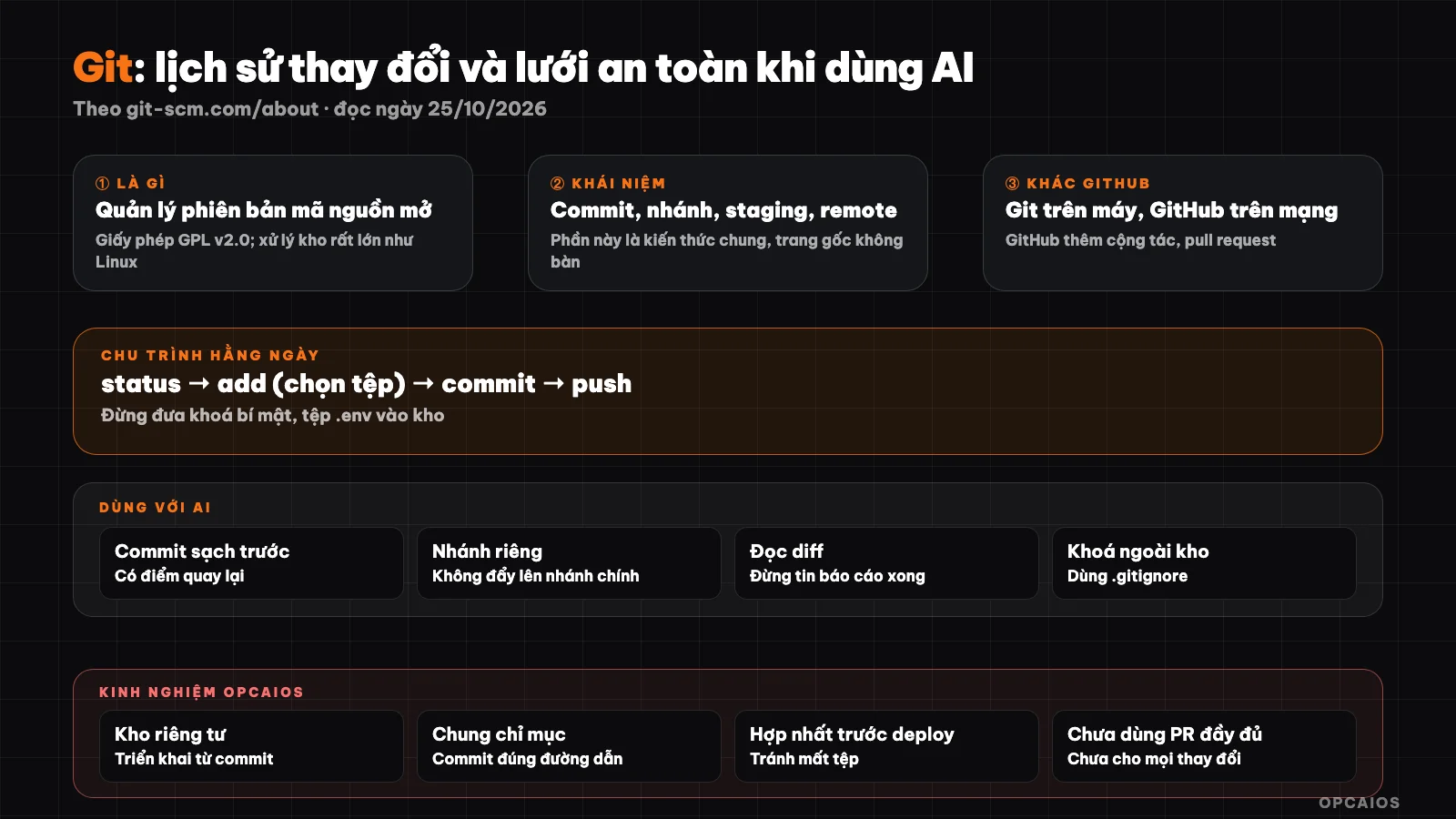
Git records the history of changes; GitHub is where you store and collaborate. Diagram: OPCAIOS.
What is Git and what is it for?
Git records the history of changes to a set of files through savepoints called commits, so you can review, compare, and go back to any version. It also allows multiple people, or multiple branches of work, to proceed in parallel and then merge.
For someone working alone, the clearest value is having a point to fall back to when you break something. And with AI tools that fix code for you, Git is a safety net: every change becomes a visible difference (diff) that can be reviewed and undone. The official page says that according to a Stack Overflow 2022 survey, 96% of professional programmers use Git (figure cited by the page, not independently verified).
Core concepts
Git manages through several concepts: repository, commit, branch, staging area, and remote. The introduction page I read does not explain distributed architecture or branching; the descriptions below are common knowledge from OPCAIOS.
| Concept | Brief meaning |
|---|---|
| Repository | Project directory with full history |
| Commit | A savepoint with a descriptive message |
| Branch | Branch for parallel work, lightweight |
| Staging area | Place to select which changes go into the next commit |
| Remote | Repository copy stored elsewhere (e.g. GitHub) for syncing |
| Merge / rebase | Two ways to combine branches |
From common knowledge, Linus Torvalds created Git in 2005; Git is distributed so each copy has full history; content is identified by hash so rewriting history without detection is hard. These points are not in the page I read.
Basic Git commands
The daily cycle consists of checking status, selecting changes, creating a commit, then pushing up. A few commands are enough to get started.
git status                 # see changes
git add path/file          # select file into next commit
git commit -m "brief description" # create savepoint
git switch -c new-branch   # create and switch to new branch
git log --oneline          # see history
You should write commit messages that clearly say "what and why". Don't put passwords, API keys, or .env files in the repository; use .gitignore file to exclude them.
How is Git different from GitHub?
Git is a tool that runs on your machine. GitHub is a service that stores Git repositories on the internet, adding collaboration, pull requests, and automated checks. There are similar services elsewhere, and you can still use Git without GitHub. For details on the service, see What is GitHub.
Using Git safely with AI tools
The core rule: let AI tools work on a separate branch, check the diff before merging, and never allow it to push to the main branch or deploy without your review. Any destructive operation (deleting a branch, rewriting history) requires your confirmation.
- Commit a clean state before handing work to AI.
- Only commit necessary files, avoid bundling everything.
- Read the diff of each change; don't just trust the "done" report.
- Keep secrets outside the repository.
- With multiple sessions working on one repository, coordinate to avoid overwriting each other.
See Claude Code and programming agent for people who don't know code.
OPCAIOS's experience
The source code for our website is in a private Git repository on GitHub, and deployment publishes cleanly from the current commit, not from the working directory that is being edited. This ensures what goes to the server is exactly what has been committed.
The real lesson: multiple sessions sharing one index (staging) of a repository means one session can accidentally bring another session's files into its commit. How we handle it is to always specify paths clearly when committing instead of adding everything, and merge the latest version from the remote repository before deploying. Limitation: we haven't yet fully applied a branch and pull request process for all changes.
Frequently Asked Questions
Is Git free?
Yes. Git is open source software under the GPL v2.0 license according to the official website. Hosting services like GitHub have their own plans.
Do people who don't write code need Git?
Not required, but useful for any kind of text files like documents, notes, configurations; and very worthwhile when you have AI fix files for you.
How are commit and push different?
Commit saves changes to the repository on your machine; push sends those commits up to the remote repository.
What if I accidentally commit a secret key?
Treat the key as exposed: revoke and create a new one immediately. Deleting from history is complicated and doesn't replace changing the key.
I'm just starting out, what should I do?
Create a repository for a small directory, practice status, add, commit. Need guidance, see AI application training service.
Source: git-scm.com/about, read on 25/10/2026; the page does not discuss distributed architecture, branches, staging area, authors and year of origin (these items are general knowledge, not yet verified from the read source). The 96% figure is cited by the page from Stack Overflow 2022 survey. The experience is OPCAIOS's.
Translated from Vietnamese with AI. Read the original.
Want to apply this in your business?
Book a free 30-minute call (Vietnam time, in English or Vietnamese).