


What Is a Programming Agent?
A programming agent is an AI tool that does not just answer questions but also reads files in your project, edits code, runs commands, and checks results based on what you ask in plain language. Claude Code is one example that runs in a terminal window, but there are also versions for desktop applications, editor plugins, and the web. This post does not promise that anyone can build working software without understanding anything: people who do not know code are still responsible for the results, and AI can write incorrect code, code that is unsafe, or code that uses the wrong library versions. What this post does is lay out a process to reduce risk: having a Git repository to go back to, working on a test branch, limiting permissions, reviewing changes before accepting them, running checks, testing in a staging environment before deploying, and always having a way out. The end shares real experience from OPCAIOS and risks that cannot yet be eliminated.
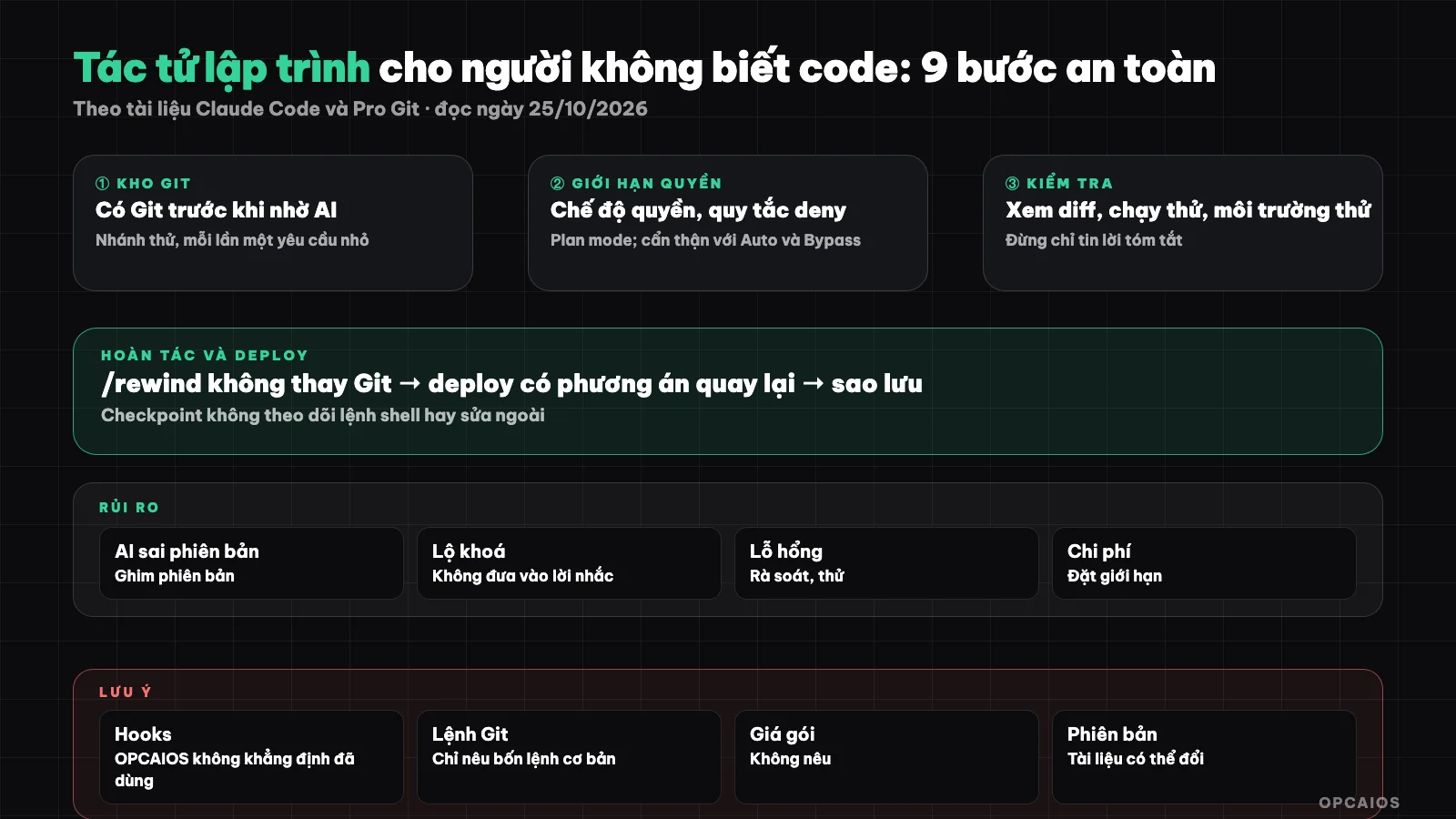
Layers of protection before putting the agent's changes into production. Diagram: OPCAIOS.
Understand First Before You Start
An agent has permission to read, write files and run commands on your machine, and that is the risk. Every step below revolves around two questions: if it goes wrong, can I go back, and is it allowed to do more than it needs to.
9-Step Process
Step 1: How do I install and log into Claude Code?
Installing Claude Code means running an install command from Anthropic's official documentation, then logging in once through your browser. According to the quick start guide (read on 25/10/2026), on macOS, Linux, and WSL the install command is to download a script from Anthropic's page and run it; Windows has separate commands for PowerShell and CMD; you can also use Homebrew or WinGet. The process has 3 tasks.
- First, open a new terminal window after installing and run
claude --versionto check. - Next, go to your project directory and type
claude. - Finally, complete the login step through your browser on the first run.
Copy the command correctly from the official documentation page, not from blog posts or third-party videos, because the install command runs directly on your machine. Example scenario: on macOS, you open the Terminal app, paste the command from Anthropic's official page, and wait for installation to finish before running claude --version. The post does not mention pricing or subscription plans because they may change; check the official page.
claude --version
cd /path/to/project
claude
Step 2: Why put the project into Git first?
Git is a system that saves change history, and for newcomers the most important thing is that each commit is a point you can go back to. According to the Pro Git book (read on 25/10/2026), there are 4 core commands. The git status command shows which files are new, modified, or staged for commit. The git add <file> command stages a file for commit. The git diff command shows unstaged changes, and add --staged to see staged changes. The git commit -m "message" command records a snapshot as a commit. Before letting the agent do anything, commit the current good state. Without Git, Claude Code's undo feature is your only backup, and the documentation clearly says that feature does not replace Git (see step 6). Example scenario: you commit your homepage running well, ask the agent to change the interface, it breaks, and one command reverting to the old commit restores the page. Pushing the repository to a private remote storage service is also a backup copy.
Step 3: What is a test branch and why create one?
A branch is a separate history line in Git, and a test branch is where you let the agent work without touching the main branch. The main branch is your live version, so working on a test branch means the live version doesn't change until you decide to merge. You can ask Claude Code to create a branch, because the quick start guide has examples of asking the agent to create a new branch or summarize changed files in plain language. Still, run git status yourself to be sure which branch you're on. Example scenario: you create a branch named "ui-refresh", ask the agent to fix the contact page on that branch, check it, then merge to main. If something goes wrong, you delete the test branch and your main version stays intact. Branches are outside the four core commands from the Pro Git book, so the branch creation command has not been verified in this post; read the branches chapter of the book.
- First, create the branch.
- Next, work and commit on the branch.
- Finally, merge to main after checking in the browser.
Step 4: Write specific and small requests
The documentation advises describing clearly what you want and breaking large work into steps. A better example than "fix bug" is stating the symptom, which page, what you expect. Some safe habits:
- Each turn, only one small task, so changes are easy to read.
- State clearly what should not be touched (for example: don't change payment settings, don't delete data).
- Let it explore first: Plan mode is read-only and suggests, you review then edit.
- Don't paste API keys, passwords, or customer data into prompts. What you type and files it reads can go through an AI service. Secrets should stay outside the code repository (environment config files not pushed to Git), and see also 5 rules for business data security when using AI.
Step 5: How do I limit permissions for Claude Code?
Limiting permissions means choosing a permission mode so the agent must ask before editing files or running commands. According to Claude Code's permission mode documentation (read on 25/10/2026), there are 5 main modes. Manual is the default: read-only no ask, but file edits, command runs, and network use ask first. Accept edits allows file edits and some basic file commands in the working directory. Plan is read-only and suggests, blocks edits until you review the plan. Auto runs most things, using a model to classify actions. Bypass permissions runs everything without protection, only suited to isolated containers or virtual machines. Press Shift+Tab to change mode. Advice for people who don't know code: stay in default mode, read each permission request, and use Plan when unsure what to do. The documentation warns that Auto mode doesn't guarantee safety and Bypass mode can't prevent malware installation. The .git directory is a protected path, and deny rules take effect in all modes. Don't grant permissions for bulk delete, send email, or make payments, and if a command you don't understand comes up, refuse it and ask the agent to explain.
Hooks (commands that run at fixed times, per official documentation) can add fixed controls, but newcomers don't need to set them up.
Step 6: Undo when things go wrong
Claude Code saves a checkpoint before each turn you send, and /rewind (or press Esc twice when the input box is empty) opens a menu to restore code, conversation, or both. Limits per documentation: changes caused by shell commands on files it has never edited with the file tool are not tracked; edits from subagents usually can't be reverted; outside edits or edits from other sessions usually aren't recorded; and checkpoints are a way to recover within a session, not a replacement for version control. Practical conclusion: use /rewind for small mistakes, use Git for everything else.
Step 7: See diff, don't just trust the summary
Before committing, run git diff or view the changes section in the interface. People who can't read code can still check: how many files did the agent modify, are there files you didn't expect (config, keys, payments), are there large deletions that seem odd. Ask the agent to explain each change in plain language, treat that as a hint not a guarantee.
Step 8: Run checks and test in a staging environment
Let it run the build and automated tests if you have them, then open the page yourself in a browser: do buttons work, do forms submit, does mobile not break. A staging environment is a copy at a separate address with test data; payments use only the provider's test mode.
Step 9: Deploy with a rollback plan and backup
- Back up data before changes touch the database.
- Deploy so you can keep the old version to roll back; then open the live page to check and note which commit is running.
- Critical work (data migration, payments) should be reviewed by someone experienced.
Main Risks
| Risk | How it shows | How to reduce it |
|---|---|---|
| Wrong version or library | Code runs on this machine, breaks on another; using a function that no longer exists | Run build and check; write down versions clearly; read error messages |
| Security holes | Missing input checks, data leaks, wrong permissions | Get a separate security review; see 15 website security checks for one person; hire experts for systems with customer data |
| Leaked keys and secrets | Keys in code that got pushed to a public repository | Keep secrets outside the code, use private repositories, rotate keys if you suspect anything |
| Cost | Using many runs, setting long-running mode | Track usage, split work into smaller pieces, set spending limits if the service allows |
| Data loss | Delete or overwrite commands | Git, backups, don't give delete permissions |
| Trusting too much | "It runs" but the logic is wrong | Test real scenarios yourself; see audit AI content before posting for the content part |
When to use a different tool instead of Claude Code?
Use a different tool when you want an AI code editor or an app-building platform from descriptions instead of an agent running in terminal. See What is Cursor and Cursor and Lovable build micro SaaS without code. Git principles, branches, viewing diffs, limiting permissions and backups apply to every tool, so the 9 steps in this post still work with Cursor, Lovable or any programming agent from Anthropic, OpenAI or Google. For example, if you pick an app-building platform from descriptions, still put the result in a Git repository and read the changes before pushing to production.
OPCAIOS's Experience
The opcaios.org website was built and run by one person using a programming agent. The habits we actually use, from project notes: commit only the files we list because many sessions work in one folder and one shared commit command once pulled incomplete changes from another session; run a build test before pushing to production, with the build process in a separate folder so a broken build doesn't replace the running version; check in the browser after UI changes; carefully compare the file list before syncing to the server so we don't accidentally delete another session's work; back up the database before editing live data; and keep secrets outside the source code. We also hit problems from loose process (one sync temporarily broke part of another session's features) so we made those rules. About hooks: the project notes don't mention them, so we don't claim we use them. We don't publish numbers on time saved, and OPCAIOS is someone who already knows how to read code, so someone with zero coding knowledge would have a different experience.
Frequently Asked Questions
Can someone who doesn't know how to code use programming agents?
You can use them for small tasks with verification, but you still need to check the results the real way, and you should have someone who understands the system to check for customer data or payment issues.
What permission mode is safest for beginners?
The default mode asks before modifying files or running commands, plus Plan mode to see the plan first. Avoid bypass mode outside isolated environments.
Can /rewind replace Git?
No. According to Claude Code's checkpoint documentation (read on 25/10/2026), /rewind is only a recovery method within a session and doesn't track certain changes: shell commands on files never edited with the file editing tool, edits from sub-agents, or edits from outside and from other sessions. Git is the long-term history. The suggested workflow has 3 steps.
- First, commit the good state before each major task.
- Next, use
/rewindfor small errors within the session. - Finally, use Git to revert to old commits when errors are bigger.
Example scenario: a shell command that accidentally deletes a file the agent never edited won't be recovered by /rewind, but if the file was already in a previous commit, Git can recover it.
Should I put API keys in the prompt so it auto-configures itself?
No. Keep secrets in a separate, private place outside the code; if they leak, revoke and create new keys.
What should I learn first?
You should learn basic Git, how to read diffs, and how to run checks first, because these three skills help you control every change Claude Code or any agent makes. The suggested roadmap has 3 steps.
- First, learn the 4 Git commands in this post, following Pro Git.
- Next, practice reading
git diffafter each agent edit. - Finally, practice running build and opening the page in a browser to check the result.
For example, after 1 week of practice with a small project, you can already answer yourself the two core questions from this post: if the agent makes a mistake, can you revert, and is the agent allowed to do more than necessary. To learn properly how to work with AI, see OPCAIOS's AI application training course.
Source: Claude Code documentation (quick start, permission modes, checkpoints, hooks) and Pro Git, read on 25/10/2026; unverified: Git branch and undo commands beyond the four mentioned, features may change by version, package prices not mentioned; experience is from OPCAIOS.
Translated from Vietnamese with AI. Read the original.
Want to apply this in your business?
Book a free 30-minute call (Vietnam time, in English or Vietnamese).