


What is Google Search Console?
Google Search Console is a free service from Google that helps you track, maintain, and fix your website's presence on Google Search. According to Google's help page (read on 10/25/2026), the service tells you whether Google is finding and crawling your site, helps you fix indexing errors, shows search traffic, sends you alerts, and shows you which sites link to you. Using Search Console is not required to appear on Google. This post explains what Search Console is, how to set it up, 5 reports you should check each week, common errors, and OPCAIOS's experience.
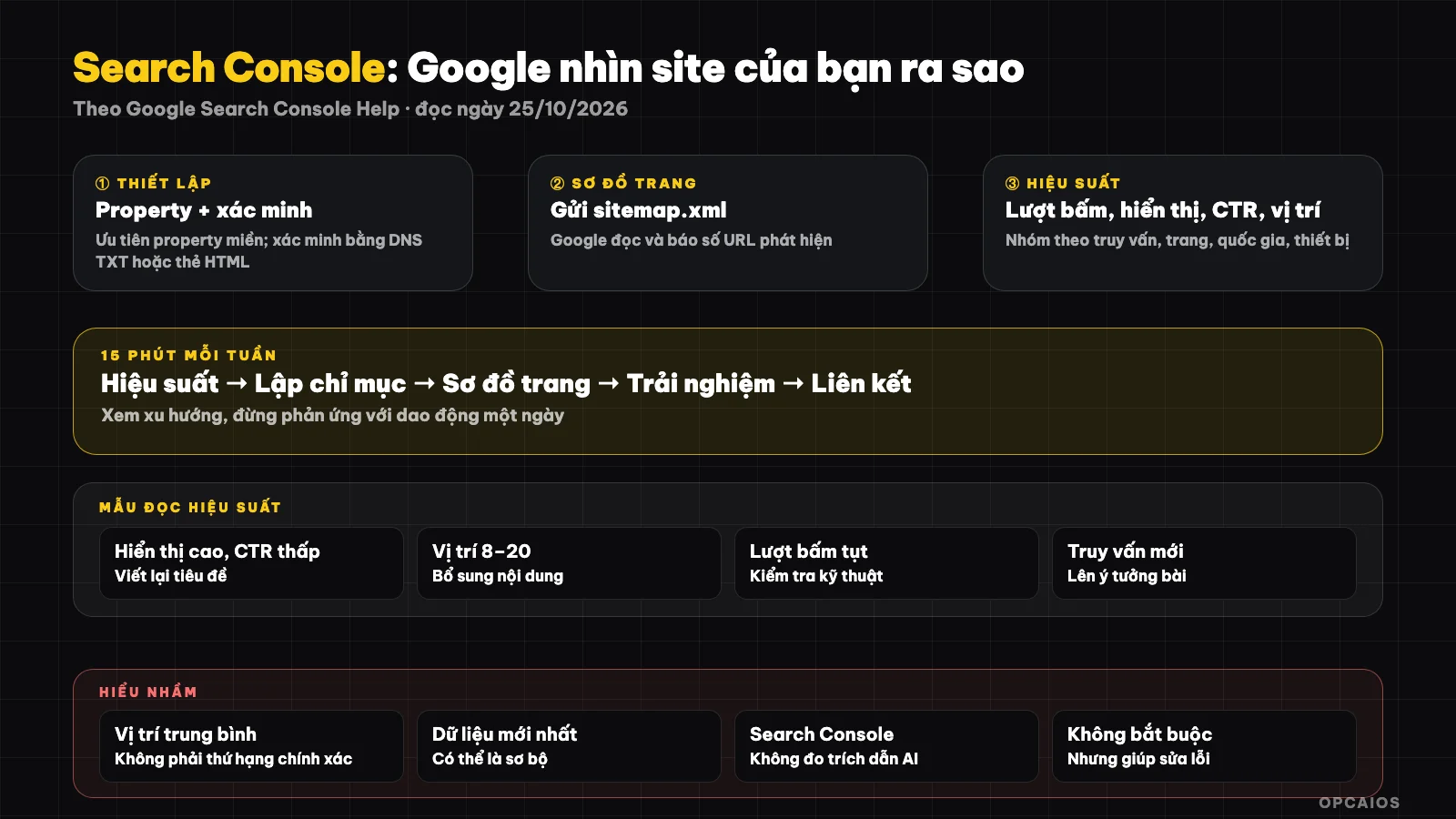
Search Console is a dashboard that shows how Google sees your site. Diagram: OPCAIOS.
What is Google Search Console and how is it different from Google Analytics?
Search Console tells you what happens before users visit your site: which search results your site appears in, how many times it was clicked, whether Google indexed your pages. Google Analytics measures what happens after they visit your site: which pages they view, what they do, what they buy.
| Criteria | Search Console | Google Analytics (GA4) |
|---|---|---|
| Measures | Impressions, clicks from Google Search, indexing | User behavior on your site |
| Data from | Google Search | Tracking code embedded in your site |
| Answers the question | "What do people search for to find me?" | "What do they do when they arrive?" |
| Requires code | Need to verify ownership | Need to add tracking tag |
The two tools complement each other. To optimize to be found and cited by AI, see What are SEO and GEO.
How to set up Search Console
Setup involves four tasks: add a property, verify you own the site, submit your sitemap, and wait for data to come in. The domain property type covers all subdomains and protocols, suitable for sites with many subdomains.
- Go to Search Console, select add property; prioritize the domain type if you can manage your DNS.
- Verify ownership, usually with a TXT DNS record, HTML tag, or uploaded file.
- Submit your sitemap URL (usually
/sitemap.xml) under the Sitemaps section. - Wait a few days for data; Google notes the latest data may be preliminary and change within a few hours after that.
If your site uses Cloudflare, adding a TXT record to your DNS is a convenient way to verify.
5 reports to check each week
Five reports are enough for a small business owner: Performance (queries and pages), Index Coverage, Sitemaps, Page Experience, and Links. Each week, spend 15 minutes checking, noting changes, and don't react to day-to-day fluctuations.
1. Performance
Google defines clicks as the number of times users clicked your site from search results, impressions as the number of times your site appeared, CTR as clicks divided by impressions, average position as the typical rank of your highest result. Group by query to find keywords you're appearing for but get few clicks on; group by page to see which posts drive traffic. The default view is the past 3 months.
2. Pages
Shows which pages have been indexed and which have not, with reasons. Check for new reasons appearing in the week, especially if important pages are excluded.
3. Sitemaps
Check that your sitemap has been read successfully and the number of URLs discovered is reasonable compared to the number of pages you have.
4. Page Experience (Core Web Vitals, if data is available)
Track groups of slow-loading URLs. The report only appears when you have enough real user data, so small sites may be empty.
5. Links
See which pages are linked to most and from which sites; useful to know which content is being referenced.
I haven't read Google's separate description pages for reports 2 through 5, so my description of these sections reflects common practice, not a quote from Google's documentation.
How to Read Performance Data to Find Work to Do
Look for four patterns: pages with high impressions but low CTR (fix title, description), queries ranking 8–20 (push to first page with better content), pages that suddenly drop clicks (check technical issues), and new queries you haven't written about yet.
| Pattern | Meaning | What to Do |
|---|---|---|
| High impressions, low CTR | Title isn't compelling or doesn't match search intent | Rewrite title, description |
| Ranking 8–20 | Close to first page | Add content, internal links |
| Sharp drop in clicks | Technical error or ranking loss | Check indexing, recent changes |
| New query, no article | Unmet demand | Brainstorm new article |
Google's note: charts and tables can differ in numbers because they use different grouping methods, for example two results from the same site for one query count as one impression in the chart.
Common Errors and Misunderstandings
The most common misunderstanding is treating average position as exact ranking and comparing numbers across too short a timespan. Average position combines many queries, devices and countries, so use it only to spot trends.
- Data lag and preliminary data: don't conclude from the most recent day.
- Only looking at totals: filter by page or query to find work that needs doing.
- Forgetting the second property: if you have both
wwwand non-www, use the domain property. - Demanding instant indexing: requesting indexing doesn't guarantee ranking.
- Ignoring security alerts: read alert emails from Search Console right away.
OPCAIOS Experience
We use Search Console through a service account with the domain property of the site, and display data in a private admin section to see it alongside other metrics. From 25/10/2026, site admins also have an Analytics section that combines Search Console with Google Analytics and other sources.
Limitation: the site is still new so data samples are small; we don't use one week of data to conclude a trend. This article doesn't post real click counts or rankings for the site. Measuring whether AI cites your site is separate work; see measuring whether AI cites your website.
Read more: 6 best website measurement tools 2026, 6 best free SEO and GEO tools 2026.
Frequently Asked Questions
Is Search Console free?
Yes, Google describes it as a free service.
Will my site appear on Google without Search Console?
Possibly yes; Google says using Search Console is not required to show up, but it helps you see and fix issues.
How long after adding a site do I get data?
Usually takes a few days; the newest data may be preliminary. I haven't verified maximum storage time in Google's docs; check the official page.
Does Search Console tell me if AI cites my site?
Not directly. It measures Google Search; measuring AI citations needs manual checking or other tools.
How often should I check?
Once a week for 15 minutes is enough for most small sites. You need someone to set up a monitoring process; see AI application training service.
Source: Google Search Console Help, introduction page and Performance report page (support.google.com/webmasters), read 25/10/2026; haven't read separate pages for Indexing report, Sitemap, Core Web Vitals, Links and data retention time. Experience is from OPCAIOS.
Translated from Vietnamese with AI. Read the original.
Want to apply this in your business?
Book a free 30-minute call (Vietnam time, in English or Vietnamese).