



Cloudflare is a service that sits between visitors and your website server: managing domain names (DNS), storing copies of content in many places (CDN), blocking attacks and encrypting HTTPS connections. When your website goes through Cloudflare, visitors connect to Cloudflare's network instead of going directly to your server, so pages load faster and your original server is hidden from the Internet. The Free plan costs $0 per month (according to Cloudflare), including DNS, CDN, SSL certificate, web application firewall (WAF) and unlimited DDoS protection; the Pro plan costs from $20 per month when paid annually (checked on 23/10/2026). Because of this, Cloudflare is a reasonable first step for almost every website, from personal blogs to business introductions. The post goes through six parts: (1) what is Cloudflare; (2) how it works; (3) pricing; (4) putting your website on Cloudflare; (5) SSL/TLS mode; (6) real experience from opcaios.org.
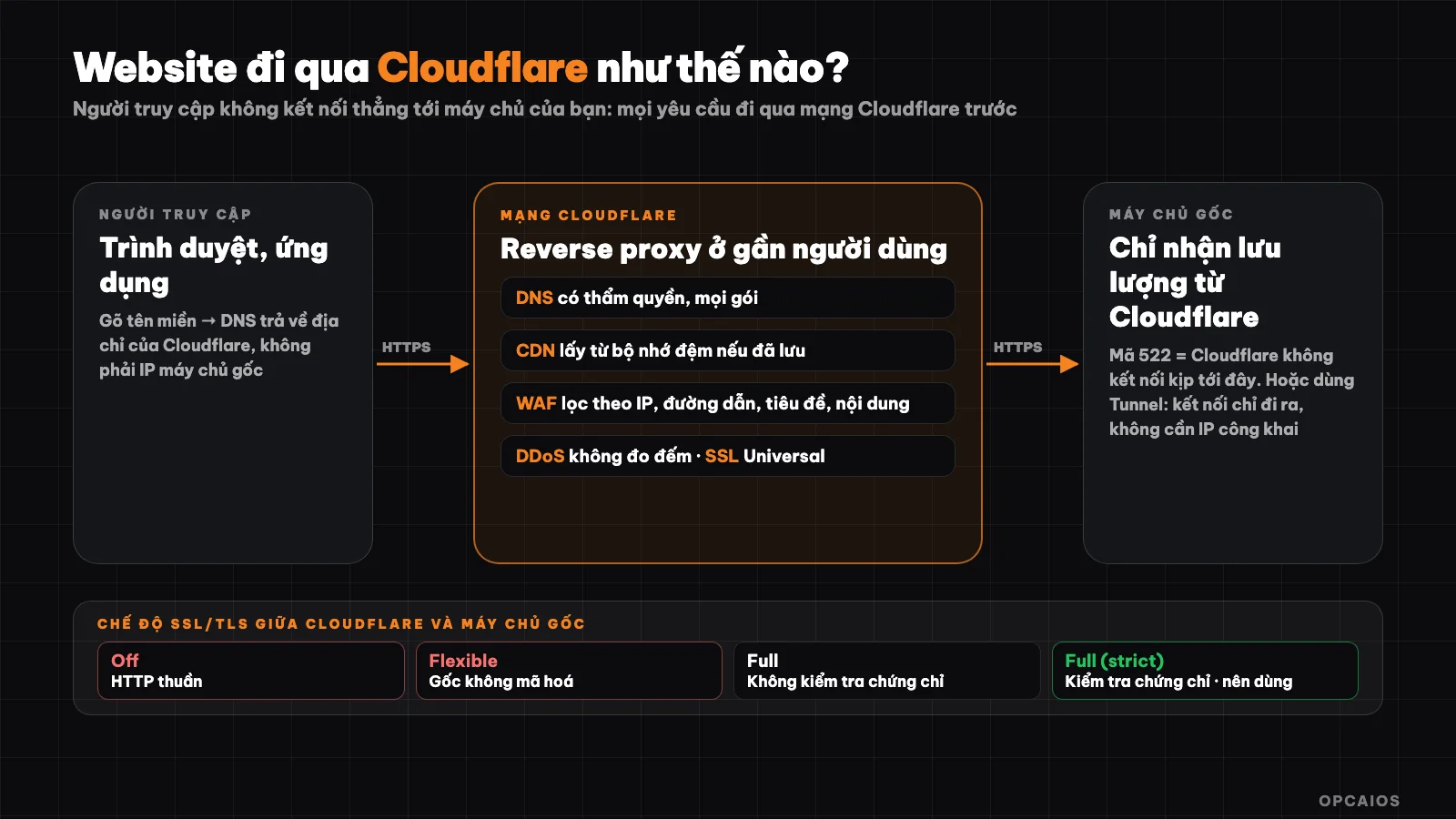
Traffic flow when your website goes through Cloudflare: users, Cloudflare network, original server. Diagram: OPCAIOS.
What is Cloudflare?
Cloudflare is a network and security platform providing DNS, CDN, WAF, DDoS protection and programming services running on its own global network. According to Cloudflare's website, the company describes itself as operating roughly 20% of the Internet, present in over 335 cities and reaching 95% of the world's Internet-connected population within 50 milliseconds; these are figures self-reported by Cloudflare, which OPCAIOS has not independently verified.
For website builders, Cloudflare usually acts as a reverse proxy, and according to official documentation, the DNS and CDN services sit in the middle to forward web traffic from and to your domain. Beyond that there are four other products: (1) Workers to run code; (2) R2 for storage; (3) Tunnel for secure connection; (4) Turnstile for human verification. Hypothetical example: a small blog can enable HTTPS and CDN right after switching nameservers to Cloudflare.
How does Cloudflare work?
Cloudflare works by becoming the primary DNS server for your domain, then returning Cloudflare's own address instead of the original server address. According to documentation, when you put your website on Cloudflare, Cloudflare becomes the authoritative DNS provider for your domain, and you manage DNS records through Cloudflare's dashboard or API. If the domain is active and the record is set to "proxied" mode, Cloudflare returns one of its anycast IP addresses instead of your original server's real IP address.
The practical consequence is that visitors don't see your server's real address. All requests go through Cloudflare, which can pull content from cache if already stored, check with the firewall, then only forward to the original server when needed. To get started in the default way (full DNS setup), you change the domain's nameservers at your domain registrar to Cloudflare's nameservers.
What are Cloudflare's main services?
The services you encounter most when using Cloudflare for your website:
| Service | Does | Available in which plan |
|---|---|---|
| DNS | Manage domain records, fast and stable | All plans |
| CDN and cache | Store copies of content near users, reduce original server load | All plans |
| DDoS protection | Block overload attacks, unlimited by traffic | All plans |
| SSL certificate (Universal SSL) | Encrypt HTTPS for your domain | All plans |
| WAF (web application firewall) | Filter requests by IP, path, header, content; has pre-managed rule sets | All plans |
| Tunnel | Connect your server to Cloudflare without opening ports to the Internet | Part of Cloudflare One (Zero Trust) |
| Workers | Run code at the network edge, near users | Has free plan |
| R2 | Object storage, no outbound bandwidth charges | Has free plan |
| Turnstile | Verify humans, replaces annoying CAPTCHA | See Turnstile page for plans |
How Much Does Cloudflare Cost Now?
Cloudflare offers a free plan for websites and monthly paid plans. According to Cloudflare's official pricing page (checked on October 23, 2026), the Free plan costs $0 per month and suits personal projects. The Pro plan costs $20 per month when billed yearly or $25 when billed monthly, suitable for professional websites. The Business plan costs $200 per month when billed yearly or $250 when billed monthly, suited for small businesses operating online. The Enterprise plan is priced by agreement. For example, a small shop selling through a website might choose Business if it needs higher control. The pricing page states that DNS, unlimited DDoS protection, CDN, Universal SSL certificate, free management rules, and WAF are all included in every plan, including Free; paid plans add features like image optimization, additional control, and support.
Cloudflare Plan Comparison
| Plan | Price | For |
|---|---|---|
| Free | $0 per month | Personal projects, hobbies, not critical to business |
| Pro | $20 per month when billed yearly, or $25 when billed monthly | Professional websites not critical to business |
| Business | $200 per month when billed yearly, or $250 when billed monthly | Small businesses operating online |
| Enterprise | By agreement | Core applications, requiring commitment |
How Are Cloudflare's Other Services Priced?
According to Cloudflare's official pricing page (checked on October 23, 2026), other services are priced separately. For example Workers: free plan for 100,000 requests per day with 10 milliseconds CPU per run; paid plan includes 10 million requests per month then $0.30 for each additional million requests. R2: free plan includes 10 GB storage per month, 1 million write operations and 10 million read operations, and according to the documentation does not charge for outbound bandwidth. Zero Trust: free for groups under 50 people, $7 per person per month for the pay-as-you-go plan. Prices change over time, check the official pricing page before deciding.
How Do I Add a Website to Cloudflare?
The process of adding a website to Cloudflare consists of six steps, completable within about 30 minutes using the default method (full DNS setup) according to Cloudflare documentation:
- Step 1, add domain to your Cloudflare account and choose the Free plan.
- Step 2, review DNS records that Cloudflare found, comparing with old records so you don't miss email or other service records.
- Step 3, change nameservers at your domain registrar to the two nameservers Cloudflare provides.
- Step 4, wait for the domain to "go active" then check that your website opens normally.
- Step 5, choose the correct SSL/TLS mode (see section below), should be Full (strict).
- Step 6, enable basic protection layers: WAF with management rules, redirect HTTP to HTTPS, and caching rules for static files.
Important note: keep email records (MX) in DNS-only mode, do not set to proxy, because Cloudflare only proxies web traffic.
How Are Different SSL/TLS Encryption Modes Different?
SSL/TLS encryption mode is a setting that determines how Cloudflare manages two connections: between visitor and Cloudflare, and between Cloudflare and your origin server. According to Cloudflare's official documentation (checked on October 23, 2026), there are five modes, and according to Cloudflare, Full or Full (strict) mode is strongly recommended:
- 1. Off: everything is plain HTTP, not encrypted.
- 2. Flexible: visitors to Cloudflare can encrypt with HTTPS, but the segment from Cloudflare to the origin server is not encrypted.
- 3. Full: Cloudflare connects to the origin server with HTTPS but does not verify the certificate, suitable when the origin server uses a self-signed certificate.
- 4. Full (strict): like Full but verifies the origin server's certificate, issued by a public organization like Let's Encrypt or Cloudflare Origin CA.
- 5. Strict (SSL-Only Origin Pull): always connects to the origin server with HTTPS with certificate verification.
Cloudflare strongly recommends using Full or Full (strict) to prevent malicious connections to your origin server. The Automatic SSL/TLS feature (default) automatically chooses the safest mode for your website and according to documentation will not automatically downgrade to a less secure mode; you must ensure your origin server certificate remains valid.
What are Cloudflare Tunnel and Workers used for?
Cloudflare Tunnel allows you to connect your server to Cloudflare without needing a public IP address. According to the documentation, a lightweight process called cloudflared placed in your infrastructure creates an outbound-only connection to the Cloudflare network, so your server serves traffic through Cloudflare without being easily attacked around it. This is a common way to safely expose a service running on an internal network to the outside.
Cloudflare Workers is where you run JavaScript or TypeScript code right at the network edge, close to users, suitable for receiving webhooks, building small APIs or handling requests before they reach your origin server. If you're not yet familiar with the concept, read more about What is an API?.
Can Cloudflare Turnstile replace CAPTCHA?
Turnstile is Cloudflare's human verification service, used to replace CAPTCHA boxes that ask users to select images. According to the official documentation, there are three widget types: Managed (recommended, decides whether to show a checkbox based on risk level), Non-interactive (visitors don't need to act) and Invisible (completely hidden). Turnstile meets WCAG 2.2 AA accessibility standards and according to the documentation does not access, store or transmit form contents or user emails. The documentation also provides guidance for migrating from reCAPTCHA and hCaptcha. Turnstile is suitable for blocking bots from submitting contact forms or signing up.
Real experience: how does opcaios.org use Cloudflare?
The opcaios.org website places Cloudflare in front of the origin server, and the origin server is configured to only accept connections from Cloudflare's IP ranges. Direct access to the server address is rejected with a 403 code. This approach closes the back door, ensuring all requests go through Cloudflare's protection layer rather than bypassing it.
We noticed one thing in practice: even when deploying a new version by swapping two versions back and forth, sometimes there's a brief moment when Cloudflare reports a 522 code. Code 522, according to Cloudflare (checked on 23/10/2026), means Cloudflare cannot connect to the origin server in time, usually because the origin server is restarting or overloaded. The lesson: 522 error is an origin server error, not Cloudflare's fault. So when you see a 522 error, check the origin server first, and retrying after a few seconds usually fixes it.
Does Cloudflare have any weaknesses or risks?
Cloudflare solves many things but has some risks worth knowing:
- Misconfigured SSL: Flexible mode combined with an origin server that redirects to HTTPS often causes redirect loops; use Full (strict) to avoid this.
- Single vendor dependency: DNS and traffic both go through Cloudflare, so an incident or misconfiguration here affects your entire website. Keep account admin rights tight and enable two-factor authentication.
- Caching dynamic content by mistake: caching login pages or shopping carts by mistake can expose other people's data; use explicit cache rules and bypass cache when login cookies are present.
- Origin server still needs protection: if the origin IP leaks and the server accepts direct connections, attackers bypass Cloudflare; restrict the server to only accept traffic from Cloudflare or use Tunnel.
- Data and features change quickly: prices and features per plan change, check the official page before buying.
Cloudflare and AI: can it be used with MCP?
Yes. Cloudflare's official documentation lists MCP servers for AI agents (including Code Mode MCP Server and MCP servers for specific domains), allowing AI assistants to operate on Cloudflare accounts. Like any AI connection to real infrastructure, grant minimal permissions, prioritize read-only access and keep human review before irreversible changes like modifying DNS or deleting rules; see more in the article What is MCP?. When you need to manage many infrastructure services through automated processes, n8n can also call Cloudflare's API.
Read more: Reviewing website security for one person.
Frequently Asked Questions
What is Cloudflare and what is it used for?
Cloudflare is a network and security service that stands between visitors and your website: it manages DNS, speeds things up with CDN, blocks DDoS attacks, filters requests with a WAF firewall and encrypts with HTTPS. It's used to make your website faster and more secure.
Is Cloudflare free?
Yes. According to Cloudflare's official pricing page (checked on 23/10/2026), the Free plan costs $0 per month and includes DNS, CDN, Universal SSL certificate, WAF, management rules and unlimited DDoS protection. The Pro plan starts at $20 per month when paid annually or $25 when paid monthly; the Business plan is $200 per month when paid annually or $250 when paid monthly. Other services have their own free limits: Workers allows 100,000 requests per day, R2 allows 10 GB storage per month, and Zero Trust is free for teams under 50 people.
As a hypothetical scenario, for example a small business website usually gets by with the Free plan. Step 1, enable basic protection layers. Step 2, measure speed before and after enabling. Step 3, consider upgrading if you need more control. Pricing changes over time, so check the official pricing page for current rates.
Does Cloudflare make websites faster?
Usually yes, because CDN stores copies of static content closer to users and reduces load on the origin server. The amount of improvement depends on your website, so measure your speed before and after enabling it.
Which SSL mode should I choose in Cloudflare?
You should use Full (strict) when your origin server has a valid certificate, because Cloudflare recommends Full or Full (strict) to avoid harmful connections to the origin server. Avoid Flexible if possible.
What does error 522 in Cloudflare mean?
Error 522 means Cloudflare cannot connect to your origin server in time, usually because the origin server is restarting, overloaded or blocking Cloudflare's addresses. Check your origin server first. To build safe website infrastructure for small businesses, see OPCAIOS's AI application training course.
Source: homepage, pricing page and official documentation of Cloudflare (how Cloudflare works, DNS, WAF, SSL/TLS modes, Tunnel, Workers, R2, Turnstile; checked 23/10/2026); OPCAIOS's operational experience. Network scale figures are self-reported by Cloudflare. Pricing and features may change.
Translated from Vietnamese with AI. Read the original.
Want to apply this in your business?
Book a free 30-minute call (Vietnam time, in English or Vietnamese).