



Multiple AI Sessions Editing One Project
Multiple AI sessions editing one project is when two or more coding agents, for example Claude Code, Codex CLI or Google Antigravity, read and write to the same code repository at the same time, each session thinking it's the only one working. This approach helps one person run many tasks in parallel, but creates a kind of error that a single session never encounters: overwriting each other's files, mixing files into commits, a deployment this time deleting files from another session, two builds running on top of each other, and thousands of files "changed" just because the line ending is different. This post does not promise a way to eliminate all conflicts, and does not give time savings figures because we don't measure them. The post goes through 5 types of collisions, then 6 measures: git worktree (comparing git documentation and Claude Code documentation), committing the correct paths, merging the main branch before deploying, running sync tests, locking or waiting for builds, shared status files, and .gitattributes for line endings. The final section is real experience from OPCAIOS.
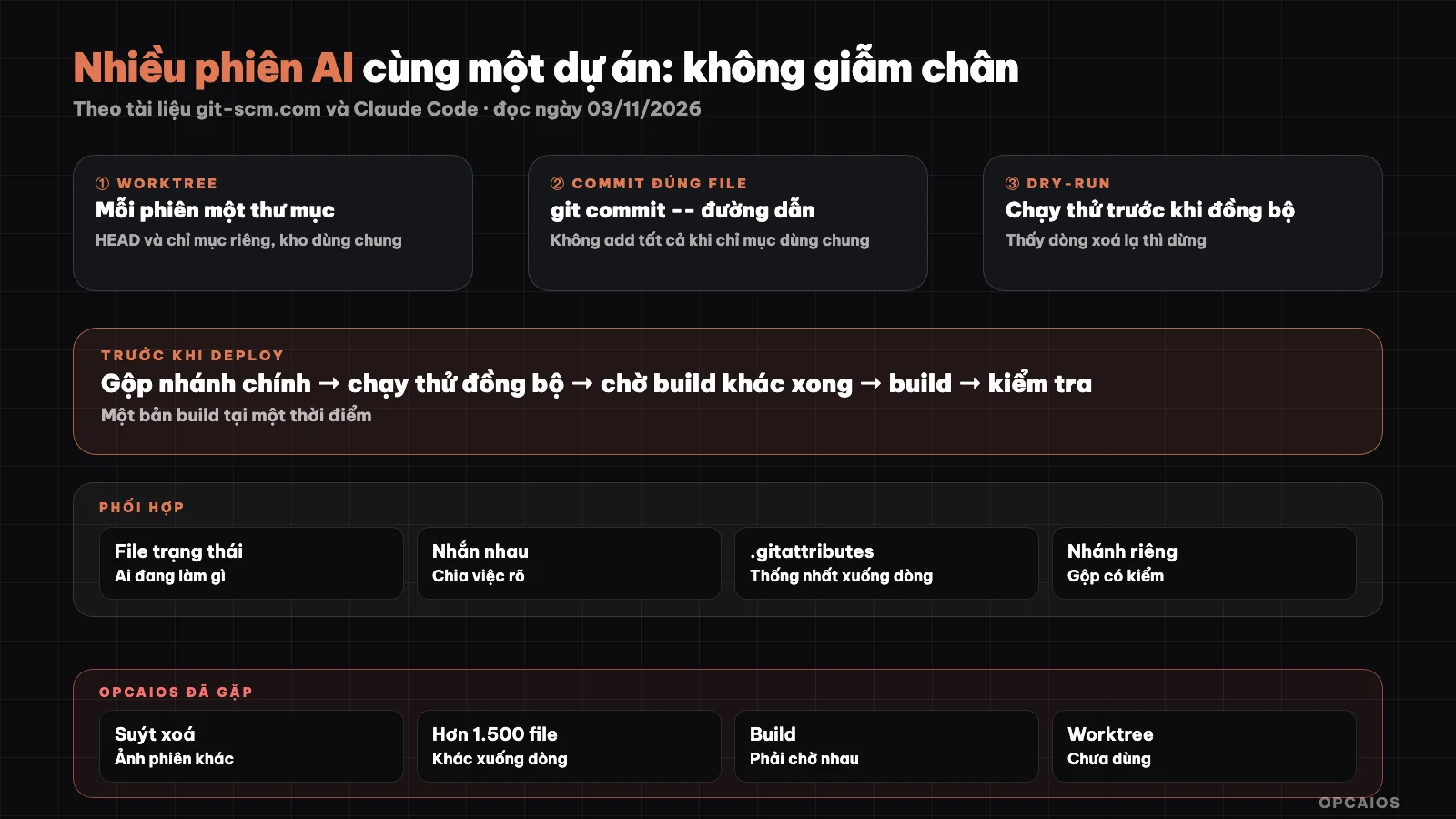
Six layers of protection when multiple AI agents work on one code repository. Diagram: OPCAIOS.
When multiple AI sessions edit one project, what breaks first?
What usually breaks first is not the code, but the boundary between sessions. Each agent like Claude Code or Codex CLI only sees its own conversation, so it doesn't know which files the other session just edited, what it staged for commit, or whether it's in the middle of a build. Five common types of collisions:
- File overwrite: two sessions edit the same file, the session that saves later erases the part the earlier session made without warning.
- Mixed commits: sessions share one working directory and one git index, so a plain commit command pulls in files that another session already
git add'd. - Deployment deletes each other's files: a sync tool with the option to delete files no longer at source will delete from the server files that another session pushed up but your machine doesn't have yet.
- Build overlap: two builds write to the same output directory at the same time, resulting in a broken or hybrid build.
- Different line endings: one agent runs on Windows and saves a file with CRLF, another session on macOS or Linux saves LF, and git reports thousands of changed files even though the content is identical.
A hypothetical example, not real people: session A edits the pricing page, session B edits the signup form, both work in the same directory. Session B types commit and pushes, pulling along half of A's unfinished pricing page edits.
What is git worktree and why give each session its own worktree?
Git worktree is a separate working directory with its own files and branch, but shares the repository history with the main directory. According to the git worktree documentation on git-scm.com (read 03/11/2026), each worktree has its own HEAD and index, while the object store, config and branches and tags under refs/ are shared; a branch can only be checked out in one worktree at a time, the add command by default refuses if that branch is already checked out in another worktree. This "separate index" property fixes the mixed commit error at its root: each session has its own staging area. Claude Code documentation (Worktrees page on code.claude.com, read 03/11/2026) describes the --worktree or -w flag creating a worktree under .claude/worktrees/<name>/ at the repository root, on a new branch named worktree-<name>. On exit, if the worktree is clean, unnamed sessions are cleaned up automatically; if there's unfinished work, Claude Code asks whether to keep or delete. The documentation also suggests adding .claude/worktrees/ to .gitignore.
Commands to create worktree according to the documentation
# Claude Code: each terminal a different name
claude --worktree feature-auth

# Plain git: create worktree on new branch, list, remove
git worktree add ../project-feature-a -b feature-a
git worktree list
git worktree remove ../project-feature-a
Three notes from Claude Code documentation: worktree is a new checkout so you must reinstall libraries; files ignored by gitignore like .env are not present, to copy automatically list them in .worktreeinclude file; and the repository must have at least one commit. Subagent can also run in its own worktree using the isolation: worktree field in agent definition, see more at what is subagent.
How do I commit without pulling in files from another session if I can't use worktree?
The rule is to put the file paths directly on the commit command, not just on git add. According to the git commit documentation (git 2.55, read on 03/11/2026), when there's a pathspec on the command line, git commit takes the content of exactly the files that match and ignores other changes already in the index. The suggested process has 3 steps:
- Check the staging area first:
git diff --cached --stattells you what's in the index, including things the other session just added. - Commit with paths:
git commit -m "message" -- <path 1> <path 2>. - Check after:
git show --stat HEADto make sure the commit only has your files, before pushing.
The post 10 lessons from letting AI agents build and run a website tells of two times OPCAIOS got hit by this bug, so here I just emphasize: running git add -- yourfile then committing bare is still not safe.
Why merge main and do a dry run before deploying?
Merging main before deploying makes sure what you push already has work that other sessions pushed. If the deploy process syncs the whole directory to the server with an option to delete extra files, then skipping the merge means deleting other people's work. The safe sequence has 4 steps:
- Fetch updates:
git fetch, check if the remote branch is ahead of yours. - If it is, merge the remote main in first, run a build test.
- Do a sync in dry-run mode. With rsync, the
-nor--dry-runoption doesn't change anything at the destination (rsync man page, read on 03/11/2026); add a list of changes so you can read each line that will delete. - Treat any line that deletes a file you didn't write as a stop signal. An empty dry-run result or a connection error is also a stop, not "nothing to delete."
Step 4 gets skipped most: a filter command that removes delete lines run on an empty result file will report clean even if the dry run never worked.
How do I keep two builds from running on top of each other?
The simplest way is a lock: the build script creates a lock file at the start, deletes it when done, and any session that sees the lock waits. Combined with building into a separate directory then swapping over, a failed build can't replace the running version. Three things you need:
- A lock with a timeout or process ID written in, so an orphan lock after the machine hangs doesn't block forever.
- A build log with a clear end line (success or failure), so the next session reads it instead of guessing.
- Only do the next step, like publishing content, when the log says the new build ran.
Claude Code also uses git worktree lock on the subagent's worktree while it runs to keep cleanup at the same time from deleting it, according to the Worktrees page. Same idea: anything in use needs a lock.
How does a shared status file help different agents coordinate?
A shared status file is a short document that every agent reads at the start of a session and writes at the end: which services are running, which incidents are open, what work is in progress and who has it. Claude Code, Codex CLI and Antigravity don't share memory with each other, so this file is the only "whiteboard" all three see. Suggested structure:
| Item | Content | Rule |
|---|---|---|
| Service status | Running, broken, checked at | Write with the actual check time |
| Open incidents | Description, who is handling | Delete when closed |
| Work in hand | File or area being edited | Other sessions avoid touching |
| Recent log | One line per finished job | Limit lines, move old ones to archive |
Information in the file is for reference; before using a port, deploy result or service status, the agent still has to check the real thing. With Claude Code, the document also has cross-session messaging to pass findings from one session to the next; the rule to read the file at session start goes in CLAUDE.md.
How to use .gitattributes to fix line ending issues?
.gitattributes is a path-specific configuration file where the text and eol attributes determine how git normalizes line endings. According to the gitattributes documentation on git-scm.com (read 03/11/2026), setting * text=auto lets git automatically detect text files and normalize them to LF in the repository; eol=lf or eol=crlf enforces line ending style in the working directory for each file type; while -text disables conversion, used for images and binary files. This file lives in the repository so it applies to all machines and all agents, unlike core.autocrlf which is only per-machine configuration. After adding it, the standard procedure to renormalize from a clean working directory is:
echo "* text=auto" >.gitattributes
git add --renormalize .
git status
git commit -m "Introduce end-of-line normalization"
Shell scripts should add a line *.sh text eol=lf to avoid breaking when checked out on Windows. Do this on a separate worktree, since the normalization commit can touch hundreds of files.
OPCAIOS experience
The opcaios.org website is run by one person with multiple agents: Claude Code (command line and desktop versions), Codex CLI and Google Antigravity, syncing state through a shared status file and daily log in Obsidian. What actually happens, according to project notes:
- Claude Code sessions share the same directory and git index, so the rule is each session only commits its own files, with paths specified right in the commit command. This rule lives in Claude's automatic memory so the next session can read it back.
- Before each deployment: merge the main branch from remote, run a sync test and read the deletion lines. Once a sync almost deleted a photo from another session that hadn't been committed yet.
- Saw over 1,500 files differ just because of Windows line endings, when another agent deployed from a Windows machine.
- Concurrent builds have to wait for each other, and we only publish content once the build log reports the new version has run.
- When two sessions work together, they coordinate by messaging and dividing tasks.
What we haven't done yet: not fully moved each session to its own worktree, haven't added standardized .gitattributes to the entire repository at the time of writing, and don't have hooks to automatically block wrong commits, see hooks in Claude Code. So the measures above still rely more on discipline and notes than tools.
Frequently Asked Questions
Can two AI agents work on the same branch?
They can if they work in the same directory, but that's the most collision-prone scenario. According to git documentation, a branch can only be checked out in one worktree at a time, so to separate cleanly, each agent should have their own branch and worktree, then merge back to the main branch. If they must share a directory, clearly divide which files each agent owns in a shared status file, commit with file paths, and check the staging area before each commit.
Does worktree consume a lot of storage?
Worktree shares git's object repository so it doesn't duplicate the entire history, but each worktree is a full checkout of files and needs its own libraries—for example, the dependency directory of a JavaScript project. With large projects, the library portion is what takes up space. Remove worktree when done using git worktree remove; Claude Code also automatically cleans up worktree when exiting an unnamed session, according to its documentation.
What do I need to prepare when agents run on Windows and macOS in the same repository?
Standardize line endings in the repository using .gitattributes rather than relying on each machine's individual configuration. The line * text=auto normalizes text files to LF in the repository; add eol=lf for shell scripts and -text for binary files. Then run git add --renormalize . according to git documentation and commit separately. Also check your deployment process so Windows machines don't push CRLF files to the server.
Is there a way for Claude Code to automatically block commits with wrong file paths?
According to Claude Code documentation, hooks are the mechanism that runs reliably at each event, while instructions in CLAUDE.md are just requests. In theory you could write a hook to check commands before they run. We haven't done this so we don't provide sample configuration. The surer way is worktree: each session has its own index, no shared staging area to mix things up. For details on hooks see the post hooks in Claude Code.
Where should beginners start?
Start with worktree for each session, since it eliminates both file overwrites and mixed commits at once. Next, test syncing and read the delete lines before each deployment, since this error corrupts the running version. Last comes the shared status file and .gitattributes. If you're not yet comfortable with Git, read safe workflow for non-coders first. To get guidance on building a controlled multi-agent workflow, see OPCAIOS's AI application training course.
Source: git-scm.com documentation (git-worktree, gitattributes), git 2.55 git-commit man page and rsync man page; Claude Code documentation on code.claude.com (Worktrees, Common workflows, Extend Claude Code), read 03/11/2026. Unverified: worktree behavior in desktop application and Codex CLI, how Antigravity handles worktree; features may change across versions. Experience is from OPCAIOS.
Translated from Vietnamese with AI. Read the original.
Want to apply this in your business?
Book a free 30-minute call (Vietnam time, in English or Vietnamese).