


What is Obsidian Skills?
Obsidian Skills is an open-source set of Agent Skills under MIT license that teaches AI agents like Claude Code, Codex, or OpenCode to write proper Obsidian-style Markdown (wikilinks, embeds, callouts, properties), create Files Bases and JSON Canvas, control Obsidian via command line, scrape web content into clean Markdown, and generate notes in bulk from data. According to the GitHub API (read on 04/11/2026), the kepano/obsidian-skills repository was created on 02/01/2026, has 50,698 stars and 3,584 forks, with the most recent code push on 15/09/2026. The author is Steph Ango (kepano), who created the Minimal theme and works at Obsidian. This post answers: what skills are included, which agents they can be installed on, what Obsidian version is needed, what risks come with letting an agent edit your vault, and how this compares to writing instructions yourself.
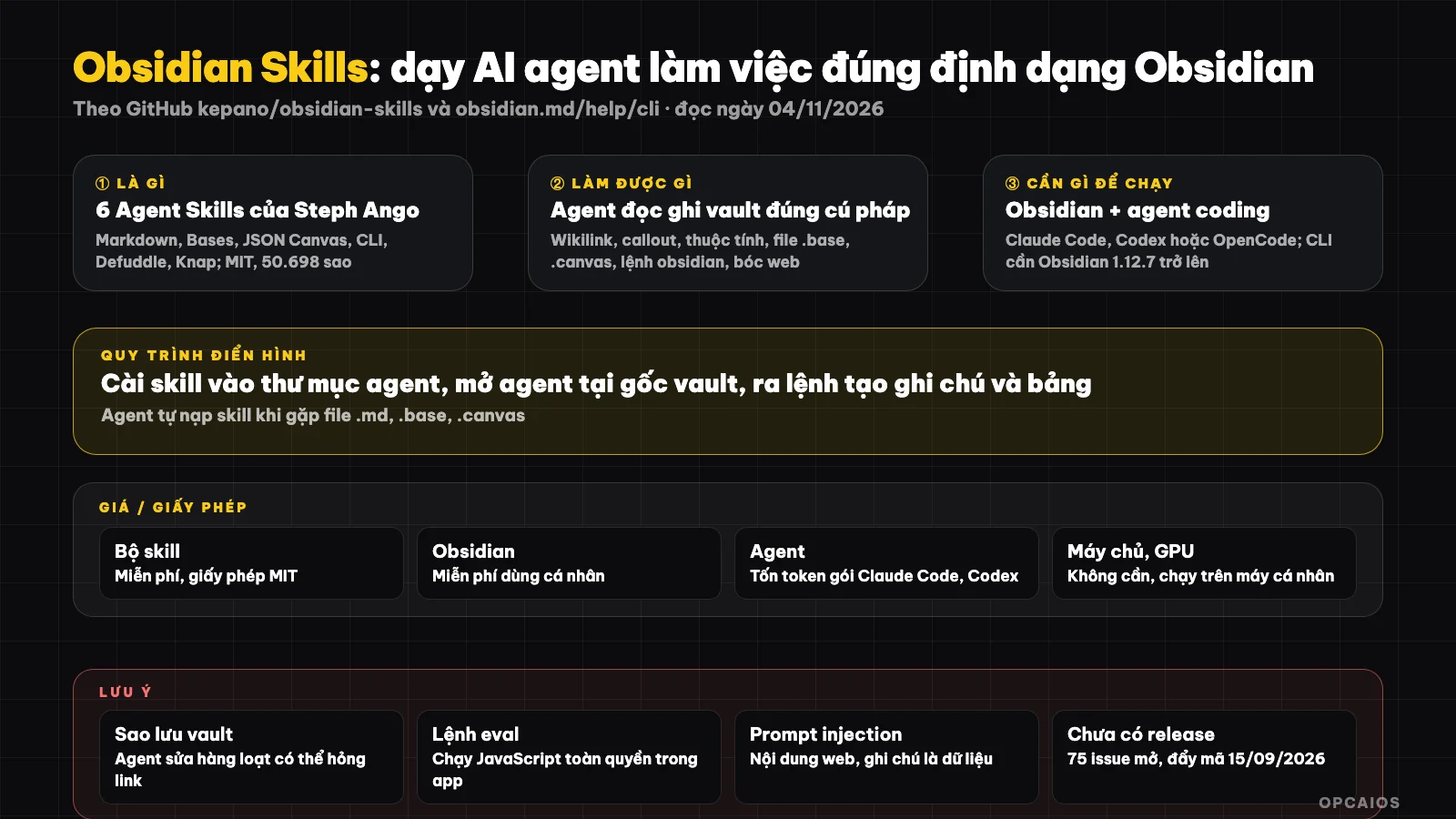
Six skills that teach the agent how to work in the right Obsidian format. Diagram: OPCAIOS.
What is Obsidian Skills and who created it?
Obsidian Skills is a set of skills following the Agent Skills standard (agentskills.io) published by Steph Ango in early 2026. The marketplace.json file in the repository (read on 04/11/2026) lists the plugin name as "obsidian", with the description "Claude Skills for Obsidian", version 1.0.1, owned by Steph Ango with the site stephango.com. Kepano's GitHub page shows Obsidian as the workplace; we do not assert any specific job title since the page does not state it.
A skill, in short, is a folder containing a SKILL.md file that describes when to use it and how to do something, so the agent can load it when facing that task instead of you having to mention it in every prompt; see what is a skill and how to use skills. The problem Obsidian Skills solves is that Obsidian has many syntax conventions beyond standard Markdown: wikilinks [[Note]], embeds with the ! sign, callouts > [!tip], YAML properties at the top of a file, .base files in YAML format to make tables, .canvas files in JSON format. An agent that doesn't know these conventions will create broken links or wrong properties, and you'll have to fix them by hand. The skill set brings those conventions together, with references to Obsidian's official help pages, so the agent gets it right the first time. Since the repository only contains Markdown, the GitHub API does not assign any programming language to it.
What skills are in Obsidian Skills?
Obsidian Skills includes six skills, each one matching a format or tool of Obsidian. The skills/ directory in the repository (read on 04/11/2026) has exactly six items as follows:
| Skill | Teaches the agent to |
|---|---|
| obsidian-markdown | Create and edit .md files in Obsidian style: wikilinks to notes, headings, or block IDs; embed notes, images, PDF pages; callouts with titles and collapse support; properties tags, aliases, cssclasses; highlight, footnotes, math formulas, Mermaid |
| obsidian-bases | Create and edit .base files: global and per-view filters, formulas calculated from properties, four view types (table, card, list, map), summaries like Sum, Average |
| json-canvas | Create and edit .canvas files in JSON Canvas standard: nodes, edges, groups, connections |
| obsidian-cli | Use obsidian command to read, create, append notes, search, set properties, view backlinks, work with daily notes, and develop plugins or themes (reload, see errors, take screenshots, run JavaScript in the app) |
| defuddle | Scrape the main content from a web page into clean Markdown using Defuddle, drop excess parts to save tokens |
| knap | Generate Markdown notes in bulk from a template and JSON or CSV data using Knap |
For example with the obsidian-markdown skill, the workflow for creating a note that the skill teaches is: first add properties at the top of the file, next write structured content, link to related notes, embed documents if needed, add callouts, finally check in reading mode. The obsidian-cli skill notes clearly that commands by default act on the most recently opened vault and on the currently open file if no file= is specified, so you should be careful if you have multiple vaults.
Is Obsidian Skills free? Licensing and hidden costs
Obsidian Skills is free under the MIT license; the real costs lie in the agent and the Obsidian CLI. There is no paid version or accompanying service. The table below lists what we read on 04/11/2026; prices may change:
| Item | Cost | Notes |
|---|---|---|
| Skill set | 0 đồng | MIT license via GitHub API |
| Obsidian | Free for personal use | We have not read the Obsidian pricing page for this post, so we do not mention commercial or Sync plan pricing |
| Obsidian CLI | Included in Obsidian from version 1.12 | The help page obsidian.md/help/cli (read on 04/11/2026) states it requires 1.12.7 or later, enabled in Settings, General |
| AI agent | Costs a Claude Code, Codex plan, etc. | Each time the agent loads a skill and reads the vault, tokens are consumed; see What is Claude Code? |
| Defuddle, Knap | Open source by the same author | Install additionally when using the two respective skills; we have not read the separate licenses of these two tools |
| GPU, server | Not needed | Everything runs on a personal machine with Obsidian |
How do I install Obsidian Skills?
There are four installation methods depending on the agent, according to the README (read on 04/11/2026); we have not installed it ourselves, so we record what the documentation says:
- Claude Code via marketplace (the method the project introduces first), type in Claude Code:
/plugin marketplace add kepano/obsidian-skills
/plugin install obsidian@obsidian-skills
- Using the npx skills command, for any agent supporting standard Agent Skills:
npx skills add https://github.com/kepano/obsidian-skills
The README also provides a variant via SSH git@github.com:kepano/obsidian-skills.git.
- Claude Code manually: copy the repository contents into the
.claudefolder at the vault root, or in the folder you open with Claude Code. - Codex manually: copy the
skills/folder to Codex's skill path, usually~/.codex/skills. See What is Codex?. - OpenCode: clone the entire repository (not just
skills/) into~/.opencode/skills/obsidian-skills, OpenCode automatically recognizesSKILL.mdfiles, restart and you can use it.
After installation, to use the obsidian-cli skill you must also enable the CLI in Obsidian: open Settings, General, enable "Command line interface" and follow the registration instructions. On macOS this creates a symlink /usr/local/bin/obsidian requiring administrator rights; on Windows add Obsidian to PATH; on Linux copy the binary to ~/.local/bin. Obsidian must be running for the command to work.
Example (hypothetical): a consultant keeps 300 meeting notes in Obsidian and wants each note to have client, date, status properties to create a tracking table. That person opens Claude Code at the vault root where the skill is installed and asks: "Read the notes in the Hop folder, add client, date, status properties based on content, then create a Hop.base file with a table view filtered by status not done". The agent uses obsidian-markdown to edit the properties with correct syntax and obsidian-bases to write the .base file instead of guessing the format.
Limitations, risks, and security when letting an agent edit your vault
The biggest risk is that the agent has write permissions over your knowledge base, including running JavaScript in Obsidian via CLI. Five points to know, according to documentation read on 04/11/2026:
- Back up first. An agent making bulk edits to Markdown files can corrupt properties or links widely. Put your vault in Git or use a versioned backup before letting the agent run.
- Obsidian CLI's
evalcommand runs JavaScript in the app with full permissions over the vault. The obsidian-cli skill has no separate warning; we recommend only enabling it when truly needed and reviewing each command. - Prompt injection from notes and web pages. The defuddle skill brings web content into the agent's context; a page containing text instructing AI can make the agent do work outside your intention. Treat all readable content as data; see what is prompt injection?.
- Personal data leaving the machine. Vaults usually contain diaries, customer information. When the agent reads a file, that file's content goes up to the model provider according to their data policy. Limit which folders the agent can read.
- Repository has no official release yet. GitHub API does not record releases; 75 issues are open and the last code push was in September 2026, roughly two months before we read this. The repository is not archived.
Legally, the MIT license permits use and modification freely, including commercially. This is not legal advice.
Obsidian Skills vs Other Options
Obsidian Skills is a knowledge layer about formatting, while other repositories are process or memory layers. The table below is a general description, not a measurement:
| Option | What it does | How it differs from Obsidian Skills |
|---|---|---|
| Obsidian Skills | Teaches agent Obsidian Markdown syntax, Bases, Canvas, CLI | Made by people inside Obsidian, follows official documentation closely, doesn't impose processes |
| Obsidian Second Brain | Turns vault into long-term memory for agent, has semantic search | Adds processes and commands, heavier; see What is Obsidian Second Brain? |
| Write CLAUDE.md or AGENTS.md yourself | Record vault conventions by hand | Quick for small vaults, but easy to miss Bases and Canvas syntax |
| MCP server for Obsidian | Lets agent call API to read and write vault | It's a tool, not knowledge; can be used together with skill; see What is MCP? |
| AI plugin in Obsidian | Chat with notes inside the app | Doesn't bring agent coding into vault, less automation |
When should you use Obsidian Skills?
Obsidian Skills is worth installing when you already use Obsidian and a coding agent, and want the agent to work with vault in correct format. Scenario table:
| Scenario | Suggestion |
|---|---|
| Using Obsidian as second brain, already have Claude Code or Codex | Install, start with obsidian-markdown and obsidian-bases |
| Want agent to create tracking tables from hundreds of notes | Install, use obsidian-bases and knap, remember to back up |
| Only use Obsidian for writing, don't use agent | Not needed yet |
| Developing Obsidian plugin or theme | Install, obsidian-cli supports reload, see errors, take screenshots |
| Vault contains sensitive customer data | Think carefully, limit directories agent can read |
OPCAIOS Experience
We added Obsidian Skills to the Repo list in the Utilities section on opcaios.org after reading the README and checking the repository is still maintained; we haven't tested it yet, so this section explains the criteria we use to consider it, not an evaluation after use. Our Obsidian vault is our main knowledge repository, and agents like Claude Code, Antigravity, Codex read and write files there daily according to a self-written instruction file; but we haven't installed this repository yet. Four criteria: first, the repository is up to date (September 2026) and the author is from inside Obsidian, so syntax won't diverge far from official documentation; next, MIT license; third, hidden costs are only tokens when agent loads the skill, no server or GPU needed; finally, it can replace the syntax instruction part in our self-written file, especially Bases which we haven't used much. No risk from terms; the real risk is giving the agent batch write permissions, so initially we'll test on a vault copy.
Read more: What is Obsidian?, What is second brain?, What is skill and how to use skill, Utilities section, 7 best Claude Code skill sets in 2026.
Frequently Asked Questions
Is Obsidian Skills free?
Yes. The kepano/obsidian-skills repository is under the MIT license (GitHub API, read 04/11/2026), with no paid version. You spend agent tokens when it loads skills and reads your vault, and you need Obsidian version 1.12.7 or higher if you want to use the obsidian-cli skill. The two skills defuddle and knap require you to install additional tools with the same names.
Which agents can use Obsidian Skills?
The README mentions Claude Code (via marketplace plugin or .claude directory), Codex (copy to ~/.codex/skills) and OpenCode (clone to ~/.opencode/skills). Since they follow the Agent Skills standard at agentskills.io, the npx skills add command works for other agents that support this standard. We have not tested with Antigravity or Cursor.
What is Obsidian CLI and is it required?
Obsidian CLI is the obsidian command line integrated into Obsidian from version 1.12, which lets you read, create, search notes, set properties and develop plugins from the terminal, according to the help page obsidian.md/help/cli read 04/11/2026. Only the obsidian-cli skill needs it; the other five skills work directly with files so it is not required.
Is it safe to let an AI agent edit your Obsidian vault?
It is safe if you back up first, limit the directories the agent can read, review each change and avoid the CLI eval command unless necessary. The content of notes and web pages that the agent reads is data and may contain text meant to control the agent; content the agent reads also goes to the model provider according to their policies.
Can someone without coding knowledge use Obsidian Skills?
Yes, because after installing you just give instructions in Vietnamese to the agent, for example "create a project tracking table from notes with the du-an tag". What you need to get familiar with is installing Claude Code or Codex, enabling CLI and understanding how the agent asks permission before writing files. If you want to learn that process from scratch with your own vault, see the AI application training course from OPCAIOS.
Source: GitHub kepano/obsidian-skills (README, marketplace.json, SKILL.md files, API, read 04/11/2026), kepano's GitHub page, Obsidian CLI help page at obsidian.md/help/cli; not read/not verified: Obsidian pricing page, Defuddle and Knap individual licenses, official title of Steph Ango at Obsidian; star count and pricing may change. Experience is from OPCAIOS.
Translated from Vietnamese with AI. Read the original.
Want to apply this in your business?
Book a free 30-minute call (Vietnam time, in English or Vietnamese).