


What is Passkey?
Passkey is a way to log in that aims to replace passwords: instead of something you remember and type, a passkey is a secret stored on your device and unlocked using biometrics like fingerprint or face. According to the introduction on passkeys.dev (accessed 25/10/2026), a passkey is tied to each service, the private key stays on your device while the website only stores the public key, and the browser and operating system ensure the passkey is only used with the correct service, so it protects against phishing. This post explains what a passkey is, its advantages and disadvantages, how it compares to passwords and authentication codes, how to get started, and OPCAIOS's experience.
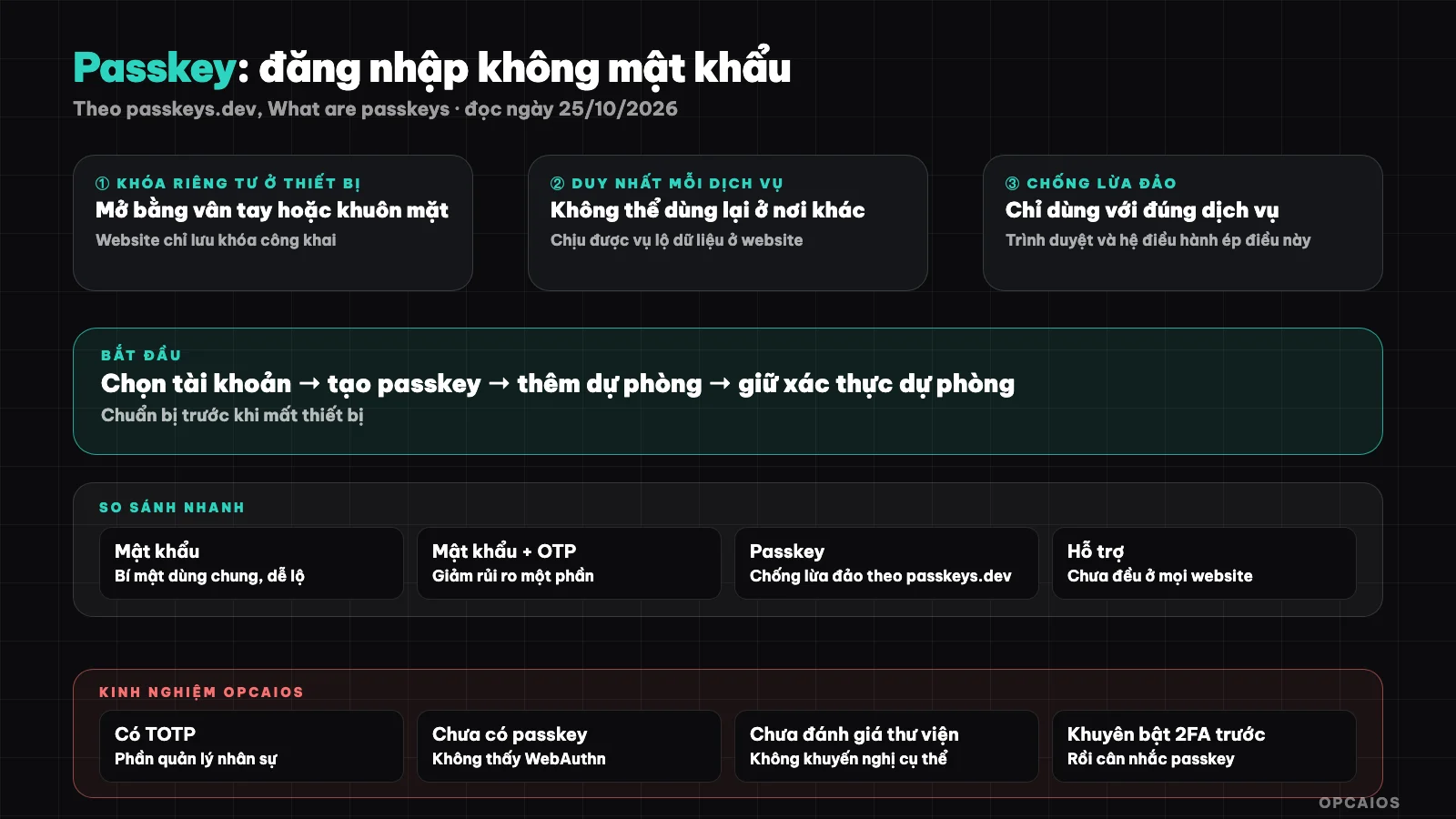
Private key never leaves the device, website only holds the public key. Diagram: OPCAIOS.
What is a passkey and how does it differ from a password?
A password is a secret shared between you and the website: if the website is breached or you are tricked into entering it on a fake page, an attacker has it. A passkey uses public key cryptography: the private key never leaves your device, so there is nothing for the website to leak.
According to passkeys.dev, a passkey is easy to use (you just agree to save and use it, no need to think up a password), unique for each service (cannot be reused elsewhere), survives data breaches (the website only stores the public key), and protects against phishing (the browser and operating system ensure the passkey is only used with the correct service, so you don't have to check the address yourself).
Comparing passkey with password and authentication code
| Criterion | Password | Password + authentication code (OTP/TOTP) | Passkey |
|---|---|---|---|
| You must remember | Yes | Yes (and keep the code app) | No, unlock with device |
| Reused across services | Easy mistake | Password still exists | One passkey per service |
| Data breach at website | High risk | Reduced somewhat | Website only has public key |
| Protection against phishing sites | Weak | Limited (code can be tricked) | Good, according to passkeys.dev |
The authentication code row is OPCAIOS's general assessment, not cited from the page I read; passkeys.dev says their guidance targets password-only and password plus OTP flows. For other authorization protocols, see What is OAuth.
Disadvantages and things to note
Passkey is good but not perfect: you need a plan for when you lose your device, and syncing between devices depends on your ecosystem. The passkeys.dev page I read didn't discuss recovery, FIDO2/WebAuthn, or step-by-step login, so the points below are general practical notes from OPCAIOS.
- Recovery when losing a device: you need a backup plan (second device, recovery codes), because without it you could be locked out of your account.
- Syncing: passkeys can sync across services from your device provider; check which provider you trust.
- Uneven support: not every website has passkey; for a long time it will run alongside passwords.
- Shared devices: don't register a passkey on public computers.
How to get started using passkey
Turn on passkey for your most important accounts first: primary email, cloud account, bank if supported. Usually you go to the security section of your account, choose to create a passkey, then confirm with biometrics or screen lock code.
- Choose accounts with big consequences if compromised: email, password manager, cloud.
- Create a passkey on a device you trust and turn on screen lock.
- Add a backup option (another device or recovery codes).
- Keep backup authentication strong, don't drop the password right away if you're not sure.
- For your own website: consider supporting passkey if you have users logging in; I haven't read the WebAuthn technical documentation carefully so this post doesn't give programming guidance.
See also website security review and data security when using AI.
OPCAIOS's experience
When checking the website source code on 25/10/2026, we found that the staff management section supports TOTP codes (two-factor authentication using a code app), but did not find WebAuthn or passkey. That means our website doesn't yet have passkey support; we're just introducing the concept in this post, not sharing something we've already built.
What we think should come first: turn on two-factor authentication for all admin and critical service accounts, then consider passkey when the service supports it. Limitation: we haven't thoroughly evaluated passkey implementation options for self-built websites so we don't recommend specific libraries.
Frequently Asked Questions
Can passkeys completely replace passwords?
The goal is to replace them, but in practice many services keep passwords in parallel for a period of time. The page I read did not outline a timeline.
If I lose my phone, do I lose my passkey?
It depends on how you sync and whether you have a backup plan. Prepare a backup device or recovery codes before you need them.
Are passkeys safer than SMS codes?
According to passkeys.dev, passkeys are phishing-resistant because they only work with the correct service; SMS codes do not have this property. A detailed evaluation of SMS is outside the scope of the page I read.
Does my fingerprint get sent to the website?
According to the page, the website only stores the public key; the private key stays on your device. Biometric verification only unlocks the private key on your device, according to the general description.
Where should I start?
Enable passkey for your main email and add a backup option. You need security guidance for your team; see AI application training services.
Source: passkeys.dev, "What are passkeys?", read on 25/10/2026; the page does not discuss FIDO2/WebAuthn, step-by-step login process, and recovery, so those sections are general notes from OPCAIOS. That the OPCAIOS website has TOTP and does not yet have passkey is from our source code review on 25/10/2026. The experience is from OPCAIOS.
Translated from Vietnamese with AI. Read the original.
Want to apply this in your business?
Book a free 30-minute call (Vietnam time, in English or Vietnamese).