


What is OAuth? OAuth 2.0 is the industry standard authorization protocol that allows one application to access your resources at another service without needing to know your password. According to oauth.net (accessed 25/10/2026), the IETF OAuth working group develops the protocol, RFC 6749 is the core framework, and the Authorization Code flow combined with PKCE is one of the main grant types. This post explains what OAuth is, how it differs from login (OpenID Connect), grant types, tokens, how to authorize safely, risks and OPCAIOS's experience.
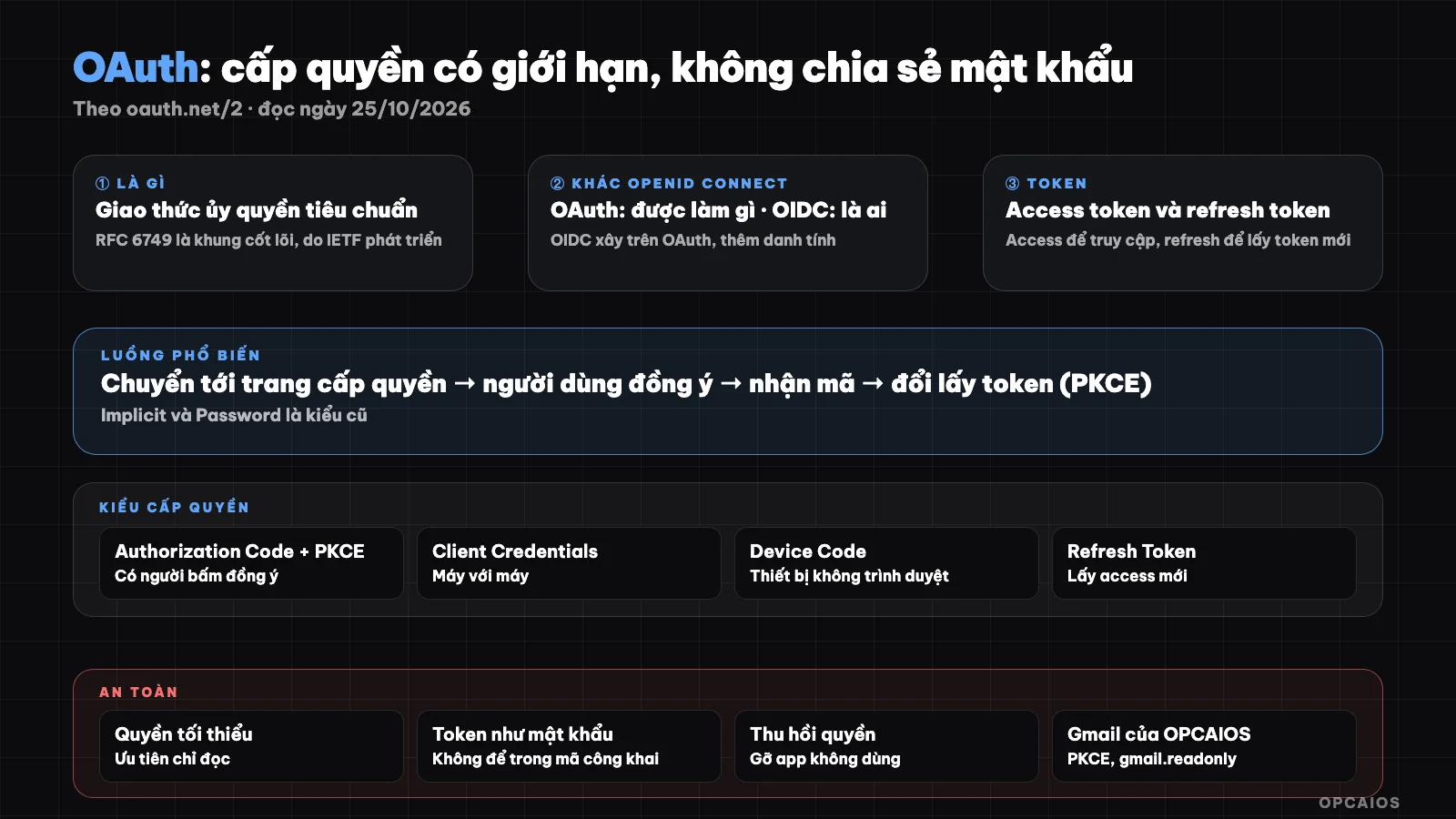
OAuth grants limited access via token instead of sharing password. Diagram: OPCAIOS.
What is OAuth and what problem does it solve?
Before OAuth, if you wanted application A to read your data at service B, you had to give your password to A. OAuth replaces that by giving A a token with limited scope and expiration, and you can revoke it without changing your password.
That's why when an application asks for "Gmail read permission" or "calendar view permission", you get redirected to Google's own page to agree, instead of typing your password into that application. The protocol supports web applications, desktop, mobile and devices without browsers.
How is OAuth different from OpenID Connect and "login"?
OAuth 2.0 solves authorization (what the application is allowed to do), while OpenID Connect builds on OAuth to add identity (who the user is). According to oauth.net, the two types of tokens are also different: access token to access resources, ID token to prove identity.
| Protocol | Answers the question | Example |
|---|---|---|
| OAuth 2.0 | What is the application allowed to do with my data? | Allow app to read my calendar |
| OpenID Connect | Who is this user? | "Sign in with Google" |
The "Sign in with Google" button typically uses OpenID Connect on top of OAuth. If you want to drop passwords entirely, see what are passkeys.
Grant types and tokens
According to oauth.net, grant types include Authorization Code (paired with PKCE), Client Credentials, Device Code and Refresh Token; Implicit and Password are listed as legacy types. Tokens are central: access token to access resources, refresh token to get a new access token.
| Grant type | Use when |
|---|---|
| Authorization Code + PKCE | Application has a user clicking agree (web, mobile) |
| Client Credentials | Machine to machine, no user |
| Device Code | Device with no browser or keyboard |
| Refresh Token | Get new access token when the old one expires |
| Implicit, Password | Legacy types per oauth.net, avoid for new projects |
The part about choosing which type for which case is OPCAIOS's interpretation; the page I read only lists the types. OAuth 2.1 is an ongoing effort to consolidate OAuth 2.0 and popular extensions.
Grant permission to applications safely
As a user, only grant permission to applications you trust and read carefully the scope they ask for. As someone building an application, ask for minimum permissions, prioritize read-only access and use PKCE for the code flow.
- Read the permission scope: "read mail" is very different from "read, send and delete mail".
- Ask for minimum permissions and explain why to the user.
- Protect tokens like passwords: don't put them in public code or logs.
- Revoke permissions for applications you no longer use in the account security section of the provider.
- Check redirect URI strictly for safety.
- With AI agents: grant narrow permissions, avoid having agents hold wide tokens; see prompt injection and tool use.
OPCAIOS's experience
In our task management system we have a Gmail connection flow: according to comments in the source code, the flow starts with Google's consent screen with PKCE and state signature, asking only for read permission (gmail.readonly) for the user's own account. We chose read-only permission because we only need to read to create tasks, not send or delete.
Limitations: we haven't run our own security tests for this flow, and this post doesn't publish client code, redirect addresses or tokens. For many Google data reads on our server side we use a service account rather than user OAuth; the two approaches have different permission models. See Google Search Console and webhook for other connection methods.
Frequently Asked Questions
Is OAuth a login?
No. OAuth is authorization; login (identity) is built on OAuth by OpenID Connect.
How are access tokens and refresh tokens different?
Access tokens allow resource access for a short time; refresh tokens are used to get new access tokens.
What is PKCE?
It is an extension to protect the Authorization Code flow; oauth.net mentions it comes with this flow. The page I read did not explain the mechanism in detail.
How do I revoke permission for an application?
Go to the account security section of the provider (for example Google) and remove the application permission. Details depend on the provider.
Where should I start?
Review the applications that have permission in your Google account and remove the ones you don't use. If you need support, see AI application training service.
Source: oauth.net/2, read on 10/25/2026; the page does not define the roles in detail and does not explain the PKCE mechanism. The table for choosing authorization type by situation is an interpretation by OPCAIOS. Gmail flow information is taken from notes in OPCAIOS source code. Experience is from OPCAIOS.
Translated from Vietnamese with AI. Read the original.
Want to apply this in your business?
Book a free 30-minute call (Vietnam time, in English or Vietnamese).