



What is Playwright?
Playwright is an open source framework by Microsoft for end-to-end web testing and browser automation: an API that controls Chromium, Firefox and WebKit on Linux, macOS and Windows, written in TypeScript, Python, Java or .NET. According to the GitHub API (read on 04/11/2026), the microsoft/playwright repository was created on 15/11/2019, has around 99,200 stars, Apache-2.0 license, most recent code push on 03/11/2026 and latest release is v1.64.1 (14/10/2026). This post answers: what Playwright can do, how free it is, how to install it, how it differs from Selenium or Puppeteer, how it relates to AI agents via Playwright MCP, and when someone working alone should use it.
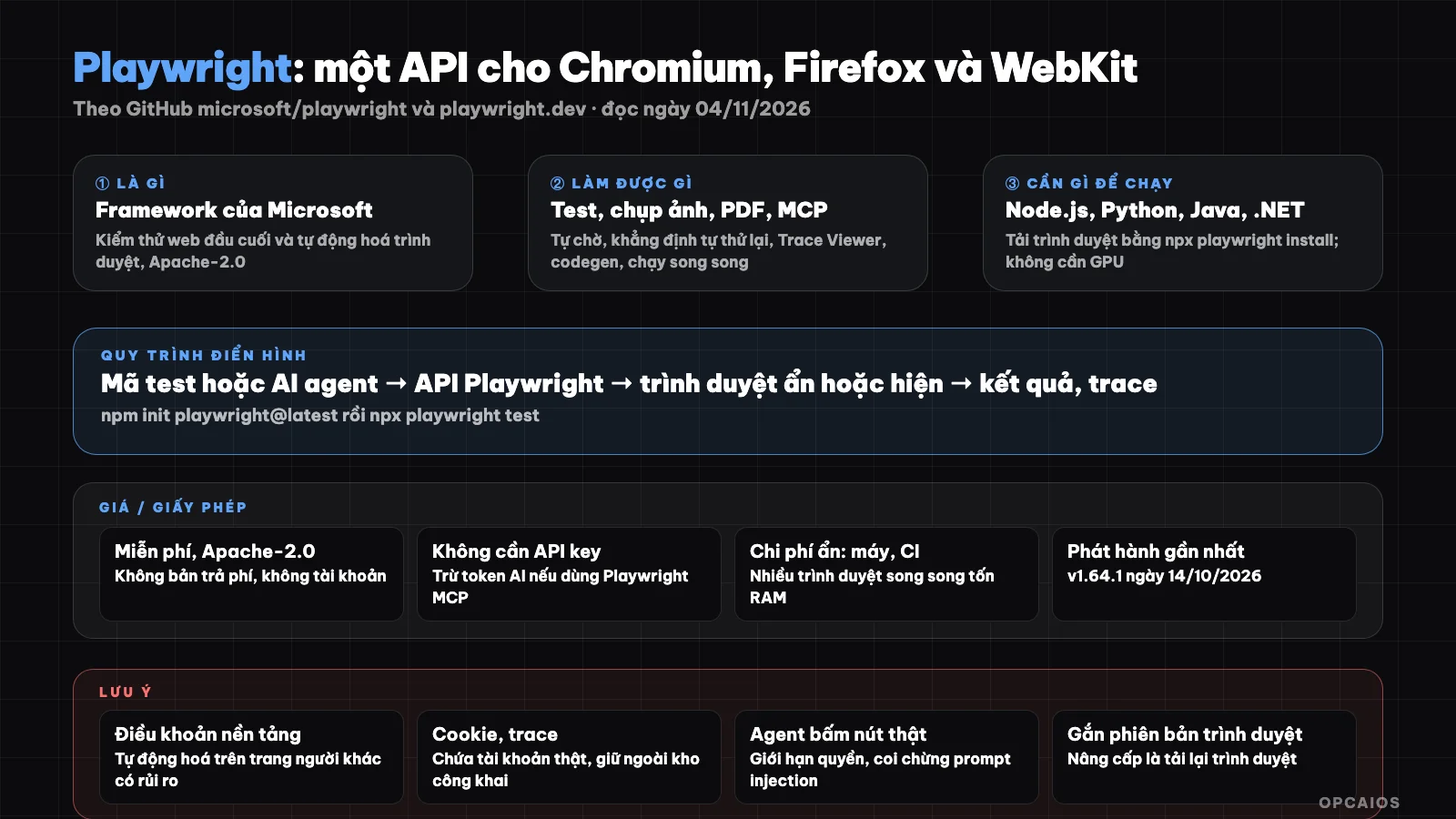
Playwright is a layer between your code, or an AI agent, and three browser engines. Diagram: OPCAIOS.
What is Playwright and who made it?
Playwright is a browser automation framework developed by Microsoft and released as open source from late 2019 under the Apache-2.0 license. A single set of APIs runs on three major browser engines, so the same test script works for Chrome, Edge, Firefox and Safari.
According to the README in the repository (read on 04/11/2026), each Playwright release comes with specific browser versions: Chromium 158.0.8127.2 (uses Chrome for Testing by default), WebKit 27.2 and Firefox 159.0, all runnable in headless and headed mode on Linux, macOS and Windows. The homepage playwright.dev (read on 04/11/2026) divides the product into five parts: Playwright Test is a full test runner; Playwright Library is the playwright package for writing free scripts like taking screenshots, exporting PDFs, extracting page data; Playwright MCP is an MCP server for AI agents to control the browser; Playwright CLI is a command line tool for programmatic agents; and a VS Code extension to record actions into code. Microsoft holds the copyright and maintains the repository very regularly: GitHub shows the most recent code push just one day before we read.
What can Playwright do?
Playwright does two groups of things: automatically testing web interfaces, and automating any browser action like logging in, filling forms, taking screenshots, exporting PDFs or collecting data. The table below summarizes according to the README and homepage (read on 04/11/2026).
| Feature | Description |
|---|---|
| One API, three engines | Chromium, Firefox, WebKit; same code runs on Linux, macOS, Windows |
| Four languages | TypeScript/JavaScript, Python, Java, .NET |
| Auto-wait | Actions automatically wait for elements to be ready, no manual timeout needed |
| Web-first assertions | Assertions automatically retry until condition is true |
| Resilient locators | getByRole, getByLabel, getByPlaceholder, getByTestId |
| Test isolation | Each test has its own browser context; can save and reuse login state |
| Parallel execution | Runs in parallel across configured browsers by default |
| Trace Viewer | Timeline with DOM snapshots, network requests, console logs, step-by-step screenshots |
| Codegen | Record actions in the browser then generate test code, with locator suggestions |
| Device emulation, network interception | Device profiles like iPhone, page.route to block or modify requests |
| Playwright MCP | AI agents read accessibility tree (accessibility snapshot) instead of screenshots to control pages |
The difference the README emphasizes is the auto-wait mechanism and self-retrying assertions: the two most common causes of flaky web tests are handled at the framework level rather than leaving it to the person writing to add sleep commands. For someone working alone, this means less time fixing false test failures.
Is Playwright free? License and hidden costs
Playwright is completely free under the Apache-2.0 license, no paid version, no account or API key required. The playwright.dev homepage has no pricing section. The real costs are the machine running the browser and learning time. Table below (read 04/11/2026, may change).
| Item | Details |
|---|---|
| Software fee | 0 đồng, Apache-2.0, commercial use allowed |
| Browser | Download via npx playwright install, each engine a few hundred MB |
| GPU | Not needed |
| API key | Not needed for Playwright; if using Playwright MCP with AI agent then you spend tokens of the AI model you choose |
| Server | Running tests on CI or private server costs CPU, RAM; running many browsers in parallel is quite heavy |
| Learning time | Need to know one of four languages; non-coders should use via AI agent or codegen |
Note: Microsoft does not sell cloud services bundled in this repo; if you see a "run Playwright on cloud" service, that's a third party with separate pricing, we haven't read about them so we don't mention them.
How to install Playwright and run a test?
Installing Playwright with Node.js takes three steps per README (read 04/11/2026); Python has its own path per official documentation.
- First, create a new test project with the init command; this command asks a few questions then creates config, sample test, and downloads browsers:
npm init playwright@latest
If you already have a project, install manually with npm i -D @playwright/test then npx playwright install to download Chromium, Firefox, WebKit.
Next, run the sample tests with
npx playwright test. README shows an example test that checks the playwright.dev page title contains "Playwright", and a test that clicks "Get started" then checks the "Installation" title appears.If using Python, documentation at playwright.dev/python (read 04/11/2026) guides you to install the pytest plugin then download browsers:
pip install pytest-playwright
playwright install
Requires Python 3.8 or higher; can install with Poetry or uv instead of pip.
- Finally, if you want an AI agent to control the browser, the homepage lists the MCP server startup command as
npx @playwright/mcp@latest, and with Claude Code it'sclaude mcp add playwright npx @playwright/mcp@latest. Playwright CLI installs withnpm install -g @playwright/cli@latest. These two tools are in separate reposmicrosoft/playwright-mcpandmicrosoft/playwright-cli, we haven't read their READMEs in this post.
Example (hypothetical): an online course seller builds their own website, writes three Playwright tests for the critical flows being signup, payment, and entering the course; each time they modify the interface, tests run on CI and report immediately if the payment button disappears. We haven't measured the time to write and maintain these tests.
Limits, risks, and legal notes when using Playwright
Playwright is a browser control tool, so risks lie in how you use it: automating on someone else's website may violate their terms of service, while testing on your own system has almost no legal risk.
First, on platform terms. Many websites ban automated access, ban data scraping, or use anti-bot measures. Playwright is not a fingerprint spoofing tool or bypass tool, and Microsoft does not encourage that; this post does not teach bypassing either. If you use Playwright to collect data, read the terms and robots.txt of the site, prioritize official APIs, and respect the copyright of collected content.
Second, on personal data. Login state saved for tests contains real cookies and tokens; accidentally putting it in a public code repo exposes accounts. Screenshots and traces can also contain customer information. Use test accounts and fake data for testing.
Third, on operations. Each Playwright version is tied to a specific browser version, so upgrading the package means re-downloading browsers and may cause old tests to change behavior; v1.64.1 for instance is a patch of two bugs from 1.64.0 per release notes. Running many browsers in parallel also consumes RAM. And when you hand Playwright to an AI agent via MCP, the agent can click real buttons on real pages: limit permissions, review each sensitive step, and read What is prompt injection? because web page content may contain instructions aimed at the agent. The legal part above is reference only, not legal advice.
Playwright versus other options
Playwright is often compared to Selenium, Cypress, and Puppeteer when discussing testing, and to Browser Use or browser agents when discussing AI. The table below is a general description, not a measurement by us.
| Option | How it differs from Playwright | Best for |
|---|---|---|
| Selenium | Mature, many languages, uses WebDriver; requires more manual wait handling | Teams with existing Selenium test suites |
| Cypress | Runs in the browser, great debugging experience, primarily JavaScript; limited WebKit support | JavaScript frontend teams |
| Puppeteer | Google's library for Chrome/Chromium, Node.js focused; no built-in test runner | Simple Chrome scripts |
| Browser Use | AI agent that plans and executes browser actions independently, uses Playwright under the hood | Natural language descriptions |
| Camoufox CLI | Modified Firefox browser designed to be hard to detect; different purpose, higher terms of service risk | See separate article, think carefully |
We have a separate article on what Browser Use is and in this batch we have an article on Camoufox CLI.
When should you use Playwright?
Use Playwright when you have a website or web application that needs repeated testing, or when you need to automate browser actions on systems you own or have permission to use. Don't use it when you only need to call an API, or when the goal is to bypass restrictions on someone else's site.
| Scenario | Recommendation |
|---|---|
| Self-built website, worried that fixing one thing breaks another | Write Playwright tests for 3 to 5 important flows, run on CI |
| Need to take screenshots, export web page PDFs on a schedule | Use Playwright Library with a few lines of code |
| Want an AI agent to automatically check the interface after changes | Use Playwright MCP with Claude Code or similar agents |
| Get data from someone else's site | Prioritize official APIs or licensed services; read terms first |
| Don't know how to code, need simple testing | Use codegen or ask an AI agent to write it, then learn to read tests |
| Only need to call a backend API | No browser needed, use an API testing tool |
OPCAIOS experience
We added Playwright to the Repo list in the Tools section on opcaios.org after reading the README and checking that the repository is still maintained; we haven't run it through our own process yet, so this section outlines the criteria we use to evaluate, not an assessment after using it.
The first criterion is whether the repository is still actively maintained: the most recent code push was on 03/11/2026 and releases are regular, making it one of the healthiest repositories we follow. The second criterion is Microsoft's Apache-2.0 license: safe to use in products and services. The third criterion is hidden costs: no fees, no GPU, only consuming machine resources when running multiple browsers and spending tokens if an AI agent controls it. The fourth criterion is whether it can replace the tools we're currently using: the opcaios.org website is built and operated by an AI agent, so an automated testing layer for key flows like buying resources and signing up for courses is something we want to add; Playwright along with Playwright MCP is a reasonable candidate because the agents we use (Claude Code, Antigravity, Codex) all support MCP. Finally, there's terms of service risk: low when testing your own systems, high when automating on other platforms, and we only plan to use it for the former.
Read more: what is MCP?, what is Claude Code?, and what is Firecrawl? for licensed web data extraction, 5 best web scraping tools for AI agents in 2026.
Frequently Asked Questions
Is Playwright free?
Yes. Playwright is open source under the Apache-2.0 license maintained by Microsoft, with no paid version, no account or API key required, and usable for commercial purposes. The Playwright.dev homepage has no pricing section (as of 04/11/2026). The only costs that arise are machine resources to run the browser, CI costs if you run tests on a continuous integration service, and AI model tokens if you use Playwright MCP with an agent. "Playwright in the cloud" services are from third parties and have their own pricing.
How is Playwright different from Selenium and Puppeteer?
Selenium came earlier, controls browsers via the WebDriver protocol, and supports many languages, but writers often have to manually handle waiting for elements. Puppeteer is Google's library focused on Chrome/Chromium and Node.js, with no built-in test runner. Playwright supports all three engines—Chromium, Firefox, WebKit—with a single API, has auto-waiting, auto-retrying assertions, a built-in test runner, and Trace Viewer included. This is a general description based on documentation, not our own benchmarking.
Can Playwright be used with AI agents?
Yes, in two ways Microsoft provides. Playwright MCP is an MCP server so agents like Claude Code, Cursor, or Claude Desktop can control the browser through the accessibility tree instead of screenshots, run with npx @playwright/mcp@latest. Playwright CLI is a command-line tool that the homepage describes as more token-efficient than MCP for coding agents. Both are in separate repositories; we have not read the details yet. When handing the browser to an agent, limit permissions and be careful with page content that may contain instructions targeting AI.
Is it legal to use Playwright to scrape web data?
It depends on the site and how you scrape. Playwright is just a tool to control browsers; legality depends on the website's terms of service, content copyright, and data protection laws where you operate. Many platforms prohibit automated access or bulk data collection. Prioritize official APIs, respect robots.txt, do not circumvent anti-bot measures, and do not store other people's personal data without a legal basis. This section is for reference, not legal advice.
Can someone without coding knowledge use Playwright?
You can get started without writing code from scratch: the VS Code extension has a record-and-generate feature for test code, and AI agents like Claude Code can write, run, and fix tests based on your requirements in Vietnamese. But to maintain a test suite long term, you still need to read and understand code at a basic level so you know what the test checks and why it fails. Using an AI agent as your code writer while you set the requirements and review the work is what we teach in OPCAIOS's AI application training course.
Source: GitHub microsoft/playwright (README, API, release notes v1.64.1, accessed 04/11/2026), playwright.dev homepage and playwright.dev/python/docs/intro documentation (accessed 04/11/2026); not yet read/verified: README of microsoft/playwright-mcp and microsoft/playwright-cli repositories, Java and .NET documentation, third-party cloud service pricing; star counts and prices may change. Experience is from OPCAIOS.
Translated from Vietnamese with AI. Read the original.
Want to apply this in your business?
Book a free 30-minute call (Vietnam time, in English or Vietnamese).