


What is Browser Use?
Browser Use is an open-source Python library for building AI agents that control the browser: the user describes the task, the language model looks at the webpage, decides to click, type, switch tabs and repeats until done. The project, according to GitHub (read 25/10/2026), uses the MIT license, has around 119.1 thousand stars, requires Python 3.11 or higher, installs via uv add browser-use and runs with a local browser or Browser Use's cloud browser. The company also sells Browser Use Cloud: according to the official pricing page, there is no subscription plan, only pay-as-you-go, cloud browser is $0.02 per hour.
The article includes: 1) how it works; 2) price and additional fees; 3) security risks; 4) when to use it instead of scraping tools; 5) OPCAIOS experience. For example, an office worker can ask an agent to fill a form on a page with no API, while someone who just needs to read content should use a scraping tool.
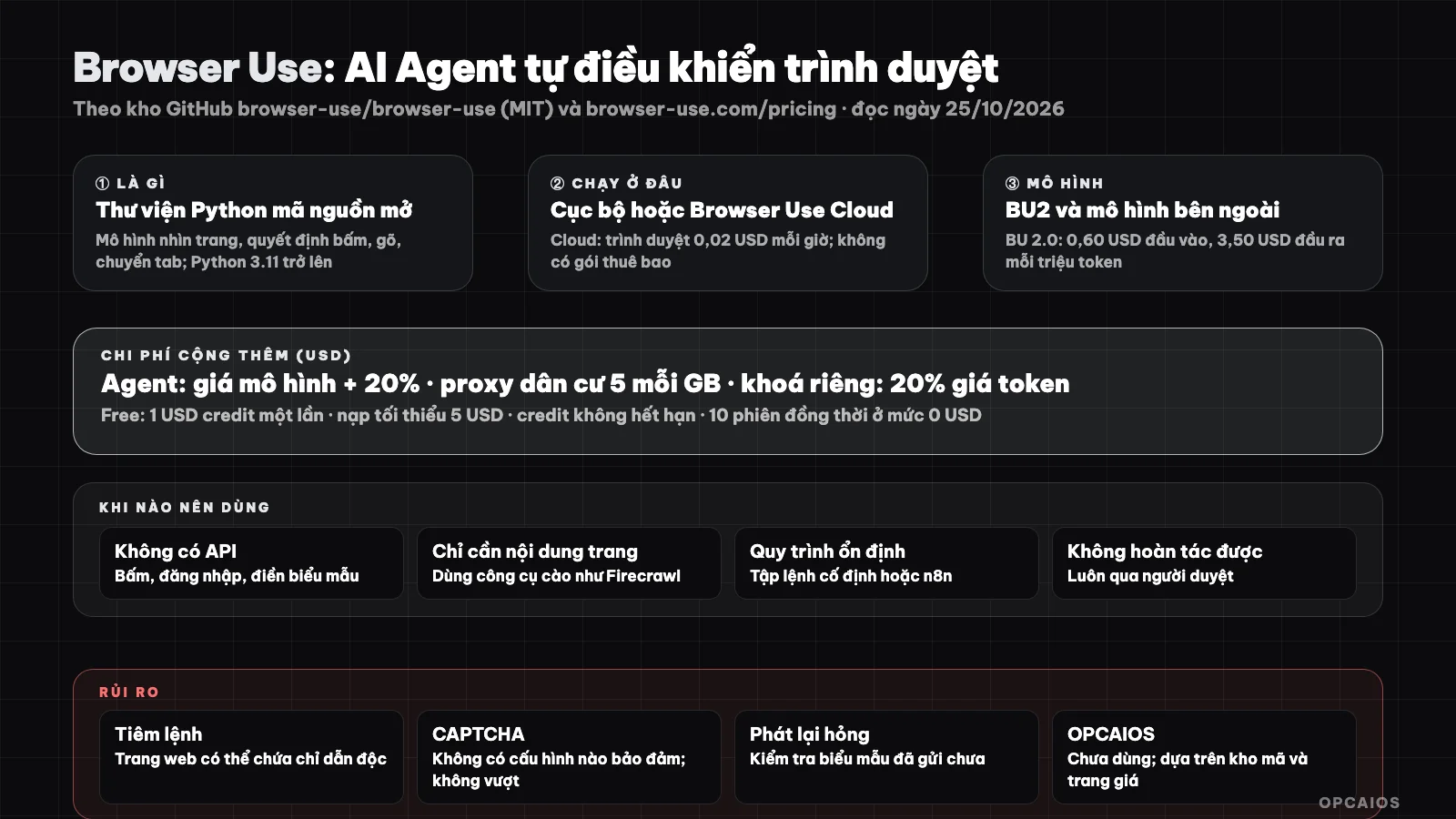
Agent looks at page, chooses action, repeats; cost includes model, browser and bandwidth. Diagram: OPCAIOS.
How does Browser Use work?
Browser Use is an "open-source Python library for AI browser agents", according to GitHub (read 25/10/2026), plus Browser Use Cloud service with stealth browser and pre-built agent API. It works in three steps. First, the agent uses a language model to read the page; the project's topic tags mention Playwright and CDP, but the page does not explicitly state how to control. Next, the model chooses actions like clicking, typing or switching tabs. Finally, the loop runs again until the task is done. The project recommends using its own BU2 model (ChatBrowserUse) and also supports models from OpenAI, Anthropic, Google via wrapper classes, plus local models via Ollama. Features listed include registering custom tools, replaying saved sessions with new variables and reusing browser profiles. For example, a saved session can be replayed with new variables for each customer. On the foundation of agents, see What is LLM? and 5 autonomous AI Agent tools.
How much does Browser Use Cloud cost?
Browser Use Cloud charges by usage, no subscription. According to the official pricing page (read 25/10/2026, USD, tax not included), eligible accounts get $1 credit once, minimum deposit $5 to unlock all models. Cloud browser costs $0.02 per hour, rounded up by minute. Browser agent charges the model cost plus 20%, plus browser time and bandwidth. Residential proxy costs $5 per GB and is on by default, while direct or private proxy is $0.20 per GB. BU 2.0 model costs $0.60 input, $0.06 cached input and $3.50 output per million tokens. Concurrent sessions increase by total amount paid: $0 gets 10 sessions, $100 gets 50, $1,000 gets 250 and $5,000 gets 500. For example, a 30-minute session costs $0.01 for browser time, not counting model and bandwidth; a $5 deposit covers many such sessions. All prices may change, so verify on the official page.
The page also mentions SOC 2 Type II and HIPAA certification, and on-premise deployment via sales. We do not verify those claims and also do not verify the 90.5% score on "Stealth Bench V2" that the project self-reports for its cloud browser.
When to use Browser Use?
| Need | Suggestion |
|---|---|
| Task needs clicking, logging in, filling forms on a page with no API | Browser Use or similar browser agent |
| Just need to get page content as clean text for AI | Use scraping tool like Firecrawl, cheaper and more predictable |
| Page already has official API | Call the API (see What is API?) |
| Process repeats reliably, rarely changes | Fixed script or n8n; agents are costly and unpredictable |
| Task cannot be undone (payment, sending message) | Always go through human review |
What risks and limits does Browser Use have?
The biggest risk of a browser agent is taking action on your behalf on untrusted pages, and according to Browser Use's GitHub and pricing page (read on October 25, 2026) there are six groups you need to know about.
- Command injection through web pages: for example, a page you have the agent read could contain malicious instructions that make the agent change direction; treat all web content as untrusted input.
- CAPTCHA: according to the code repository itself, there is no configuration that guarantees avoiding or solving CAPTCHA. We do not encourage bypassing CAPTCHA; many sites prohibit this in their terms.
- Login and secrets: profile sync only copies cookies so some pages still require logging in again; session history files can contain secrets and need to be kept private.
- Replay may break midway: if the page changes, check whether the form was submitted before running again to avoid sending twice.
- Hard to predict costs: each step calls the model; long loops consume tokens, plus a 20% platform fee if you use Browser Use's agent plan.
- Terms and legal: scraping data, automating accounts could violate a page's terms; read the terms and respect robots.txt and personal data.
How do I use Browser Use safely?
Using Browser Use safely means limiting the agent's permissions and costs from the start, in five steps.
- Step 1: start with small tasks, read-only, on pages you have access to.
- Step 2: use a separate account with minimal permissions, do not use an admin account or real payment card.
- Step 3: set step and cost limits for each run, since each step calls the model and Browser Use Cloud adds 20% to the model cost.
- Step 4: log and review the session before running it on schedule.
- Step 5: do not put keys and passwords in the prompt; see authorization principles in What is MCP?.
For example, a read-only task like getting the titles of 10 public pages is a reasonable starting point, while payment or sending messages should always go through a human reviewer. According to Browser Use's GitHub, there is no configuration that guarantees avoiding CAPTCHA, so choose pages that allow automation. Finally, track the cost of each run, since Browser Use Cloud adds 20% to the model cost, and stop immediately if the agent loops.
OPCAIOS's experience
We have not used Browser Use; this post is based on the official code repository and pricing page, not our own test results. When we need to read a page where automatic loading tools are blocked, we use the browser built into the Claude tool to read the displayed content, following an internal rule not to bypass CAPTCHA and not to impersonate to work around blocks. We have also not compared the stability or cost between Browser Use and other methods.
Read more: 5 best web scraping tools for AI agents in 2026.
Frequently Asked Questions
What is Browser Use?
Browser Use is an open-source Python library for building AI agents that control browsers, along with a paid cloud service priced by usage. According to GitHub (accessed on October 25, 2026), the library uses an MIT license, has around 119.1 thousand stars, and requires Python 3.11 or higher. The language model looks at web pages, chooses actions like clicking or typing, then repeats until done. Browser Use Cloud sells cloud browsers for $0.02 per hour, with no subscription required. For example, instead of writing a fixed script, you describe in natural language what needs to be done on a page with no API, and let the agent figure out the steps. This approach is more flexible but less stable than fixed scripts, and each step costs model tokens. We haven't used Browser Use ourselves, so we can't confirm the success rate.
Is Browser Use free?
The MIT-licensed library is free to use and runs browsers locally; you still pay for model costs. The cloud service gives you $1 in credits once, then charges by usage—browsers cost $0.02 per hour.
How is Browser Use different from Playwright?
Playwright runs fixed scripts that you write; Browser Use lets the model decide the next step itself, which is more flexible but less stable and costs more tokens. We haven't measured this directly.
Is it safe to let an agent log into my accounts?
There are risks (prompt injection, irreversible actions); use separate accounts with minimal permissions and review what it does.
Can I use it for bulk data scraping?
You can, but it's expensive; if you just need content, dedicated scraping tools are more suitable. Want to learn how to build safe agents? Check out OPCAIOS's AI application training program.
Source: browser-use/browser-use GitHub repo and browser-use.com/pricing, accessed directly on October 25, 2026; star count, pricing, and benchmark figures are from the project's announcements and not verified; prices exclude taxes and may change. The experience is OPCAIOS's.
Translated from Vietnamese with AI. Read the original.
Want to apply this in your business?
Book a free 30-minute call (Vietnam time, in English or Vietnamese).