



What is ReClip?
ReClip is an open-source, self-hosted web application that lets you paste video links from YouTube, TikTok, Instagram, X and over 1,000 other sites, then download them as MP4 or extract audio as MP3, based on the yt-dlp tool and FFmpeg. According to GitHub API (read on 04/11/2026), Avery Gan's averygan/reclip repository was created on 31/03/2026, has around 11,200 stars, MIT license, with the most recent code push on 09/07/2026. The README notes that the backend is just a Python file of about 150 lines with two dependencies. This post explains what ReClip does, how to run it per the README, platform terms and copyright risks, comparisons with VidBee and yt-dlp, and when you should use it.
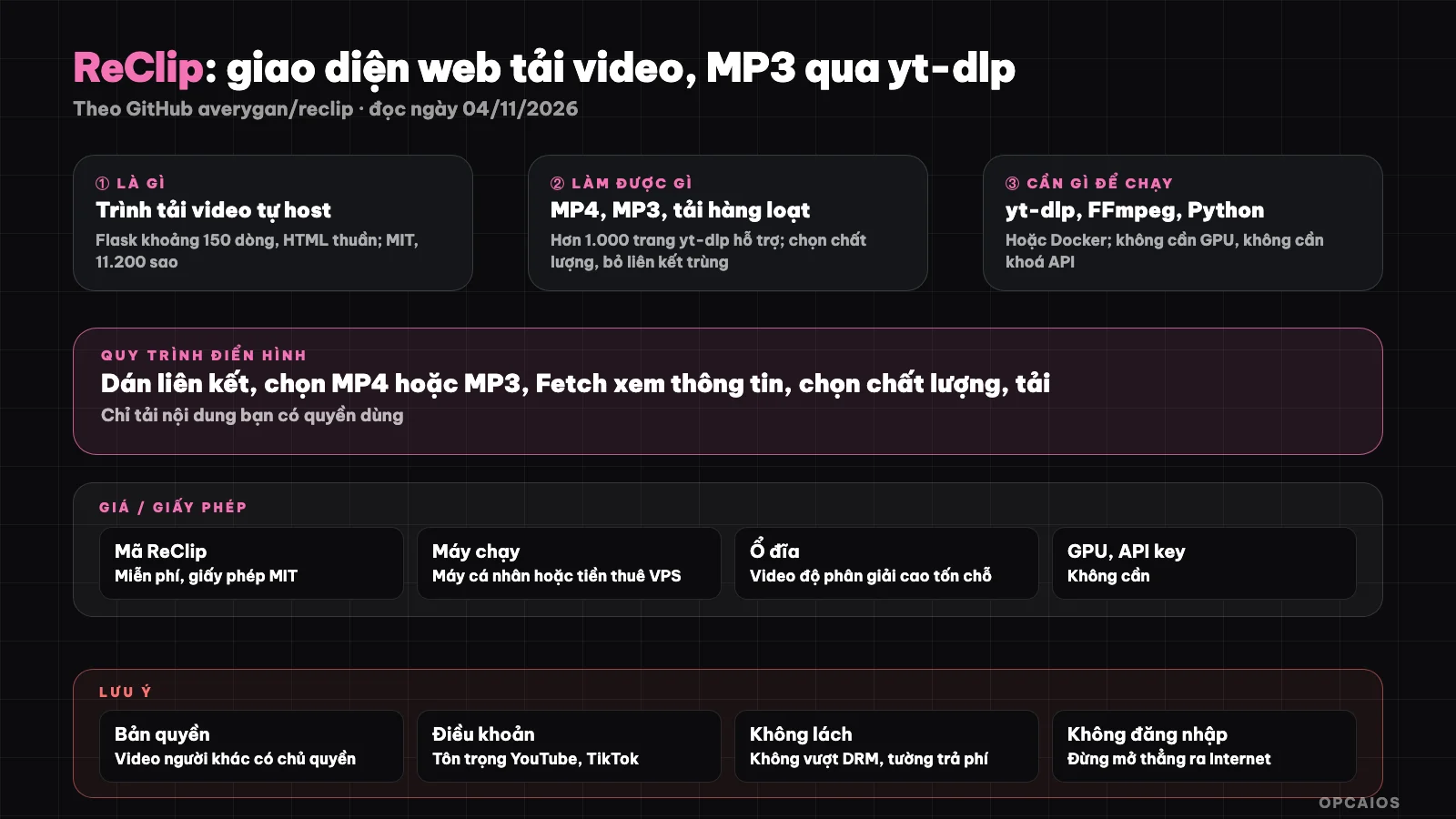
ReClip is a thin interface layer on top of yt-dlp and FFmpeg, running on your machine. Diagram: OPCAIOS.
What is ReClip and who made it?
ReClip is a lightweight web interface for yt-dlp, the famous command-line tool for downloading videos, so people unfamiliar with the terminal can still download content through a browser. The author is Avery Gan; his GitHub profile (read on 04/11/2026) only says "Build & grow apps", with no separate project website.
According to the README, ReClip has three parts. First is the backend written in Python and Flask, about 150 lines, which takes links, calls yt-dlp to fetch information and download. Next is the frontend in plain HTML, CSS, JavaScript in a single file, no framework, no build step. Finally is the downloading engine yt-dlp combined with FFmpeg to merge video and audio or convert to MP3. Because ReClip is just a wrapper, the list of supported sites is mainly the list of yt-dlp, and when a platform changes its structure, the fix is in yt-dlp. The update on 09/07/2026 in the commit history added a step to self-update yt-dlp on startup, which can be disabled with the RECLIP_NO_UPDATE=1 environment variable. According to the app.py source code we read on 04/11/2026, the server by default only listens on localhost, which can be changed with the HOST and PORT environment variables.
What are ReClip's main features?
ReClip focuses on one thing: downloading video or audio from links, multiple links at once, through a clean interface. No transcripts, no AI, no user accounts. The table below is from the README, read on 04/11/2026.
| Feature | Short description |
|---|---|
| Support for over 1,000 sites | Every site yt-dlp supports: YouTube, TikTok, Instagram, X, Reddit, Facebook, Vimeo, SoundCloud |
| MP4 or MP3 | Download video or extract audio only |
| Choose quality | Select resolution when the source offers multiple levels |
| Batch download | Paste multiple links at once, automatically removes duplicates |
| Playlists | Has API to fetch playlist information |
| Lightweight | One Python file, two dependencies: Flask and yt-dlp |
| Docker | Has Dockerfile and docker-compose |
The usage process has five steps: paste links, choose MP4 or MP3, click Fetch to see information and thumbnail, choose quality, then download each video or download all.
Price, license and hidden costs
ReClip is free, MIT license according to GitHub API (read on 04/11/2026). No paid version or cloud service included. Real costs are the machine to run it and your time maintaining it.
| Item | Cost | Note |
|---|---|---|
| ReClip code | 0 đồng | MIT; yt-dlp uses Unlicense, FFmpeg under LGPL/GPL depending on build |
| Machine to run it | Personal machine 0 đồng, or VPS rental fee | Not including tax, may change |
| Storage, bandwidth | Depends on number of downloads | High-resolution video uses lots of disk |
| GPU, API key | Not needed | No AI features |
Limitations: the README has no user authentication, so if you expose it to the Internet, anyone who knows the address can use it. The repository has no updates from 09/07/2026 to the read date, so bug fixes depend on yt-dlp self-updating.
How to Install and Run ReClip
Running ReClip requires yt-dlp, FFmpeg and Python 3.8 or higher, or just Docker, according to the README on GitHub (read 04/11/2026). It's all just a few commands and should run on your personal machine.
- First, install yt-dlp and FFmpeg, then download the code and run the startup script:
brew install yt-dlp ffmpeg    # or apt install ffmpeg && pip install yt-dlp
git clone https://github.com/averygan/reclip.git
cd reclip
./reclip.sh
- Next, open localhost with the port that the README specifies in your browser. If you're using Docker, replace the step above with:
docker build -t reclip . && docker run -p 8899:8899 reclip
- Finally, paste the link, choose the format and download. The file is returned through your browser.
If running on a server, don't expose it directly to the Internet: put it behind a login layer or private network, because ReClip doesn't have user accounts.
Limitations, Risks, Platform Terms and Copyright
The most important thing about ReClip is legal, not technical: being able to download doesn't mean you're allowed to download or reuse it. The README itself notes that the tool is only for personal use and requires users to respect copyright law and platform terms.
This section is for reference only, not legal advice; we haven't reviewed the original terms text of each platform or specific laws. There are four points to keep in mind. First, the terms of service of YouTube, TikTok, Instagram and Douyin generally restrict downloading content using external tools if the platform doesn't provide a download button; read the terms first. Second, other people's videos are protected by copyright; reposting, remixing for ads or reselling without permission may violate Vietnam's Intellectual Property Law and laws where the author lives. Third, ReClip doesn't support and you shouldn't try to bypass DRM, paywalls or access restrictions; we don't provide guidance on circumventing blocks. Finally, if you self-host for multiple users, you may be liable for what they download. More reasonable uses: download videos you own, open-licensed content like Creative Commons, or save a personal copy to rewatch when permitted.
Compared to VidBee, yt-dlp and Other Options
ReClip is the lightest choice in the group of yt-dlp-based video download tools: no AI, no desktop app, just a web page. The table below is a general description, not a measurement.
| Option | Strengths | Limitations |
|---|---|---|
| ReClip | Single Python file, web interface, batch downloads | No authentication, no transcription |
| VidBee | Desktop app, transcription, AI summary, RSS | Heavier, more components |
| yt-dlp command line | Most full-featured options | Need terminal familiarity |
| Douyin TikTok Download API | API retrieves data and video from Douyin, TikTok | Focused on two platforms, need to self-host |
| AI Video Transcriber | Download with transcription, summary | Depends on AI model |
When Should You Use ReClip?
ReClip works when you need a simple interface to download content you have the right to use, on your personal machine or internal network. It doesn't work if you need transcription, content analysis or public sharing with many people.
| Situation | Recommendation |
|---|---|
| Save video you posted yourself for reediting | ReClip on personal machine |
| Extract MP3 from open-licensed lecture | ReClip in MP3 mode |
| Need transcription to write an article | VidBee or combine with Whisper |
| Want a team to use it together | Put behind a login layer, document internal rules clearly |
| Want to repost someone else's video | Ask the creator first, tool doesn't substitute for permission |
Example (hypothetical): a one-person OPC instructor wants to save their own livestreams on YouTube to cut into lessons; run ReClip on their personal machine, paste five links and download MP4 in one batch.
OPCAIOS's experience
We recently added ReClip to the Repo list under Utilities on opcaios.org after reading the README and checking that the repository is still being maintained; we haven't tested it yet, so this section outlines the criteria we use to consider it, not an evaluation after use. Our criteria: whether the repository is still being updated (latest code push on 07/09/2026, about four months from the reading date); license (MIT); hidden costs (no GPU, only the machine running it and storage); whether it can replace the tool we're already using, since we've self-hosted a Douyin TikTok Download API for internal content research; and platform terms risk, copyright risk, which are our highest priorities with any video download tool.
Read more: What is VidBee?, What is Docker?, What is Douyin TikTok Download API?, 6 best automatic short video cutting tools 2026.
Frequently asked questions
Is ReClip free?
Yes. ReClip uses the MIT license under GitHub API (read on 04/11/2026), has no paid version, requires no account, no API key or GPU. The only cost is the machine running it: if you run it on a personal computer, it costs almost nothing extra; if you rent a server, you pay for hosting and bandwidth. You also need disk space for downloaded videos, especially high-resolution ones. Note that free software doesn't mean the downloaded content is free to reuse; copyright still belongs to the video creator.
Is downloading videos with ReClip legal?
It depends on the content and purpose, and this is not legal advice; we haven't checked the original terms of each platform. ReClip's README states the tool is only for personal use and requires respecting copyright law and platform terms; the developer is not responsible for misuse. YouTube, TikTok, and Instagram terms usually restrict downloading outside their official download buttons. Downloading your own videos or openly licensed content is low risk; downloading to repost or resell someone else's content is high risk.
How is ReClip different from yt-dlp?
ReClip doesn't replace yt-dlp but is a web interface wrapping around it. yt-dlp is the command-line tool that does the actual downloading; FFmpeg handles muxing video, audio, and converting to MP3. ReClip adds a webpage to paste multiple links, view thumbnails, choose quality, and batch download without typing commands. In return, ReClip only uses a small subset of yt-dlp's options. If you're comfortable with the terminal and need advanced options like subtitles, renaming files by pattern, using yt-dlp directly will be more flexible.
Should we run ReClip on a VPS for a whole team to use?
Possible, but be careful. According to the README and source code read on 04/11/2026, ReClip has no login or permission system, and by default only listens on localhost. If you change it to expose to the internet, anyone who knows the address can use your server to download, wasting bandwidth and potentially making you liable for what they download. Put it behind a login layer, private network or VPN, limit users, and set clear internal policies on copyright. See What is VPS? first before self-hosting.
Where can I learn to use AI tools and self-host safely?
First, read the README of averygan/reclip and yt-dlp documentation to understand what the tool does. Next, read What is Docker? and What is VPS? on the OPCAIOS blog to learn how to run self-hosted services without exposing them to the internet. Finally, set rules for yourself: only download content you have rights to use, cite sources when quoting, ask permission before reposting. If you want a structured roadmap to bring AI tools and automation into your content workflow legally, check out OPCAIOS's AI application training course.
Source: GitHub averygan/reclip (README, API, commit history, app.py file, read 04/11/2026), Avery Gan's GitHub profile; project has no separate official website; not read/not verified: original terms of YouTube, TikTok, Instagram, Douyin, relevant copyright law text, detailed licenses of yt-dlp and FFmpeg; star counts and prices may change. Experience is from OPCAIOS.
Translated from Vietnamese with AI. Read the original.
Want to apply this in your business?
Book a free 30-minute call (Vietnam time, in English or Vietnamese).