


What is VidBee? VidBee is an open source desktop application by nexmoe that downloads video and audio from over 1,000 websites using yt-dlp, transcribes audio right on your machine with Whisper, SenseVoice, Parakeet or Qwen3-ASR including speaker diarization, then summarizes, translates or answers questions about the content using an AI provider of your choice. According to GitHub (API, read 04/11/2026), the nexmoe/VidBee repository was created on 22/10/2025, has around 11,000 stars, MIT license, most recent code push on 01/11/2026, and has not been archived. The vidbee.org website states the application is free, requires no account, and sells one-time Cloud AI credit packages starting from 5 USD (read 04/11/2026). This post answers: what VidBee does, what you need to run it, the real pricing, how to install it, and copyright boundaries when downloading video.
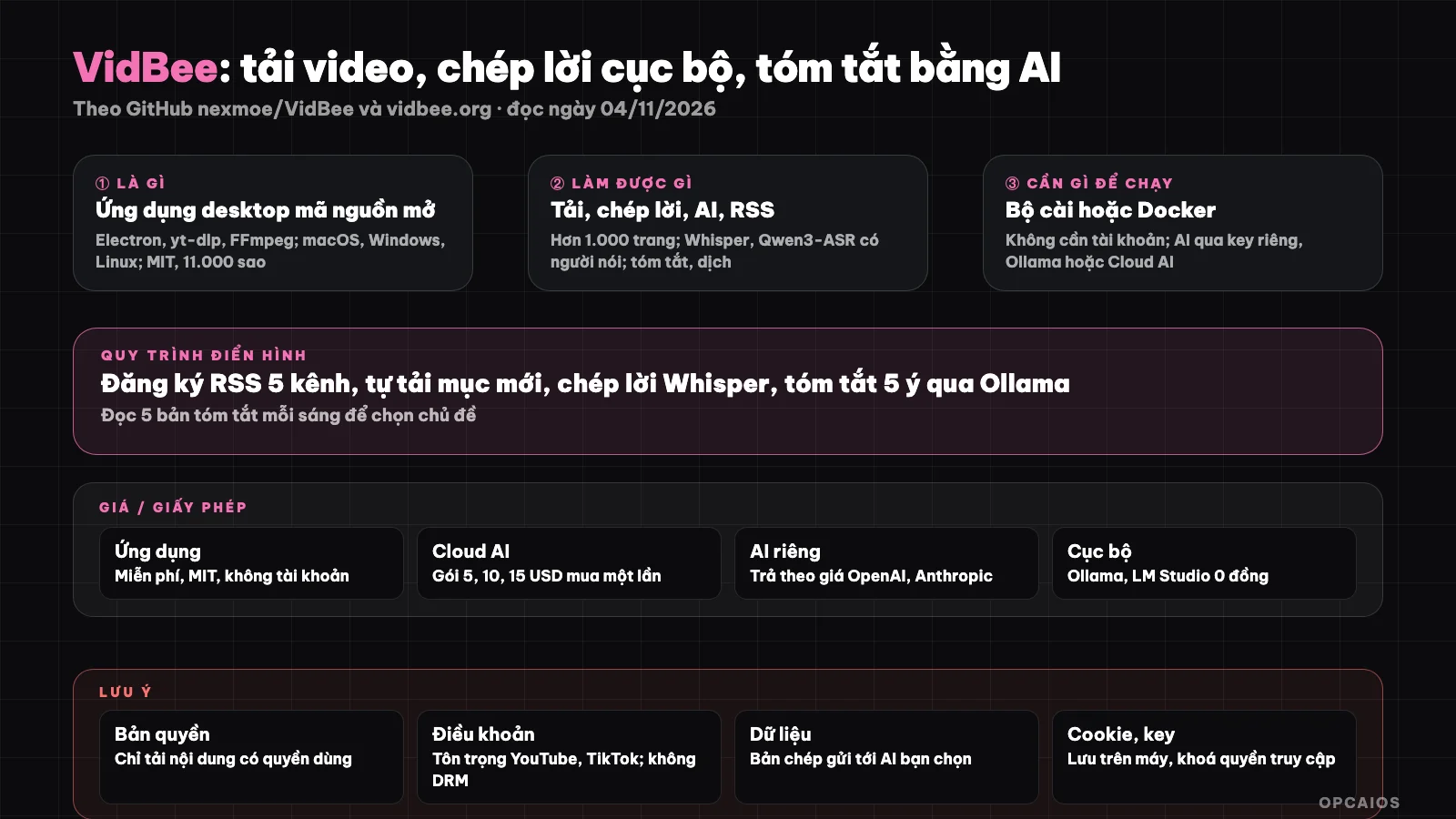
Download and transcription run on your machine; only the AI step sends data out, and only when you choose. Diagram: OPCAIOS.
What is VidBee and who created it?
VidBee is a desktop application written in Electron, React, Vite, Tailwind CSS and shadcn/ui, developed by author nexmoe, along with a web version and API running on Docker. The vidbee.org homepage (read 04/11/2026) lists support for macOS, Windows and Linux; the installer bundles yt-dlp, ffmpeg, ffprobe together with Deno runtime.
According to the README (read 04/11/2026), VidBee has three layers on top of one file. First is downloading: paste video links, playlists, channels or upload existing files, everything into one searchable library. Next is local transcription: speech recognition models run on your machine, so recordings are never uploaded to any transcription service. Finally is the AI layer: run preset prompts (summary, FAQ, mind map, translation, grammar fix) or custom prompts through a provider of your choice, including Ollama or LM Studio locally. The homepage tagline is "AI only if you send it", meaning data only leaves your machine when you actively send it. This tool sits in the same group as Whisper but is meant for people who don't want to type commands.
What can VidBee do?
VidBee handles four groups of tasks: queueing downloads, transcribing with speaker diarization, running AI on transcripts, and tracking RSS. Table from README and vidbee.org (read 04/11/2026); figures like "over 1,000 websites", "over 100 languages", "up to 8K" are from the project's claims, not verified.
| Feature | Details |
|---|---|
| Download video, audio | Over 1,000 websites per yt-dlp; playlists, channels, search results; up to 8K; SRT subtitles in over 50 languages; login via VidBee browser extension or cookies |
| Queue | Progress, speed, size; pause, resume, retry; choose format per file |
| Local transcription | Whisper, SenseVoice, Parakeet, Qwen3-ASR; app suggests models based on your machine and language; use original subtitles or create new |
| Speaker diarization | Auto detect or set speaker count fixed; rename speakers; search by words or name; click timestamp to play |
| Export transcript | Text, Markdown, subtitles, or build video with selectable subtitles or hardcode |
| AI on transcript | OpenAI, Anthropic, Google, DeepSeek, Groq, Azure, Hugging Face, OpenRouter, xAI, Ollama, LM Studio or custom endpoint; import SKILL.md file; keys stored on machine |
| RSS | Auto download new items or add to review queue; filter keywords, tag, folder and custom filename template |
| Format | MP4, MKV, WebM or keep original; extract audio; embed cover art, chapters, subtitles |
The web/API version uses Fastify, oRPC and TanStack Start, storing data in SQLite (vidbee.db).
Is VidBee Free? Licenses and Hidden Costs
VidBee is free for the application and source code (MIT), while Cloud AI sells one-time credit purchases; other costs are hardware and APIs you choose yourself. Table from GitHub API, README, and vidbee.org/pricing (read 04/11/2026); does not include taxes, subject to change.
| Item | Reality |
|---|---|
| Desktop application | Free, no account needed; MIT license |
| VidBee Cloud AI | New accounts get 50K credits, expire after 6 months; Starter 5 USD (2,000K credits), Popular 10 USD (4,400K), Power 15 USD (7,200K); one-time purchase, no auto-renewal |
| AI of your choice | Pay OpenAI, Anthropic, Google, etc. at their rates (we have not read each company's pricing page); Ollama or LM Studio 0 đồng but uses your machine |
| Transcription | Runs on your machine, no cost; models take up disk space |
| GPU | README and docs do not list GPU requirements; having GPU or Apple Silicon is usually faster, we have not measured it |
| Self-host web | Need Docker, server, or NAS; see What is a VPS? |
The pricing page does not state how many summaries 2,000K credits convert to in the section we read, so do not rush to calculate.
How to Install VidBee?
There are two ways to install VidBee: download the desktop installer from vidbee.org/download, or run the web version with Docker. The command below is taken verbatim from the README (read 04/11/2026); we have not tested it yet.
- First, the simplest way: download the installer for macOS, Windows, or Linux at vidbee.org/download, open the application, paste the link. To download videos that require login, the docs recommend installing the VidBee browser extension first.
- Next, if you want to self-host the web version and API using prebuilt images, the README provides a Docker Compose file using
ghcr.io/nexmoe/vidbee-api:latest(port 3100) andghcr.io/nexmoe/vidbee-web:latest(port 3000) with two volumes for downloads and data; optional.envincludesVIDBEE_API_PORT,VIDBEE_WEB_PORT,VIDBEE_DOWNLOAD_DIR_HOST. - Finally, build from source code:
docker compose up -d --build
docker compose down
Running without Docker in the source code directory (pnpm monorepo):
pnpm run start:web
In the container, downloads are at /data/downloads, while /data/vidbee holds vidbee.db, settings, cookies, and transcription models. Newcomers should use the desktop version; the Docker version works for those already familiar with Docker.
Limits, Risks, Security, and Legal Issues When Using VidBee
The biggest risk with VidBee is not technical but copyright and the terms of the platform you download from. The README has no legal disclaimer section, but the Terms of Service on vidbee.org (read 04/11/2026) clearly state: use lawfully and follow the platform's terms; only download public content you have the right to use; respect copyright; ask permission before accessing private content; do not bypass access controls or DRM; do not create deepfakes to impersonate. YouTube, TikTok, and Facebook terms typically ban downloading content outside their own methods; we have not cross-checked each document and this is not legal advice. Practical principle: download your own videos, licensed videos, or for internal research not republished; do not circumvent restrictions.
On data and security:
- Transcription runs locally, but the AI step sends the full transcript to your chosen provider; meeting notes or interviews with personal data should use Ollama on-premises.
- Login cookies are saved in the application or volume
/data/vidbee; anyone with access to the machine or NAS can read them, so restrict permissions. - API keys are stored on your machine per the README; do not share the data folder.
- yt-dlp changes constantly with the platforms; download failures are often due to old versions, update the application before reporting bugs.
AI results can be wrong; VidBee's Terms also remind you to verify before using.
VidBee versus ReClip, AI Video Transcriber, and other options
VidBee stands out by combining downloading, transcription with speaker identification, and AI in a single desktop application that needs no account. The table describes general capabilities from public documentation, not from our testing.
| Tool | Focus | How it differs from VidBee |
|---|---|---|
| ReClip | Download video and audio through a self-hosted web interface | Download only, no transcription or AI |
| AI Video Transcriber | Paste link, get transcript, translation, summary | Web app, no library, RSS, or queue |
| Whisper direct | Command-line transcription model | You must wire together yt-dlp, diarization, and AI yourself |
| Douyin TikTok Download API | API to download Douyin and TikTok for automation | For developers, no interface |
| Plain yt-dlp | Command-line tool that powers VidBee under the hood | Strongest at downloading, nothing else |
When should you use VidBee?
Use VidBee when you work with content or research from long videos, need transcripts with speaker names, and want to keep data on your machine.
| Scenario | Suggestion |
|---|---|
| Research 20 competitor videos each week | VidBee desktop, AI through your own key |
| Transcribe a podcast with 2 to 3 speakers | VidBee with speaker diarization, export to Markdown |
| Internal recording, cannot leave the machine | VidBee with Ollama or LM Studio |
| Just need to download files | ReClip or plain yt-dlp is lighter |
| Need scheduled automation in n8n | Self-hosted API version or another API tool |
| Weak machine, no GPU | Pick a small model; expect long waits for long video |
Example (hypothetical): someone running a personal finance channel subscribes to RSS from 5 YouTube channels, VidBee automatically downloads new items, transcribes with Whisper, then runs the prompt "summarize 5 main points" through Ollama; each morning they read 5 summaries in 10 minutes to pick topics for their own video, never reusing anyone else's footage. See also Turn YouTube video into 10 blog posts.
OPCAIOS experience
We added VidBee to the Repo list in the Tools section on opcaios.org after reading the README and checking the repository was still active; we have not run it yet, so this section states the criteria we use to consider it, not an assessment after use. Four criteria:
- Is the repository still being updated: yes, the most recent code push was on 01/11/2026 according to GitHub API.
- License: MIT for the code; Cloud AI is a separate paid service, use it or not as you choose.
- Hidden costs: none required; transcription costs CPU or GPU, AI costs a key.
- Can it replace a tool we use: we self-host a Douyin TikTok Download API to pull internal content research data; VidBee does not replace that API in automation, but could be an interface layer for manual viewing and transcription. Terms risk: like any download tool, you must respect platform terms and author copyright.
Read more: What is Whisper?, What is Ollama?, What is Docker?, What is ReClip?, 6 best automatic short video tools 2026.
Frequently Asked Questions
Is VidBee free?
The desktop application is free, requires no account, and has MIT-licensed source code on GitHub (API, read 04/11/2026). The only paid part is VidBee's Cloud AI credits: 50K credits given when you create an account, one-time purchase packages of 5, 10, 15 USD according to vidbee.org/pricing (read 04/11/2026, taxes not included, subject to change). You are not required to buy: use your own OpenAI, Anthropic keys, or free Ollama.
Can VidBee transcribe Vietnamese?
The homepage states it transcribes over 100 languages, and the built-in models like Whisper, SenseVoice, Qwen3-ASR all support Vietnamese according to their documentation, so it very likely can. We have not measured accuracy for Vietnamese, especially with multiple speakers or background noise. How to test: select the medium Whisper model, run a 5-minute recording, compare it to your ear before trusting the transcript for important work.
Does VidBee upload my video to the internet?
According to the README and homepage (read 04/11/2026), downloading and transcribing run on your machine, media is not uploaded to any service. Only when running an AI prompt is the transcript (not the video) sent to your chosen provider, or to VidBee's Cloud AI if you use credits. With Ollama or LM Studio, this step also stays on your machine. Cookies and API keys are stored locally.
Does downloading video with VidBee violate copyright?
It depends on the content and how you use it. VidBee's terms require you only download public content you have the right to use, respect copyright and platform terms, and do not circumvent DRM. Many platforms prohibit downloading except through their own means. Downloading your own video, open-licensed video, or for personal research is safer ground; re-uploading someone else's video carries risk. This is not legal advice; we have not cross-checked Vietnamese law.
Can someone with no coding skills use VidBee?
Yes, that is VidBee's strength compared to command-line yt-dlp or Whisper: install, paste a link, click transcribe, pick a prompt. The part that takes a bit of skill is entering an API key or installing Ollama if you want local AI, and installing a browser extension when downloading content that requires login. The Docker version is for people familiar with servers. If you want to integrate VidBee into a systematic solo content research workflow, see OPCAIOS's AI application training course.
Source: GitHub nexmoe/VidBee (README, API, read 04/11/2026), vidbee.org (homepage, pricing, docs, terms, read 04/11/2026); not read/not verified: full list of supported platforms, privacy policy, hardware requirements for each transcription model, Vietnamese accuracy, pricing pages of AI providers; star count and prices may change. This post is not legal advice. The experience is OPCAIOS's.
Translated from Vietnamese with AI. Read the original.
Want to apply this in your business?
Book a free 30-minute call (Vietnam time, in English or Vietnamese).