


What is Twenty CRM?
Twenty CRM is an open-source customer relationship management software developed by the company Twenty, positioning itself as an open alternative to Salesforce. It lets you define objects, fields, interfaces, automated workflows, and agents using code or directly in settings. According to GitHub API (as of November 4, 2026), the twentyhq/twenty repository was created on December 1, 2022, has around 60,393 stars and 9,940 forks, and is written in TypeScript; the latest release is v2.55.0 dated November 3, 2026. The license is primarily AGPLv3, along with some commercial files and some MIT packages. According to the twenty.com pricing page (as of November 4, 2026), the cloud Pro plan is 9 USD per user per month when billed annually, while self-hosting the core is free. This article explains what Twenty does, pricing, how to get started, licensing risks, and when you should choose it.
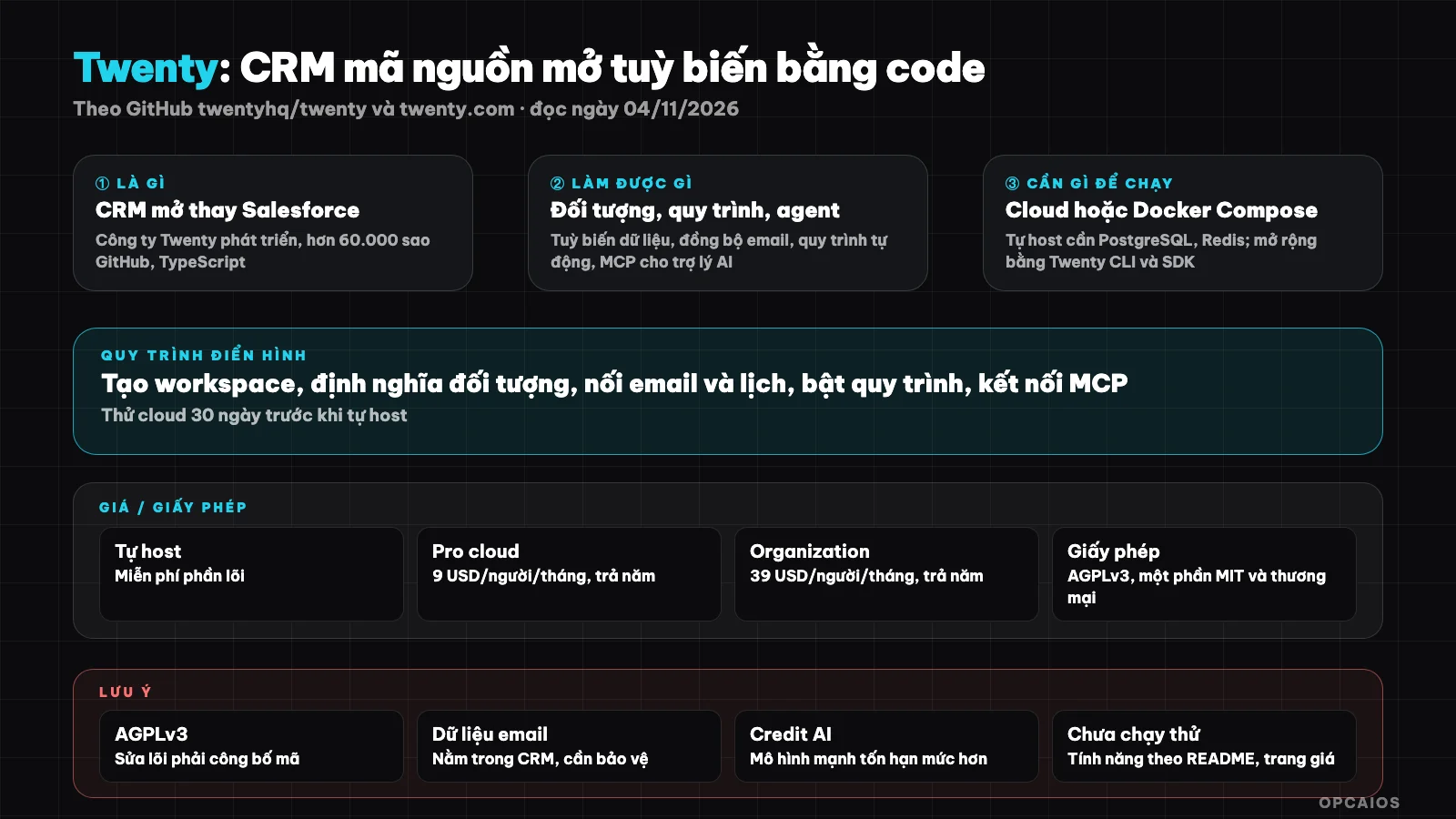
Twenty is the CRM you build, release, and version manage like the rest of your source code. Diagram: OPCAIOS.
What is Twenty CRM and who's behind it?
Twenty is an open-source CRM built and operated by the company Twenty (GitHub account twentyhq). According to the README on GitHub (as of November 4, 2026), Twenty is a set of "building blocks" for engineering teams to create their own CRM, release it, and manage versions like their own source code.
Unlike many packaged CRMs, Twenty treats the data model as something you design yourself. You create new objects, like "course" or "contract," add fields, build table, Kanban, or calendar interfaces, then write automated workflows. Non-coders do this in settings; developers do it in TypeScript through Twenty CLI and twenty-sdk, then push it to a workspace like an application. Twenty claims to be the number one open-source CRM on GitHub; that's what the project announces, unverified, though the GitHub star count from GitHub API is real as of the read date. If you're not sure what a CRM is for, check out What is a CRM?.
What are Twenty's main features?
Twenty includes the basic blocks of a modern CRM: objects, interfaces, automated workflows and AI agents, plus extensibility through code. The table below is compiled from the README and pricing page, read as of November 4, 2026; we have not tested it to confirm.
| Feature | Short description |
|---|---|
| Customizable data model | Objects, fields, interfaces with no quantity limits per pricing page |
| Interface | Table, Kanban, calendar, reporting dashboard |
| Email and calendar | Sync Google and Microsoft, emails and meetings auto-logged to records |
| Workflows and AI agents | Automated workflows, AI agents, each member has personal AI quota |
| Code-built apps | Twenty CLI, twenty-sdk: define objects, logic functions, React components |
| API and MCP | REST, GraphQL, webhook; each cloud workspace has an MCP server connecting to Claude, ChatGPT, Cursor |
| Agent programming skill | Official skill set for use with Claude Code, Codex, Cursor via skills CLI |
| Stack | TypeScript, Nx, NestJS with BullMQ, PostgreSQL, Redis, React |
The MCP server is worth noting for AI users: according to the pricing page, the AI assistant connects via OAuth then reads and writes CRM data in natural language. See What is MCP? to understand the mechanism.
How much does Twenty cost and what's the license?
Twenty has two ways to use it: a cloud version charged per user, and self-hosting the open source core for free. The prices below are from twenty.com/pricing on 04/11/2026, in USD, not including tax, and may change.
| Plan | Price | Key points |
|---|---|---|
| Self-hosted | Free | Open source core, you manage the server, PostgreSQL, Redis |
| Pro (cloud) | $9/user/month, billed annually | Around 100 AI tasks/week per member, 1 credit/person/month |
| Organization | $39/user/month, billed annually | 5x the AI limit, permissions down to field and row level, SSO |
| Enterprise | From $50,000/year | Separate infrastructure, SLA, dedicated AI provider |
| Extra credit | $1/credit, packages from $20/month | 1 credit equals about 10,000 workflow steps |
The pricing page mentions a 30-day free trial with no card required. API limits are 50 calls per minute for Pro and 100 for Organization.
For licensing, the LICENSE file on GitHub (read on 04/11/2026) lists three tiers. Most code is under AGPLv3. Files marked @license Enterprise follow a separate commercial license. Development tools (CLI, SDK, twenty-ui, sample apps) are under MIT. There's also a supplementary right: applications that only interact with Twenty via API, SDK, and app format are not bound by AGPLv3. This is a reference summary, not legal advice.
How do I install and get started with Twenty?
The fastest way to start with Twenty is to sign up for the cloud version on twenty.com and create a workspace in about a minute following the README. Developers who want to extend it should use Twenty CLI; those who want to manage their own infrastructure should self-host using Docker Compose per the official documentation.
- First, choose how to run it: cloud (no server management) or self-hosted via Docker Compose instructions on docs.twenty.com.
- Next, if you want to build an app with code, install the CLI and create a project per the README:
npm install -g twenty
twenty app init my-app
cd my-app
yarn install
- Define objects, fields, and interfaces in TypeScript, then log in and publish to your workspace:
twenty auth login --url https://your-workspace.twenty.com
twenty app publish --private
- Finally, if you're using a programming agent, install Twenty's official skill set:
npx skills add https://github.com/twentyhq/twenty/tree/agent-skills --list
Self-hosting requires familiarity with Docker and a VPS with enough resources for PostgreSQL, Redis, and a job queue. We haven't measured the minimum configuration.
Limits, risks, security, and legal matters
The main risks when using Twenty fall into three areas: AGPLv3 license obligations when modifying the core code, customer data and emails passing through the system, and AI costs scaling with usage. The legal section below is for reference only, not checked against Vietnamese law, and is not legal advice.
AGPLv3 requires: if you modify the core code and let others use the modified version over a network, you must provide the source code of your changes. Writing applications via API and SDK is exempt per the supplementary right in the LICENSE. If you plan to sell services based on a modified Twenty version, ask a lawyer.
On data, Twenty syncs emails and calendars, so sales team emails are stored in the CRM. The cloud version has a Data Processing Agreement (DPA) per the pricing page; self-hosted means you're responsible for backups, patches, and access control. When connecting an AI assistant via MCP, CRM data will be sent as context to an external model.
On costs, personal AI limits are measured in "tasks", estimated per the default model; the pricing page notes smarter models use more. When you hit the limit, chat continues using workspace credits unless an admin turns it off.
Twenty versus other options
Twenty differs from HubSpot or Salesforce in being open source and self-hostable, and differs from smaller open source CRMs in having a large community and a ready-made cloud version. The table below is general description, not a benchmark.
| Tool | Strengths | Things to consider |
|---|---|---|
| Twenty | Open source, cloud or self-hosted, customize with code, has MCP | AGPLv3, cloud charges per user |
| Salesforce, HubSpot | Large ecosystem, many integrations | Closed source, costs often higher when scaling |
| Comp AI CRM | Agent researches customers on its own, MIT | Very new, self-hosted only |
| erxes | Combines marketing, sales, support | Large architecture, many components |
Read more: What is Comp AI CRM? and What is erxes?.
When should you use Twenty?
Twenty is a good fit for teams with technical people who want a deeply customizable CRM without being locked into a vendor. Solo workers can start with the cloud Pro version, and anyone familiar with Docker can self-host for free.
| Situation | Recommendation |
|---|---|
| Solo worker, not comfortable with servers | Try cloud for 30 days first |
| Team with developers, specific workflows | Use Twenty CLI to build custom objects |
| Want an AI assistant to read and write CRM data | Use the MCP server of a cloud workspace |
| Need data on your own server | Self-host, manage backups and patches yourself |
| Planning to sell services based on core code modifications | Review AGPLv3 with a lawyer |
Example (hypothetical): a small training center creates objects for "courses" and "students", connects email so each exchange automatically goes into the record, then sets up a workflow to remind when a student hasn't paid after seven days.
OPCAIOS experience
We recently added Twenty to the Repo list in the Utilities section on opcaios.org after reading the README and checking that the repository is still maintained; we haven't tested it yet, so this section outlines the criteria we use to evaluate, not an assessment after use. OPCAIOS built its own CRM on the website and hasn't used Twenty, erxes, or Comp AI CRM. Our criteria are:
- First, the repository is maintained: the latest commit was 04/11/2026, release v2.55.0 on 03/11/2026.
- Next, the license: AGPLv3 for the core, you need to understand it well before modifying code.
- Hidden costs: servers for PostgreSQL and Redis if self-hosting, or per-user and AI credit fees if using cloud.
- Finally, can you replace a self-built CRM: only worth switching if your own maintenance cost is higher than the cost of learning Twenty.
Read more: What is CRM?, What is MCP?, What is Comp AI CRM?, What is Docker?, Best CRM for small business 2026.
Frequently Asked Questions
Is Twenty free?
Twenty is free if you self-host the open source core code, according to twenty.com pricing (checked 04/11/2026). You still pay for server, PostgreSQL database, Redis, and maintenance time. The cloud version has a 30-day free trial without a card, then the Pro plan is 9 USD per user per month and Organization is 39 USD, both billed annually, before tax. If you use a lot of AI, you may need to buy additional credit at 1 USD per credit, packages starting at 20 USD per month.
Does Twenty support Vietnamese?
The twenty.com pricing page (checked 04/11/2026) states Twenty supports over 30 languages, and the README mentions the project uses Crowdin for translation. We haven't checked the specific language list so we haven't confirmed whether Vietnamese is included or how complete the translation is. Even if the interface is in English, you can name objects, fields, and values in Vietnamese since that's your data. Open the trial version and check the language settings before deciding for your whole team.
Can someone without coding knowledge use Twenty?
Yes, at a basic level. According to the FAQ on the pricing page, users can create objects, fields, interfaces, and workflows without code right in the settings, at no extra cost. The cloud version also avoids server management. The part that needs code is deep customization: writing logic functions, React components to display in Twenty, or separate applications using Twenty CLI. Self-hosting with Docker Compose also requires command line familiarity. For solo workers, starting with cloud and learning gradually is the least risky approach.
Can Twenty connect to Claude or ChatGPT?
Yes. According to twenty.com pricing (checked 04/11/2026), each cloud workspace has an MCP server built in; you connect an AI assistant like Claude (Anthropic), ChatGPT (OpenAI), or Cursor via OAuth, then the assistant reads and writes CRM data using natural language. Additionally, the README introduces official skill sets for programming agents like Claude Code and Codex, helping agents write Twenty applications correctly. Grant minimal permissions, since customer data will go into the context of an external model.
What should I learn before choosing an open source CRM?
You should understand four things: what objects and steps your sales process needs, the difference between MIT and AGPLv3 licenses, the real cost of self-hosting (server, backups, patches), and how to safely connect an AI assistant to your data via MCP. Then try two tools on the same sample dataset for a week before migrating real data. If you want proper guidance on how to bring AI into your daily work, check out OPCAIOS's AI application training course.
Source: GitHub twentyhq/twenty (README, LICENSE, API, checked 04/11/2026), twenty.com/pricing (checked 04/11/2026); not read/not verified: Docker Compose guide on docs.twenty.com, language list, minimum server configuration, self-description as "number one open source CRM"; star count and pricing may change. Experience is from OPCAIOS.
Translated from Vietnamese with AI. Read the original.
Want to apply this in your business?
Book a free 30-minute call (Vietnam time, in English or Vietnamese).