


What is Voicebox?
Voicebox is an open source computer application, MIT licensed, that combines three things in one place: cloning a voice from a few seconds of audio, converting text to speech (TTS), and dictating spelling into any input field, all running on your machine. According to GitHub (API, read on 04/11/2026), the jamiepine/voicebox repository was created on 25/01/2026, has around 59,400 stars and 7,400 forks, with the most recent code push on 07/10/2026. The voicebox.sh pricing page (read on 04/11/2026) states that the locally-running application version is free, with cloud sync packages as optional and not yet launched. This post explains what Voicebox does, what machine you need, how to install it, legal risks when cloning real people's voices, and how it compares to ElevenLabs, OmniVoice and Whisper.
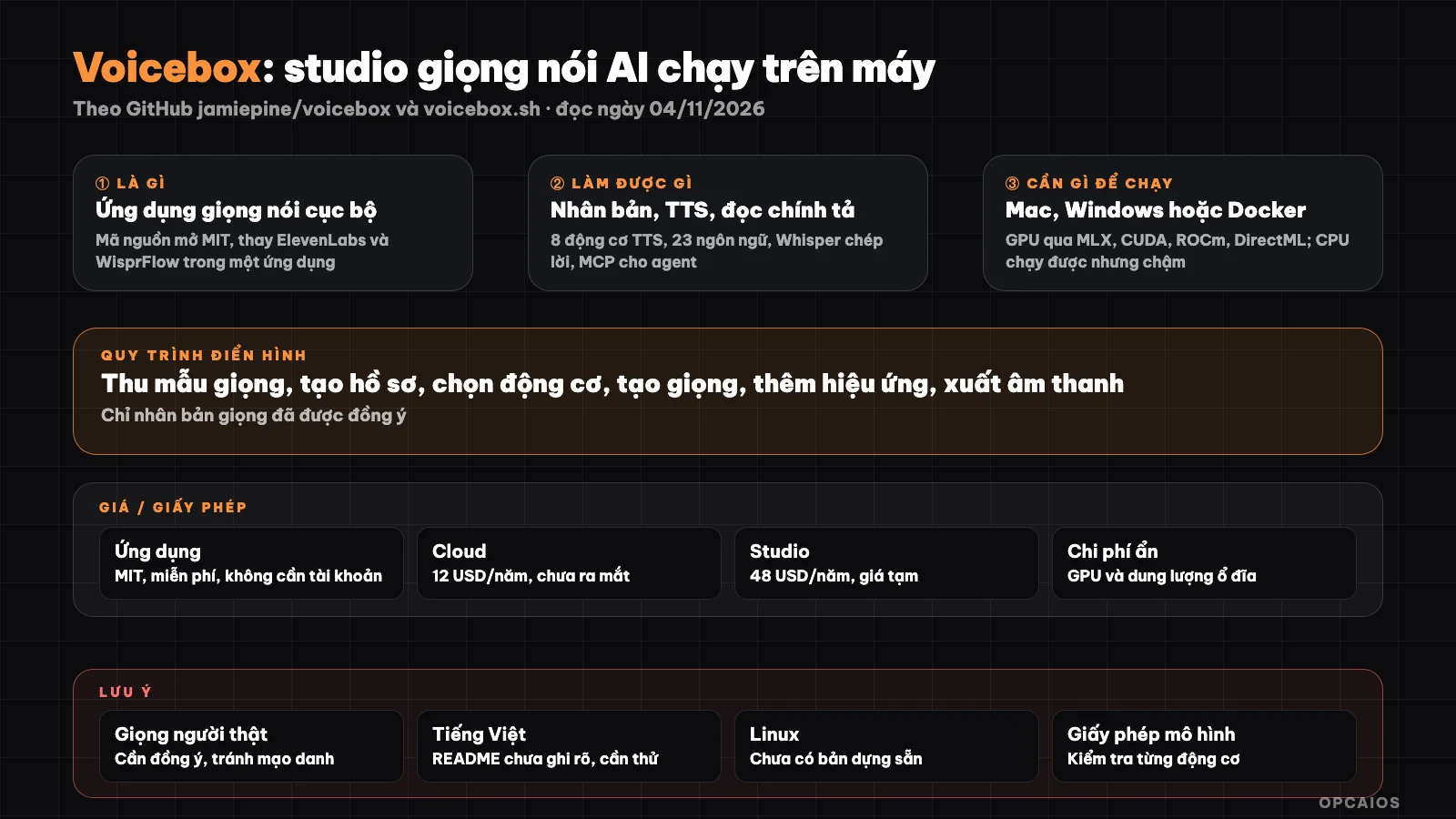
Voicebox connects speech both ways: text to sound and sound to text, running on your machine. Diagram: OPCAIOS.
What is Voicebox and who created it?
Voicebox is an AI voice studio that is "local-first", meaning it prioritizes running on the user's machine, initiated by Jamie Pine; the voicebox.sh footer states copyright belongs to Spacedrive Technology Inc., the company behind Spacedrive. The project positions itself as a free alternative to ElevenLabs and WisprFlow.
The README on GitHub (read on 04/11/2026) describes the main idea quite clearly. ElevenLabs is strong in the output direction: turning text into voice. WisprFlow is strong in the input direction: turning speech into text. Voicebox does both directions in one application, then connects them with a small language model running locally (Qwen3) to clean up text and create a "personality" for each voice. The application is written in Tauri (Rust) for the shell, React for the interface and FastAPI (Python) for processing. The main language of the repository according to GitHub is Python. According to the README, the project is maintained with support from the Capy agent platform: agent threads test and review pull requests before the author merges them. This is information published by the project; we have not verified how that works. If you are new to AI voice, you should first read What is Whisper to understand the speech recognition part that Voicebox reuses.
What are Voicebox's main features?
Voicebox has eight TTS engines that can be switched for each generation, voice cloning without training, sound effects, a multi-voice timeline editor, dictation via keyboard shortcut and an MCP server for agents. The table below summarizes according to the README (read on 04/11/2026).
| Feature | Short description |
|---|---|
| Eight TTS engines | Qwen3-TTS, Qwen CustomVoice, Qwen VoiceDesign, LuxTTS, Chatterbox Multilingual, Chatterbox Turbo, HumeAI TADA, Kokoro |
| Voice cloning | From a short reference sample, supports multiple samples for one voice profile |
| Ready-made voices | Over 50 sample voices via Kokoro and Qwen CustomVoice |
| Languages | 23 languages, broadest is Chatterbox Multilingual |
| Expression tags | Tags like laughter, sigh, only Chatterbox Turbo understands them |
| Long text | Auto-splits sentences and blends smoothly, max 50,000 characters |
| Stories | Multi-voice editor, multiple tracks for dialogue, podcasts |
| Effects | 8 effects from Spotify's pedalboard library, with presets |
| Dictation | System-wide keyboard shortcut, auto-pastes into selected field on macOS |
| Speech recognition | OpenAI Whisper, has faster Turbo version |
| MCP and REST API | Agents like Claude Code, Cursor call tools to speak using chosen voice |
What is new compared to other TTS applications is the agent part. Voicebox provides four MCP tools, including a speak tool and a transcribe tool. A programming agent can report "tests completed" using your chosen voice. If you are unfamiliar with MCP, see What is MCP.
One important note for Vietnamese speakers: the language list in the README does not clearly state Vietnamese. We have not checked which of the eight engines support Vietnamese well, so do not assume it is available.
How much does Voicebox cost and are there hidden fees?
Voicebox is free: the source code is under the MIT license and running locally doesn't require an account. The pricing page on voicebox.sh (read on 04/11/2026) only charges for encrypted cloud backup and sync, currently listed as "coming soon". The prices below don't include tax and may change.
| Plan | Advertised Price | Details |
|---|---|---|
| Local | 0 USD | Full application, unlimited generation |
| Cloud | 12 USD/year (launch price) | End-to-end encrypted backup, 25 GB, up to 5 devices; not yet launched |
| Studio | 48 USD/year | 250 GB, unlimited devices; pricing page temporary, not finalized |
Hidden costs lie in hardware. The models run on your machine, so speed depends on your GPU. The README lists MLX on Mac Apple Silicon, CUDA for NVIDIA, ROCm for AMD, DirectML on Windows, Intel Arc, and CPU for any machine but slower. Models also need disk space to download; the README doesn't state total storage, and we haven't measured it. Additionally, Linux has no prebuilt binary, so you have to build from source.
How do I install Voicebox and get started?
The quickest way is to download the installer from voicebox.sh or the GitHub Releases page. The README has DMG for Mac Apple Silicon and Mac Intel, MSI for Windows, and Docker. The process has four steps, starting with download and ending with trying an agent:
- First, download the installer suitable for your operating system from voicebox.sh or GitHub Releases.
- Next, open the application, download the TTS model you want to use, then create a voice profile from an audio file or record directly.
- Type text, choose an engine, create a voice and try effects if needed.
- Finally, if using an agent, enable the MCP server in settings and add it to Claude Code following the instructions in the README.
With Docker, the README shows the command:
docker compose up
Those who want to build from source need Bun, Rust, Python 3.12, Tauri tools and Xcode on Mac. According to the README:
git clone https://github.com/jamiepine/voicebox.git
cd voicebox
just setup
just dev
The just command installs with brew install just or cargo install just. If you're new to Docker, see What is Docker. We haven't run these steps ourselves; this is a summary from the official documentation.
Risks, security and legal considerations when using Voicebox
The biggest risk with Voicebox isn't technical but using it to clone someone else's voice. The tool lets you create a voice from just a few seconds of audio, making it very easy to misuse for impersonation, fraud or creating fake content. This section is for reference only, not legal advice.
First is consent. A voice is tied to a person's identity; only clone your own voice or someone's who has agreed in writing. The voicebox.sh intro page has a demo with voices named after famous people; that's how the project illustrates itself, but it doesn't mean you can use a celebrity's voice for publicly posted content or ads. Next is personal data: voice samples are sensitive data, so store carefully and delete when no longer needed. We haven't cross-checked the original Vietnamese text of the law on personal data protection or personality rights against this case. Finally, transparency: if you post a video using an AI voice, you should clearly note it so viewers aren't misled.
On security, Voicebox runs locally so models and voice samples don't leave your machine, according to the README. However, the API and MCP server listen on your machine; other processes on the same machine can call them. Don't expose this port to the internet. Each TTS engine also has its own model license, which may differ from the application's MIT license; if you use it commercially, check the license for each model. We haven't checked the licenses for each model.
Voicebox versus other options
Voicebox suits people who want a graphical application for both TTS and transcription without per-character fees. The table below is general description, not measurement.
| Tool | Type | Strengths | Things to consider |
|---|---|---|---|
| Voicebox | Desktop app, MIT | Multiple engines, bidirectional, MCP | Needs good GPU, Vietnamese support unclear |
| ElevenLabs | Paid cloud service | Consistent quality, easy to use | Data goes to cloud, pay per plan |
| OmniVoice | TTS model, Apache-2.0 | Has Vietnamese, good cloning | Need to build your own workflow, command line |
| Whisper | Speech recognition model | Transcribe many languages | One-way only, doesn't create voices |
| VibeVoice | Conversational TTS model | Multiple speakers, long passages | Not a complete application |
When Should You Use Voicebox?
You should use Voicebox when you need an offline voice studio with a user interface, don't want to pay per character, and have a sufficiently powerful machine. You shouldn't choose it when you need high-quality Vietnamese right away without testing first, or when your machine is weak.
| Situation | Suggestion |
|---|---|
| Voiceover English narration for videos, podcasts | Try Voicebox with Qwen3-TTS or Chatterbox |
| Vietnamese voiceover using your own voice | Test a few sentences first; compare with OmniVoice |
| Want a programming agent to report results by voice | Use Voicebox's MCP server |
| Read notes quickly on Mac with dictation | Use dictation keyboard shortcut |
| No GPU on machine, need high quality | Consider paid cloud service |
| Want to clone someone else's voice without permission | Don't do it |
Example (hypothetical): someone creating a course creates a voice profile from three clean recordings of their own voice, pastes a 10-minute lesson script into it, lets Voicebox auto-cut sentences, then uses Stories to insert a Q&A segment with a pre-made voice. Actual results depend on the recording sample and engine chosen.
OPCAIOS's Experience
We added Voicebox to the Repo list in the Utilities section on opcaios.org after reading the README and checking that the repository is still being maintained; we haven't tested it yet, so this section outlines the criteria we use to consider it, not an evaluation after use. Four main criteria:
- First, the repository is still being updated: the most recent code push is 07/10/2026 according to GitHub API, about a month before the date read.
- Next, the license: the application is MIT, but each model inside has its own license to read.
- Hidden costs: no API fees, but requires GPU and disk space.
- Finally, the ability to replace tools currently in use: with Vietnamese, we're using OmniVoice for speaker-focused video workflows, so Voicebox is worth trying only if there's a good Vietnamese speech engine. The terms risk lies in cloning voices without consent.
Read more: What is OmniVoice, What is Whisper, What is MCP, What is Claude Code, 7 best AI voice cloning tools in 2026 for Vietnamese.
Frequently Asked Questions
Is Voicebox free?
Yes. Voicebox is open source software under the MIT license, and the voicebox.sh pricing page (read on 04/11/2026) states that running locally is free, requires no account, and has no limit on the number of voice generations. The only paid part is encrypted cloud backup and sync, with a launch price of $12 per year for the Cloud plan, currently still listed as "coming soon". The real cost you need to account for is hardware: a machine with a GPU will generate voices much faster than using only CPU, and the models need disk space to download.
Can Voicebox read Vietnamese?
The README on GitHub (read on 04/11/2026) says Voicebox supports 23 languages and lists some of them like Arabic, Japanese, Hindi, Swahili, but does not explicitly mention Vietnamese. We have not tried it so we cannot confirm which engine reads Vietnamese well. The safe approach is to download the application, try a few Vietnamese sentences with each engine, listen to them, and then decide. If Vietnamese is your top priority, you should also compare with OmniVoice, a model that has Vietnamese in its list of supported languages.
What kind of computer can run Voicebox?
Voicebox has versions for macOS (Apple Silicon and Intel), Windows, and Docker; Linux must be built from source. According to the README, the application accelerates using MLX on Mac Apple Silicon, CUDA on NVIDIA cards, ROCm on AMD cards, DirectML on Windows and Intel Arc. A machine with only CPU can still run it but will be slower. Some lightweight engines like Kokoro or LuxTTS can run on CPU. The README also allows connecting to another machine with a GPU for processing. We have not measured speed on any specific machine.
Is it legal to clone someone else's voice using Voicebox?
This depends on the laws where you live and your intended use; the content here is for reference only, not legal advice. The safe principle is to only clone your own voice or that of someone who has given explicit consent, preferably in writing. Using a celebrity's or acquaintance's voice for advertising, fraud, or creating fake content may violate personality rights, image rights, and personal data regulations. We have not reviewed specific Vietnamese law. When posting content using AI voices, you should clearly state so viewers know.
Can Voicebox be used with Claude Code?
Yes. Voicebox has a built-in MCP server with four tools: speak in one voice, transcribe audio file, list recordings, and list voice profiles. The README explains how to add Voicebox to Claude Code with a single claude mcp add command, and it also supports Cursor, Windsurf, and VS Code. You can assign each agent its own voice so you can tell which one is reporting just by hearing. If you want to build these kinds of workflows for your work, check out OPCAIOS's AI application training course.
Source: GitHub jamiepine/voicebox (README, API, read on 04/11/2026), voicebox.sh and voicebox.sh/pricing (read on 04/11/2026); not read/not verified: latest release API version (rate-limited), license for each TTS model, Vietnamese quality, actual speed; star count and prices may change. Experience is from OPCAIOS.
Translated from Vietnamese with AI. Read the original.
Want to apply this in your business?
Book a free 30-minute call (Vietnam time, in English or Vietnamese).