



What is WanGP?
WanGP (formerly called Wan2GP) is an open-source application by DeepBeepMeep that runs multiple generative AI models on a personal computer: video (Wan 2.1/2.2, LTX-2, Hunyuan Video), images (Flux, Qwen Image), voice, music, 3D models, and even "interactive worlds," with the goal of making it usable for people with weak GPUs. According to the GitHub API (read on 04/11/2026), the deepbeepmeep/WanGP repository has 11,362 stars, is written in Python, was created on 27/02/2025, with the most recent code push on 03/11/2026, under a custom license called WanGP Community License 2.0; version v19.12 was released on 02/11/2026. The software is free to run locally, but requires a graphics card. This post starts with how it works, then covers hardware and installation, followed by licensing and copyright, and finally when to use it.
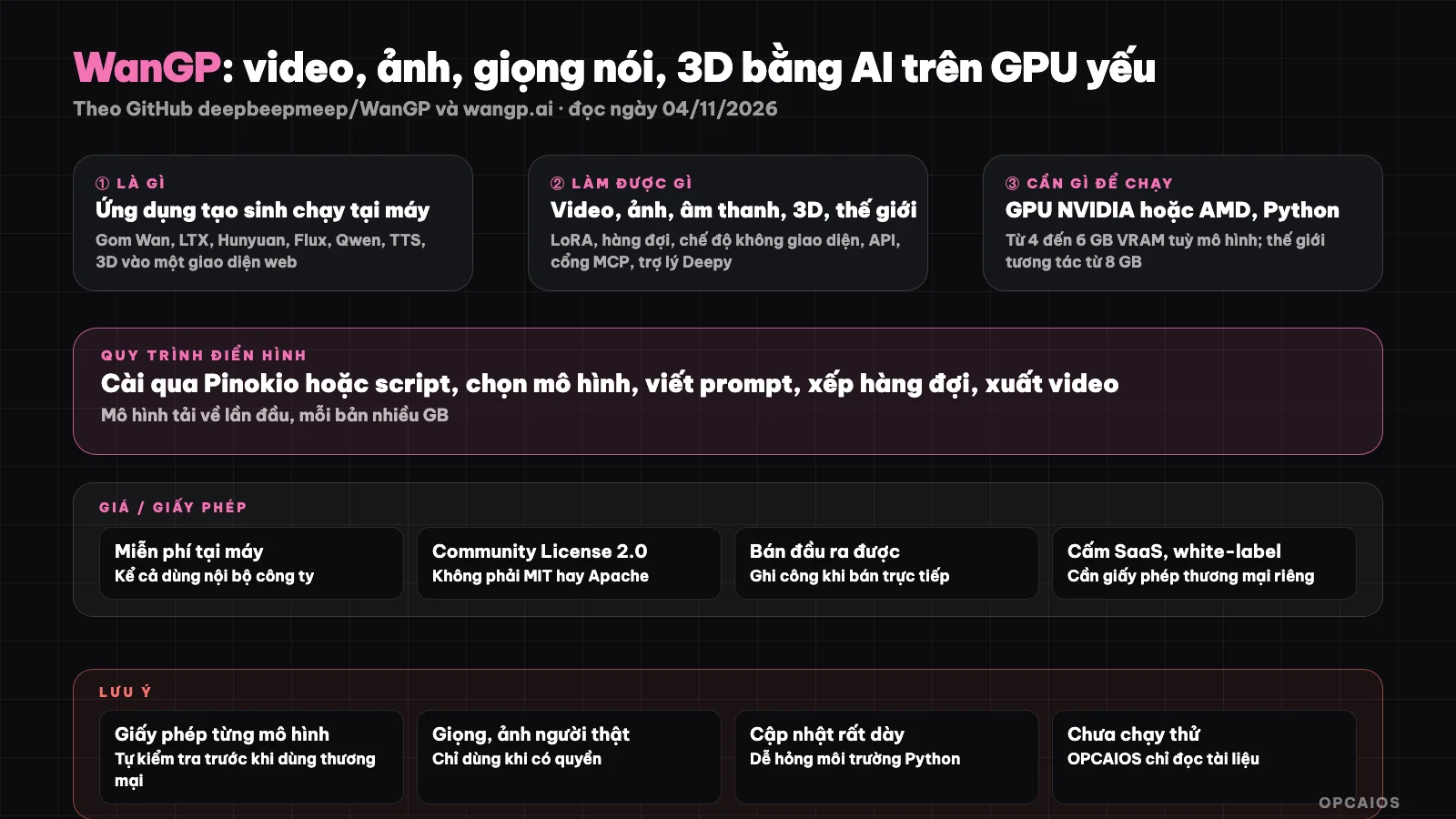
WanGP brings together many generative models into a single interface and optimizes memory to run on standard GPUs. Diagram: OPCAIOS.
What is WanGP and who created it?
WanGP is a local machine application that brings together dozens of open-source generative AI models into a single web interface and optimizes memory so they run on standard graphics cards. The motto on the README is "best open generative models for GPU-poor people."
The author is DeepBeepMeep, an independent developer, along with contributing community members on GitHub and Discord. The original name Wan2GP comes from Alibaba's Wan video model, but according to the README (read on 04/11/2026) the project has expanded to images, audio, voice, 3D assets, and since October 2026 also includes an "interactive world" generator. The GitHub repository has also been renamed from Wan2GP to WanGP; the old URL still redirects. The three main components are: first, a web interface and command line for choosing models and generating content; second, a memory management layer (MMGP) that lets you load large models into small VRAM using compressed formats like int8, fp8, GGUF, NV FP4, and Nunchaku; finally, Deepy, an integrated assistant that plans and runs task sequences, along with Showrunner which uses Deepy to build multi-scene videos. The official site wangp.ai warns that WanGP is not related to third-party services with similar names.
What can WanGP do?
WanGP does five things: generate video, generate and edit images, synthesize voice and music, create 3D models, and create interactive worlds; all run locally with queueing, headless mode, API, and MCP ports for AI agents to control.
According to the README and wangp.ai (read on 04/11/2026):
| Category | Details |
|---|---|
| Video | Wan 2.1/2.2 and variants, MiniMax H3, LTX-2/2.3/2.5, Hunyuan Video 1/1.5, LongCat, Kandinsky |
| Images | Flux (1/2/3 Klein), Qwen Image, Z-Image, Fibo 2.0, MOSS Image, Krea 2, HiDream |
| Audio, voice | Ace Step, Qwen3 TTS, MOSS-TTS, Index TTS2, Chatterbox, Stable Audio 3, YuE2 |
| 3D | Hunyuan3D 2.1, TRELLIS.2, TripoSG, PartCrafter, MoGe-2 |
| Interactive worlds | Hy-Nomas 8B (from text), EVOKE Turbo 14B (from image) |
| Customization | LoRA, self-added finetuning from Hugging Face or CivitAI, prompt enhancement, mask editing, upscaling |
| Automation | Queueing, headless mode (--process), API, local MCP port for agents, --offline mode |
| Assistant | Deepy plans and runs task sequences; Showrunner builds multi-scene videos |
The model list changes roughly every week: the README shows 12 releases from 06/09 to 02/11/2026. Each model has its own license; WanGP is just a wrapper (see the licensing section).
Is WanGP free? Licenses and hidden costs
WanGP is free to install and run on your machine, including internal company use, under the WanGP Community License 2.0; but this is not a standard open source license like MIT, and the biggest hidden cost is a graphics card.
| Item | Status (as of 04/11/2026) |
|---|---|
| Running locally, personally or internally | Free; wangp.ai states the project will not charge licensing fees, subscriptions or donations to run on your machine |
| Selling or renting generated outputs | Permitted; only requires crediting WanGP when selling direct outputs (summarized in LICENSE.txt) |
| Reselling WanGP, white-label, paid API/SaaS/hosting | Requires a separate commercial license in writing |
| Third-party models and weights | Each model retains its own license; some have commercial use restrictions |
| Hardware | NVIDIA from GTX 10xx, RTX 20xx and up; AMD RDNA 2 to 4. README mentions some models run from 4 GB VRAM, wangp.ai says from 6 GB; interactive world from 8 GB |
| Storage and bandwidth | Models download first time, each version several GB |
Hardware and electricity costs exclude tax and may change. Two official sources differ on minimum VRAM; we have not measured. README has .sh scripts for macOS but does not clearly state which Apple hardware is supported.
How do I install WanGP?
There are four installation methods: one-command script (.bat/.sh), Pinokio, Wan2GP Desktop (Windows) and WanGP Manager (experimental, Windows); manual method using conda and pip. Below is the manual method for RTX 20xx to 50xx per README (as of 04/11/2026):
- First, clone the repository and create a Python 3.11 environment:
git clone https://github.com/deepbeepmeep/Wan2GP.git
cd Wan2GP
conda create -n wan2gp python=3.11.14
conda activate wan2gp
- Next, install PyTorch CUDA 13.0 and libraries:
pip install torch==2.10.0 torchvision==0.25.0 torchaudio==2.10.0 --index-url https://download.pytorch.org/whl/cu130
pip install -r requirements.txt
GTX 10xx uses Python 3.10.9 and PyTorch 2.7.1 per separate instructions.
3. Run the web interface:
python wgp.py
Run batch without interface: python wgp.py --process my_queue.zip. Open MCP port for agents: python wgp.py --mcp-webui.
4. Finally, on Linux use Docker: the ./run-docker-cuda-deb.sh script auto-detects GPU on Debian/Ubuntu. See What is Docker?.
Those unfamiliar with command line should use Pinokio (README recommends Morpheus6's community script) or Wan2GP Desktop. We have not tested these; the steps above follow official documentation. Versions change fast; read the latest README when installing.
Limitations, risks and copyright when using WanGP
WanGP's risks span three layers: each model's license, copyright and image rights of input content, and heavy Python dependencies prone to breaking on updates.
- Model licenses. WanGP Community License covers only WanGP's code. Each model (Wan, LTX, Flux, Hunyuan, TTS suites) has its own license, some restricting commercial use or requiring credit. Before using outputs for clients, read that specific model's license. We have not cross-checked each one.
- Copyright and personality rights. Image-to-video, voice cloning and character animation features can create deepfakes of real people. Use only images, voices and videos you have rights to; Vietnamese law protects personal image and voice, many platforms require AI content labels. This is reference, not legal advice; we have not checked the original text.
- Auto-downloaded content. Models and LoRAs load from Hugging Face or CivitAI; community LoRAs may contain inappropriate content.
--offlinemode helps you control this. - Stability. The repository has 1,369 open issues per GitHub API (as of 04/11/2026). PyTorch, CUDA and driver must match; keep a separate conda environment.
- Opening MCP or API ports. Default address is local; if exposing to outside networks, you need authentication and firewall.
WanGP vs. other options
WanGP sits between ComfyUI (flexible but you assemble nodes yourself) and cloud services (easy but you pay per use). The table below is a general description, not a measurement:
| Option | How it works | Best for |
|---|---|---|
| WanGP | Clean interface, many models pre-installed, optimized for low VRAM | Common GPUs, want to try many models quickly |
| ComfyUI | Node graph, large community of workflows | Need control over each step; see What is ComfyUI? |
| Cloud services | Pay per use, no hardware needed | Need stability, don't want to install |
| Rent GPU by the hour then install WanGP | Run on rented GPU server | No card but need to control models and data |
When should you use WanGP?
Use WanGP when you have a compatible NVIDIA or AMD card, want to generate video and images on your machine with zero cost after hardware, and can handle troubleshooting environment issues yourself. Don't use it when you need stable results for clients right away and don't have technical support.
| Situation | Recommendation |
|---|---|
| Have RTX 3060 12 GB, want to try AI video | Use it, start with Pinokio or one-command script |
| Office laptop with no discrete GPU | Not suitable; use cloud services or rent GPU |
| Need voice-over and short video editing every day | Try Showrunner and TTS tools, check license for each model |
| Want to sell a video generation tool to clients | Need WanGP's separate commercial license |
| Want an AI agent to run a batch of videos at night | Use --process or MCP port, keep it on internal network |
Example (hypothetical): a content creator has an RTX 4070 12 GB, installs WanGP via Pinokio, makes 10 five-second video clips to illustrate an article using LTX-2, uses Deepy to assemble them into one one-minute video, and labels it "video created with AI" when posting.
OPCAIOS experience
We added WanGP to the Repo list in the Utilities section on opcaios.org after reading the README and checking that the repository is still being updated; we have not tested it yet, so this section states the criteria we use to consider it, not an evaluation after use. Four criteria:
- Repository still being updated: very actively, version v19.12 as of 02/11/2026; the downside is rapid change, so articles can become outdated easily.
- License: allows internal use and selling output, forbids paid hosting; aligns with how we use tools for our own content.
- Hidden costs: needs a GPU; our current process for building speaker videos runs on a rented GPU server, so WanGP is a candidate to test on that same server before we conclude.
- Terms risk: many models clone voices and images into video; we will only use it with our own voices and images.
Read more: What is ComfyUI?, What is OmniVoice?, What is Real-ESRGAN?, What is VPS?, 7 best AI speaker video tools 2026, 5 best open-source AI video tools 2026.
Frequently Asked Questions
What is WanGP?
WanGP (formerly Wan2GP) is an open-source application by DeepBeepMeep that runs multiple generative AI models on your personal computer: Wan and LTX video, Hunyuan, Flux and Qwen images, voice, music, 3D models, and interactive worlds. Its strength is memory optimization to run on 4 to 8 GB VRAM GPUs. According to GitHub (read on 04/11/2026), the repository has 11,362 stars and is written in Python.
Is WanGP free?
Yes, you can install and run it on your machine, including within your company, under WanGP Community License 2.0. You can sell the outputs you create; you just need to give credit when selling the output directly. You cannot resell WanGP, white-label it, or provide paid API/SaaS without a separate commercial license. Each model inside has its own license. The real cost is the graphics card and electricity.
How much GPU does WanGP need?
The README (read on 04/11/2026) says some models run from 4 GB VRAM, while wangp.ai says from 6 GB; interactive worlds need from 8 GB. Supported cards include NVIDIA GTX 10xx, RTX 20xx and above, and AMD RDNA 2 to 4. High resolution, long videos, and larger models require more. We have not measured it on any machine ourselves.
How is WanGP different from ComfyUI?
WanGP offers a clean interface, pre-installed models, and VRAM optimization, suited for people who want to create quickly. ComfyUI uses node graphs, is more flexible and has a larger workflow community, but you have to assemble each step yourself. This is a general description, not a measurement. Many people use both: WanGP to try new models, ComfyUI to build fixed pipelines.
Is WanGP suitable for people who don't know how to code?
Partly. You can install it through Pinokio, Wan2GP Desktop, or a one-command script, and the web interface is fairly user-friendly. But when you hit driver, CUDA, or PyTorch errors, you still need to read the logs and ask the project's Discord. People who don't want to touch the command line should start with Pinokio and accept that sometimes you need to reinstall. If you want to learn how to safely bring AI video creation tools into your content workflow, check out OPCAIOS's AI application training course.
Sources: GitHub deepbeepmeep/WanGP (formerly deepbeepmeep/Wan2GP; README, LICENSE.txt, API, read on 04/11/2026), wangp.ai (read on 04/11/2026); not read/not verified: licenses of each model inside, actual VRAM levels, macOS support; star count and pricing may change. Not legal advice. Experience is from OPCAIOS.
Translated from Vietnamese with AI. Read the original.
Want to apply this in your business?
Book a free 30-minute call (Vietnam time, in English or Vietnamese).