


What is OmniVoice?
OmniVoice is an open-source text-to-speech (TTS) model supporting over 600 languages, cloning voice from a sample clip of a few seconds, and designing voice by attributes like gender, age, and pitch. The project is developed by the k2-fsa team (Next-gen Kaldi). According to GitHub (API, read on 04/11/2026), the k2-fsa/OmniVoice repository was created on 31/03/2026, has around 16,256 stars, Apache-2.0 license, and the latest code push was on 02/11/2026. The PyPI package omnivoice is at version 0.2.1. This post explains what OmniVoice does, what hardware it needs, how to install it, risks when cloning voice, and our real experience using it for videos with Vietnamese speakers.
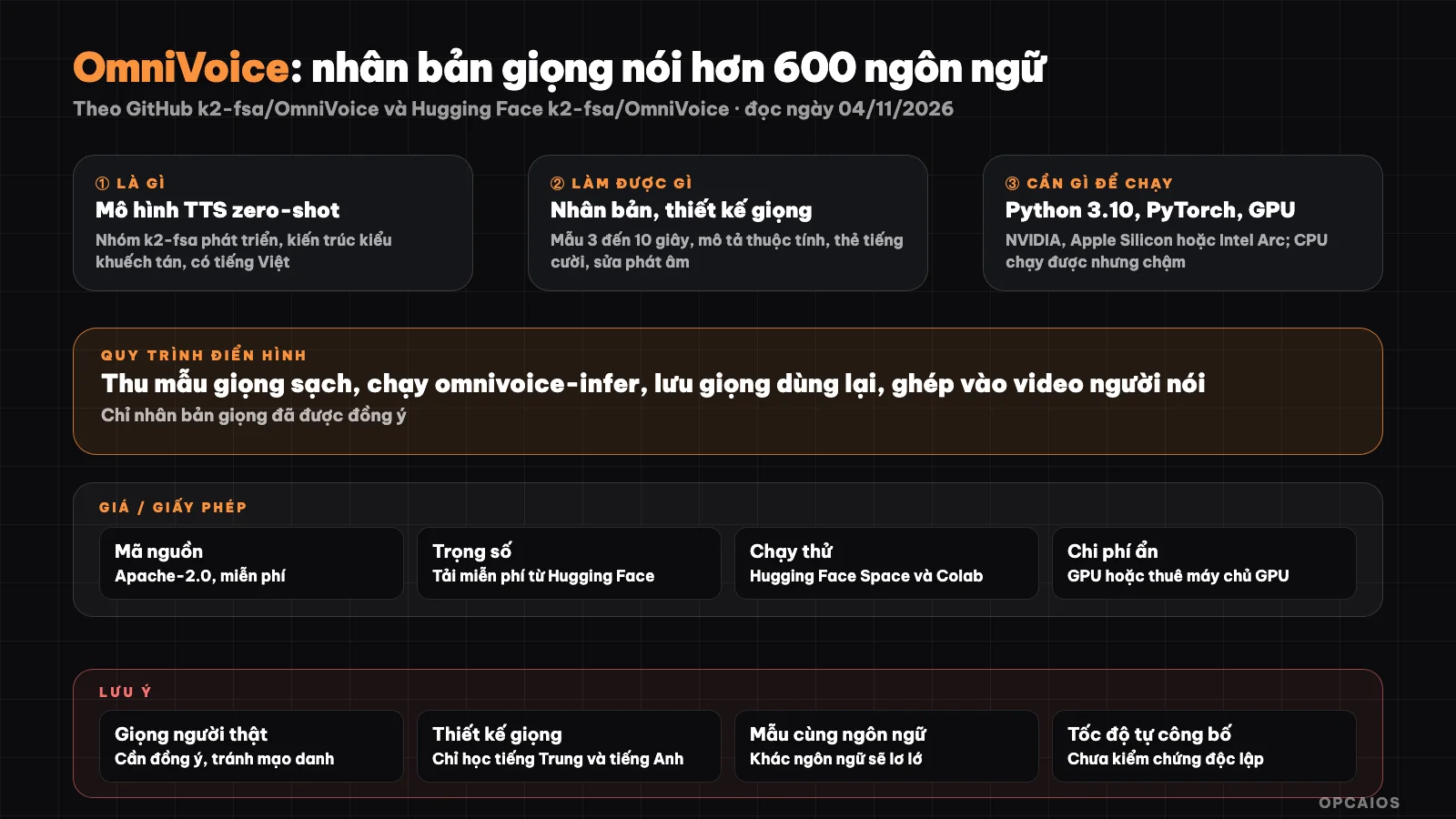
OmniVoice has three voice generation modes and runs best on GPU. Diagram: OPCAIOS.
What is OmniVoice and who created it?
OmniVoice is a "zero-shot" TTS model, meaning it clones a new voice without needing to retrain for each speaker. The author team is k2-fsa, the group developing the Next-gen Kaldi speech recognition toolkit; the paper's author list includes Han Zhu and Daniel Povey.
According to the README on GitHub (read on 04/11/2026), OmniVoice uses a diffusion language model architecture, aiming for both quality and speed. The team published a paper on arXiv with ID 2604.00688, with a demo page, a trial run on Hugging Face Space, and a Google Colab notebook. Model weights are hosted at k2-fsa/OmniVoice on Hugging Face, where the API shows around 3 million recent downloads (read on 04/11/2026). The file docs/languages.md lists 646 languages with about 581,000 hours of training data total; Vietnamese has code vi and about 8,482 hours of data (as published by the project, not verified). Output audio is at 24 kHz.
The repository has over 16,000 stars after about seven months and continues to be updated regularly, showing strong community interest. If you're new to AI model concepts, see What is LLM?.
What are OmniVoice's main features?
OmniVoice has three voice generation modes (clone, design, auto) along with detailed control tools like inserting laughter or fixing pronunciation. The table below summarizes the README on GitHub (read on 04/11/2026); speed numbers are as published by the project, not verified.
| Feature | Short description |
|---|---|
| Voice cloning | Provide a 3 to 10 second sample plus speech; without speech, Whisper auto-transcribes |
| Save voice for reuse | Encode the sample voice once, save the file, load it again in later sessions |
| Voice design | Describe gender, age, pitch, whisper, English accent or Chinese dialect |
| Auto voice | No sample provided, model picks a voice |
| Non-linguistic audio | Tags like [laughter], [sigh] inserted directly into text |
| Fix pronunciation | Pinyin for Chinese, CMU symbols for English |
| Speed | Real-time factor as low as 0.025, about 40 times faster than real time |
| FlashInfer speedup | About 2 to 2.9 times faster on NVIDIA GPU |
| Batch run | Command omnivoice-infer-batch splits work across multiple GPUs |
Two notes from the README itself: voice cloning mode is most stable because the model mainly trains on this, while voice design only trains on Chinese and English data and may be unstable with other languages. The sample should be in the same language as the speech to be read; using an English sample to read Vietnamese will carry a foreign accent.
How much is OmniVoice, what are the licenses and limits?
OmniVoice is free with source code under the Apache-2.0 license, which allows commercial use if you keep the copyright notice. The real cost is hardware: if you want speed you need a GPU, and if you don't have your own machine you have to rent a GPU server by the hour or month.
| Item | Status (as of 04/11/2026) |
|---|---|
| Source code | Apache-2.0, free |
| Model weights | Download free from Hugging Face; the model page does not specify a license field via API |
| Try on the web | Hugging Face Space and Google Colab, free within the limits of both platforms |
| Supported hardware | NVIDIA GPU, Apple Silicon, Intel Arc GPU; CPU works but is slow |
| Paid service price | The project does not sell any packages |
Hidden costs include GPU or GPU server rental fees, model weight download volume and time to collect clean voice samples. All costs do not include taxes and may change. On CPU speed, the benchmark table from the ZeroTTS project (a third party and a competitor) shows OmniVoice is about 6 times slower than real time when running on CPU; this is a number disclosed by the third party and has not been verified. Since the README does not specify minimum VRAM, we do not provide that figure.
How to install OmniVoice and get started?
Installing OmniVoice has two steps: install PyTorch correctly for your hardware, then install the omnivoice package from PyPI; you need Python 3.10 or higher. The commands below are taken from the README on GitHub (as of 04/11/2026).
- First, create a separate virtual environment and install PyTorch. For NVIDIA GPU with CUDA 12.8:
pip install torch==2.8.0+cu128 torchaudio==2.8.0+cu128 --extra-index-url https://download.pytorch.org/whl/cu128
On Apple Silicon Mac then install:
pip install torch==2.8.0 torchaudio==2.8.0
- Next, install OmniVoice:
pip install omnivoice
- Try cloning a voice from the command line, with
ref.wavbeing your sample:
omnivoice-infer \
    --model k2-fsa/OmniVoice \
    --text "This is a test for text to speech." \
    --ref_audio ref.wav \
    --ref_text "Transcription of the reference audio." \
    --output hello.wav
- Finally, if you want a button-clicking interface, run the
omnivoice-democommand (seeomnivoice-demo --helpto choose a port), or try it directly on the Hugging Face Space without installing anything.
Programmers call from Python using OmniVoice.from_pretrained and then the generate function. You can save a voice sample using create_voice_clone_prompt so next time you don't have to process the sample again.
What legal, ethical and personal data risks does OmniVoice have?
The biggest risk of OmniVoice is cloning someone else's voice without permission, leading to impersonation and fraud. The README itself has a disclaimer section prohibiting using the model to clone voices without permission, impersonate or defraud. This section is for reference only, not legal advice.
First, only clone your own voice or that of someone who has agreed in writing, specifying the purpose of use. Voice is information tied to a specific person; in Vietnam, regulations on personal data protection and personal rights may apply, and we have not reviewed the source text. Second, do not take voice from videos of celebrities or customers on social networks; besides the consent issue, that audio clip is also protected by the copyright of the person who posted it. Third, when posting a video using AI voice on YouTube, TikTok or Facebook, many platforms require labeling content created or modified with AI. Finally, if you run on Hugging Face Space or Colab, the voice sample is uploaded to third-party servers; self-hosting on your own machine keeps the data in your hands.
How does OmniVoice compare to other options?
OmniVoice is strong in language coverage and voice cloning quality, in exchange it needs a GPU. The table below is a general description, not a measurement.
| Tool | Strengths | Points to consider |
|---|---|---|
| OmniVoice | Over 600 languages, voice cloning from seconds, Apache-2.0 | Should have GPU |
| ZeroTTS | Vietnamese-specialized, runs on CPU, MIT | Public version does not yet self-clone voices |
| Voicebox | GUI application runs locally | Depends on the model underneath |
| VoiceStudio | Bundles voice cloning, dubbing, lip-sync | Requires setup time |
| Cloud voice service | No hardware needed | Pay per character, voice samples sit on provider's server |
When should you use OmniVoice?
OmniVoice works well when you need your own voice to read a lot of content, need multiple languages, and have or are ready to rent a GPU. If you only need to read Vietnamese using a voice already available on your laptop, a lighter model would be more convenient.
| Situation | Recommendation |
|---|---|
| Video of a speaker using their channel voice | OmniVoice with a clean voice sample |
| Dubbing one video into multiple languages | OmniVoice, check each language first |
| Reading Vietnamese articles on a laptop without GPU | Consider ZeroTTS |
| Just want to try quickly | Hugging Face Space, but don't upload sensitive voices |
| Batch producing hundreds of files | omnivoice-infer-batch on a rented GPU server |
OPCAIOS experience
We use OmniVoice to clone Vietnamese voices in our talking-head video production workflow running on a rented GPU server. The generated voice sounds natural with Vietnamese, but quality depends heavily on the sample: the sample must be clean, with minimal echo and noise. We haven't measured quality by numbers, so we're not providing any scores or speed figures.
Three criteria led us to keep OmniVoice in the Repo list under Utilities: the repository is still being updated (last push on 02/11/2026), the Apache-2.0 license is clear, and hidden costs are mainly GPU rental fees, which you can turn on and off as needed. On terms-of-service risk, the principle should be to only clone your own voice and have consent.
Read more: What is ZeroTTS?, What is ComfyUI?, What is VPS?, What is VideoLingo?, 7 best AI voice cloning tools 2026 for Vietnamese, 7 best AI talking head video tools 2026.
Frequently asked questions
Does OmniVoice read Vietnamese well?
OmniVoice has Vietnamese in a list of 646 languages, with about 8,482 hours of training data according to docs/languages.md. From our experience using it for talking-head videos, the cloned Vietnamese voice sounds natural if the sample is clean, but we haven't measured by numbers. The ZeroTTS project's benchmark lists OmniVoice's Vietnamese word error rate as 4.13%, which is a third-party figure and hasn't been verified. You should use a Vietnamese sample when reading Vietnamese text to avoid a flaky accent.
What GPU does OmniVoice need?
OmniVoice's README supports NVIDIA GPUs via CUDA, Apple Silicon via MPS, and Intel Arc GPUs via XPU; the development team notes they tested on an Arc A310 with 4 GB memory. The README doesn't state an official minimum VRAM requirement. CPU still works but much slower. If you don't have a suitable machine, you can try on Hugging Face Space, Google Colab, or rent a GPU server by the hour when you need to produce.
How long should the voice sample for OmniVoice be?
The README recommends using a sample 3 to 10 seconds long. Longer samples slow down the generation process and may reduce clone quality. You should include the exact transcription of the sample; if left blank, OmniVoice uses Whisper to transcribe it itself. From our experience, recording the sample in a quiet room, keeping the mic close, and avoiding background music is more important than sample length.
Can I use OmniVoice for commercial purposes?
OmniVoice source code is under the Apache-2.0 license, which allows commercial use if you keep the copyright notice and license. The weights page on Hugging Face did not list a license field via API as of 04/11/2026, so check the model page again before commercial use. Beyond the software license, you must have consent from the person whose voice is being cloned. This is reference information, not legal advice.
Can someone with no coding knowledge use OmniVoice?
Someone with no coding knowledge can try OmniVoice right on Hugging Face Space or Google Colab without installing anything. To run on your own machine, you need to install Python, PyTorch, and type a few commands, or ask an AI agent like Claude Code to run it for you. For a complete talking-head video production workflow, you'll also need lip-sync tools and a GPU machine. If you want to learn systematically how to combine AI tools into your work, see OPCAIOS's AI application training course.
Source: GitHub k2-fsa/OmniVoice (README, docs/languages.md, API, read 04/11/2026), PyPI omnivoice and Hugging Face k2-fsa/OmniVoice (read 04/11/2026), GitHub README zeroweight-ai/ZeroTTS for third-party benchmark; not read/not verified: arXiv paper 2604.00688, demo page, speed figures released by the project, license listed on the Hugging Face model card; star count and price may change. Experience is OPCAIOS's.
Translated from Vietnamese with AI. Read the original.
Want to apply this in your business?
Book a free 30-minute call (Vietnam time, in English or Vietnamese).