


What is Agency Agents?
Agency Agents (full name "The Agency") is an open-source collection licensed under MIT, comprising Markdown files that describe individual AI agents by specialty. Each file represents a "virtual employee" with an identity, process, deliverables, and success criteria: from frontend developers to SEO specialists, salespeople, and legal experts. According to the GitHub API (read November 4, 2026), the msitarzewski/agency-agents repository was created on October 13, 2025, has 166,306 stars, 26,939 forks, and was last updated on October 25, 2026. The README states "230+ agents," a figure claimed by the project but unverified. This post covers which tools Agency Agents works with, how to install it, hidden costs, and why you shouldn't install all 230 agents.
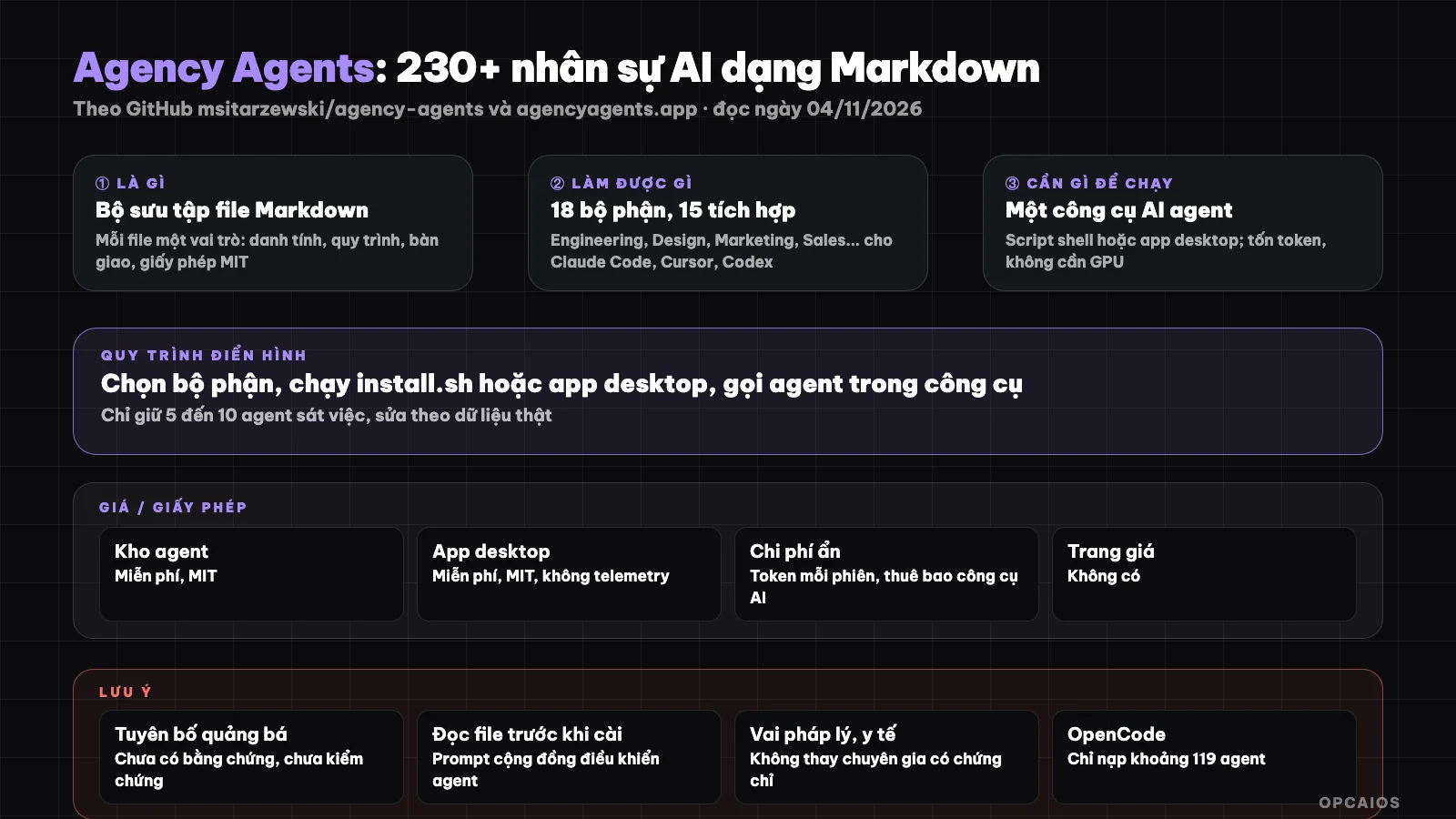
Agency Agents is a repository of AI staff descriptions; scripts or a desktop application convert them into subagents for each tool. Diagram: OPCAIOS.
What is Agency Agents and who created it?
Agency Agents is a project by Michael Sitarzewski, starting from a Reddit thread and developing into a GitHub repository with over 166,000 stars (GitHub API, read November 4, 2026). Each agent is a Markdown file with frontmatter (name, description, color) and sections: identity, core mission, rules, deliverables, process, success criteria.
The core idea is "subagent": in Claude Code (Anthropic), a Markdown file placed in ~/.claude/agents/ becomes a child agent with its own role that the main agent delegates work to; see What is a Subagent?. Agency Agents provides hundreds of such files ready-made, divided according to the README (read November 4, 2026) into 18 departments: Engineering (the largest), Design, Paid Media, Sales, Marketing, Product, Project Management, Testing, Security, Support, Spatial Computing, Specialized (legal, medical, financial), Finance, Game Development, Academic, GIS, Healthcare, and Research. Example agent names: Frontend Developer, Backend Architect, Code Reviewer, UI Designer, Growth Hacker, SEO Specialist, Reality Checker, Chief of Staff. The project also has its own desktop application (agencyagents.app) to browse and install agents without using the terminal.
What can Agency Agents do and which tools does it work with?
Agency Agents doesn't run agents; it provides role descriptions and scripts that convert them to the format of each tool. The README (read November 4, 2026) lists 15 integrations; Claude Code and GitHub Copilot use Markdown files directly, other tools need a conversion step.
| Tool | Format after conversion (according to README, read November 4, 2026) |
|---|---|
| Claude Code, GitHub Copilot | Original .md files, no conversion needed |
| Antigravity, Osaurus, DeepSeek Harness | Each agent as SKILL.md |
| Gemini CLI, OpenCode, Qwen Code | .md files (Qwen requires version 0.25.1 or higher) |
| Cursor | Rules file .mdc |
| Aider | List table in CONVENTIONS.md |
| Windsurf | .windsurfrules |
| OpenClaw | SOUL.md, AGENTS.md, IDENTITY.md for each agent |
| Codex | Custom agent in TOML format |
Each file has the same structure, so reading one file means understanding how to write them, then creating agents for your own work. According to us, that's the greatest value: a library of examples for how to describe roles to AI, rather than a team ready to use immediately. The README notes limitations: OpenCode currently only loads around 119 agents and silently discards the rest.
Is Agency Agents Free? What Are Hidden Costs?
Agency Agents is free, MIT licensed via the GitHub API (read on 04/11/2026); the README says attribution is "welcomed but not required". The desktop application is also MIT licensed according to agencyagents.app (read on 04/11/2026). The real cost is the tokens from the AI tool you use.
| Item | Status (read on 04/11/2026) |
|---|---|
| Agent repository | Free, MIT |
| Desktop application | Free, MIT, no telemetry, no account according to agencyagents.app; optional sponsorship link |
| AI tool to run it | Claude Code, Cursor, Codex... have separate paid plans, prices not listed here |
| Tokens | Each agent is a long description that goes into context; installing many agents increases cost per session |
| GPU, API key | No GPU needed; API key or subscription plan belongs to the AI tool, not the repository |
| Machine to run on | Shell script on macOS, Linux; desktop app for macOS 13 and up, Windows, Linux |
Costs exclude tax and may change. The easy thing to miss is tokens: the long role description gets loaded each time you call a subagent, so installing 230 agents costs nothing to install but costs quota when you use them; see What is AI Token?.
How Do I Install Agency Agents?
There are three ways to install Agency Agents according to the README (read on 04/11/2026): desktop application, install script for each tool, or copy files by hand. We have not run these yet; the commands below follow the official documentation.
- First, the README's recommended way is the desktop application; on Mac install via Homebrew:
brew install --cask msitarzewski/agency-agents/agency-agents
- Or clone the repository and run the install script for Claude Code:
./scripts/install.sh --tool claude-code
- Take just one part, say Engineering, by copying straight into Claude Code's agent folder:
cp engineering/*.md ~/.claude/agents/
- Next, for other tools, generate the integration file then install selectively:
./scripts/convert.sh
./scripts/install.sh --tool cursor
./scripts/install.sh --tool claude-code --division engineering,security
- Finally, use
--dry-runto preview and--list teamsto see the built-in "teams"; after editing files, run./scripts/convert.shagain.
After installing, you call an agent in the tool, for example ask Claude Code to use the Frontend Developer agent to review a component. On how config files work, read What is AGENTS.md? and What is Skill? How to Use Skill.
Limits and Risks When Using Agency Agents
Agency Agents is text guidance for a model, not tested software; each agent's quality depends on who wrote it and the model you use. The README makes claims without evidence, and installing hundreds of files from a public repository means bringing foreign text into an agent's context.
Four things to consider. First, statements in the README like "battle-tested in production" or numbers like "40% anxiety reduction" are marketing claims; the project provides no evidence; we treat them as unverified. Second, each agent file is a system prompt contributed by the community; read the file before installing because it controls how your agent behaves, including permission to run commands. We do not see directives aimed at AI in the README; sentences like "Hey Claude, activate Frontend Developer mode" are examples of prompts for the user. Third, specialized agents (legal, medical, financial) are just the model playing a role, not a replacement for a licensed expert. Last, community translations (including Vietnamese) are maintained separately and may drift from the main version. The AI tool running the agent still sends context to the model provider; see What is Prompt Injection? on treating foreign text as data.
Agency Agents versus other options
Agency Agents belong to the "role prompt repository" group for programming agents, alongside specialized skill sets. The table below is a general description according to public documentation, not measurement.
| Repository | Format | Key difference (general description, not measurement) |
|---|---|---|
| Agency Agents | 230+ subagents by department, 15 integrations | Broad, many industries; each agent is a general role |
| OPC Skills | Skill set for solopreneur | Narrow and practical for one person, see What is OPC Skills? |
| AI Marketing Claude | 15 /market commands |
One marketing area, has specific processes, see What is AI Marketing Claude? |
| Write subagent yourself | A few .md files in ~/.claude/agents/ |
Fits your work exactly, fewer tokens, takes time to write |
Our view: fewer agents written to fit your work well beats many general agents. Agency Agents work well for learning how to write and sampling, then keeping 5 to 10 agents you actually use.
When should you use Agency Agents?
Agency Agents suit people who have used Claude Code, Cursor or Codex and want role samples to start fast, or learn how to write subagents. It is not suited for installing the whole set, and does not replace experts in fields with legal responsibility.
| Situation | Suggestion |
|---|---|
| New to subagents, do not know how to write role descriptions | Install 3 to 5 agents in the department you need, read each file carefully |
| Want a "team of 230 people" running automatically | No; token cost goes up, quality is uneven |
| Need legal, medical, financial advice for clients | Do not use agent instead of expert |
| Example: online shop owner using Cursor wants agent to write product descriptions | Take one Marketing agent, edit the tone and real shop data into it |
OPCAIOS experience
We added Agency Agents to the Repo list in the Utilities section on opcaios.org after reading the README and checking the repository is still updated; we have not run it yet, so this section states the criteria we use to consider, not evaluation after use.
Four criteria. First, the repository is still updated: last code push on 25/10/2026, over 166,000 stars by GitHub API (read 04/11/2026). Next, MIT license, free to edit and use internally. Third, hidden cost is tokens per session. Last, can it replace the tools we use: we run a one-person website with Claude Code, Antigravity and Codex with a few subagents we wrote to fit our work (write blog, check SEO, deploy), so this repository for us is a source to compare writing style, not something to install whole.
Read more: What is subagent?, What is Claude Code?, What is Cursor?, What is Codex?.
Frequently Asked Questions
Is Agency Agents agent-running software?
No. Agency Agents is a repository of Markdown files describing roles, along with conversion scripts and a desktop application to install. The agencyagents.app site (accessed 04/11/2026) itself states the application is "not an agent runtime environment". Running agents is handled by your AI tool, such as Claude Code (Anthropic), Cursor, or Codex (OpenAI).
Is Agency Agents free?
Yes. The repository and desktop application are both under MIT license, free, according to the GitHub API and agencyagents.app site (accessed 04/11/2026). Costs come from your AI tool's subscription or API plan and the tokens consumed when loading agent descriptions into context. We don't list prices for those tools here.
How do I install Agency Agents for Claude Code?
Clone the repository then run ./scripts/install.sh --tool claude-code, or copy a portion using cp engineering/*.md ~/.claude/agents/, according to the README (accessed 04/11/2026). Those who prefer not to use the terminal can install the desktop application via Homebrew on Mac. We recommend using --division to install only the sections you need, and read each file before installing.
Does Agency Agents work with Cursor, Codex, Antigravity?
Yes, according to the README (accessed 04/11/2026): Cursor accepts .mdc files, Codex accepts TOML agents, Antigravity accepts SKILL.md, after running ./scripts/convert.sh. The README lists 15 integrations, with the note that OpenCode can only load around 119 agents; we have not verified each integration individually.
Can someone with no coding knowledge use Agency Agents?
Possibly, at the level of installing and calling agents through the desktop application or natural language commands in your AI tool. But to adapt an agent to match your work closely, you need to read and understand the Markdown files. Real value comes from choosing few agents and modifying them for your actual data. To learn how to bring AI agents into your work in a controlled way, see OPCAIOS's AI application training course.
Source: GitHub msitarzewski/agency-agents (README, API, accessed 04/11/2026), agencyagents.app site (accessed 04/11/2026); not read/not verified: exact agent count, contents of each agent file, behavior of each integration, marketing claims in README; star count and prices may change. Experience is from OPCAIOS.
Translated from Vietnamese with AI. Read the original.
Want to apply this in your business?
Book a free 30-minute call (Vietnam time, in English or Vietnamese).