



Running a Solo Business with AI: What Does It Mean?
Running a solo business with AI means the business owner holds the decision-making role, handles sales, and takes responsibility, while repetitive tasks in other functions are drafted, completed, or checked by AI agents and automation tools. This is feasible because language models are skilled at drafting, summarizing, and categorizing (see What is an LLM?), but not everything should be delegated: irreversible work, tasks with legal risk, or those requiring personal credibility still need human review. For example, when using Dify as a website assistant and n8n for automation flows, one person still retains final approval for all outgoing content; information in this post was compiled on 24/10/2026.
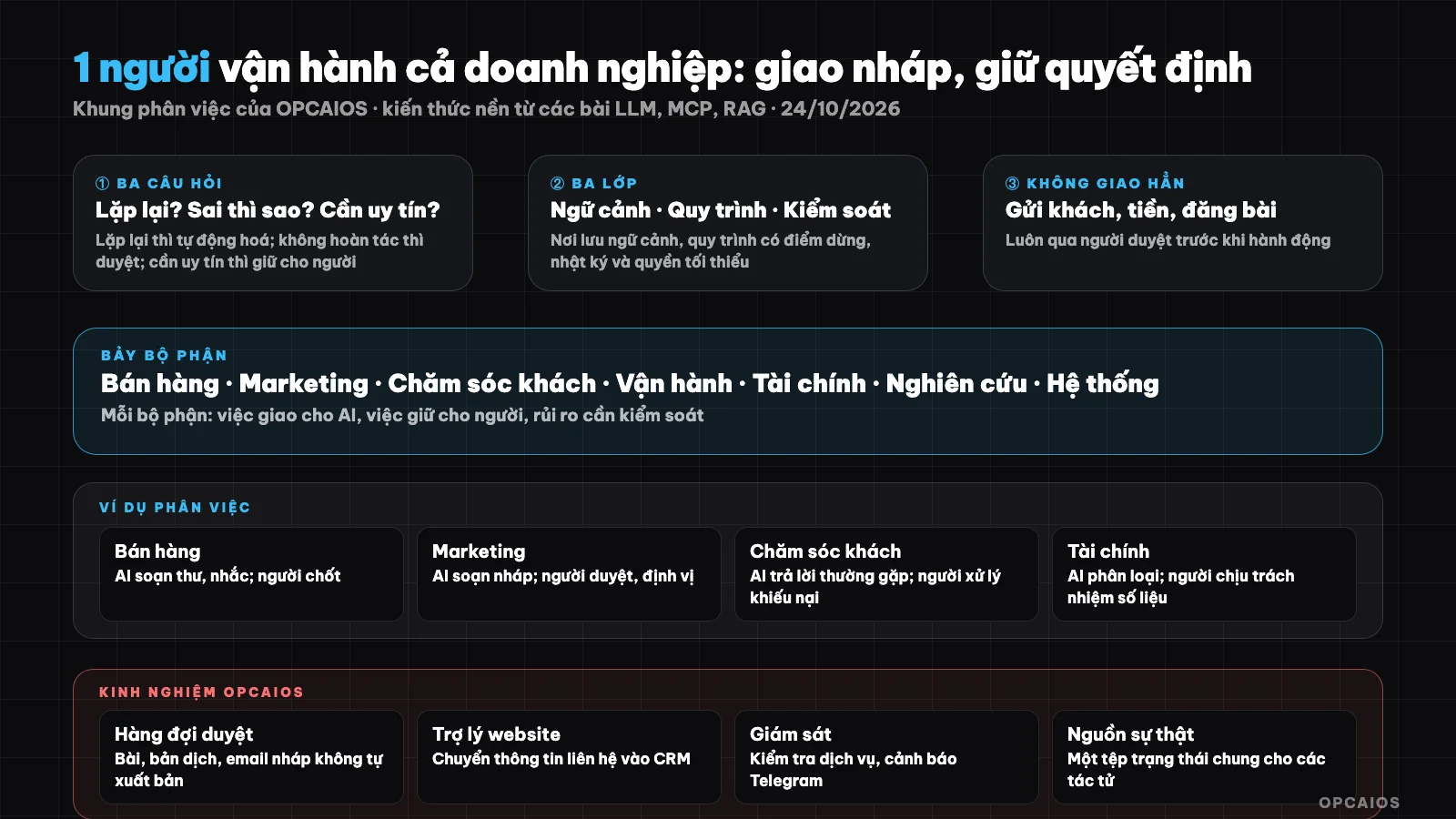
Delegate repetitive work to AI, keep decisions and risk points. Diagram: OPCAIOS.
Delegation principle: delegate drafts, keep decisions
The principle "delegate drafts, keep decisions" means AI creates drafts and handles repetitive work, while the business owner decides and takes responsibility. Hypothetical example: AI drafts a quote for a customer, the business owner reviews the figures and terms, then sends it. Use three questions to categorize a task, in order:
- Is it repetitive and have a clear pattern? If yes, automate it.
- What are the consequences of error? If irreversible (sending to customers, payment, public posting), it needs human review.
- Does it require personal credibility or relationships? If yes, keep it with the person.
Map of seven functions
| Function | Delegate to AI | Keep with person | Risk to control |
|---|---|---|---|
| Sales | Draft outreach, summarize calls, update CRM, send reminders | Closing conversations, price negotiation, relationships | Over-committing, sending to wrong customer |
| Marketing | Generate ideas, draft posts, convert formats, schedule posting | Brand positioning, tone of voice, review before posting | Generic content, wrong figures |
| Customer Care | Answer FAQs, categorize requests, draft responses | Complaints, exceptions, refunds | Wrong policy answers |
| Operations, Delivery | Checklists, reports, progress updates, task reminders | Output quality control | Miss customer requirements |
| Finance | Categorize transactions, remind invoices, compile reports | Tax figures, spending decisions, reconciliation | Accounting errors |
| Research | Find materials, summarize, compare competitors | Strategic conclusions | Unverified sources |
| Systems, Technology | Write code, test, monitor, alert | Access rights, security, backups | Security flaws, data loss |
Three layers to organize: context, process, control
Three layers are the arrangement for one person to coordinate multiple AI agents without losing control. First is context, second is process, third is control. Hypothetical example: the business owner writes pricing rules in a note, builds a process with n8n or Dify, and sets alerts via Telegram. Details:
- Context: one place to store information about the business, customers, tone, rules; AI reads from here instead of guessing (see What is a Second Brain? and What is RAG?).
- Process: repetitive steps built with automation tools like n8n or platforms like Dify, with pause points for human review.
- Control: logs, alerts, minimum permissions, backups; see What is MCP? on the principle of granting minimum permissions to agents.
What does a sample work day for a solo business owner look like?
A sample work day splits into four time slots, where AI handles aggregation and drafting while the business owner handles review and decisions. Hypothetical example: morning takes only about 10 minutes to read a summary.
| Time | AI's work | Your work |
|---|---|---|
| Morning | Aggregate new emails, new leads, system alerts into one summary | Read 10 minutes, pick three priorities |
| Midday | Draft posts, customer responses, quotes | Review, edit, send |
| Afternoon | Update CRM, run reports, check systems | Call customers, meetings, close deals |
| End of day | Log journal, prepare tomorrow's summary | Review, decide adjustments |
This is a guiding framework, not a measurement; actual time depends on industry and volume.
Things You Should Not Fully Delegate to AI
- Sending quotes, contracts, invoices to clients without reviewing them.
- Transferring money, issuing refunds, changing payment terms.
- Publishing content publicly under your name without approval.
- Processing sensitive personal data when you don't have security rules in place yet.
- Making hiring, firing, signing, and legal compliance decisions.
OPCAIOS's Experience
We apply the principle of "delegate drafts, keep decisions" correctly. Articles, English translations, and draft emails composed by AI go through an approval queue and do not self-publish; the website assistant (built with Dify) feeds contact information into the CRM; a monitoring system checks service delivery regularly and sends alerts via Telegram; and a shared status file serves as the source of truth for agents. The work we still keep for people is talking to clients, deciding priorities, and approving everything that goes public. We haven't measured time savings by department yet, so we don't include a replacement ratio in this post.
Read more: The "SOP-ifying" process for your entire company; How to build a Voice AI Agent with Vapi.ai to automatically call and confirm orders.
Frequently Asked Questions
Can one person really run an entire business with AI?
Yes, at a small scale, if the product is simple, the process is clearly repetitive, and there's a person reviewing at risk points. OPCAIOS doesn't have overall data on the success rate of one-person businesses, so this is a practical observation rather than a research finding. The hardest part is still sales and keeping trust, because it requires credibility and personal relationships.
Which department should I start automating first?
Start with work that takes time, repeats often, and causes little harm if wrong—usually drafting, summarizing, and reminders. First, list weekly repetitive tasks and apply the three classification questions above. Next, pick one task that's easy to fix and set a checkpoint for someone to review. Finally, expand to tasks that are hard to undo, like quotes or payments. Marketing and research are usually easier to start with than finance or systems.
Can AI replace employees?
AI can replace certain repetitive tasks, not entire roles. Drafting greeting emails, answering frequent questions, or writing code can be delegated to AI for drafts; complaints, refunds, hiring, and contracts still need people. OPCAIOS hasn't measured time savings by department, so we don't include a staff replacement ratio in this post. See the cost calculation in the post about AI tool costs for OPC.
What tools do I need to start?
You need four components: an AI assistant, an automation tool like n8n or Dify, a place to store context, and a simple CRM. For example, you can start with just an AI assistant and a customer spreadsheet, adding automation later. First, pick a repetitive task; next, document the process; finally, connect the tools and set a checkpoint for someone to review. OPCAIOS doesn't recommend buying the full package upfront, because each added tool is a cost and a potential failure point; see AI tools for the OPC model. Learn how to build this system in OPCAIOS's AI application training course.
Source: the task allocation map is OPCAIOS's consulting framework based on systems-building experience, not research data; knowledge of language models and MCP comes from OPCAIOS's corresponding posts (read on 24/10/2026). The experience is OPCAIOS's.
Translated from Vietnamese with AI. Read the original.
Want to apply this in your business?
Book a free 30-minute call (Vietnam time, in English or Vietnamese).