


AntiBridge Telegram là gì?
AntiBridge Telegram là một dự án mã nguồn mở viết bằng JavaScript (Node.js), cho phép bạn dùng một bot Telegram để gửi lệnh cho AI agent đang chạy trong Antigravity IDE, xem trạng thái, xem quota mô hình, chụp màn hình và chấp nhận hoặc từ chối thao tác của agent khi không ngồi trước máy. Theo GitHub API (đọc ngày 04/11/2026), kho Nhqvu2005/AntibridgeTelegram có 19 sao, 7 fork, giấy phép MIT, tạo ngày 10/02/2026 và lần push gần nhất là 25/07/2026. Phần mềm miễn phí, không có trang giá. Bài này giải thích AntiBridge hoạt động thế nào, cài ra sao, và vì sao điều khiển một IDE có quyền chạy lệnh qua bot chat là việc cần cân nhắc kỹ về bảo mật.
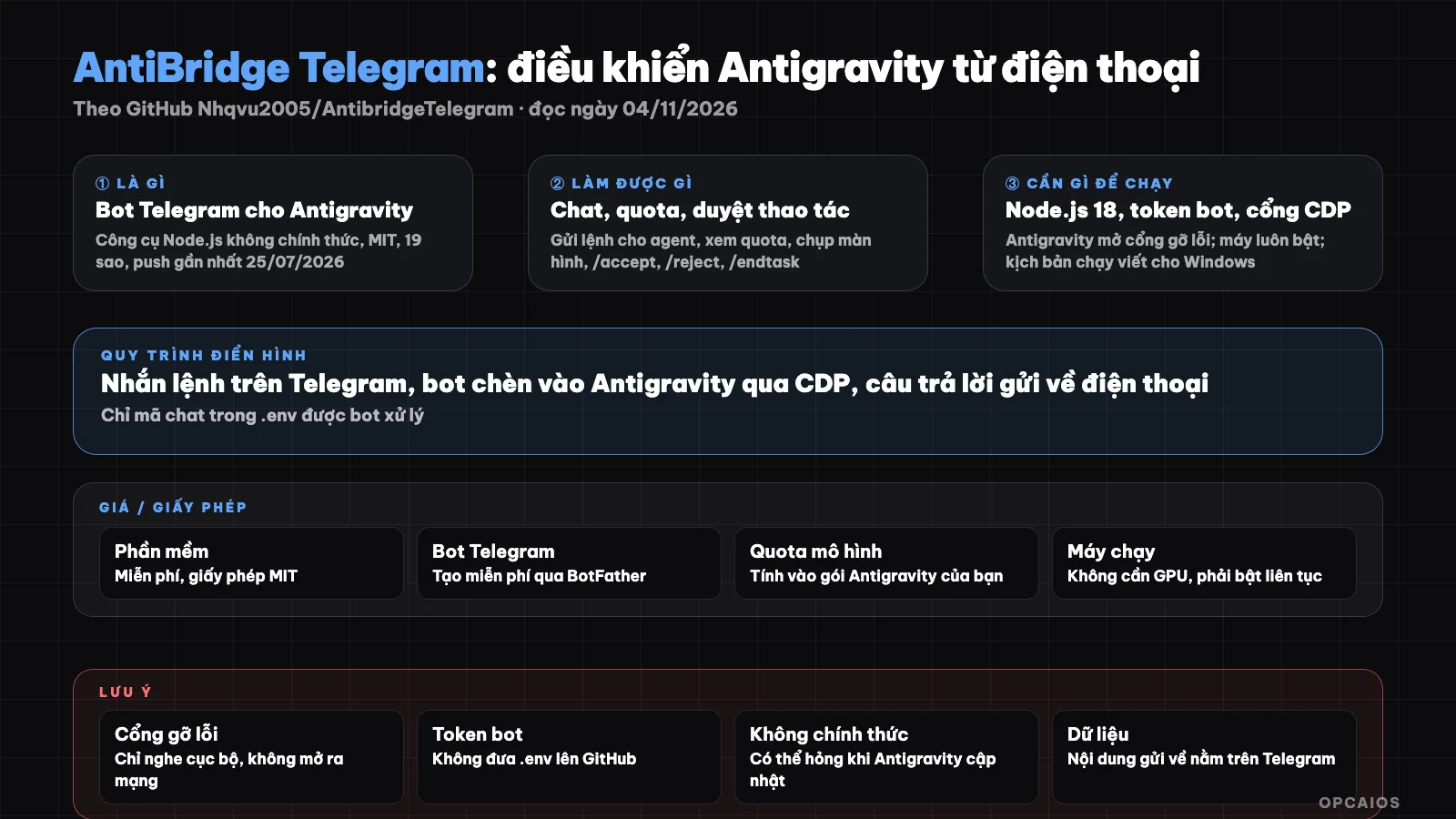
Telegram nói chuyện với một tiến trình Node.js, tiến trình này điều khiển Antigravity qua cổng gỡ lỗi. Sơ đồ: OPCAIOS.
AntiBridge Telegram là gì và ai tạo ra?
AntiBridge Telegram là công cụ không chính thức do tài khoản GitHub Nhqvu2005 phát hành, xây tiếp trên dự án AntiBridge-Antigravity-remote của tác giả linhbq82. README ghi rõ công cụ không liên kết với Antigravity và người dùng tự chịu rủi ro. Mục tiêu là điều khiển Antigravity từ điện thoại.
Antigravity là IDE có AI agent của Google, nơi agent đọc mã, sửa tệp và chạy lệnh trong dự án của bạn. Nếu chưa quen, xem Antigravity là gì?. AntiBridge Telegram không gọi API chính thức nào của Antigravity. Theo README trên GitHub (đọc ngày 04/11/2026), nó mở Antigravity với cổng gỡ lỗi từ xa (remote debugging), rồi dùng Chrome DevTools Protocol (CDP) để đọc và chèn nội dung vào giao diện IDE, giống cách một công cụ kiểm thử điều khiển trình duyệt Chrome. Một tiến trình Node.js chạy trên máy của bạn làm cầu nối: phía trước là bot Telegram, phía sau là cửa sổ Antigravity. Vì đi qua giao diện chứ không qua API, công cụ có thể hỏng khi Antigravity đổi bố cục ở bản cập nhật mới. Kho cũng có phiên bản README tiếng Việt, cho thấy tác giả nhắm tới người dùng Việt Nam.
AntiBridge Telegram làm được những gì?
AntiBridge Telegram biến Telegram thành bảng điều khiển từ xa cho Antigravity: nhắn tin hai chiều với agent, xem quota mô hình, đổi mô hình, chụp màn hình, mở dự án, chạy workflow và skill, dừng hoặc tắt tiến trình. Mọi cập nhật của một câu trả lời được gom vào một tin nhắn để tránh làm đầy khung chat.
| Tính năng | Mô tả ngắn (theo README, đọc ngày 04/11/2026) |
|---|---|
| Chat hai chiều | Gửi tin từ Telegram vào Antigravity, nhận câu trả lời của AI về Telegram |
| Một tin nhắn duy nhất | Suy nghĩ, phần đang sinh và kết quả cuối được cập nhật trên cùng một tin |
| Chèn lệnh qua CDP | Không chiếm chuột, không thu nhỏ cửa sổ |
| Theo dõi quota | Xem mức dùng các mô hình Claude, Gemini, GPT qua API nội bộ; tự kiểm tra 5 phút một lần, lưu lịch sử thay đổi |
| Hỏi thưa thông minh | Tốc độ hỏi tự chỉnh từ 3 giây lên 10 giây, tối đa 15 phút chờ |
| Đổi mô hình | Lệnh /model |
| Chấp nhận, từ chối | Lệnh /accept và /reject cho thao tác agent đang chờ duyệt |
| Mở dự án | Duyệt thư mục và mở dự án bằng /open |
| Workflow và skill | Chạy tệp trong .agent/workflows và .agent/skills |
| Tắt tiến trình | /endtask kết thúc tiến trình Antigravity |
Lưu ý: "API nội bộ" để đọc quota không phải giao diện được Google công bố cho bên thứ ba, nên có thể đổi hoặc bị chặn bất cứ lúc nào.
AntiBridge Telegram có miễn phí không, chi phí ẩn ở đâu?
AntiBridge Telegram miễn phí theo giấy phép MIT, không có gói trả phí. Chi phí thật nằm ở chỗ khác: máy tính phải luôn bật và chạy Antigravity, và quota mô hình bạn dùng qua bot vẫn tính vào tài khoản Antigravity của bạn như khi gõ trực tiếp.
| Hạng mục | Chi tiết (đọc ngày 04/11/2026; chưa gồm thuế, có thể thay đổi) |
|---|---|
| Phần mềm | Miễn phí, giấy phép MIT |
| Bot Telegram | Tạo miễn phí qua BotFather của Telegram |
| Máy chạy | Máy tính của bạn phải bật liên tục; không cần GPU |
| Quota mô hình | Tính vào gói Antigravity bạn đang dùng |
| Hệ điều hành | Kịch bản cài và chạy viết cho Windows (tệp .bat); hệ khác phải tự chạy lệnh npm |
| Bảo trì | Lần push gần nhất 25/07/2026, hơn ba tháng trước ngày đọc |
How to Install AntiBridge Telegram?
Installing AntiBridge Telegram requires Node.js 18 or higher and Antigravity running with the debug port open. You download the code, install libraries, fill your bot token and chat ID into the config file, then run the bot. The steps below follow the README; we haven't tested running it ourselves yet.
- First, create a bot using BotFather on Telegram to get the token, and get your own chat ID.
- Next, download the code and install libraries:
git clone https://github.com/Nhqvu2005/AntibridgeTelegram.git
cd AntibridgeTelegram
npm install
cp .env.example .env
- Open the
.envfile, fill inTELEGRAM_BOT_TOKEN,TELEGRAM_CHAT_IDand the CDP port (default 9000). - Open Antigravity with the remote debug port; the repo has a .bat file for Windows to do this.
- Finally, run the bot using
START_TELEGRAM.baton Windows or:
npm run telegram
Type /start in Telegram to check the connection. If you get an error that the chat context is not found, the README recommends checking that Antigravity is open and logged in, then type /reconnect.
Is controlling the IDE remotely through a bot safe?
Controlling the IDE remotely through a chat bot is adding another door to a computer with permission to read code, edit files and run commands. Whoever gets the bot or the debug port has nearly the same permissions as the agent. The risk doesn't lie in the author's intentions but in this architecture itself.
The remote debugging port of the Chromium background application allows any process that can connect to it to read content and run JavaScript in the application, with no password required. That's the first reason to be careful: this port should only listen on the local machine and never be exposed to the network. Next is the Telegram bot. According to the TelegramBot.js source code we read on 04/11/2026, the bot only handles messages from the correct chat ID in the config, this is the main layer of protection. But if the bot token leaks (via .env file pushed to GitHub, screenshots, malware on the machine) then someone else can take over the bot. Third, the repo also has a helper web server in the backend folder; the server.js file calls listen on all network interfaces and has CORS open. We haven't verified what configuration this server starts in, but if you run it, block it with a firewall. Finally, the content the agent sends back to Telegram (code, paths, sometimes API keys in logs) will sit on Telegram's servers.
Habits you should have:
- Never push the
.envfile to GitHub; change the token right away if you suspect it leaked. - Keep the mode where you review the agent's actions, don't turn on auto-accepting all commands; see safe mode in Antigravity.
- Only open projects that don't contain secrets when controlling through the bot.
- Turn off the bot and debug port when you don't need them.
- Read the code before running it, since this is a personal tool, few people review it (19 stars).
On terms: controlling Antigravity through CDP and reading quota through internal API may not fall within Google's intended use. We haven't cross-checked Antigravity's terms of service; this is not legal advice.
How does AntiBridge Telegram compare to other ways?
AntiBridge Telegram is the fastest way to send commands to Antigravity from your phone, in exchange you have to handle security yourself. Other options like remote screen control or running the agent on a server with its own interface are heavier but fall within the scope of official tools.
| Method | Advantages | Disadvantages |
|---|---|---|
| AntiBridge Telegram | Light, send commands like chat, has quota and screenshots | Not official, can break when IDE updates, token and debug port risk |
| Remote screen control software | See the whole machine, doesn't depend on IDE interface | Hard to operate on phone, also needs account security |
| Command line agent running in background (Claude Code, Codex) | Has official auto-run mode, clear logging | Not Antigravity, needs separate setup |
| Go back to the machine | Most secure | Slow |
General description, not a measurement. If you want the agent to work when you're away, see more running Claude Code automatically every day.
When Should You Use AntiBridge Telegram?
AntiBridge Telegram works well for Antigravity users on Windows who understand Node.js and config files, and need to monitor a long-running task while away from their desk. It's not suitable for machines storing customer data, shared machines, or people who can't read code.
| Situation | Recommendation |
|---|---|
| Agent is running a long task, you want to know when it's done | Good fit, only use for status and screenshots |
| Need to quickly review an action while out | Can work, but read the action carefully before /accept |
| Machine contains customer code and data | Not recommended |
| You don't know Node.js, can't read code | Not recommended, high risk of config errors |
| Using macOS or Linux | Must run npm commands yourself, support level unclear |
Example (hypothetical): an OPC worker assigns Antigravity to rewrite a landing page, then meets with a client. They type /status and /screenshot on their phone to check progress, see the agent waiting to approve a library install command, read the command and choose /reject because they're not sure.
OPCAIOS Experience
We use Antigravity daily but haven't used AntiBridge Telegram yet. We added AntiBridge Telegram to the Repo list in our Utilities section on opcaios.org after reading the README and checking that the repository is still maintained; we haven't tested it yet, so this section outlines the criteria we use to consider it, not an evaluation after use.
- Is the repository still being maintained: the most recent push was 25/07/2026; for a tool that hooks into an IDE interface, three months without updates is a signal to test again before trusting it.
- License: MIT, free to modify and use.
- Hidden costs: no new GPU or API key needed, but the machine must stay on and quota still counts toward your Antigravity plan.
- Security and terms risks: this is our heaviest criterion. A tool that opens a debug port and accepts commands via bot should only run on machines with no secrets.
Read more: What is a Telegram bot?, Agent Manager in Antigravity, What is an AI agent?.
Frequently Asked Questions
Is AntiBridge Telegram an official Antigravity tool?
No. AntiBridge Telegram is a personal project released by the GitHub account Nhqvu2005, built on top of linhbq82's AntiBridge-Antigravity-remote project. The README clearly states that the tool is not affiliated with Antigravity and users assume their own risks. The tool controls the IDE through an interface using Chrome DevTools Protocol rather than through a published API, so an Antigravity update could break it. Think of this as an experimental utility—check it again after each Antigravity update and don't rely on it for anything important.
Can someone else control my machine through the bot?
According to the source code read on 04/11/2026, the bot only replies to messages from the exact chat ID you set in the .env file, so strangers messaging the bot will be ignored. The real risks lie in three places: the bot token being exposed, the Antigravity debug port being opened to the network, and the subsidiary web server in the repo listening on all network interfaces if you run it. Keep the token secret, block ports with a firewall, rotate the token immediately if you suspect exposure, and turn off the bot when not in use—these are the minimum steps.
Does AntiBridge Telegram run on macOS?
The README contains installation and run scripts for Windows using .bat files, and the config has references to Antigravity.exe paths and taskkill commands. The npm run telegram command is a Node.js command so in theory it runs on macOS or Linux, but you'll need to manually start Antigravity with the remote debug port and may hit errors in the Windows-specific parts. We haven't tested it on any operating system, so read the code and try it on a spare machine before using it for real.
Does using AntiBridge consume additional model quota?
Not beyond typing directly, but it's not free either. Each message you send through Telegram becomes a request to an agent in Antigravity, so usage is counted against your Antigravity account's plan and quota as normal. The /quota command reads figures through an internal API and is only for reference—it may be inaccurate or stop working. If you leave an agent doing a lot of work while you're away, monitor your quota regularly so you don't run out halfway through.
Should someone who can't code use AntiBridge Telegram?
No. Installing AntiBridge requires Node.js, command line, a config file holding tokens, and understanding what a debug port is. Getting one thing wrong in the config could open your computer to someone else's control. If you're new to this, first learn how to use an agent safely on your own machine—for example, command review mode and minimal permissions—then think about remote control later. If you want to learn properly how to work with AI agents for real work, check out OPCAIOS's AI application training course.
Source: GitHub Nhqvu2005/AntibridgeTelegram (README, .env.example, TelegramBot.js and server.js code, API, read on 04/11/2026: 19 stars, 7 forks, MIT, most recent push 25/07/2026); repo has no separate website; not read/not verified: Antigravity terms of service, linhbq82's original AntiBridge-Antigravity-remote project, macOS and Linux support levels, star count and pricing may change. Experience is OPCAIOS's.
Translated from Vietnamese with AI. Read the original.
Want to apply this in your business?
Book a free 30-minute call (Vietnam time, in English or Vietnamese).