


What is Antigravity Manager?
Antigravity Manager (displayed as Antigravity Tools in the application) is an open source desktop application built with Tauri v2 using Rust and React, used to manage and switch between multiple Antigravity accounts (Google's AI IDE) with a single click, while running a local proxy server that exposes those models as OpenAI-compatible, Anthropic, and Gemini APIs. According to the GitHub API (read on 04/11/2026), the lbjlaq/Antigravity-Manager repository was created on 26/11/2025, has 32,799 stars, the README license states CC BY-NC-SA 4.0 (non-commercial), last updated on 03/11/2026. This article covers what the tool does, costs, how to install it, and most importantly, the risks of violating Google's terms when using multiple accounts.
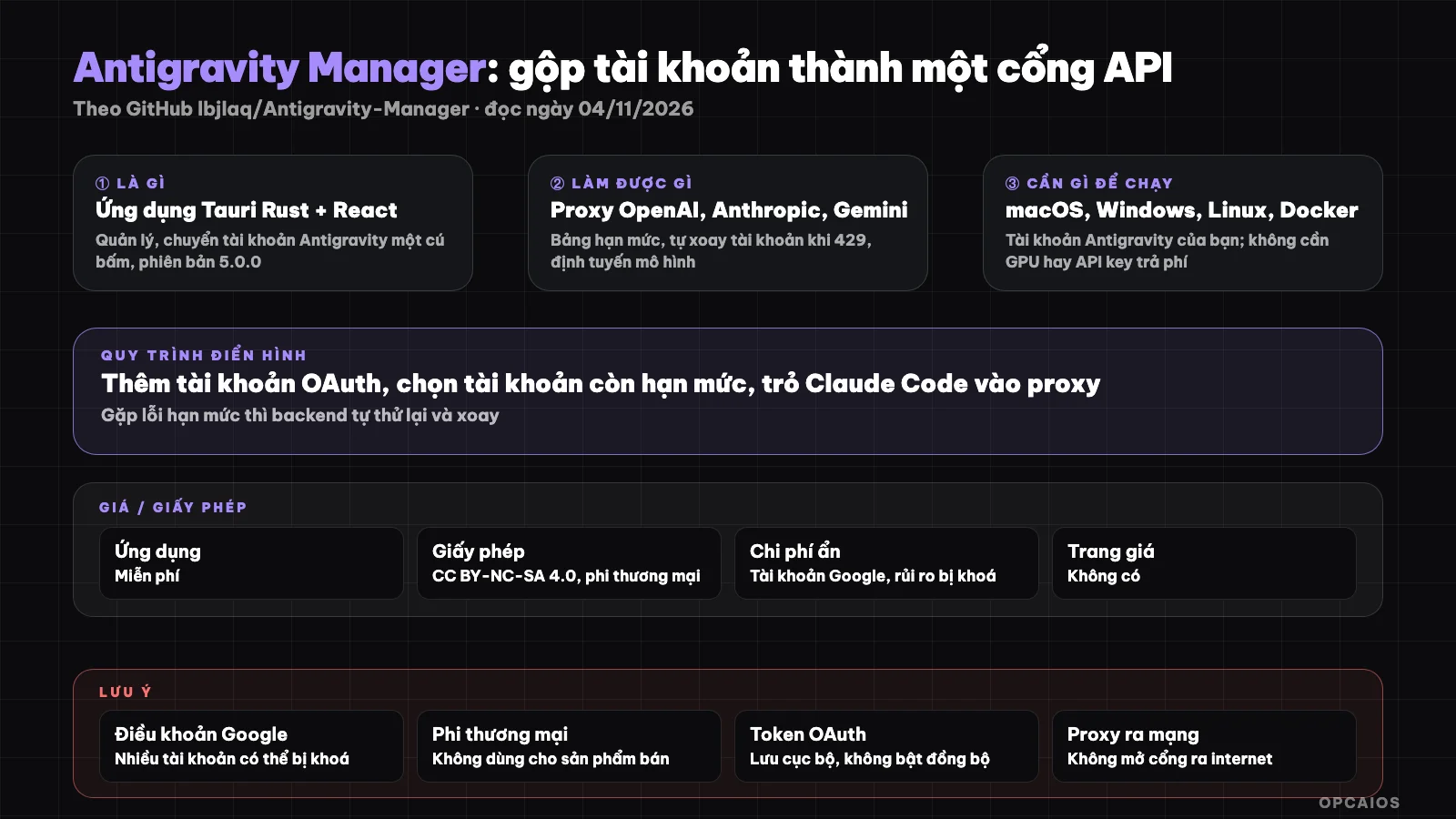
Antigravity Manager consolidates multiple Antigravity accounts into a single local API gateway and automatically rotates accounts when hitting quota errors. Diagram: OPCAIOS.
What is Antigravity Manager and who created it?
Antigravity Manager is an application by author lbjlaq on GitHub, describing itself as "a local AI refueling station": consolidating multiple Antigravity accounts, converting protocols, and orchestrating requests. The README version is listed as v5.0.0, dated 24/10/2026 (read on 04/11/2026).
Antigravity is a programming IDE with AI agents from Google, allocating quotas for Gemini and Claude models per Google account; see What is Antigravity?. Antigravity Manager solves the problem of users with multiple accounts having to manually log out and log in when they hit quota limits. According to the README (read on 04/11/2026), the application performs three main tasks. First, a dashboard displays remaining quota for Gemini Pro, Gemini Flash, Claude, and Gemini Image, then suggests the "best account". Next, an Axum server written in Rust runs on a local port, receiving requests in OpenAI, Anthropic, or Gemini format then forwards them using the currently selected account's session. Finally, when encountering 429 or 401 errors, the backend automatically retries and switches to another account. The README states account data is encrypted, stored in SQLite on the machine, and never leaves the machine except when sync is enabled; this is the project's claim, which we have not verified.
What can Antigravity Manager do?
Antigravity Manager bundles four groups of features: account management, multi-protocol proxy, model routing, and client integration. The table below summarizes the README on GitHub (read on 04/11/2026); all feature names are as described by the project, which we have not tested.
| Feature group | Description per README (read on 04/11/2026) |
|---|---|
| Account management | Add via OAuth 2.0, import token, bulk import JSON, mark 403 accounts |
| Quota dashboard | Display remaining quota by model group, suggest best account, switch with one click |
| Multi-protocol proxy | /v1/chat/completions OpenAI style, /v1/messages Anthropic style (for Claude Code), and Gemini format for Google SDK |
| Self-healing | On 429 or 401, automatically retry and rotate accounts |
| Model routing | Map model names by group, regex, tier accounts, push background work to Flash |
| Client integration | Guides for Claude Code CLI, OpenCode, Kilo Code, Cherry Studio, OpenAI SDK |
Additionally there is a CLI at command for account switching and an image generation feature. The appeal is a single local API gateway for many tools, similar to how we use 9Router; the difference is Antigravity Manager uses web login sessions instead of paid APIs, and this very point creates the terms-of-service risk.
Is Antigravity Manager free? License and limits
Antigravity Manager is free to download and use, but the CC BY-NC-SA 4.0 license in the README (read 04/11/2026) prohibits commercial use. Hidden costs are the Antigravity account (rate limits set by Google), the machine running the application, and the risk of losing your account.
| Item | Status (read 04/11/2026) |
|---|---|
| App price | Free; README has no pricing page |
| License | CC BY-NC-SA 4.0, "non-commercial use only" per README; GitHub API lists NOASSERTION |
| Antigravity account | You bring your own; rate limits set by Google per account; we have not read the Antigravity pricing page |
| Machine to run | macOS, Windows, Linux, or Docker (1GB RAM recommended) |
| GPU, API key | No GPU needed; no paid API key needed; uses Google login session |
Non-commercial license is a real constraint for solo businesses: building a product to sell to customers falls outside the license scope. Costs exclude tax and may change. The README sponsors section lists third-party API relay services, not the project's own pricing.
How do I install Antigravity Manager?
Antigravity Manager has four installation paths per README (read 04/11/2026): install script, Homebrew, download from Releases, or Docker. We have not tested it; you should read the script before running it.
- First, on macOS or Linux, run the install script (open the link and read the script contents first):
curl -fsSL https://raw.githubusercontent.com/lbjlaq/Antigravity-Manager/main/install.sh | bash
- Or use Homebrew on macOS:
brew tap lbjlaq/antigravity-manager https://github.com/lbjlaq/Antigravity-Manager
brew install --cask antigravity-tools
On Windows, README provides a PowerShell command or you can download the msi file from Releases.
Next, open the application and add an account using OAuth; README notes that the application must be running when the browser calls back.
Finally, point your client to the proxy. With Claude Code, README says to set
ANTHROPIC_BASE_URLto the proxy's local address andANTHROPIC_API_KEYto a string defined by the application, then runclaude.
With Docker, README has a docker run command with API_KEY, WEB_PASSWORD variables and a volume for data storage; see What is Docker?. Running a script from the internet with curl | bash grants execution permission to the author; read the script first.
Risk: do multiple accounts violate Google's terms?
Antigravity Manager uses login sessions from multiple Google accounts to call models in place of the official API, and rotates accounts when rate limits are hit. This usage pattern may violate Google's and Antigravity's terms, with the consequence of account lockout. This is not legal advice.
Four points to consider. First, Google's terms typically prohibit account sharing, creating multiple accounts to exceed limits, and unauthorized automated access; we have not compared against the original Antigravity terms, you must read them yourself. Second, the README (read 04/11/2026) has no warning about account lockout risk; the feature to flag accounts returning 403 shows that rejection happens, though we do not know the cause. Third, the application keeps OAuth tokens from every Google account you add; the project claims local encryption, and sync, if enabled, moves data outside the machine. Last, when you expose the proxy to a network (especially Docker version), anyone with the API_KEY can use your rate limits; do not open ports to the public internet. For a solo business living on a Google Workspace account, losing the account means losing email, calendar, and data—a much bigger risk than the rate limit savings.
Antigravity Manager versus other choices
Antigravity Manager differs from other model routers in that it uses Antigravity login sessions instead of paid API keys. The table below is a general description, not a benchmark.
| Tool | Model source | How it differs (general description, not a benchmark) |
|---|---|---|
| Antigravity Manager | Login sessions from multiple Antigravity accounts | Free, non-commercial, Google terms risk |
| 9Router | API keys from multiple vendors | Local routing gateway, pay per API, see What is 9Router? |
| OpenRouter | Cloud service, one key many models | Pay per token, no self-hosting, see What is OpenRouter? |
| Use Antigravity directly | One account, limits set by Google | Complies with terms, no extra install |
When Should You Use Antigravity Manager?
Antigravity Manager suits individual, non-commercial users who accept account risks. It doesn't suit service providers for clients, or people who depend on a single Google account for their livelihood.
| Situation | Recommendation |
|---|---|
| Individual learning and experimenting, with a secondary account containing no important data | You can try it, read the terms first, don't enable sync |
| Solo business using a primary Google Workspace account | Don't; the risk of losing your account outweighs the benefits |
| Building a product or service to sell to customers | No, due to non-commercial license and terms risk |
| Hypothetical example: freelance programmer with three personal Google accounts, wants Claude Code to use Antigravity quota | Technically possible, but you bear the terms risk yourself; we don't recommend it |
OPCAIOS's Experience
We added Antigravity Manager to the Repo list in the Utilities section on opcaios.org after reading the README and checking that the repository is still maintained; we haven't run a test yet, so this section outlines the criteria we use to evaluate, not an assessment after use.
We use Antigravity every day, but we haven't used Antigravity Manager. Four criteria. First, the repository is very active: latest code push on 03/11/2026, over 32,000 stars, but over 1,600 open issues (via GitHub API) is a sign to read carefully before installing. Second, the CC BY-NC-SA 4.0 license doesn't suit commercial use. Third, hidden costs lie in your Google account. Finally, terms risk is why we haven't tried it: we already have 9Router as a model routing gateway and have no need to add another Antigravity account layer.
Read more: What is Antigravity?, What is Claude Code?, What is AntiBridge Telegram?, What is Docker?, 6 best tools to run multiple AI code agents at once in 2026.
Frequently Asked Questions
Is Antigravity Manager a Google product?
No. Antigravity Manager is an open-source project by author lbjlaq on GitHub, not officially related to Google. Antigravity is Google's AI IDE; Antigravity Manager is just a third-party tool for managing accounts and creating local proxies, with 32,799 stars per GitHub API (read 04/11/2026).
Is Antigravity Manager free?
Yes, the application is free, but the CC BY-NC-SA 4.0 license per the README (read 04/11/2026) only permits non-commercial use. You must have an Antigravity account allocated by Google with a quota; we haven't read the Antigravity pricing page so we can't state specific quotas.
Can you get locked out using multiple Antigravity accounts?
Possibly. Google's terms typically ban creating multiple accounts to bypass limits and unauthorized automated access; the README (read 04/11/2026) doesn't warn about this, and the app has a feature to flag 403 accounts. We haven't cross-referenced the exact Antigravity terms; please read them yourself and don't use accounts containing important data. This is not legal advice.
Does Antigravity Manager need an API key or GPU?
No GPU needed and no paid API key needed. The app uses the OAuth session of the Antigravity account you add; when you point Claude Code or the OpenAI SDK to the proxy, you set the key string the app specifies. The Docker build requires setting API_KEY and WEB_PASSWORD separately to protect the proxy.
Can someone with no coding knowledge use it?
The app has a UI and you add accounts via OAuth, so non-coders can install and switch accounts; the proxy and client routing part needs terminal familiarity. But this group finds it hardest to assess terms risk, so we recommend using Antigravity as-is. To learn how to choose and use AI tools safely, see OPCAIOS's AI application training course.
Source: GitHub lbjlaq/Antigravity-Manager (README, API, read 04/11/2026); the project's GitHub Pages has only a title, no additional content; not read/not verified: the exact Google and Antigravity terms, Antigravity pricing page, claims about local data encryption, AGENTS.md file in the repo; star count and pricing may change. The experience is OPCAIOS's. This post is not legal advice.
Translated from Vietnamese with AI. Read the original.
Want to apply this in your business?
Book a free 30-minute call (Vietnam time, in English or Vietnamese).