


What Is 3-2-1 Backup? The Backup Rule for Solo Workers
What is 3-2-1 backup? The 3-2-1 rule requires keeping three copies of data, on two different types of storage media, with one copy located offsite. According to secondary sources I found on October 25, 2026, this rule originated from photographer Peter Krogh in The DAM Book (2005); many articles also mention that CISA recommends it, but I haven't been able to read the CISA page so I can't confirm that. This post explains 3-2-1 backup for solo workers, what types of data to keep, how to apply it in practice, test restoration, and OPCAIOS's experience.
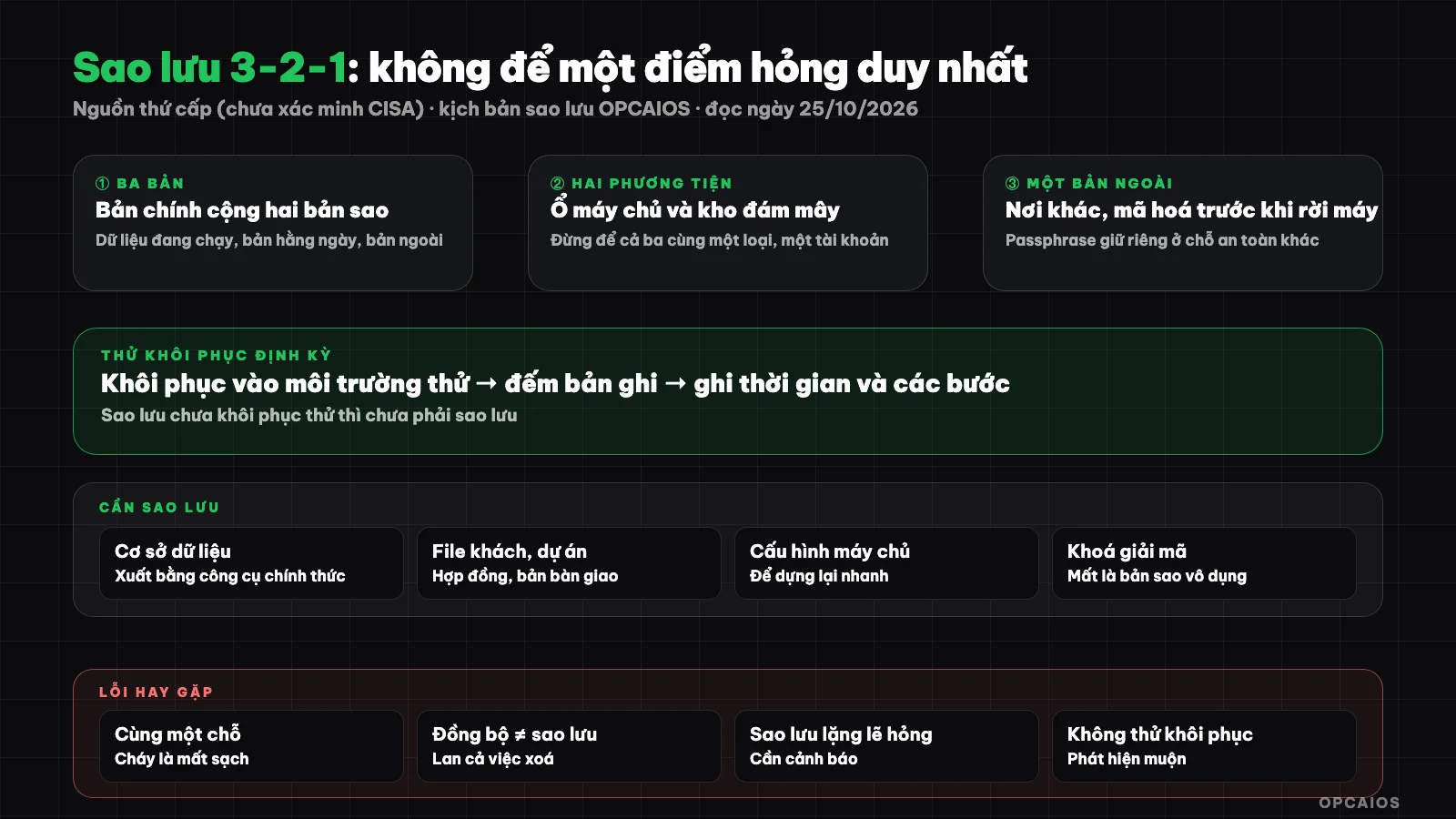
A backup that hasn't been tested for restoration isn't really a backup. Diagram: OPCAIOS.
What Is 3-2-1 Backup?
The 3-2-1 rule means: 3 copies of data (the working copy plus 2 backups), 2 different types of media (for example, a server drive and cloud storage), 1 copy somewhere else so that a local incident doesn't wipe everything out. The goal is to have no single point of failure.
Secondary sources also note that the rule was created before the ransomware and cloud era, so there are extended variants like 3-2-1-1-0: adding one immutable or offline copy and verifying no errors on restoration. This is a description from summary articles, not a standard I've read from the original source.
What Should a Solo Worker Back Up?
Back up the things that if lost, you couldn't rebuild: website database, customer files, source code, knowledge notes, server configuration, and encryption keys. Things you can redownload from the Internet get lower priority.
| Data Category | Examples | Priority |
|---|---|---|
| Database | Posts, orders, customers | Very high |
| Client files and projects | Contracts, design files, deliverables | Very high |
| Source code | Website repo (already on Git) | High |
| Notes, knowledge | Obsidian Vault (Second Brain) | High |
| Server configuration | nginx, crontab, environment variables | High: missing means long rebuild |
| Encryption keys, backup passwords | Passphrase for backup encryption | Very high: loss makes backups useless |
| Redownloadable items | Installers, cache | Low |
Applying 3-2-1 in Practice
A lean design for solo workers: copy 1 is the running data; copy 2 is an automatic daily backup on the same server (kept for a few weeks); copy 3 is an encrypted copy sent to a cloud storage from a different provider. Two different media types are the server drive and cloud storage.
- Automate daily with cron or your OS scheduler; manual backups will be forgotten.
- Export the database with official tools (for example
pg_dumpfor Postgres) and compress it. - Encrypt before leaving the machine: the copy going offsite should be encrypted, and the passphrase must be kept separately in a different secure location.
- Keep multiple versions: short-term on the machine, longer-term in the offsite repository.
- Check that backups are usable: for example verify the export contains important tables; empty or incomplete backups should trigger an alert.
- Add alerts when tasks fail.
With data on a VPS, don't treat the provider's snapshot as your only backup because it's usually in the same account and same location as the original machine.
Test Restoration: the Step Often Skipped
A backup only has value if you can restore from it. Schedule periodic restoration tests to a separate environment, measure the time it takes, and document the steps. The first time you restore shouldn't be when there's an emergency.
- Restore to a test machine or database, don't overwrite the running copy.
- Check that the data actually opens: count the records, open a few sample files.
- Document the steps in a "emergency restoration" guide (SOP your work).
- Verify you still have the passphrase to decrypt the offsite copy.
Risks and Common Mistakes
The most common mistake is backing up in the same location as the original data, not encrypting copies sent elsewhere, and never testing recovery. The second dangerous mistake is backups failing silently for weeks without anyone knowing.
- Same point of failure: all three copies on the same machine or same account.
- Backup contains secrets: configuration and environment variables contain keys, so they must be encrypted and access restricted.
- Lost passphrase: encrypted backup cannot be opened.
- Sync is not backup: cloud sync folder will sync deleted files or files encrypted by malware.
- Storage and cost: keeping too many versions is expensive; set retention limits.
See also the checklist website security review for one person.
OPCAIOS Experience
According to the backup script in the website source code (read 25/10/2026), each day the system exports the website database, compresses it, keeps 14 days on the server; if remote storage is configured then additionally copies an encrypted version (AES-256 using gpg) and keeps 60 days. The script also backs up project files and server configuration needed to rebuild. It rejects exports missing the posts table, treating that as a failed backup.
Real limitation: this document shows the design, it does not prove we have tested full recovery on a clean machine regularly; that remains something we should do. We also do not publish the path, address, or location where the passphrase is kept. Data outside this script (for example personal notes, source code on another machine) needs to be backed up separately.
Frequently Asked Questions
Is the 3-2-1 rule enough to protect against ransomware?
Not by itself. You need an additional immutable or offline copy and recovery testing, as described by variants like 3-2-1-1-0.
Is iCloud or Google Drive sync a backup?
Not really. Sync spreads both deletions and file corruption. It can be one copy in your strategy, not a replacement for versioned backup.
How often should I back up?
It depends on how much data you can afford to lose. Data that changes daily should be backed up daily; notes that change rarely can be backed up less frequently.
How long should I keep backups?
Balance cost against the need to recover from old incidents. Set two tiers: short term on machine, longer term in remote storage; legal requirements for record retention need expert advice.
I am not technical, how do I start?
Start by listing data you cannot afford to lose, turn on automatic backup from the service you use, and test recovering one file. You may need someone to help set it up, see AI application training service.
Sources: synthesis articles on the 3-2-1 rule (NinjaOne, Nakivo, etc.) from search on 25/10/2026; CISA page returned 403 error so CISA recommendation not verified; backup script from OPCAIOS project itself, read 25/10/2026. Source information on the rule origin is from secondary sources, original book not read. Experience is from OPCAIOS.
Translated from Vietnamese with AI. Read the original.
Want to apply this in your business?
Book a free 30-minute call (Vietnam time, in English or Vietnamese).