


What is Beekeeper Studio?
Beekeeper Studio is an open-source desktop application for connecting to, viewing, editing data, and writing SQL queries for PostgreSQL, MySQL, SQLite, SQL Server, and over twenty other types of databases, running on macOS, Windows, and Linux. According to the GitHub API (read on 04/11/2026), the beekeeper-studio/beekeeper-studio repository has around 23,800 stars, created on 23/07/2019, with the most recent push on 03/11/2026 and the latest version v6.2.1 released on the same day. The free Community edition is under GPLv3; paid packages start from 9 USD per month according to the official pricing page (read on 04/11/2026). This post answers what the tool can do, what the free version lacks, how to install it, and when you should choose it.
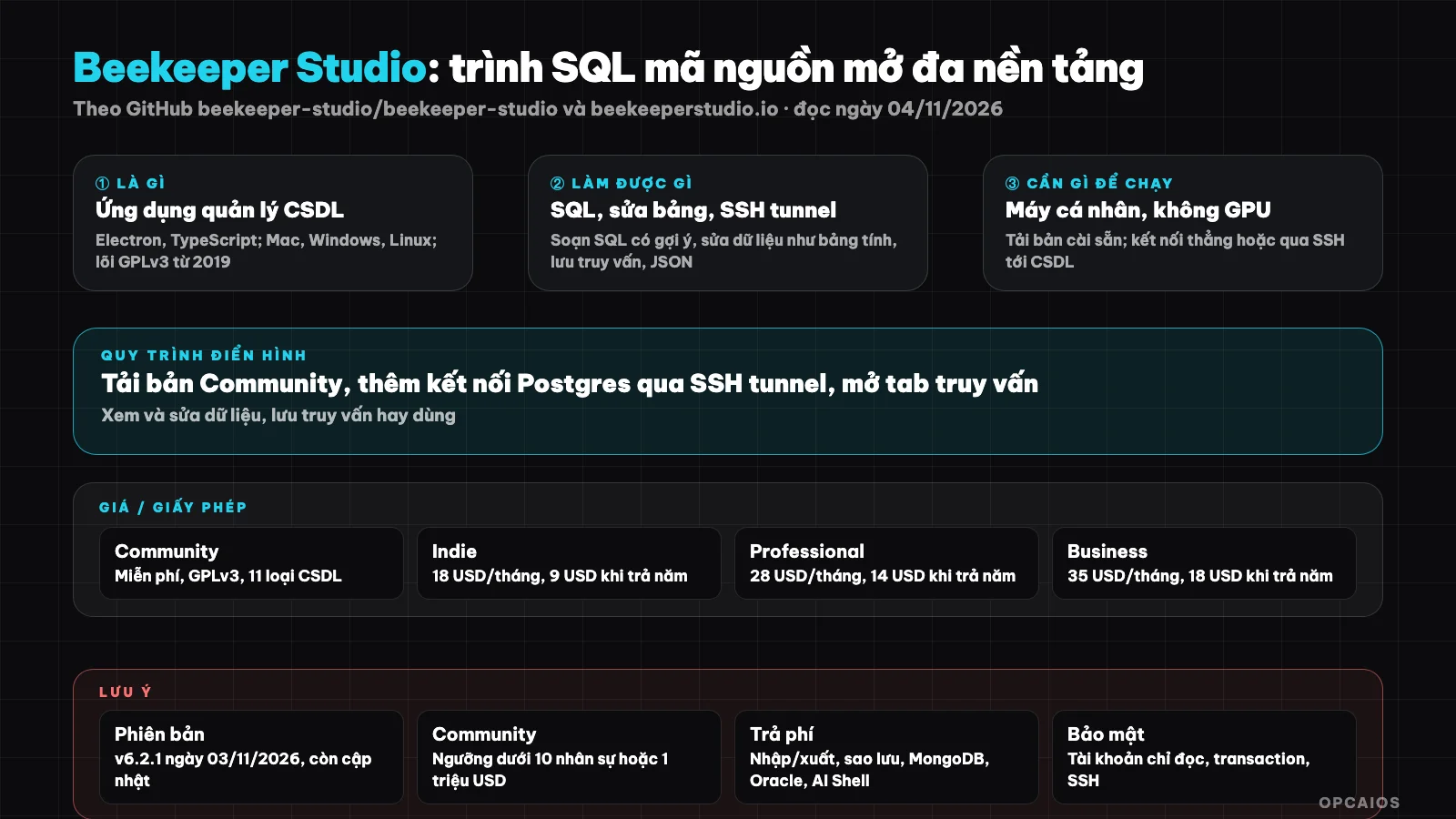
One application on your machine, many types of databases, split into free and paid tiers. Diagram: OPCAIOS.
What is Beekeeper Studio and who made it?
Beekeeper Studio is a database manager with a graphical interface, developed by Beekeeper Studio, Inc. and its code published on GitHub since 2019. According to the README (GitHub, read on 04/11/2026), the project started as an experimental branch of sqlectron-core and aims to be "fast, easy to use," accepting the removal of any feature that clutters the interface.
Technically, the application is written in TypeScript, Vue.js, and Electron, so the same code runs on all three operating systems. The project follows an "open core" model: GPLv3 core, with the src-commercial directory under a separate commercial license. Users typically download the pre-built version from beekeeperstudio.io and don't need to know about this structure. If you manage Postgres on a dedicated server, check out What is VPS and What is Supabase.
What can Beekeeper Studio do?
Beekeeper Studio brings everyday database tasks into one window: connecting to a server, browsing tables like a spreadsheet, writing SQL with suggestions, saving queries, and viewing history. The table below restates the README (GitHub, read on 04/11/2026):
| Feature | Meaning for users |
|---|---|
| SQL editor with autocomplete and syntax highlighting | Write queries quickly, fewer mistakes with table and column names |
| Multi-tab interface | Open multiple queries and tables at once |
| Edit data directly like a spreadsheet | Tweak a cell, add a row without writing UPDATE |
| Save queries and run history | Reuse common commands |
| SSH tunnel and transaction management | Connect securely to servers that don't expose public ports |
| View data as JSON | Useful for JSON columns in Postgres |
| Import, export, backup, restore | According to the pricing page, mostly in paid packages |
The README lists 25 types of databases. The Community version has PostgreSQL, MySQL, MariaDB, SQLite, SQL Server, Amazon Redshift, CockroachDB, TiDB, Google BigQuery, Redis, and GreengageDB. Oracle, MongoDB, ClickHouse, DuckDB, Cassandra, Snowflake, and several others are only in the paid version; DynamoDB is in beta. The README and pricing page differ on Firebird and ScyllaDB, so check in the application before you buy.
How much does Beekeeper Studio cost, and what license does it have?
The Community version is free and requires no registration; paid tiers are priced per user and unlock additional features for the same database type. Prices below are from beekeeperstudio.io/pricing (read 04/11/2026), in USD, before tax, and subject to change:
| Plan | Price per user | What's included |
|---|---|---|
| Community | Free, GPLv3 | Core, unlimited connections and tabs, edit tables, edit schema, SSH tunnel, Community database groups |
| Indie | $18/month billed monthly; $9/month billed yearly | Sidebar JSON, import/export, backup/restore, edit query results; 1 device, max 2 users |
| Professional | $28/month; $14/month billed yearly | AI Shell, cloud workspace, email support, full database, max 20 users |
| Business | $35/month; $18/month billed yearly | Priority support, network-isolated environment, SSO, invoice billing, unlimited users |
| Enterprise | From $4,999/month | Custom contract, security questionnaire |
The pricing page doesn't label month/year next to each figure; we inferred this from the "pay yearly, save 50%" button—please double-check when purchasing. Three things worth noting: 14-day trial with no card required; 30-day money-back guarantee; paid tiers come with a perpetual license for versions released during your subscription period. The pricing page also states the Community version is for individuals, students, nonprofits, and businesses under 10 employees or under $1 million annual revenue; we have not verified the original terms.
On licensing, the GitHub API returns "NOASSERTION" because the repository has two layers: core GPLv3, and the src-commercial directory commercial. According to LICENSE-COMMERCIAL.md (read 04/11/2026), you may modify commercial code to contribute back, but may not use it in private projects or competing products. Hidden costs: almost none—the app runs on your machine and needs no GPU or API keys; AI Shell in the Professional plan may require your own model account, which we have not verified.
How do I install Beekeeper Studio?
Most users just need to download the installer; developers building from source is a different story. According to the README (GitHub, read 04/11/2026):
- First, go to beekeeperstudio.io/get-community, download the version for macOS, Windows, or Linux, and install it like a normal app.
- Next, pick a database type, enter server, port, username, password; if your server doesn't expose a public port, turn on SSH tunnel.
- Save the connection so you can open it quickly next time.
- Finally, open a query tab to write SQL, or click a table to edit it directly.
If you want to build from source to contribute, the README walks you through it:
git clone git@github.com:<your-username>/beekeeper-studio.git beekeeper-studio
cd beekeeper-studio/
mise install
pnpm install
pnpm run bks:dev
The README says mise install sets up Node 24 and pnpm 12. We have not tested a build ourselves; the steps above follow the official documentation.
Limits, risks, security, and legal
The main risk with any database manager is not the software itself but that you hold write permission to real data. There are four points.
First, editing directly like a spreadsheet is convenient and also easy to mess up—you can edit the wrong row on a production database. Use read-only accounts for viewing, and enable transactions when editing.
Second, connection passwords are stored on your machine; a shared computer or unencrypted disk is a weak link. Prefer SSH tunnel instead of exposing the database port to the internet.
Third, customer personal data. Exporting CSV or screenshotting a table means copying personal data outside the system; Vietnam's personal data protection law and the GDPR both have rules on this. We have not checked the original text; this is not legal advice.
Fourth, licensing. Using the Community version in a business beyond the thresholds listed on the pricing page may violate the terms; read the terms before rolling it out to your team. Trademarks and logos are not part of the open-source code.
How it compares to other tools
The table below is general description, not benchmark:
| Tool | How it differs from Beekeeper Studio |
|---|---|
| DBeaver | Open source, more features, heavier Java interface and steeper learning curve |
| DataGrip (JetBrains) | Paid, strong at refactoring and IDE integration |
| TablePlus | Commercial, compact and lightweight only; not open source |
| pgAdmin, MySQL Workbench | Free but each tool only works with one database family |
| Adminer, phpMyAdmin | Runs in browser, handy when installed on the server |
| psql, mysql command line | Lightest, good for automation, no grid UI to edit |
When to Use?
| Situation | Suggestion |
|---|---|
| One person managing Postgres or MySQL for their website | Community edition is enough |
| Need to export CSV, back up regularly in the application | Consider Indie plan or use free command-line tools |
| Working with MongoDB, ClickHouse, Oracle | Need Professional plan |
| Team over 10 people or revenue over 1 million USD | Check Community terms, may need to purchase |
| Only need to run SQL scripts automatically every night | Use command line and cron, no GUI needed |
Example (hypothetical): an online shop owner self-hosting Postgres, using Community edition over SSH tunnel to check orders every morning and fix a few wrong delivery addresses, while backups run via pg_dump on schedule.
OPCAIOS Experience
We recently added Beekeeper Studio to the Repo list in the Utilities section on opcaios.org after reading the README and checking that the repository is still maintained; we haven't tested it yet, so this section lists the criteria we use to evaluate, not an assessment after using it. First, the repository is still maintained: push on 03/11/2026 and release v6.2.1 on the same day, over seven years of development. Next, the license: GPLv3 core is clear, but remember the business threshold of the Community edition. Then, hidden costs: nearly none, since it runs on your personal machine. Finally, can it replace what we're using: opcaios.org website uses PostgreSQL, we currently manage it through a web interface and command line; Beekeeper Studio is a candidate for manual data editing, but we haven't tested it so we haven't concluded.
Read more: What is VPS?, What is Docker?, 3-2-1 Backup for Solo Workers.
Frequently Asked Questions
Is Beekeeper Studio free?
Yes, there's a free Community edition under GPLv3, downloadable from beekeeperstudio.io, no registration or card needed. Import/export, backup, AI Shell, cloud storage, and some databases like MongoDB, Oracle, ClickHouse are in paid plans, from 9 USD per person per month when paying annually according to the official pricing page (read 04/11/2026, not including tax). There's a 14-day trial.
What databases does Beekeeper Studio support?
The README (GitHub, read 04/11/2026) lists 25 types. The free edition includes PostgreSQL, MySQL, MariaDB, SQLite, SQL Server, Amazon Redshift, CockroachDB, TiDB, Google BigQuery, Redis, GreengageDB. The paid edition adds Oracle, MongoDB, ClickHouse, DuckDB, Cassandra, Snowflake, Trino, SurrealDB, LibSQL, SQL Anywhere, Firebird; DynamoDB is in beta and SAP HANA coming soon.
Is Beekeeper Studio safe with production data?
The application runs on your machine and connects directly to the database, so safety depends on how you grant permissions. Create read-only accounts for viewing, use SSH tunnel instead of opening public ports, enable transactions when editing, don't screenshot customer personal data. The free edition already has SSH tunnel and transactions.
How is Beekeeper Studio different from DBeaver?
Both are open source, cross-platform. DBeaver has more features and supports more database types in the free edition, but the Java interface is heavy and takes longer to learn. Beekeeper Studio chooses simplicity, opens fast, edits data like a spreadsheet. This is general description from documentation, we haven't benchmarked the two tools.
Can someone who doesn't know SQL use it?
You can use it to view and edit data, since the table interface allows filtering, sorting, cell editing without writing commands. To truly take advantage, you should learn basic SQL: SELECT, WHERE, JOIN. For a solo business owner, combining Beekeeper Studio with an AI agent writing SQL is the practical way; see how to learn at OPCAIOS's AI Application Training.
Source: GitHub beekeeper-studio/beekeeper-studio (README, API, LICENSE.md, LICENSE-COMMERCIAL.md, release v6.2.1, read 04/11/2026: approximately 23,800 stars), beekeeperstudio.io/pricing (read 04/11/2026); not read/not verified: full commercial EULA terms, Community edition business restrictions, account requirements for AI Shell; star count and pricing may change. Experience is from OPCAIOS. This post is not legal advice.
Translated from Vietnamese with AI. Read the original.
Want to apply this in your business?
Book a free 30-minute call (Vietnam time, in English or Vietnamese).