



Supabase is an application development platform built around a Postgres database: each project is a complete Postgres database, with built-in user login, automatic API, file storage, real-time data, server-side functions, and vector search for AI. This allows one person or a small team to build the "backend" of a web or mobile application without having to assemble each service individually. According to Supabase's official pricing page (checked 23/10/2026), the Free plan costs $0 per month and the Pro plan starts from $25 per month. Supabase is open source under the Apache-2.0 license and can be self-hosted on your own server. This article covers five main points: (1) Supabase components; (2) Row Level Security; (3) pricing; (4) how to get started; (5) self-hosting and connecting to AI, along with OPCAIOS's practical experience.
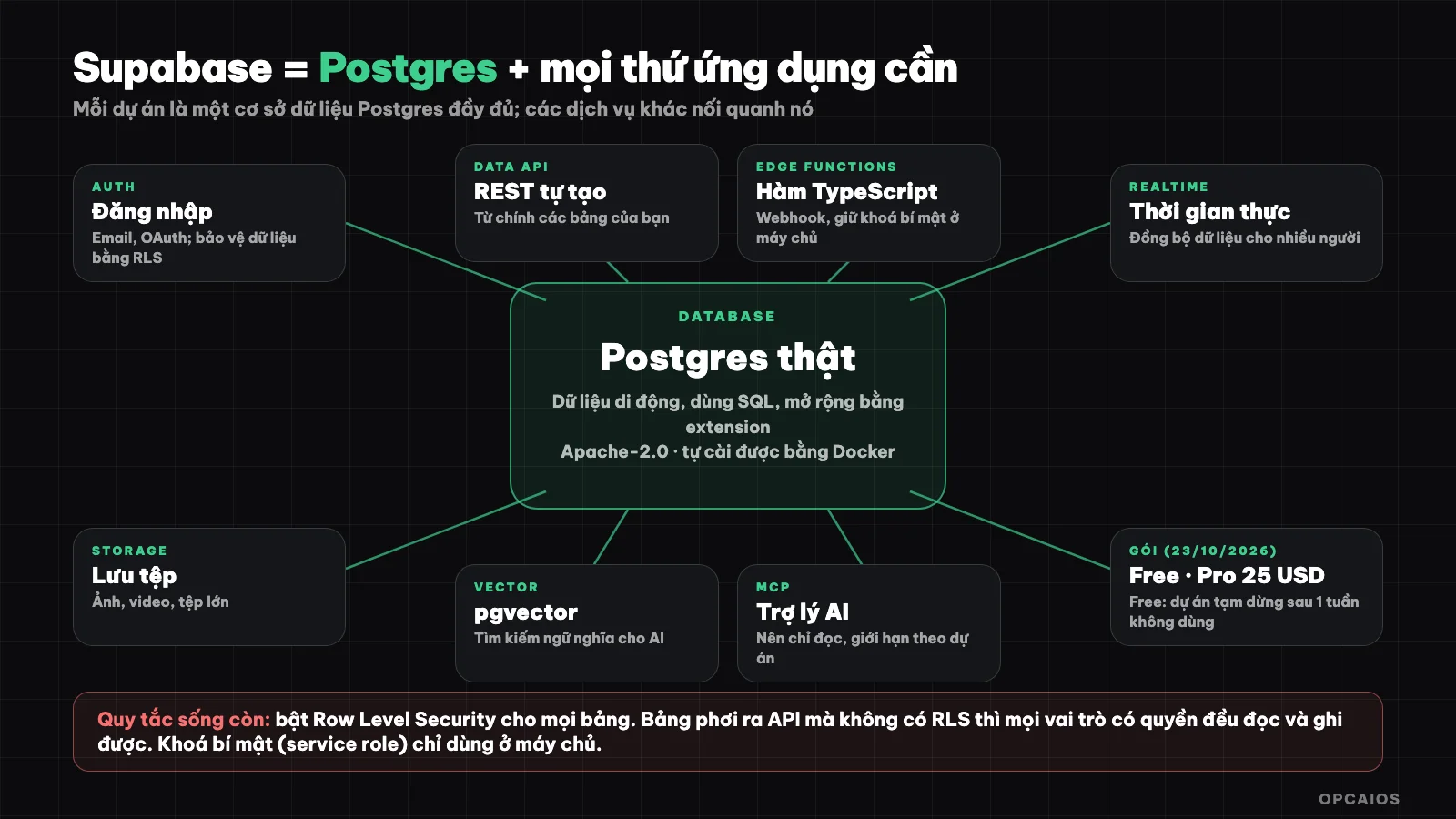
Supabase bundles the components of an application around a Postgres database. Diagram: OPCAIOS.
What is Supabase?
Supabase is a "Postgres development platform": instead of just giving you a database, the service adds components you typically need when building an application. According to the official website, you start with a Postgres database and then add authentication, data API, Edge Functions, real-time data, file storage, and vector embeddings.
What makes Supabase different from many "ready-made backend" services is that your data lives in a real Postgres database, which means you can take your data elsewhere because it's standard Postgres; the Supabase website emphasizes 100% portability. According to GitHub (23/10/2026), the Supabase repository has around 113,500 stars, is under the Apache-2.0 license, and continues to be updated regularly. For example, imagine a small team building a customer management application could use Postgres, built-in Auth, and API instead of assembling each service themselves.
What components does Supabase include?
Supabase comprises seven main components revolving around a database. According to the official documentation:
| Component | What it does | Example use |
|---|---|---|
| Postgres database | Store relational data, extend with extensions | Customer tables, orders |
| Authentication (Auth) | User sign-up, login, protect data with Row Level Security | Login with email, Google |
| Data API | Pre-built REST API from your tables | App reads and writes data |
| Edge Functions | TypeScript functions running on the server, close to users (Deno-based) | Receive webhooks, call Stripe or AI |
| Realtime | Sync data in real-time | Chat, live leaderboards |
| Storage | Store and distribute large files | Images, videos |
| Vector | Store and search vector embeddings (pgvector) | Semantic search for AI |
You use one, a few, or all of them. Many projects only use the database and authentication.
What is Row Level Security and why is it the most important?
Row Level Security (RLS) is a Postgres feature that lets you set permission rules that run inside the database, deciding which rows each user can read and edit. This is where newcomers most often make mistakes when using Supabase, because applications often call the database directly from the browser.
The official documentation makes clear: a table in a schema exposed to the API that doesn't have RLS enabled means every role with permission on that table can read and write. Supabase recommends enabling RLS on every table in the exposed schema, and removing default permissions for the anonymous role if your project grants it; just adding policies doesn't automatically remove those permissions.
Example: let only the creator view their own customers:
alter table khach_hang enable row level security;

create policy "chi_nguoi_tao_xem_duoc"
  on khach_hang for select
  to authenticated
  using ( (select auth.uid()) = nguoi_tao );
The key rule: enable RLS on every table, write minimal policies, then test with a regular user account, not with admin permissions. The "service role" key or secret key bypasses RLS, so only use it on the server side and never expose it to the browser or public source code.
What is the current price of Supabase?
Supabase has a free plan and paid plans charged per project. According to Supabase's official pricing page (checked on 23/10/2026), the Free plan costs $0 per month and includes unlimited API calls, 50,000 monthly active users, 500 MB database, and 1 GB file storage. The Pro plan starts at $25 per month and includes the first project; additional projects cost $10 each. It also includes 100,000 monthly active users, 8 GB disk, 250 GB bandwidth, 100 GB file storage, and daily backups retained for 7 days. The Team plan starts at $599 per month and adds SSO, backup controls, and industry certifications. The Enterprise plan is custom pricing.
Two important notes for the Free plan: projects are paused after one week of inactivity and each account can have a maximum of 2 active projects. Because of this, the Free plan is suitable for learning and testing, but less suitable for real applications that need to run continuously. Paid plans include $10 monthly compute credits, enough for one Micro machine, and the Pro plan has "spend limits" enabled by default to avoid surprise bills. You can turn it off when you want to exceed the limit. Prices change over time, so check the official pricing page before deciding.
Supabase detailed pricing table
| Plan | Price | Notable features |
|---|---|---|
| Free | $0 per month | Unlimited API calls, 50,000 monthly active users, 500 MB database, shared CPU and 500 MB RAM, 5 GB outbound bandwidth, 1 GB file storage |
| Pro | From $25 per month | First project included; additional projects from $10 each; 100,000 monthly active users, 8 GB disk, 250 GB bandwidth, 100 GB file storage, daily backups retained for 7 days |
| Team | From $599 per month | Includes SSO, backup controls, and industry certifications |
| Enterprise | Contact for pricing | Dedicated support, uptime commitment |
How do I get started with Supabase in 30 minutes?
A first project goes through six steps and can be completed in about 30 minutes following the process in Supabase's documentation and homepage (checked on 23/10/2026). Example scenario: a customer table for a small shop could follow this exact process, with under 100 test rows. The most important thing is to enable RLS before importing real data, since forgetting this step is the most common mistake among newcomers.
- Step 1, create a project on Supabase and choose a region closest to your users.
- Step 2, create a table using the Table Editor or SQL Editor in the dashboard, for example a
customerstable. - Step 3, enable RLS immediately and add policies like the example above, before importing real data.
- Step 4, get the public key and project URL to connect from your application; keep the secret key only on the server.
- Step 5, call from your application using the official library. Example from Supabase's homepage for a React application:
import { createClient } from '@supabase/supabase-js'

const supabase = createClient(process.env.SUPABASE_URL, process.env.SUPABASE_ANON_KEY)
const { data } = await supabase.from('todos').select('*')
- Step 6, add login with Auth so that RLS policies know which user is calling.
If you are new to the concept of calling data through a programming interface, first read What is an API?.
What are Edge Functions used for?
Edge Functions are TypeScript functions that run on the server side on the Deno runtime, distributed globally close to users. According to Supabase's documentation, they are suitable for receiving webhooks or integrating your project with third parties like Stripe. The Free plan includes 500,000 calls per month (checked on 23/10/2026).
The reason to use server-side functions instead of calling directly from the browser: secret keys for AI services or payment gateways should never be in code running in the browser. For instance, OPCAIOS uses exactly this approach for a private application: the browser only calls the function, while the AI service key stays on the server. There are three simple steps. Step 1, the browser sends a request to the function. Step 2, the function reads the key from an environment variable and calls the third-party service. Step 3, the function returns the result to the browser. If you need to receive events from another system, see the article What is a Webhook?.
Can I install Supabase on my own server?
Yes. According to Supabase's official documentation (checked on 23/10/2026), the quick and recommended way to self-host is using Docker Compose. This approach works when you need full control over your data, have compliance requirements that prohibit managed services, or want to run in an isolated environment.
You should know these differences beforehand: (1) the self-hosted version runs a single project, since Studio doesn't support multiple organizations or multiple projects; (2) most configuration is done through environment variables; (3) some platform management features are unavailable, such as project branching, managed backups, point-in-time recovery (PITR), advanced metrics, and Management API. When self-hosting, you are responsible for security, updates, and backups.
This is OPCAIOS's real-world experience: the opcaios.org website runs its database on a self-hosted Supabase set up with Docker on a dedicated server, including Postgres, Auth, API, Storage, Realtime, and Edge Functions. In exchange for full data ownership, we have to handle backups and upgrades ourselves.
How does Supabase connect with AI and AI assistants?
Supabase connects with AI in two ways. First, the database supports vector embeddings through pgvector for semantic storage and search, which is the foundation for question-answering applications over private documents.
Second, Supabase has an MCP server for AI tools like Claude Code to interact with your project. According to Supabase's official documentation (checked on 23/10/2026), you add it with the command claude mcp add --transport http supabase ... then log in through your browser, and can limit the MCP server to a single project or enable read-only mode. The documentation itself warns that connecting a language model to your Supabase project carries security risks, so read the security guide before running it. General advice: use a development project, not production data, enable read-only mode, and limit by project. Example scenario: a team tries MCP on a sample project with one table before connecting to customer data. See also the post What is MCP?.
How is Supabase different from Airtable and Firebase?
Supabase suits developers who need relational databases and APIs; Airtable suits non-programmers who want a spreadsheet-like interface; Firebase uses document-based databases (NoSQL) on Google infrastructure. Short comparison table:
| Criteria | Supabase | Airtable | Firebase |
|---|---|---|---|
| Target user | Developers | Non-programmers | Mobile and web developers |
| Data type | Relational (Postgres, SQL) | Relational, spreadsheet interface | Document-based (NoSQL) |
| Self-hosted | Yes (Docker) | No | No |
| Strengths | Portable data, SQL, RLS, open source | Quick setup without code | Deep integration with Google ecosystem |
If you don't program and need to manage data quickly, see What is Airtable?. If you lean toward documents and collaboration, see What is Notion?. Tool summaries are in the library: Supabase.
When should and shouldn't you use Supabase?
Use Supabase when you need a real relational database, have someone who knows or is willing to learn SQL, want data not locked into one provider, and need authentication, files, and real-time features on one platform.
Don't use it when no one in the team codes (Airtable or Notion fit better), when you only need a single-person spreadsheet, or when you can't manage security yourself. With Supabase, forgetting to enable RLS is a common and serious mistake, so you need someone responsible to review policies before going public.
Read more: How to build a self-learning AI chatbot on internal documents (RAG) with Dify and Supabase.
Frequently Asked Questions
What is Supabase and what is it used for?
Supabase is an application development platform built around a Postgres database, with authentication, automatic API, file storage, real-time features, Edge Functions and vectors. It's used to build the backend of web or mobile applications faster.
Is Supabase free?
Yes. According to Supabase's official pricing page (checked on 23/10/2026), the Free plan costs $0 per month and includes 500 MB database, 50,000 monthly active users, 1 GB file storage and unlimited API calls. Free projects are paused after a week of inactivity, and each account can have a maximum of 2 active projects. So the Free plan is suitable for learning and testing, but less suitable for real applications that need to run continuously. The Pro plan starts from $25 per month, with 100,000 active users and daily backups retained for 7 days. Pricing changes over time, so check the official pricing page.
Is Supabase open source?
Yes. The Supabase code repository uses the Apache-2.0 license according to GitHub, and can be self-hosted using Docker. The self-hosted version lacks some features of the managed platform like managed backups and point-in-time recovery.
Is Row Level Security mandatory?
Not technically mandatory, but practically essential for security: tables in the schema exposed to the API without RLS enabled means any role with permission can read and write. Enable RLS on all tables and test policies using a regular user account.
Where can I learn Supabase quickly?
Start with the official documentation and a small project like a to-do list with login. If you want to build data systems and AI processes for small businesses, check out OPCAIOS's AI application training course.
Source: Supabase's homepage, pricing page and official documentation (database, Row Level Security, Edge Functions, self-hosting, MCP server; checked 23/10/2026) and GitHub supabase/supabase; OPCAIOS's operational experience. Prices and features may change.
Translated from Vietnamese with AI. Read the original.
Want to apply this in your business?
Book a free 30-minute call (Vietnam time, in English or Vietnamese).