


The process of turning a long YouTube video into multiple multi-platform posts
What is the process of transforming a long YouTube video into multiple multi-platform posts? It is a chain of steps: get the transcript of the video, ask AI to extract the main points, then adapt it into multiple formats (one blog post, a few LinkedIn posts, a few threads on X, one email, one short video script) in your voice, then you review and post. The figure "10 posts in 15 minutes" is the target for the AI drafting part once you have prepared the process; the time you spend reading, editing, fact-checking and scheduling is separate, and we don't promise 15 minutes total. The important condition: only do this with your own videos or videos you have the right to use. This post guides you step by step: getting the transcript (three ways), cleaning it up, a set of adaptation prompts, fact-checking, posting and measuring results, notes on copyright and YouTube's AI disclosure policy, along with OPCAIOS's experience.
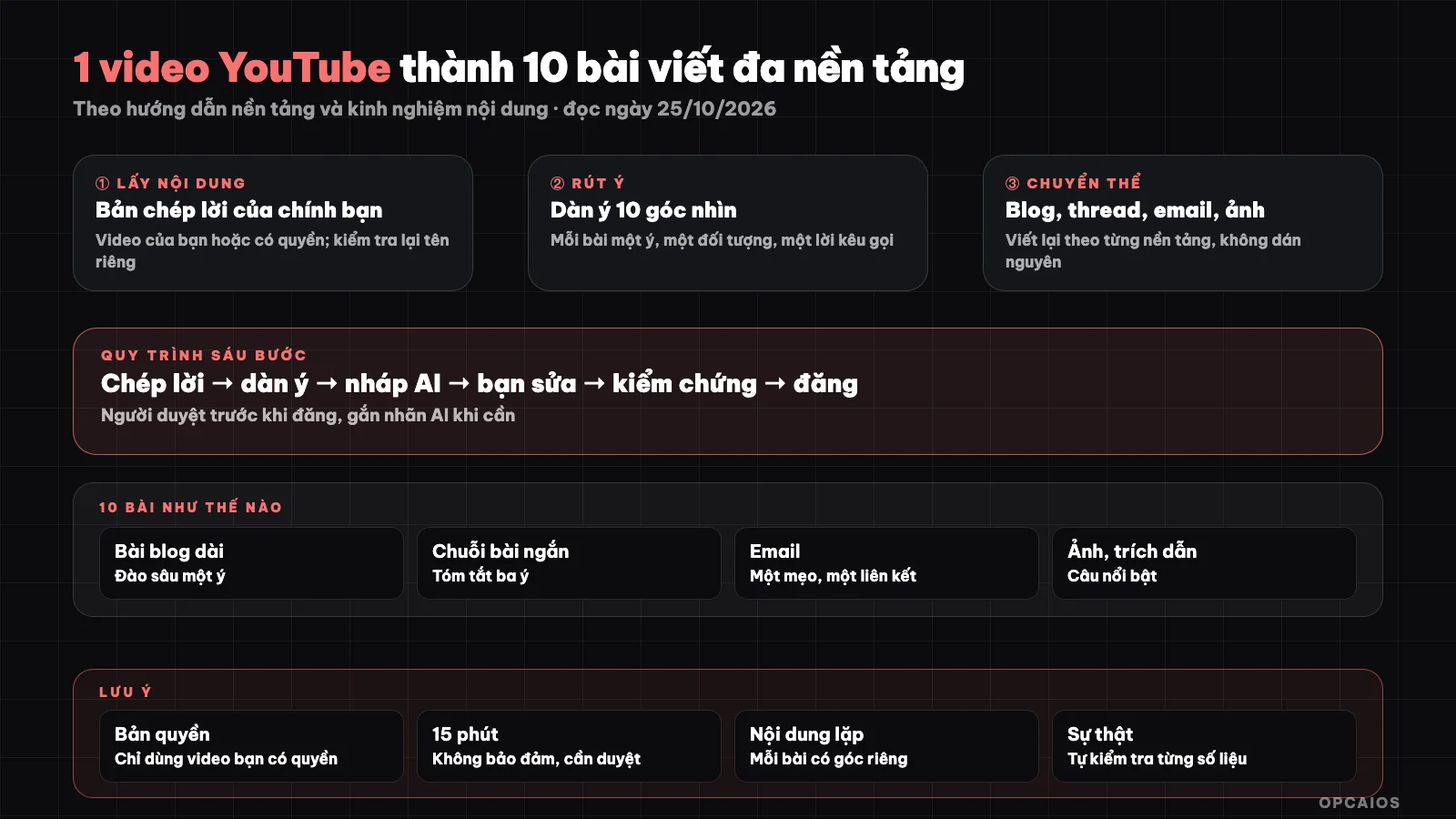
One video, one transcript, many adaptations; humans review at the end. Diagram: OPCAIOS.
Conditions before you start
- Your video or you have a license: adapting someone else's content into your posts may infringe copyright, even if you credit the source.
- Quality of the source content: AI only recycles; if the video has no good ideas, neither will the posts.
- Tone and purpose: write down first who your audience is, what each post asks them to do.
Step 1: Get the transcript
| Method | When to use | Note |
|---|---|---|
| YouTube captions (in YouTube Studio, for your video) | Fastest, video already posted | Auto captions may get proper nouns and terminology wrong; edit first |
| Transcribe using a speech recognition model running on your machine (e.g. Whisper) | You have the original video or audio file; you want control | Requires a powerful machine; running on your machine means data doesn't leave |
| Paid transcription service | Don't want to run it yourself | Read the data policy and pricing; check Vietnamese quality |
About downloading videos from YouTube using outside tools: YouTube's terms may restrict this; we haven't checked so we recommend using your original file or captions in Studio. If your video has multiple speakers, it's good to separate speakers so the post records correctly who said what.
Step 2: Clean up the transcript
Cleaning up the transcript is the step that turns rough text from YouTube or Whisper into a source AI can reliably adapt from, and this is where AI most often gets it wrong because of confusion over proper nouns, figures, and terminology. Four things to do in order:
- Drop filler words, repetitions and off-topic sections; keep timestamps if you want to refer back to the video.
- Fix proper nouns, figures, terminology.
- Divide by chapter or topic (5 to 10 sections).
- Save the clean version somewhere (for example in a Markdown note in your knowledge base; see What is Obsidian?).
Example: a 30-minute video might give you about 4,500 words of transcript; after dropping filler words and off-topic parts, dividing into 6 sections by topic is enough for AI to extract main points in the next step.
Step 3: Extract main points
Extracting main points is the step to turn the clean transcript into a list of arguments, quotes and figures that can be fact-checked before writing the post. Ask AI (see What is LLM?) to read the clean transcript and return: a suggested title, three to five arguments, at least five quotes you can use verbatim, any figures with their location in the video, and questions the audience might ask. Be clear in your request: "only use information in the transcript, mark anything that is inference". Read it again and delete anything not in the video.
Step 4: Ten adaptations
| # | Product | Content tips |
|---|---|---|
| 1 | Long blog post | Open with a direct answer, table or list, frequently asked questions (see What are SEO and GEO?) |
| 2 to 4 | Three LinkedIn posts | One argument per post, strong opening, end with a question |
| 5 to 7 | Three threads or short posts on X, Threads | One idea per thread, with figures or examples |
| 8 | Newsletter email | Sum up three ideas and link to the video |
| 9 | 30-second short video script | One idea, opening line in 2 seconds |
| 10 | Presentation or carousel | Five to seven slides, one idea per slide |
Give AI: the clean transcript, voice rules, length and prohibitions: don't add figures, proper nouns, promises not in the video; keep quotes as they are. Run each product one prompt at a time; check each draft.
Step 5: Verify and adjust tone
- Numbers and proper nouns: cross-check against the transcript.
- Tone: edit to match how you speak, remove generic "AI-ish" phrases.
- Commitments and pricing: only you decide.
- Each post has its own angle; avoid posting ten identical versions.
- Link back to the video and to your page.
Step 6: Publish and measure
Publishing and measuring results is the final step of the process. Schedule posts over one to two weeks instead of publishing all at once; see What is Typefully? and What is Postiz? for scheduling tools. Measure: video views from the post, contact inquiries, questions customers ask; don't just measure likes. Cut video into short clips; see What is OpusClip?.
What does YouTube's AI content label require?
YouTube's AI content label is the "AI use" disclosure section in YouTube Studio, required when a video contains photorealistic content created or significantly edited with AI. According to YouTube's help page (read 25/10/2026), four groups must disclose: making a real person appear to say or do something they did not, editing footage of a real event or location, creating a scene that looks real but never happened, and AI-generated music as the video's focus. You don't need to disclose when using AI to assist with scripts, outlines, titles, thumbnails, or aesthetic adjustments like captions, quality enhancement, cloning your own voice for narration. The process has three steps. First, go to YouTube Studio and upload your video. Next, open Attributes. Finally, select Yes or No under "AI use". For example, an AI avatar speaking on behalf of the channel owner falls in the group that must disclose. According to the same page, disclosing does not automatically limit viewers or monetization rights, but channels that consistently fail to disclose may be manually labeled or penalized, including removal from the YouTube Partner Program.
How does YouTube handle reused and repetitious content?
Reused content and repetitious content are two main YouTube monetization policies that the video-to-article process must avoid violating when reposting to your channel. According to YouTube's monetization policy page (read 25/10/2026), on 15/7/2025 YouTube renamed the "repetitious content" policy to "inauthentic content", meaning content that is repetitive or mass-produced, made from a template; the "reused content" policy did not change. First, reused content is content taken from YouTube or elsewhere that lacks original commentary, significant changes, or educational or entertainment value; the policy applies even with permission from the original creator and is assessed across the channel. Second, YouTube states that AI content built from a common template, lacking the creator's unique perspective, is ineligible for monetization. For example, ten identical versions posted to the same channel are likely to be seen as repetitious. Therefore each adapted post needs its own angle. This page does not discuss posts outside YouTube.
OPCAIOS's experience
We have parts of this process but haven't yet run it as a standard pipeline: our website's video-building module transcribes using faster-whisper (medium-sized model running on CPU with word-level timestamps) in the analysis step; AI-written articles go through an approval queue rather than auto-posting; our knowledge base stores many video transcripts as reference. We haven't measured the time from video to ten draft posts and don't publish the 15-minute figure from our own experience. We also don't use other people's videos to write posts.
Frequently Asked Questions
Is it really done in 15 minutes?
No, not if you count the human's work; 15 minutes is just the target for the AI drafting part when the process is already set up. OPCAIOS has not measured the time from video to ten drafts, so I haven't published this figure from my own experience. The actual time has four parts: getting and cleaning the transcript (usually quick if the video already has captions in YouTube Studio), AI drafting 10 versions, reading and fact-checking each draft, and finally scheduling them out over 1 to 2 weeks.
Can I use someone else's video?
Not without permission, because adapting someone else's content could violate copyright even if you cite the source. According to YouTube's monetization policy page (read on 25/10/2026), the reused content policy still applies when you have the original author's permission, and it is separate from copyright: a channel can violate this policy even without a copyright claim. First, only use your own videos or videos with written permission. Next, if you're referencing someone else's ideas, comment on them and add your own value instead of copying. Finally, consult a lawyer when using it commercially; OPCAIOS does not provide legal advice.
What's the best way to get a transcript?
For your own video, the best way is captions in YouTube Studio (edited) or transcribing with a model running on your machine like OpenAI's Whisper. According to the openai/whisper GitHub repository (read on 25/10/2026), Whisper is released under the MIT license and has six model sizes: tiny at 39 million parameters, base at 74 million, small at 244 million, medium at 769 million, large at 1.550 billion, and turbo at 809 million. VRAM needed is about 1 GB for tiny and base, about 2 GB for small, about 5 GB for medium, about 10 GB for large, and about 6 GB for turbo; relative speed is measured on an A100 GPU with English, so I can't extrapolate for Vietnamese. Vietnamese quality needs to be checked with a sample of your own.
Do I need to label AI use?
Using AI to write a draft blog post usually doesn't require disclosure on YouTube; creating realistic scenes with AI does require disclosure under "AI use" in YouTube Studio, according to YouTube's help page (read on 25/10/2026; details in the AI content label section above). For example, a video using an AI avatar speaking for you should be disclosed; a LinkedIn post written by AI from your transcript doesn't fall under YouTube's rules. Rules can change, so read the original page again before posting.
How do I avoid duplicate posts?
To avoid ten identical posts, each version needs its own angle, its own point, and its own voice for each platform, instead of the same paragraph cut short. First, assign each product a different main point from the list in the key points extraction step: a LinkedIn post emphasizes the professional lesson, a thread on X emphasizes data or examples, an email emphasizes benefits to the reader. Next, run each product through its own prompt with the voice guidelines for that platform. Finally, schedule them out over 1 to 2 weeks with Typefully or Postiz. To learn how to build a content process with AI, see OPCAIOS's AI application training course and SOLO Content Engine.
Source: YouTube help page on AI-generated content (support.google.com/youtube/answer/14328491) and YouTube channel monetization policy page (support.google.com/youtube/answer/1311392; updated 15/7/2025), both read on 25/10/2026; openai/whisper GitHub repository (github.com/openai/whisper), read on 25/10/2026 (speed measured on A100 GPU with English). Have not checked YouTube's terms on video downloading, and have not found a YouTube page on auto captions to cite the limits. Experience is OPCAIOS's own according to source code and knowledge base.
Translated from Vietnamese with AI. Read the original.
Want to apply this in your business?
Book a free 30-minute call (Vietnam time, in English or Vietnamese).