


What is Camoufox CLI?
Camoufox CLI is an open-source command-line tool under the MIT license that allows AI agents like Claude Code (Anthropic), Cursor, Codex, or OpenClaw to control the Camoufox browser (an anti-detection Firefox build developed by daijro) using short shell commands: open pages, capture the access tree, click, fill forms, manage sessions and cookies. According to the GitHub API (read November 4, 2026), the Bin-Huang/camoufox-cli repository was created on March 2, 2026, has 359 stars, is written in Python, and was last updated on October 19, 2026. This post covers what the tool can do, hidden costs, and terms risks; we do not provide guidance on bypassing bot detection.
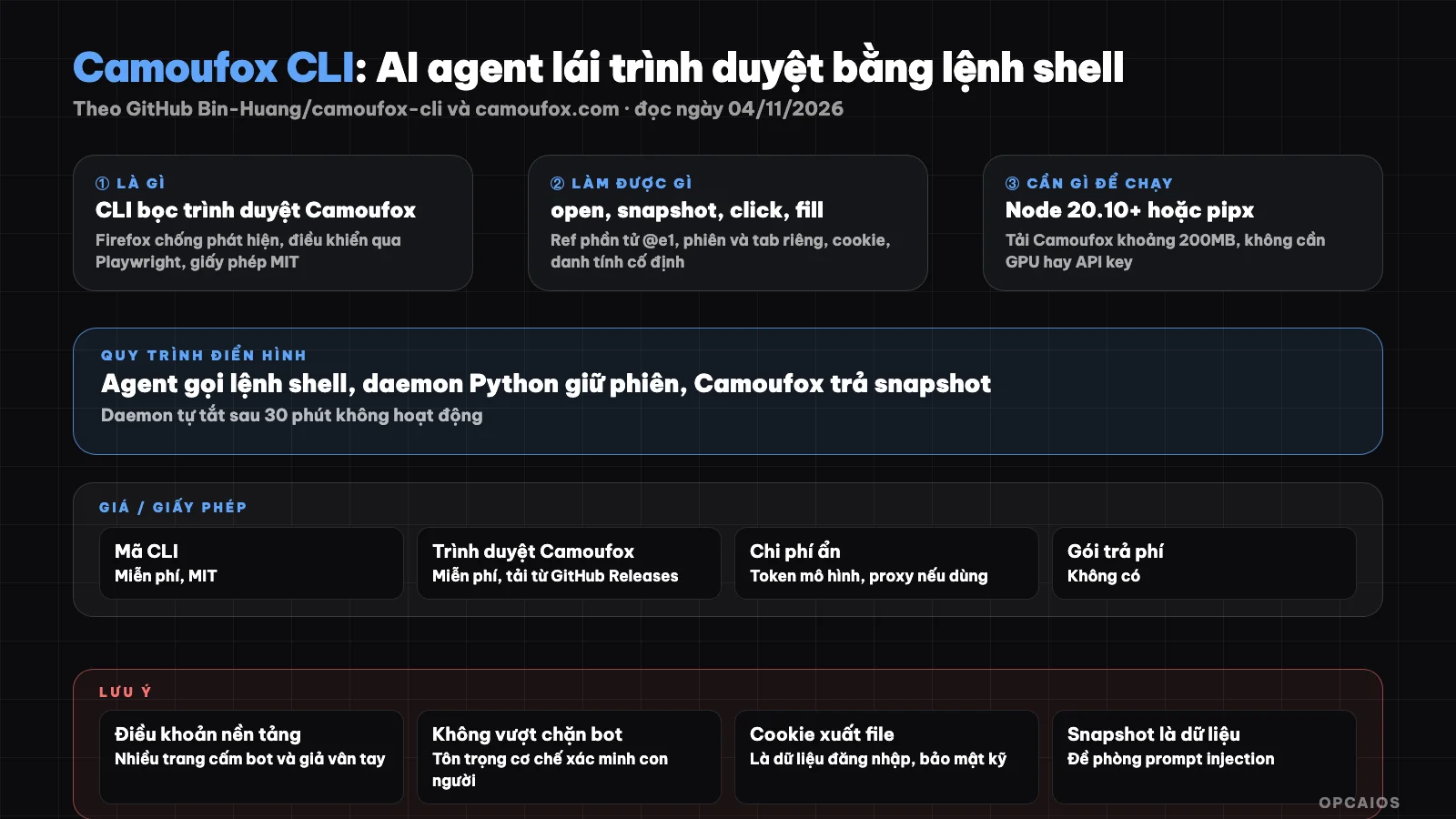
Camoufox CLI sits between the AI agent and the Camoufox browser, maintaining session state via a background daemon. Diagram: OPCAIOS.
What is Camoufox CLI and who created it?
Camoufox CLI is a command-line shell wrapper around the Camoufox browser that allows AI agents to control the browser by running shell commands. The author is Bin Huang, published on GitHub and npm. Camoufox is a headless browser developed by daijro: a Firefox build with telemetry removed and fingerprinting data modified at the C++ layer.
According to the README on GitHub (read November 4, 2026), the architecture consists of three parts. First, the camoufox-cli command takes parameters and sends a JSON package via Unix socket. Next, a background Python daemon controls Camoufox via Playwright and maintains an "element ref registry" (elements numbered like @e1, @e3) between commands. Finally, the daemon starts itself on the first command and shuts down after 30 minutes of inactivity. Because of this, agents only call short individual commands like open, snapshot, click. The camoufox.com page (read November 4, 2026) states that since version v146.0.1-beta.25 (January 2026) the entire Camoufox source code has been made public. If you are not yet familiar with the concept of agents controlling browsers, read What is Browser Use? first.
What can Camoufox CLI do?
Camoufox CLI provides command groups for navigation, reading pages, interaction, tab management, sessions and cookies, with options to keep a fixed browser "identity" across multiple runs. Results return as text or JSON.
| Feature group | Description per README (read November 4, 2026) |
|---|---|
| Navigation | open <url>, back, reload, url, title, close |
| Access tree snapshot | snapshot, snapshot -i (interactive elements only), snapshot -s "css"; elements have ref @eN |
| Interaction | click @e1, fill @e3 "keyword", type, select, hover, press Enter |
| Data retrieval | text @e1, eval "document.title", screenshot [--full] |
| Tabs and sessions | Tabs named with shared fingerprinting and cookies; --session <name> separates fingerprinting, cookies, proxy |
| Fixed identity | --persistent [path]: fingerprinting, operating system, canvas seed and fonts created on first run then kept unchanged |
There is also a command to export and import cookies and a --proxy flag per session. The difference from typical Playwright CLI is that fingerprinting is modified at the C++ layer and identity is fixed; this is also the area that needs the most consideration regarding terms.
Is Camoufox CLI free? What are the hidden costs?
Camoufox CLI is free, source code under MIT license per the GitHub API (read November 4, 2026). The Camoufox browser downloads free from GitHub Releases. Real costs lie in the machine running it, proxy if used, and tokens of the AI model reading snapshots.
| Item | Status (read November 4, 2026) |
|---|---|
| Camoufox CLI code | Free, MIT license (GitHub API) |
| Camoufox browser | Free; camoufox.com does not mention price or license |
| Running machine | Node.js 20.10 or higher or pipx; browser roughly 200MB per camoufox.com |
| Proxy | Not required; if used, cost is from the proxy provider |
| AI model tokens | Each snapshot is text going into the context of Claude Code, Codex, or Cursor |
The project does not sell paid plans. Costs do not include tax and may change. The most significant item to calculate is tokens; using snapshot -i to narrow output is what README suggests.
Install Camoufox CLI and how to get started?
Installing Camoufox CLI requires Node.js 20.10 or higher, or pipx, then run the command to download the browser. The commands below follow the README (read 04/11/2026); we have not tested them yet.
- First, install the package then download the browser (or
pipx install camoufox-cli):
npm install -g camoufox-cli
camoufox-cli install
- Next, on Linux, install additional system libraries if the browser won't start:
camoufox-cli install --with-deps
- If the agent supports standard skills, add the skill set so the agent knows the command syntax:
npx skills add Bin-Huang/camoufox-cli
- Open a page, capture the access tree, click on an element by ref:
camoufox-cli open https://example.com
camoufox-cli snapshot -i
camoufox-cli click @e1
- Finally, use
--session <name>when you need a separate identity. See What is Playwright? to understand the underlying layer.
Limits, risks, and platform terms when using fingerprint spoofing tools
Camoufox CLI is an "anti-detection" tool: it makes an automated browser look like a real user. This very feature can violate the terms of the sites you visit, because many platforms prohibit automated access or masking of technical identity. This is a legal risk, not a technical one.
We lay out four points; this is not legal advice. First, many social networks, marketplaces, and search engines explicitly state in their terms that you must not use bots or mask your technical identity; using Camoufox CLI on those sites can lead to account lockout or legal liability. We have not checked the terms of each platform—you must read them yourself. Second, the README (read 04/11/2026) has no section warning about terms, and it does mention an example using mouse click with a Cloudflare verification widget; we do not guide or encourage bypassing any human verification mechanism. Third, cookies exported to a JSON file are login credentials; storing them unencrypted or passing them into a model context is a leak risk. Finally, page content goes via snapshot into the agent, so a page might contain text deliberately designed to steer the agent; treat every snapshot as data, see What is Prompt Injection?. Collected content still belongs to the copyright holder.
Camoufox CLI versus other options
Camoufox CLI differs from other agent-browser tools in that it is a pure command-line tool with no AI model inside, and it uses Firefox anti-detection instead of Chromium. The table below is a general description, not a benchmark.
| Tool | Control method | Difference (general description, not a benchmark) |
|---|---|---|
| Camoufox CLI | Shell command, Python daemon, Firefox | C++ layer fingerprinting, fixed identity, no LLM inside |
| Playwright | Write code, Chromium/Firefox/WebKit | Testing standard, does not hide automation by default |
| Browser Use | Python library with LLM agent | Agent decides steps on its own, costs model tokens |
When should you use Camoufox CLI?
Camoufox CLI suits someone who already has an agent running shell commands and needs a browser with persistent sessions, on sites that allow automated access. It does not suit someone new to the command line, or sites that ban bots.
| Situation | Suggestion |
|---|---|
| Test the web interface of your own site | Playwright or Browser Use; no need for fingerprint spoofing |
| Agent logs into your internal tool, keeps session for multiple days | Consider Camoufox CLI with --persistent |
| Scrape data from a platform that bans bots in the terms | Do not use; find an official API or permitted data |
| Hypothetical example: a shop owner wants an agent to check prices on their own website each morning | You can use it, but plain Playwright is enough |
OPCAIOS Experience
We recently added Camoufox CLI to the Repo list in the Utilities section on opcaios.org after reading the README and checking that the repository is still being maintained; we haven't run it yet, so this section outlines the criteria we used to consider it, not an evaluation after using it.
Four criteria. First, the repository is actively maintained: the latest code push was on October 19, 2026. Second, the MIT license for the CLI is clear; we haven't read the license for the Camoufox browser itself. Third, hidden costs: no GPU or API key needed, but model tokens and proxy must be factored in. Finally, terms of service risk is the biggest drawback: we run a one-person website using AI agents like Claude Code and only use automated browsing on our own pages or pages that permit it; with fingerprinting tools, we won't use them on platforms that ban automation, even if technically possible.
Read more: What is an AI agent?, What is Browser Use?, What is Playwright?, What is Agent Reach?, 5 best web data scraping tools for AI agents in 2026.
Frequently Asked Questions
How is Camoufox CLI different from Camoufox?
Camoufox is a browser (a Firefox-based anti-detection build developed by daijro), while Camoufox CLI is a command-line tool by Bin Huang to control that browser using shell commands, using Playwright underneath and adding a daemon to maintain state, element references, sessions, and cookies. According to the GitHub API (read November 4, 2026), the CLI repository has 359 stars and an MIT license.
Does Camoufox CLI need GPU or API keys?
No. Camoufox CLI doesn't contain an AI model so it doesn't need GPU or API keys. You need Node.js 20.10 or higher or pipx, around 200MB for the browser according to camoufox.com (read November 4, 2026), and an agent that can run shell commands. Tokens are generated on the agent side when reading snapshots; proxy is an optional paid feature.
Is using Camoufox CLI a terms of service violation?
It depends on which site you're accessing. Many platforms ban automated access and technical identity masking in their terms of service, so using fingerprinting tools on those sites could result in account lockdown or legal liability. The README (read November 4, 2026) has no warning section about this. Please read the terms for each platform and consult a lawyer if using it for commercial purposes; this is not legal advice.
Can someone without coding knowledge use Camoufox CLI?
It's difficult. The tool requires familiarity with the terminal, understanding element reference mechanisms, and knowing how to manage sessions and tabs. Someone without coding knowledge could have an agent like Claude Code (Anthropic) call the CLI on their behalf, but they still need to read and understand the results to review each sensitive action like login or form filling.
Camoufox CLI versus Browser Use, which should I choose?
If you want an agent to self-decide each step on Chromium with a built-in LLM loop, Browser Use is the familiar choice; if you want an agent to call individual short commands and maintain long-lived sessions on an anti-detection Firefox, Camoufox CLI is better suited. This is a general description, not a measurement. To learn how to safely bring AI agents into your work, see OPCAIOS's AI application training course.
Source: GitHub Bin-Huang/camoufox-cli (README, API, read November 4, 2026), camoufox.com (read November 4, 2026); not read/not verified: the license of the Camoufox browser in the daijro/camoufox repository, Windows support, specific platform terms; star counts and prices may change. The experience is OPCAIOS's. This post is not legal advice.
Translated from Vietnamese with AI. Read the original.
Want to apply this in your business?
Book a free 30-minute call (Vietnam time, in English or Vietnamese).